


Demodesk
Last Updated
Overview
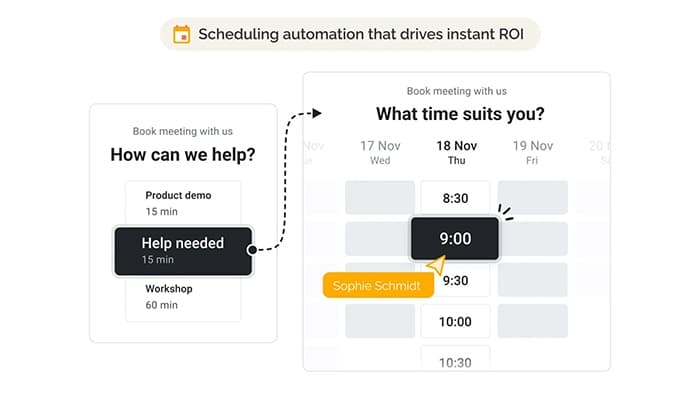
Demodesk is an advanced virtual meeting platform designed for seamless collaboration and impactful customer interactions. While its initial setup process takes time, the software supports automated scheduling and AI coaching meetings for sales teams. Demodesk brings innovative features like screen sharing and scheduling that ensure a professional, branded meeting outlook.
Demodesk Specifications
- Real-Time Communication
- File Sharing & Management
- Document Management
- Task & Project Management
What Is Demodesk?
Demodesk is a robust platform tailor-made for sales teams, trainers, and customer success professionals. It streamlines virtual meetings with advanced features like customizable branding, real-time collaboration, and scheduling automation. It drives better engagement and boosts productivity to enhance workflows while delivering a professional meeting experience. It is designed to ensure every interaction is impactful, efficient, and aligned with your goals, no matter whether you’re hosting sales demos or training sessions.
Demodesk Pricing
Demodesk price is offered through four plans along with free trial options as detailed under:
- Scheduling: €29/user/month
- Meeting: €79/user/month
- Coaching & AI: €49/user/month
- Enterprise: Custom pricing
Disclaimer: The pricing is subject to change.
Demodesk Integrations
Demodesk integrates with different third-party apps, including:
- Salesforce
- HubSpot
- Pipedrive
- Salesloft
- Intercom
- Aircall
- Microsoft Teams
Who Is Demodesk For?
Demodesk is primarily designed for sales teams across various industries, such as
- Logistics and Supply Chain
- Marketing and Advertising
- E-Learning
- Technology
- Insurance
Is Demodesk Right For You?
Demodesk software is ideal for businesses aiming to boost sales productivity through streamlined meetings, AI-powered features, and real-time coaching. It helps teams in industries like insurance, SaaS, and e-learning close deals faster and improve efficiency. The software supports calendar management, swift meeting setups, and security compliances for seamless workflow and collaboration. That’s why hundreds of businesses, such as Clark, Tutlo, and Treatwell, trust Demodesk.
Still unsure about Demodesk? Contact our team of experts at (661) 384-7070 for further assistance.
Demodesk Features
AI Assistant
This feature helps users by automatically summarizing, transcribing, and organizing meeting notes. It syncs information to your CRM and even drafts follow-up emails, saving time and keeping deals on track.
Recording Library
It enables users to record and store all customer conversations in one searchable library. Moreover, it supports transcription in 98 languages and allows easy access to past meetings for review and training.
Meeting Analytics
Demodesk can also track and analyze meeting details, including no-shows and success rates, all synced with your CRM. It provides full visibility into team performance and meeting outcomes.
AI Coach
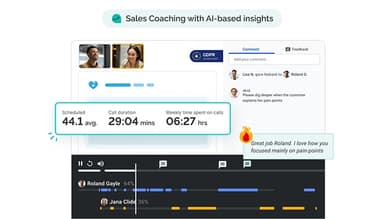
The software empowers sales managers to provide structured feedback using customizable scorecards and automated quality checks. Its AI-driven insights based on popular sales methodologies streamline team performance.
Playbooks
This feature guides sales teams to standardized meeting content, structure, and objection handling. Besides that, it facilitates consistent strategies and immediate access to customer data during meetings.
Virtual Meetings
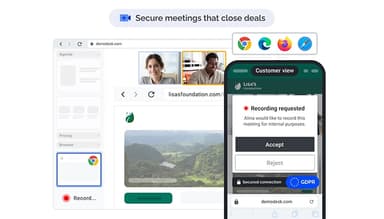
It allows users to host secure, high-quality video meetings without requiring downloads. It also supports branded meeting rooms, GDPR-compliant recording, and seamless integration with various devices for a professional experience.
Interactive Screen Sharing
The solution enables users to collaborate instantly by sharing content on a secure virtual screen. It includes tools like co-browsing, whiteboards, and e-signatures to enhance engagement during remote meetings.
Pros And Cons of Demodesk
Pros
Smooth video and audio quality
Automated scheduling saves time
No downloads are required for meetings
Customizable branding for calls
Cons
Limited mobile usability features
Chat function is missing, according to some software users
The initial setup process can be time-consuming
Demodesk Reviews
Total 18 reviews
4.6
All reviews are from verified customers
Rating Distribution
5
Stars67%
4
Stars28%
3
Stars0%
2
Stars6%
1
Stars0%
Share your experience
Computer Hardware, 101-500 employees
Less than 6 months
“A powerful sales enablement tool”
Pros
The system is quite user friendly and easy to set up. Also it integrates smoothly with major CRM systems we use like Hubspot and Salesforce.
Cons
I feel like some parts of the product are still in the working process but that's about it.
Rating Distribution
Ease of use
10
Value for money
10
Customer Support
10
Functionality
10
Computer Software, 51-100 employees
Less than a year
“Too expensive for the value”
Pros
Well we thought this software would help streamline our pitching process which was the main reason we considered it in the first place.
Cons
The online video platform is pretty buggy and at its worst and is unusable. About 40% of meetings get disconnected after starting because someone cannot connect or use video/audio. The admin interface's initial user experience was tough to navigate and with the recent update, it feels even worse as I cannot find anything now because literally every page and menu changed. We liked some of the ideas so we stuck around, hoping the product would improve. plus the mobile experience is not great either. When we decided this was not a good fit for us long term, we tried to cancel. But it is not possible to do it online as we have to contact support which is unusual for a simple SaaS tool and really inconvenient for customers.
Rating Distribution
Ease of use
3
Value for money
2
Customer Support
2
Functionality
3
Computer Networking, 1-10 employees
Free Trial
“A meeting platform that improves your sales strategy”
Pros
I love how we can show webpages inside the meeting playbook without having to share our entire desktop. Plus the new routing feature helps filter and sort prospects, directing them to the right reps. Plus we can customize questions based on how we assign sales reps to customers. And clients only need a web browser to attend the demo. Plus everything is automated and meetings are scheduled on your calendar based on subscribed events. It also integrates with our CRM, Google and Office365 calendars too.
Cons
Me personally find the pricing way too high but I guess that is because it's a niche product.
Rating Distribution
Ease of use
10
Value for money
7
Customer Support
8
Functionality
8
Frequently Asked Questions
Does Demodesk offer an API?
Yes, Demodesk provides an API.
Does Demodesk have a mobile app?
No, Demodesk does not have a mobile app.
What language does Demodesk support?
Demodesk supports English and German languages.
What other apps does Demodesk integrate with?
Demodesk seamlessly integrates with several apps, such as HubSpot, Salesforce, Microsoft Teams, Aircall, Intercom, Pipedrive, and Salesloft.
What types of pricing plans does Demodesk offer?
The Demodesk cost is offered in four plans: the Scheduling plan for €29/user/month, the Meeting plan for €79/user/month, the Coaching & AI plan for €49/user/month, and the Enterprise plan with a customized pricing quote.
Who are the typical users of Demodesk?
Typical users of Demodesk include sales teams across various industries, such as marketing and advertising platforms, e-learning, software/industrial SaaS, logistics and supply chain, and insurance.
What level of support does Demodesk offer?
Demodesk offers support via chat, email, FAQs, video tutorials, and a knowledge base.