


WalkMe
Last Updated
Overview
WalkMe simplifies digital adoption and enhances productivity by offering intuitive in-app guidance and workflow automation. It’s perfect for businesses seeking to streamline training. While it excels in automation, integration with some platforms may require additional setup. WalkMe is a strong fit for businesses with specific digital transformation goals.
WalkMe Specifications
- Automation & Workflow
- Mobile Accessibility
- Security & Compliance
- User Management
What Is WalkMe?
WalkMe offers a digital adoption platform that helps organizations identify and reduce friction across their digital workflows. It uses data to show how employees interact with applications, then provides in-app guidance, automation, and personalized experiences to improve software adoption and productivity.
The platform supports web, desktop, and mobile environments and includes AI capabilities and DeepUI technology to keep adoption content functional when applications change.
What Is WalkMe Best For?
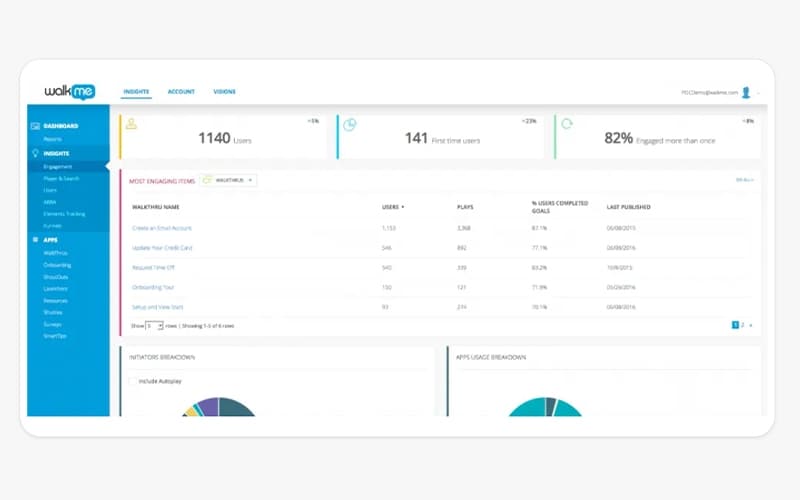
WalkMe's in-app guidance capability is what sets it apart. It delivers contextual walkthroughs, tooltips, and process automation directly inside applications at the moment an employee needs them, without interrupting the workflow. WalkMe Insights then provides the analytics to measure whether that guidance is working and where drop-off still occurs.
How Much Does WalkMe Cost?
According to industry benchmarks, WalkMe’s starting price may range between $14,400 and $197,118/year. However, costs can increase significantly based on deployment size: smaller implementations for 100–500 users may cost $40,000–$150,000 annually, while larger enterprise deployments can exceed $800,000/year.
Besides the subscription cost, users should also account for additional charges to consider the total cost of ownership. It includes, but is not limited to, the following:
- Advanced Aalytics Add-Ons: WalkMe Insights may add approximately $10,000–$50,000/year
- AI Automation Features: ActionBot may cost an additional $15,000–$40,000 annually
- Implementation And Professional Services: Deployment, configuration, integrations, and partner services can add up to $150,000, depending on the number and complexity of applications covered
WalkMe pricing is generally seen as on the higher side, with some users finding the billing model difficult to predict. Costs can also increase for businesses managing multiple product instances.
Disclaimer: The pricing is subject to change.
WalkMe Integrations
The platform integrates with multiple systems and platforms, such as:
- SAP (including SAP GUI and S/4HANA)
- Salesforce
- Workday HCM
- Microsoft Dynamics 365
- ServiceNow
- SuccessFactors
How Does WalkMe Work?
Here's how you can get started with the platform:
- Install the WalkMe extension or snippet on the web, desktop, or mobile applications you want to cover and log in
- Use the WalkMe Editor to create walkthroughs, tooltips, launchers, and surveys without writing code
- Set rules to deliver the right guidance to the right users based on role, behavior, or workflow stage using behavioral segmentation
- Publish content and track engagement, completion rates, and drop-off points through WalkMe Insights and custom dashboards
- Use workflow automation to eliminate repetitive manual steps and refine guidance based on real usage data
Who Is WalkMe For?
WalkMe is mainly suitable for:
- IT and digital transformation teams
- HR departments
- Sales organizations
- Customer care teams
- Public sector
- Federal government agencies
- Financial services
WalkMe Use Cases
Based on our assessment of WalkMe features, we have identified several situations where the platform is well suited for organizations responsible for managing physical assets and equipment:
Enterprise Software Rollouts Across Large Workforces
IT teams deploying SAP, Workday, or ServiceNow to thousands of employees use WalkMe's in-app guidance to walk users through new workflows without pulling them into training rooms. Step-by-step walkthroughs appear inside the application at the moment they are needed. By doing so, they can reduce the volume of help desk tickets and the time it takes employees to reach full productivity after a go-live.
Change Management During System Migrations
Organizations transitioning from legacy systems — including SAP ECC to S/4HANA — can use WalkMe to surface contextual guidance during the adjustment period. Behavior-based segmentation lets change management teams send targeted follow-ups to employees. They send it to people who have not completed specific workflows, insights data and tracks adoption progress without relying on self-reported survey results.
Sales Team Enablement Inside CRM Platforms
Sales teams using Salesforce deal with complex approval workflows, data entry requirements, and policy lookups that interrupt selling time. WalkMe overlays these processes with automated guidance, pulling account history, checking margin rules, and generating approval requests. Reps can complete compliance-heavy tasks without leaving the CRM or switching to a separate knowledge base.
Customer Care Workflow Automation
Customer care agents handling inbound tickets across multiple systems use it to reduce average handle time. WalkMe features a system so that when a ticket arrives, it reads the screen context, checks policy, and generates a resolution path. This way agents arrive at the answer without manually navigating multiple applications. Every action is tracked, creating an auditable record of case resolution.
Is WalkMe Right For You?
If you're looking for a digital adoption platform that can overlay a company's applications to guide employees through workflows, WalkMe is the right fit. The platform represents a meaningful shift in how the DAP category is evolving. Rather than guidance that requires a user to trigger it, WalkMe's AI layer reads real-time screen context, moves across applications, and executes workflow steps autonomously.
This directly addresses the gap most enterprise AI copilots cannot close — they can answer questions but cannot act across systems. WalkMe does so by providing the cross-application context and execution layer that makes AI agents operationally useful rather than conversationally interesting.
WalkMe holds one of the most extensive compliance certification portfolios including ISO/IEC 27001, 27017, 27018, 27701, 27032, 27036, and 27799 for health data security,alongside SOC 2 Type II covering all five Trust Service Criteria and a publicly available SOC 3 report.
It has achieved FedRAMP-Ready approval and is listed on the FedRAMP Marketplace, making it one of the few DAP vendors cleared for U.S. federal deployments. ISO/IEC 42001 certification for AI management systems is also in place. This is a standard that governs responsible AI development and is increasingly relevant as enterprises scrutinize how AI is embedded into operational tools. HIPAA compliance with BAAs available on request, GDPR compliance with EU Standard Contractual Clauses, CCPA, GxP, FIPS 140-2, and Cyber Essentials (UK NCSC) round out the compliance framework.
Trusted by global enterprises including IBM, Nestlé, ThermoFisher Scientific, Deloitte, and the U.S. federal government, WalkMe is purpose-built for organizations managing large-scale digital transformation and ongoing change management. It also took home the Gold Globee Award in 2025 for Enterprise-level AI solutions.
Want to learn more about the WalkMe? Contact us at (661) 384-7070 for detailed guidance.
WalkMe Features
In-App Guidance
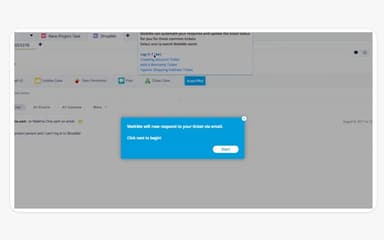
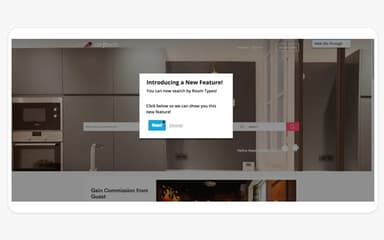
WalkMe overlays walkthroughs, tooltips, and launchers directly inside enterprise applications. It also guides employees through complex workflows step by step without requiring them to leave the tool or consult external documentation. Guidance is triggered by on-screen context rather than manual activation.
Workflow Automation
WalkMe automates repetitive multi-step processes — including form fills, policy checks, and approval routing — inside applications like SAP, Salesforce, and ServiceNow. This reduces manual effort at each workflow step and lowers error rates on compliance-critical processes.
Workflow Analytics
Teams access real-time data on how employees interact with applications, where they drop off in workflows, and how WalkMe content is performing. Funnel, Paths, and Compare visualizations help identify friction points and measure the impact of guidance changes over time.
Application Discovery And License Optimization
IT teams get full visibility into which web applications are being used across the organization, down to the user level. This surfaces underused licenses and identifies applications with high friction, helping organizations reduce software spend and prioritize adoption efforts.
DeepUI Technology
WalkMe's proprietary DeepUI layer reads UI elements across web, desktop, and mobile environments without requiring code changes in the underlying application. This makes it possible to build and deploy guidance across virtually any enterprise software stack.
Conversational Interface And ActionBot
WalkMe's conversational interface lets employees ask questions and receive next-best-action recommendations through a chat-like overlay inside any application. ActionBot extends this into automated chatbot workflows that handle repetitive requests without human intervention.
Contextual AI Assistance
WalkMe features an AI that reads real-time screen context and acts across applications. The AI assistance provided is pinned to specific UI elements, surfaced proactively through the Action Bar, or triggered on demand through the WalkMe Menu. By doing so, it brides the execution gap that standalone AI copilots cannot close.
Pros And Cons of WalkMe
Pros
Reduces dependency on support teams by providing self-sufficient solutions
Allows users to create content without needing technical teams
Helps with difficult processes by providing helpful insights along the way
Cons
Interface can be slightly difficult to navigate for beginners
Reports and analytics take up to 24 hours to reflect changes
WalkMe Reviews
Total 9 reviews
3.8
All reviews are from verified customers
Rating Distribution
5
Stars33%
4
Stars33%
3
Stars22%
2
Stars0%
1
Stars11%
Share your experience
Retail, N/A employees
More than a year
“Using WalkMe for internal training”
Pros
The implementation was great and it really helped us improve the user experience by a lot.
Cons
The tool has features that are pretty difficult for the average user with limited technical knowledge to access.
Rating Distribution
Ease of use
7
Value for money
8
Customer Support
8
Functionality
9
Law Practice, 1-10 employees
Less than 6 months
“Really handy platform”
Pros
I really love how simple and clean the design is. It's super user-friendly and reminds me of Google's minimalist approach.
Cons
I didn't like the messiness in the searches. Let's be honest, the search results aren't accurate. When I'm looking for something on the platform, I expect it to give me the right answers, not random suggestions.
Rating Distribution
Ease of use
5
Value for money
8
Customer Support
8
Functionality
7
Computer Software, 500+ employees
More than a year
“Step-by-step guidance”
Pros
It has this awesome multi-step guided experience that really helps users understand important tasks. Another thing I like is that it lets end users create content on their own, so we don't always have to rely on the tech team for content creation.
Cons
WalkMe's UI components can sometimes be a bit difficult when creating or updating records. Setting up content isn't easy and creating that content takes a lot of time.
Rating Distribution
Ease of use
7
Value for money
5
Customer Support
8
Functionality
7
Frequently Asked Questions
What other apps does WalkMe integrate with?
WalkMe integrates with SuccessFactors, AWS, Azure Blob, Google Cloud, and SSO providers including Okta and Azure AD.
What types of pricing plans does WalkMe offer?
The WalkMe Get a flexible WalkMe cost today.
Who are the typical users of WalkMe?
Typical users of WalkMe include IT administrators, change management teams, HR departments, sales operations, and customer care leaders at large enterprises.
Does WalkMe have a mobile app?
Yes, WalkMe has a mobile app available on iOS and Android devices.
What level of support does WalkMe offer?
WalkMe provides access to a Help Center, ticket-based support, training and certification programs, a Developer Hub, and dedicated customer success managers for enterprise accounts. A Center of Excellence framework is available for organizations building internal DAP programs.
Does WalkMe offer an API?
Yes, WalkMe offers an API to its users.
What language does WalkMe support?
WalkMe supports English, French, German, and Japanese on its platform interface.