


Beam
Last Updated

Overview
Beam software helps small and midsized contractors manage construction and financial workflows more efficiently. It supports estimating, invoicing, job costing, scheduling, and project tracking within one platform. While the initial setup may take some time, Beam can reduce reliance on separate tools and repeated data entry across day-to-day operations.
Be the first one to leave a review!
No review found

Starting Price
$250
per month

Beam Specifications
- Project Planning and Scheduling
- Budget Management
- Document Management
- Bid Management
What Is Beam Software?
Beam software is a construction management platform built for small and midsized residential, light-commercial, and trade contractors. It includes tools for estimating, invoicing, job costing, scheduling, and expense management. Contractors can also manage change orders and project updates within the platform. Beam includes an AI assistant for drafting and editing proposals and supports QuickBooks integration. The software helps teams reduce duplicate data entry, track project profitability, and manage financial and operational tasks in one place.
What Is Beam Software Best For?
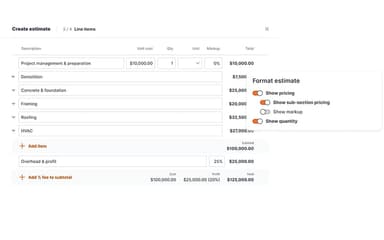
Beam software stands out for its “AI Estimating Assistant,” which helps contractors draft and edit estimates and professional proposals. The tool supports proposal creation within the estimating workflow, while email-open tracking helps teams see when clients engage with what they send. Contractors can also collect digital signatures for approvals. This makes the estimating process easier to manage from proposal creation through client response, without relying on separate steps for follow-up and approval.
How Much Does Beam Software Cost?
Beam software pricing starts at $250/month for the Plus plan, which supports up to five users. The software also offers a free Core plan for up to two users. Further pricing tiers are:
- Scale: $500/month for up to 10 users
- Enterprise: Custom pricing
In addition to base subscription, organizations should account for the following expenses:
- Implementation: Approximately $500–$2,500, depending upon the deployment complexity
- Data Migration: Estimated at $300–$2,000, depending on data volume and condition
- Custom Integrations: $1,000–$8,000+/integration, if a business requires connections beyond Beam’s standard integrations
Disclaimer: The pricing is subject to change.
Beam Software Integrations
The software supports integration with multiple systems and platforms, such as:
- QuickBooks
- CompanyCam
- busybusy
- RenoFi
- XactRemodel
- BuildZoom
How Does Beam Software Work?
Here's how you can get started with the software:
- Create a Beam account and set up business information before starting project work.
- Build estimates and proposals using project details, line items, and Beam’s AI Estimating Assistant.
- Send proposals to clients, track email opens, and collect digital signatures for approvals.
- Manage active projects through schedules, tasks, daily logs, client updates, and change orders.
- Create invoices and accept online payments as project work progresses.
- Record bills and expenses, then track them against project costs.
- Monitor estimates versus actuals through job costing reports to review project profitability.
- Sync financial data with QuickBooks Online to reduce duplicate data entry between systems.
Who Is Beam Software For?
Beam software is ideal for a wide range of industries and sectors, including:
- Residential contractors
- Home builders
- Remodelers
- Estimators
- Roofing contractors
Beam Software Use Cases
Based on our analysis of user feedback and Beam software features, we have identified the following key scenarios where it may be a good fit for construction businesses:
Contractors Managing Estimates And Client Approvals
For contractors that regularly prepare estimates, Beam supports the process from drafting through client approval. Users can create estimates, add contract language, and move approved work into invoicing. Review feedback highlights that this setup helps contractors keep estimating and invoicing within the same workflow.
Construction Teams Handling Payments Across Active Projects
Beam fits teams that manage incoming client payments alongside outgoing payments to subcontractors. The platform also gives users a way to track those transactions as part of project activity. Reviewers note that they use Beam to send invoices, collect payments, and pay subcontractors. They also use it to track project finances.
General Contractors Working With Multiple Subcontractors
Subcontractor-heavy workflows often involve payments, compliance records, and onboarding at the same time. In this regard, Beam supports these activities within a construction-focused environment. User feedback points to shorter payment times and simpler compliance tracking. Reviewers also mention easier onboarding for subcontractors joining the system.
Growing Construction Businesses Bringing Operations Into One System
As construction teams expand, project tracking, change orders, and financial oversight can become spread across different tools. Beam supports businesses that want to bring those workflows into one shared platform. Reviewers highlight the value of moving away from disjointed systems. They also note easier management of project and financial activity in one place.
Is Beam Software Right For You?
Beam may be a practical fit if you’re a small or midsized residential, light-commercial, or trade contractor in the U.S. It is designed for teams that want to manage construction operations and financial workflows while reducing manual paperwork and duplicate data entry.
Beam is trusted by brands like JJP Construction, Pulsari Builders, and Tate & Son. Beam transmits data with encryption-in-transit over HTTPS using TLS (SSL). This may suit contractors looking for construction-focused software with connected operational and financial processes.
Still doubtful if Beam software is the right fit for you? Reach out to us at (661) 384-7070 and we’ll help you make the right choice.
Beam Features
Invoicing And Online Payments
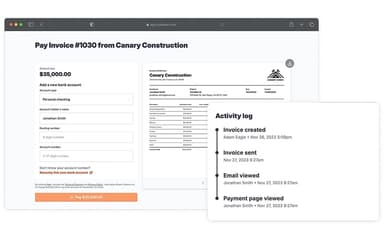
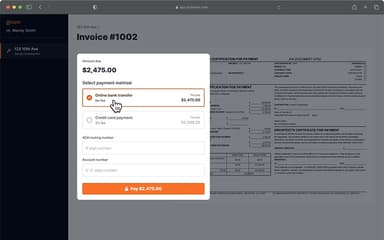
The platform supports several construction invoicing workflows, including progress, milestone, cost-plus, retention, and AIA-style billing. Contractors can send invoices, monitor client activity, and issue payment reminders. Customers can pay online through ACH, credit card, or debit card from the project portal.
Change Order Management
The software allows contractors to create and manage change orders from the office or field. Users can add labor, materials, fees, discounts, and markup before sending changes for approval. Once approved, Beam can reflect the update in project budgets and future invoices.
Daily Logs And Client Updates
Beam gives field teams a place to record daily activity, labor, deliveries, photos, videos, and project notes. Users can also assign tasks and share relevant updates with clients through the portal. This keeps jobsite records and client communication connected to ongoing project work.
Scheduling And Tasks
The platform helps teams organize project timelines and assign work across active jobs. Beam’s AI Assistant can recommend an initial schedule using information from an existing estimate. Team members can manage tasks from desktop or mobile devices and receive reminders for upcoming or overdue work.
Lien Waiver Management
The software tracks lien waiver requirements by project and shows outstanding documents from a central dashboard. Users can send waiver requests to subcontractors and vendors, collect digital signatures, and hold payments until required documents are received. Related compliance records, including W-9s, licenses, and COIs, can also be monitored.
Pros And Cons of Beam
Pros
Fast payment processing with transaction tracking
Easy estimate creation for construction workflows
Responsive and helpful customer support
Centralized tracking for clients, vendors, and payments
Convenient material tracking within the platform
Cons
Some specific requests may take longer to implement
Frequent interface updates can affect navigation familiarity
Vendor ACH setup may occasionally require extra assistance
Beam Pricing
Core | Plus | Scale | Enterprise |
|---|---|---|---|
$0 per month | $250 per month | $500 per month | Custom Pricing |
|
|
|
|
Disclaimer: The pricing details were last updated on Oct 09, 2026 from the vendor's website. Please contact us for a tailored pricing list.
Beam Reviews

No reviews yet!
Be the first to review this product
Frequently Asked Questions
Does Beam offer an API?
The vendor does not specify the availability of its API.
What level of support does Beam offer?
Beam software offers support through phone, email, live chat, and a helpdesk.
Does Beam have a mobile app?
No, Beam software does not offer a dedicated mobile app.
Who are the typical users of Beam?
Beam software is used by organizations across a wide range of industries and sectors, including remodelers, residential contractors, and home builders.
What other apps does Beam integrate with?
Beam software integrates with various systems and platforms, including RenoFi, busybusy, QuickBooks, and CompanyCam.
What language does Beam support?
Beam software primarily supports the English language.
What types of pricing plans does Beam offer?
Beam software price starts at $250/month for the Plus plan. Besides its free Core plan, it also includes a Scale plan for $500/month for up to 10 users, and a customizable Enterprise plan. Get a detailed Beam software cost breakdown tailored to your specific requirements.