

Last Updated

Overview
Projecto is capital project management software designed for building owners, offering intuitive task tracking, financial oversight, and strong ERP integrations. While some users find the scheduling module cumbersome, its clean interface and streamlined reporting tools support efficient team collaboration and lifecycle control across complex construction and budget workflows.
Projecto Specifications
- Document Management
- Project Planning And Scheduling
- Budget Management
- Bid Management
What Is Projecto?
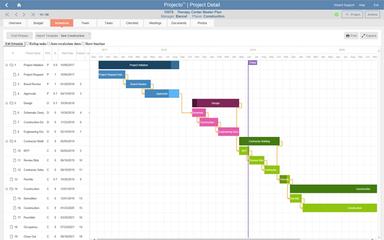
Projecto is construction and capital program management software built for building owners overseeing complex, multi-phase projects. It simplifies financial oversight through budgeting and invoice tracking, enables real-time visibility via customizable dashboards, and improves coordination with built-in document collaboration tools. By centralizing data and automating reporting, Projecto helps users reduce administrative burden and maintain control throughout the full project lifecycle.
Projecto Pricing
The vendor offers a one-time Projecto price plan at $20,000. This model is designed to support capital program teams managing long-term, high-value projects.
Disclaimer: The pricing has been sourced from third-party websites and is subject to change.
Projecto Integrations
Who Is Projecto For?
Projecto software is ideal for a wide range of large organizations that own and manage significant capital and construction project portfolios, including:
- Healthcare
- Higher education
- Corporate real estate
- Government
- Financial services
- Industrial and manufacturing
Is Projecto Right For You?
Projecto is the right fit for organizations whose primary challenge is managing the complex financial lifecycle of capital projects, rather than simply tracking tasks. Its standout feature is its ability to be configured to an organization's unique financial workflows, which significantly increases user adoption and data accuracy. Validating its position, the platform received a "User Favorite" award from SelectHub based on its high user satisfaction ratings.
Still doubtful if Projecto is the right fit for you? Connect with our customer support staff at (661) 384-7070 for further guidance.
Projecto Features
Budget And Cost Tracking
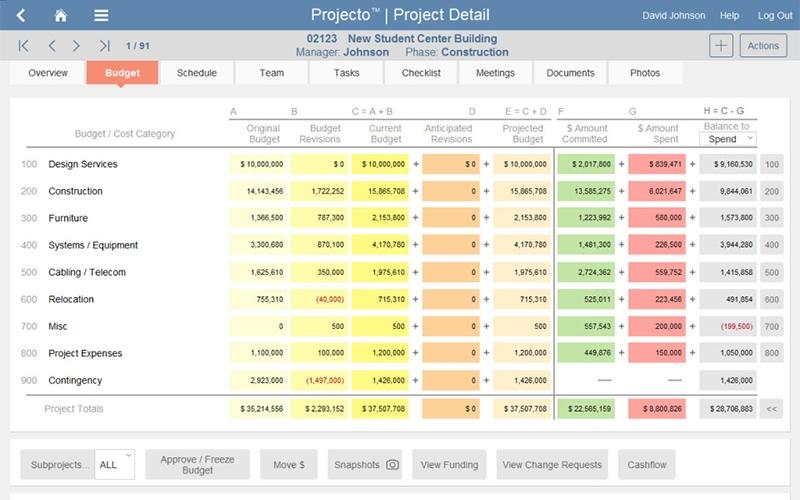
Projecto supports detailed tracking of budgets, commitments, and expenditures across the entire capital project lifecycle. This level of financial oversight helps stakeholders quickly spot discrepancies, make data-backed decisions, and ensure projects remain aligned with available funding and forecasted cash flow.
Custom Reporting And Analytics
Users can build tailored reports or use built-in templates to generate real-time insights into budgets, schedules, and resource usage. These reports reduce the manual workload and help teams consistently monitor performance against goals without relying on external systems or spreadsheets.
Configurable Dashboards And KPIs
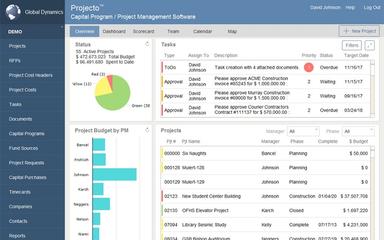
Projecto features user-specific dashboards and visual KPIs, and presents only the most relevant data to each stakeholder. This focused visibility enhances efficiency by enabling quick assessments of project status, potential issues, and priority actions—all without sifting through unnecessary information.
Document And Workflow Management
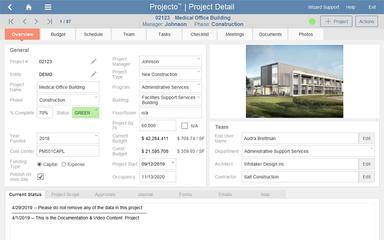
The platform centralizes document collaboration, approvals, and audit trails, streamlining communication across teams and vendors. Having everything in one place helps reduce version errors, improves accountability, and ensures timely access to critical project documentation during planning and execution.
Integrated Bid Management
Projecto includes a bid management module that digitizes the entire process from bid creation to evaluation. By centralizing bid documents, clarifications, and scoring, organizations reduce administrative overhead and gain greater transparency in vendor selection and contract awards.
Pros And Cons of Projecto
Pros
Reliable financial tracking and reporting
Intuitive interface for task management
Seamless ERP and system integration
Cons
Scheduling component can be cumbersome
Limited collaboration tool integrations
Projecto Reviews
Total 10 reviews
4.7
All reviews are from verified customers
Rating Distribution
5
Stars70%
4
Stars30%
3
Stars0%
2
Stars0%
1
Stars0%
Share your experience
Mark O.
Small-Business, 11-50 employees
“Ideal tool for most project managers”
Pros
The interface really caught my attention, it's clean and simple. After dealing with overly complex platforms that had way more features than I actually needed, this one is exactly what I was looking for. Everything feels interactive and runs efficiently, plus the pricing is very reasonable. Customer support has been great too, they always respond quickly when I need help.
Cons
I'm using an older version and haven't been able to upgrade because of internal constraints. There are some issues with data entry and workflow that could definitely be better, and I find the scheduling component kind of clunky. These might have been fixed in app updates and I'm sure the newer versions have addressed these problems.
Rating Distribution
Ease of use
7
Value for money
9
Customer Support
10
Functionality
7
Lynn B.
Mid-Market, 51-100 employees
“Efficient AP Processing Tool”
Pros
It's simplified my daily work projects. The program communicates with our operating system, so commitments and expenses flow right into their spot. Their IT team and ours worked together quickly to implement the system.
Cons
The only issue I had at first was dealing with screens we weren't using but we've found ways to incorporate those into our workflow now. Honestly, I can't think of any major issues.
Rating Distribution
Ease of use
10
Value for money
9
Customer Support
9
Functionality
9
Thitiphan P.
Mid-Market, 51-100 employees
“Excellent task management tool”
Pros
Managing tasks and projects are very simple and the dashboard layout makes it easy to create projects and set deadlines. The team sharing functionality works smoothly which really helps with collaboration.
Cons
It would be great if they added Slack integration or something similar.
Rating Distribution
Ease of use
9
Value for money
8
Customer Support
8
Functionality
8
Frequently Asked Questions
Does Projecto offer an API?
Yes, Projecto provides API access as a core component of its custom integration services.
Does Projecto have a mobile app?
Yes, Projecto does offer a mobile app.
What language does Projecto support?
Projecto is available in English.
What types of pricing plans does Projecto offer?
Projecto follows a flat-rate pricing model of $20,000 one time. For a personalized Projecto cost estimate, contact our team directly.
What other apps does Projecto integrate with?
Projecto offers deep, custom integrations with core business systems, but it does not publicly list specific integration partners.
Who are the typical users of Projecto?
Typical users include large organizations that manage complex capital project portfolios—such as healthcare systems, universities, corporate real estate departments, financial institutions, and government agencies.
What level of support does Projecto offer?
Projecto provides support via direct contact, feedback forms, and training services for onboarding and usage guidance.