


Last Updated
Key Takeaways
Generated from the text of customer reviews
Insightly is a CRM platform that helps businesses manage customer relationships, sales, projects, and support activities. Its ease of use and customization are praised, although some users report limitations in available features and task management compared with their needs. It recently added CRM Copilot, an AI feature that assists with CRM tasks and customer data.
Our Verdict
Insightly CRM aims to help firms manage customer relationships, sales pipelines, and project data in one platform. It is best suited for organizations looking for a CRM to manage sales and customer relationships. Several customers like the platform's affordable entry-level price; however, some believe the pricing structure might be more flexible as demands develop. We recommend it for relationship-driven teams that handle moderate sales processes.
Overall Rating
Based on 54 users reviews
4.4
Rating Distribution
Positive
94%
Neutral
4%
Negative
2%
Starting Price
$29
per user per month (2 agents included)
Insightly Specifications
- Live Chat
- Omnichannel Support
- CRM Integration
- Sales Forecasting
What Is Insightly?
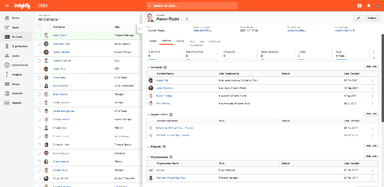
Insightly is a CRM software that helps businesses manage customer relationships, sales activities, and projects. It allows sales teams to capture lead details, track opportunities, and manage deals through customizable pipelines. The platform also lets users manage customer emails, create quotes, and convert closed opportunities into projects. Teams can set workflow rules, manage tasks, and view business data through customizable dashboards and reports. Insightly also supports integrations with tools such as Microsoft, DocuSign, Shopify, and QuickBooks.
What Is Insightly Best For?
Insightly is best suited for sales teams that want to use AI within their CRM to manage records and sales activities. Its Copilot lets users search contacts, deals, and tasks using natural language. It can also create and update records, draft follow-up emails, and suggest next steps based on previous conversations. The platform also provides AI-generated summaries of emails, calls, and notes to give teams relevant customer context.
How Much Does Insightly Cost?
Insightly price starts at $29/user/month with its Plus plan. Other paid plans for Customer Relationship Management (CRM) are as follows:
- Professional - $49/user/month
- Enterprise - $99/user/month
Besides the fixed subscription charges, users should also account for the total cost of ownership. It includes, but is not limited to, the following:
- Data Migration: Around $1,000–$10,000+ depending on record volume, duplicate cleanup, field mapping, and the complexity of migrating from an existing CRM
- Custom Implementation And Configuration: Between $2,000–$15,000+ for complex pipeline, workflow, permissions, reporting, and data-structure setup
- Third-Party Integration Development: Ranges from $1,000–$10,000+ per integration when proprietary, legacy, or unsupported systems require custom development
- Ongoing CRM Administration: Between $500–$2,000+/month where businesses require dedicated technical support for workflows, permissions, reporting, data quality, and integrations
- Integration Maintenance: Typically $500–$3,000+/year per integration for troubleshooting, API changes, authentication updates, and ongoing technical maintenance
- Guided Onboarding: $1,500, where applicable
- Premier Support And Success: 20% of license, $3,000 annual minimum, where applicable
Disclaimer: The pricing is subject to change.
Insightly Integrations
Insightly software supports integration with multiple systems and platforms, such as:
How Does Insightly Work?
Here’s how you can get started with the software upon logging into the system using your credentials:
- Once logged in, open the CRM dashboard to access contacts, opportunities, projects, and other main tools
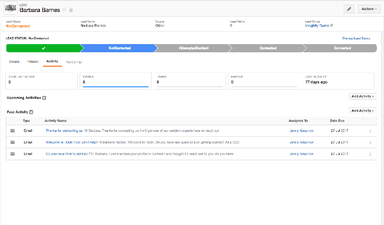
- Add contacts and leads with relevant customer and company information
- Create sales pipelines and define stages based on your sales process
- Add opportunities to the pipeline and enter details such as value, probability, and expected close date
- Set tasks and activities to keep track of follow-ups and scheduled work
- Create workflow rules to automate routine actions and record updates
- Connect your email account to manage customer communication from within the CRM
Who Is Insightly For?
Insightly is ideal for a wide range of industries and sectors, including:
- Manufacturing
- Consulting
- Finance
- Healthcare
- E-commerce
Insightly Use Cases
Based on our analysis of Insightly features and capabilities, we have identified a few key scenarios where this platform is a good match for specific operational buyers:
1. Marketing Agency Juggling Multiple Client Accounts At Once
A marketing agency managing five or six client accounts at once soon encounters the same issue: campaign data, contracts, and project timeframes get dispersed among multiple platforms for each customer. Insightly's contact and organization management lets the agency keep client records, communications, and related information under individual customer profiles. This gives the team a central place to review each client's information without switching between separate systems.
2. Healthcare Clinic Managing Patient Relationships Without Losing Track
A healthcare clinic that juggles appointment information, insurance papers, and patient questions across many platforms risks losing track of important customer information. Insightly's customer email management keeps customer email interactions connected to CRM records, allowing staff to review previous communications from the relevant contact record. This reduces the need to search through separate email threads when checking what has already been discussed with a patient.
3. Manufacturer With Multiple Divisions Running On Disconnected Systems
A manufacturer with six distinct divisions, each using its own spreadsheets and unconnected software, may find it difficult to obtain a consistent view of customer activity across the organization. Insightly's AppConnect connects the CRM with accounting, ERP, and other business systems, allowing data to transfer between connected applications automatically. This reduces the need to copy customer information between separate systems and keeps related data connected across divisions.
4. Solar Installer Tracking Projects From Quote To Installation
A solar installer managing leads, permits, and crew schedules for a dozen current projects must keep track of each one without having to contact the field team every morning. Insightly's opportunity-to-project conversion carries relevant opportunity details, records, tasks, and files into a new project after a deal closes. This gives project managers access to the information collected during the sales process as the work moves toward installation.
Is Insightly Right For You?
If you run a small or mid-market team already using Insightly CRM, Insightly is a natural fit for handling customer relationships and sales activities in one place. It connects ticket history directly to existing contact and deal records. The platform meets SOC 2 Type II, GDPR, CCPA, and HIPAA compliance standards, and is used by organizations including Noble Biomaterials, Sigma, and Better Earth Solar.
Recently, CRM platforms have been adding more automation and AI capabilities to reduce routine work. Insightly follows this trend with workflow automation that handles emails, reminders, and record updates, helping teams reduce repetitive tasks and keep customer information organized.
Still have confusion about investing in the Insightly software? Contact us at (661) 384-7070 to make an informed decision.
Insightly Features
Project And Task Management
This feature transforms a closed opportunity or a completed support issue into a project. When this happens, it copies over the linked data, tasks, contacts, and other details from the original opportunity or ticket, eliminating the need for manual re-entry. Pipelines and milestones are then used to organize projects, and each one may be configured with unique information and page layouts based on the project's requirements.
Customization
This feature lets users configure custom fields, page layouts, and workflows directly within the platform's admin settings. Changes can be made without submitting a request to an outside developer or vendor, since the configuration tools are built into the CRM itself. This applies to all records, forms, and process automations related to how a company tracks its own data.
Customer Email Management
It connects a user's existing email account to the CRM via bidirectional sync, so messages sent or received from that inbox display within the platform. Every email associated with a contact, offer, or problem is immediately logged on that record, allowing anybody viewing a customer's account to access the whole email history without having to navigate to a separate inbox.
Analytics And Reporting
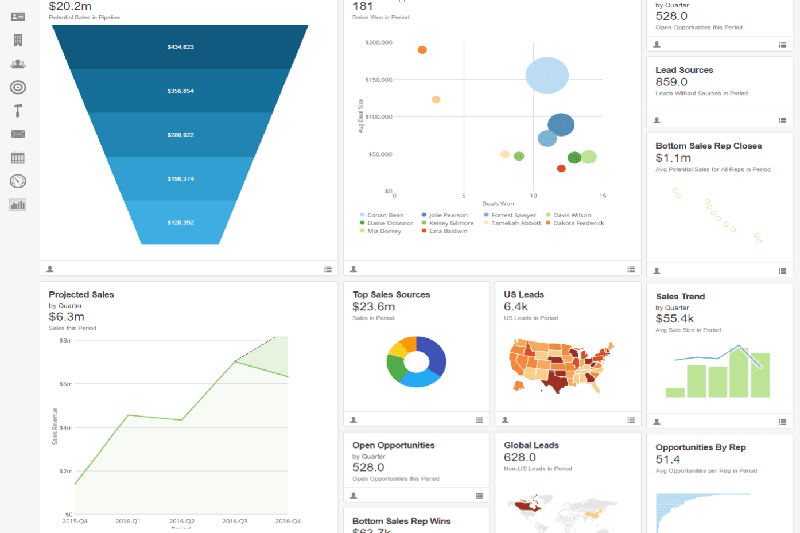
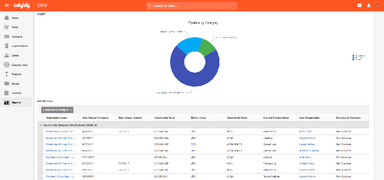
This feature contains dashboards based on critical indicators such as resolution time, ticket volume, and transaction status, depending on what is being tracked. Dashboards may be modified to display whichever KPIs a team wishes to see.
Pros And Cons of Insightly
Pros
Simplifies customer management by merging CRM and project data in a single interface
Increases follow-up consistency with automated reminders to reconnect with clients
Converts closed opportunities into projects for continued tracking
Reduces manual data entry by integrating with popular third-party apps
Improves team responsibility with dashboards that monitor project status
Cons
Mobile app functionality should be more matched with the desktop experience
Reporting and automation capabilities could be more extensive
New users have a learning curve when using advanced functions
Insightly Pricing
Plus | Professional | Enterprise |
|---|---|---|
$29 per user per month (2 agents included) | $49 per user per month (5 agents included) | $99 per user per month (10 agents included) |
|
|
|
Disclaimer: The pricing details were last updated on Sep 25, 2026 from the vendor's website. Please contact us for a tailored pricing list.
Insightly Reviews
Total 54 reviews
4.4
All reviews are from verified customers
Rating Distribution
5
Stars48%
4
Stars46%
3
Stars2%
2
Stars2%
1
Stars2%
Share your experience
Insurance, 1-10 employees
Less than 6 months
“offers great security!”
Pros
The security is excellent and I like that it provides good value for both individual users and teams. Customer support is also helpful but comes at a premium. It even includes a solid set of task management tools and very effective team collaboration features.
Cons
Getting help as an individual user means we are limited to email or chat. For guided setup or live phone support, we have to pay for a Premier package that costs between $1500 and $3000. The individual plan felt very basic while the team plan was much more powerful but also significantly more expensive.
Rating Distribution
Ease of use
9
Value for money
5
Customer Support
6
Functionality
9
Financial Services, 51-100 employees
Less than a year
“Affordable but complex CRM”
Pros
Its main strengths are its affordability and its potential. It's a very cost-effective CRM to get started with and it offers a high degree of customization for businesses on a tight budge
Cons
Unfortunately, realizing that potential requires significant effort. The customization tools are not intuitive, making the platform difficult to work with. It also lacks robust automation and native integrations, so connecting it to other tools in your stack can be a challenge.
Rating Distribution
Ease of use
4
Value for money
7
Customer Support
7
Functionality
4
Internet, 11-50 employees
Less than a year
“A simple and user-friendly interface”
Pros
I really loved the simple, user-friendly interface. Another huge plus is how much freedom you have to customize the dashboards exactly how you want them.
Cons
The main drawback as per me is that the free version is pretty limited in what it can do.
Rating Distribution
Ease of use
8
Value for money
8
Customer Support
8
Functionality
6
Frequently Asked Questions
Does Insightly offer an API?
Yes, Insightly software provides an API.
What language does Insightly support?
The platform is primarily available in English, French, German, etc.
What other apps does Insightly integrate with?
The software supports integration with a range of systems and platforms, including Asana, Shopify, Slack, Jira, and ADP Workforce Now.
Does Insightly have a mobile application?
Yes, it has a mobile app.
What types of pricing plans does Insightly offer?
Insightly pricing starts at $29/user/month for Plus, $49/user/month for Professional, and $99/user/month for Enterprise, with a 14-day free trial available for the Plus and Professional plans. You can also request a personalized Insightly cost quote now.
Who are the typical users of Insightly?
Businesses across various industries, including e-commerce, healthcare, finance, consulting, and manufacturing, benefit from Insightly features.
What level of support does Insightly offer?
The software offers a help center, chat, and email support.