


Maximizer CRM
Last Updated
Overview
Elevate customer relationships with Maximizer CRM. It empowers you to drive growth, cultivate loyalty, and maximize your business potential. Join the ranks of successful businesses that are leveraging the power of Maximizer CRM to optimize sales, enhance marketing efforts, and strengthen customer relationships.


Maximizer CRM Specifications
- Contact Management
- Lead Management
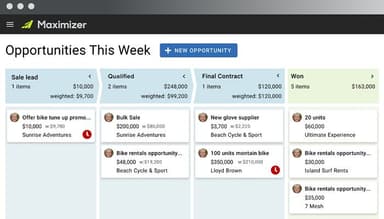
- Opportunity Management
- Sales Forecasting
What Is Maximizer CRM?
Overview
Maximizer CRM is a comprehensive cloud-based software designed to assist organizations in effectively managing all aspects of the sales pipeline. Its primary goal is to optimize campaign efficiency, expand the customer base, and foster business growth.
Maximizer CRM Pricing
Maximizer CRM offers two subscription plans:
- Base edition: $65/user/month - billed annually (minimum three users)
- Sales Leader edition: $79/user/month - billed annually (minimum five users)
Disclaimer: Prices are subject to change.
Maximizer CRM Integrations
Maximizer CRM's featured third-party integrations include:
Who Is Maximizer CRM For?
Various industries using Maximizer CRM include:
- Marketing and advertising
- Food production
- Insurance
- Electrical/Electronic manufacturing
- Financial and legal services
- Construction
Is Maximizer CRM Right For You?
Maximizer CRM is a user-friendly sales-focused solution that addresses specific challenges that sales managers and businesses encounter, allowing for streamlined sales activity management.
So, if you are a business looking to utilize powerful analytics and insights to easily track progress, meet revenue targets, assess team performance, and manage activities from a centralized hub, then Maximizer CRM might be a good choice for you.
Still not sure about Maximizer CRM? For further information, contact our experts at (661-384-7070).
Maximizer CRM Features
Pipeline Management
Maximizer CRM helps with effective management at every stage of the sales pipeline, allowing businesses to track and monitor leads, opportunities, and deals in a more structured manner.
Custom Dashboards
With customizable dashboards, the CRM interface of Maximizer allows for personalization, displaying the most relevant information and key metrics for the sales team, granting quick access to critical data.
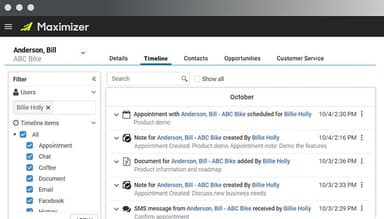
Contact Management
Contact management tools facilitate efficient organization and maintenance of customer information through which users can store and manage contact information, such as names, phone numbers, email addresses, and physical addresses.
Real-Time Performance Tracking
Real-time tracking and reporting features provided by Maximizer CRM let you stay on top of the sales team's performance. Key sales metrics such as revenue generated, deals won, and activities completed can be monitored to evaluate individual and team progress.
Data Visualization
Data visualization tools such as charts and graphs assist in the analysis and interpretation of sales data. Valuable insights are provided through visual representations of data, facilitating informed decision-making.
Pros And Cons of Maximizer CRM
Pros
Online access
Customizable fields
CRM tracking
Cons
Not very mobile-friendly
Incompatible with older licenses
Maximizer CRM Reviews
Total 12 reviews
4.7
All reviews are from verified customers
Rating Distribution
5
Stars75%
4
Stars17%
3
Stars8%
2
Stars0%
1
Stars0%
Share your experience
Financial Services, 11-50 employees
Less than a year
“Fast performance”
Pros
It runs at an impressive speed and doesn't have many glitches.
Cons
Outlook syncing occasionally gives me errors.
Rating Distribution
Ease of use
10
Value for money
10
Customer Support
10
Functionality
8
Hospitality, 11-50 employees
More than a year
“Many ways to use data”
Pros
There are lots of different ways to put data to use.
Cons
It could be more user-friendly and simpler to use.
Rating Distribution
Ease of use
10
Value for money
9
Customer Support
9
Functionality
10
Higher Education, 1-10 employees
Less than a year
“Smooth Outlook integration”
Pros
Outlook integration and the template options are things I really appreciate and they save us a lot of time. I regularly use the statuses to keep an eye on our workflow and make sure nobody gets overlooked. The export and import features are also useful for date reports and save me plenty of time.
Cons
I don't have any major complaints. One thing that could be better is adding a client-facing part of the software.
Rating Distribution
Ease of use
10
Value for money
9
Customer Support
10
Functionality
10
Frequently Asked Questions
Does Maximizer CRM offer an API?
Yes, Maximizer CRM provides an API.
What language does Maximizer CRM support?
Maximizer CRM supports English.
What other apps does Maximizer CRM integrate with?
Maximizer CRM integrates mainly with Zendesk, OpenAl, Intercom, Marketo, Facebook Lead Ads, Instagram Lead Ads, and PandaDoc.
Does Maximizer CRM support mobile devices?
Yes, Maximizer CRM supports mobile devices.
What types of pricing plans does Maximizer CRM offer?
Maximizer CRM offers two pricing plans, the Base edition and Sales Leader edition, to cater to various needs and budgets, with a starting price of $65/user/month. For further details, contact us.
Who are the typical users of Maximizer CRM?
Maximizer CRM's typical users are large enterprises, small- to mid-sized businesses, non-profits, and public administrations.
What level of support does Maximizer CRM offer?
Maximizer CRM offers phone, email, help desk, and chat support and FAQs.