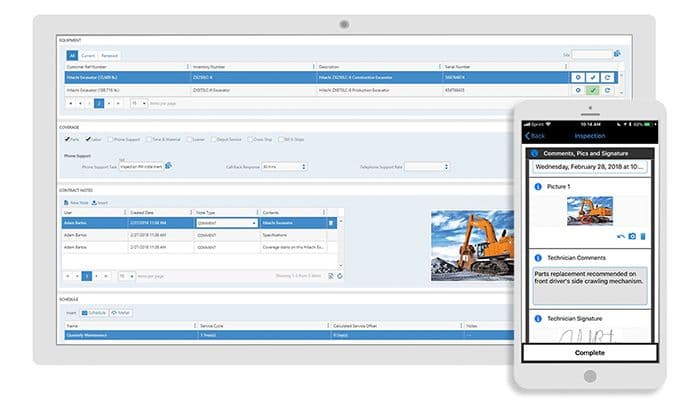
ServicePRO Software

ServicePRO Software

Last Updated

Key Takeaways

Generated from the text of customer reviews

ServicePRO is a cloud-based service desk and help desk management platform used by IT, HR, and operations teams. Users frequently highlight its self-service portal and streamlined access to automation, although some note that the interface feels somewhat dated. Recently, the vendor confirmed that ServicePRO is now Azure-compliant, enabling organizations to deploy and host the platform within their existing Azure subscription.

Our Verdict

ServicePRO is well-suited for mid-sized to large organizations managing multi-department service operations, especially those that require structured workflows, configurable project templates, and role-based access controls. Its per-agent annual pricing remains competitive, though its cost structure and implementation complexity make it a better fit for larger organizations than small businesses. Overall, it is best suited for organizations that prioritize structured service delivery and configurability.

ServicePRO Software Specifications

  • Contact Management
  • Lead Management
  • Opportunity Management
  • Sales Forecasting
View All Specifications

What Is ServicePRO?

ServicePRO software is a comprehensive cloud-based solution designed to streamline and optimize various aspects of service management for businesses in industries such as field service, maintenance, and repair. It offers multiple features and functionalities to help organizations efficiently manage their service operations, improve customer satisfaction, and drive productivity.

What Is ServicePRO Best For?

ServicePRO is best known for its role-based access control (RBAC) capabilities, which simplify the administration of security policies by allowing organizations to assign permissions at the role level. The feature can help reduce the risk of unauthorized access to sensitive data while making it easier to enable secure collaboration across an organization.

How Much Does ServicePRO Cost?

ServicePRO offers two on-cloud pricing packages, billed annually:  

  • Professional: Starting at $20/agent license/month (designed for single department service management)  
  • Enterprise: Starting at $25/agent license/month (designed for service management across multiple departments)

Alongside the base subscription costs, organizations should also consider the following additional expenses:

  • Implementation: Usually ranges from $3,000–$25,000 for initial setup, workflow configuration, and deployment support across single or multi-department environments
  • Data Migration: Typically estimated between $2,000–$15,000, depending on the number of legacy tickets, knowledge base content, and historical service records being transferred
  • Advanced Enablement: Usually ranges from $1,000 to $8,000 for optional in-depth training sessions and tailored user enablement programs that go beyond standard onboarding
  • Customization And Configuration: Typically ranges from $2,500–$18,000 for tailoring workflows, forms, service catalogs, and automation rules to align with organizational processes
ServicePRO costs may vary for on-premises pricing plans. It also offers a free trial. Request a custom ServicePRO pricing quote now!

Disclaimer: The pricing is subject to change.

ServicePRO Integrations

Some of the third-party integrations include:

How Does ServicePRO Work?

Users can log in to ServicePRO to access a centralized service desk platform and follow these steps to utilize its features:

  • Start by setting up your environment by configuring departments, user roles, and access permissions to align the system with your organization's structure
  • Next, build a service catalog by creating custom forms, service request templates, and project templates that standardize how requests are submitted and processed
  • Service requests are then received and managed within a personalized workspace, with real-time alerts and notifications keeping your team and customers updated
  • Then, collaborative workflows can be enabled by assigning tasks, looping in relevant teams, and tracking communication through built-in email collaboration and calendar tools
  • Organizations can also track assets and manage purchasing alongside service requests to ensure resource allocation remains aligned with operational needs
  • Finally, use reporting and analytics tools to monitor team performance, resolution times, and overall service desk efficiency
Watch a free ServicePRO software demo to learn more about its functionality.

Who Is ServicePRO For?

Some of the industries using ServicePRO software include:

  • Government
  • Healthcare
  • Education
  • Logistics
  • Manufacturing
  • Utilities
  • Property management
  • Finance
  • Construction

ServicePRO Use Cases

Based on our analysis of user feedback and ServicePRO’s current capabilities, we have identified several scenarios where the platform can deliver value:

Organizations Managing Complex Change Management Initiatives

Organizations undertaking system transitions, such as replacing legacy HR, ERP, or business-critical applications, often require a structured approach to planning, approvals, and execution. ServicePRO supports these initiatives through project templates that define each stage of the process. Automated event triggers help initiate follow-up tasks based on predefined conditions, while centralized visibility enables stakeholders to monitor progress and approvals throughout the project lifecycle.

Growing Organizations Streamlining Employee Onboarding

As organizations expand across departments or locations, coordinating onboarding activities between HR, hiring managers, IT, and facilities can become tricky. ServicePRO helps standardize this process through configurable user-define custom fields and automated task creation. In this way, the platform helps reduce onboarding delays and creates a more consistent experience for new hires.

Multi-Site Organizations Centralizing Complaint Management

Organizations operating across multiple locations often struggle with inconsistent complaint handling processes and limited visibility into resolution outcomes. ServicePRO can help such organizations address this challenge by routing complaints to the appropriate teams based on predefined rules while capturing relevant information through customizable forms and workflows.

Organizations Connecting Procurement Workflows With Asset Management

Organizations that manage purchasing across multiple departments or sites frequently face challenges tracking requests, approvals, and the assets acquired through those purchases. ServicePRO helps such organizations streamline this process by automating approval workflows, notifying stakeholders at key stages, and linking completed purchases to asset records within the configuration database.

Is ServicePRO Right For You?

ServicePRO may be a worthy choice for businesses as it offers flexibility of deployment, high configurability, enhanced productivity, and a rich feature set. The platform also includes role-based access controls that help organizations manage security permissions more efficiently across departments and teams while restricting access to sensitive information based on user responsibilities. It is a compelling choice for organizations seeking a comprehensive service desk system that balances functionality and security.

For further information, contact our experts at (661)-384-7070.

ServicePRO Software Features

Service Request Management

ServicePRO allows users to receive, track, and prioritize service requests, helping ensure timely resolution. Customers can submit requests through various channels, such as a self-service portal or email to capture and centralize all requests for streamlined management. Additionally, it helps teams stay informed through automated notifications that alert the appropriate support personnel whenever a request is assigned, updated, or approaches a deadline.

See How It Works
Service Design

This feature helps businesses design and define service offerings and catalog them in a structured manner. Users can create service templates, define service levels, and establish pricing models, helping organizations standardize and optimize their service offerings, ensuring consistency and efficiency in service delivery.

See How It Works
Collaborative Workflow

ServicePRO supports collaborative workflows, allowing teams and individuals to work together seamlessly. It enables the assignment of tasks, notifications, and escalations to the appropriate teams or individuals involved in the service delivery process. The platform also supports collaboration through built-in email, enabling support teams to create, update, and respond to requests directly from within ServicePRO.

See How It Works
Automation

The automation feature helps streamline and expedite service processes. It allows users to automate tasks such as ticket routing, assignment, and status updates. Automation helps reduce manual effort, minimize errors, and improve response times, increasing efficiency and customer satisfaction. Additionally, configurable business rules continuously evaluate requests against predefined criteria and can automatically trigger notifications, escalations, or workflow actions.

See How It Works
Work Order Management

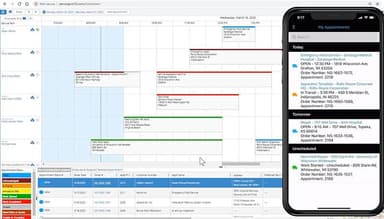
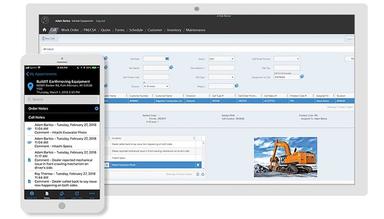
ServicePRO includes robust work order management features to effectively plan, schedule, and track work orders, allowing users to create work orders, assign them to technicians or teams, and monitor their real-time progress. Work order management helps ensure that service requests are executed promptly, resources are allocated efficiently, and service levels are met.

See How It Works

Pros And Cons of ServicePRO Software

Pros

  • Easy to use with a useful web portal

  • Exceptional implementation support

  • Offers ease of access

Cons

  • Clumsy interface with occasional glitches

  • Performance may slow down when multiple features are enabled

ServicePRO Software Reviews

Total 10 reviews

2.8

All reviews are from verified customers

Rating Distribution

5

Stars

30%

4

Stars

10%

3

Stars

10%

2

Stars

10%

1

Stars

40%

Share your experience

C

Carlos

Healthcare, 11-50 employees

More than a year

1.0
January 2025

VP

Pros

Nothing positive

Cons

Stay away- you been warned. No training no nothing from this company. A waste of valuable money

Rating Distribution

Ease of use

2

Value for money

1

Customer Support

1

Functionality

2

P

Paul

Customer Service, 51-100 employees

More than a year

1.0
August 2020

Don't waste your time

Pros

There is nothing positive to say. I couldn't get it to work at all and eventually gave up on it.

Cons

The interface is clumsy, the mobile application seldom works, and the web service integration with NetSuite is heavy, constantly pulling an astonishing amount of data from our ERP.

Rating Distribution

Ease of use

2

Value for money

2

Customer Support

2

Functionality

2

S

Simon

Construction, 51-100 employees

Less than 6 months

2.0
June 2020

Buyer Beware

Pros

There's nothing particularly appealing about this software; it was more of a necessity than a choice due to a gap in our host ERP system. However, the support provided during implementation was exceptionally good.

Cons

It didn't support some of the basic features of the ERP system we wanted to integrate with. We needed to use only one feature of those available, and that was tortuous enough, with constant syncing with the ERP to fake "integration." This was never going to work and was a very expensive all-or-nothing solution.

Rating Distribution

Ease of use

2

Value for money

2

Customer Support

10

Functionality

6

Frequently Asked Questions

What is ServicePRO software mainly used for?

ServicePRO is a field service automation software mainly used to streamline and automate business processes involved in various field service activities, including installation, repair, maintenance, and inspections.

Does ServicePRO software offer an API?

Yes, ServicePRO has an API available for use.

Who are the main users of ServicePRO software?

Businesses of all sizes use ServicePRO software. It is mainly used in manufacturing, utilities, and construction industries.

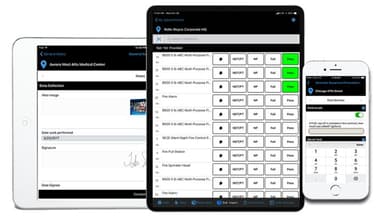
Does ServicePRO software support mobile devices?

Yes, ServicePRO software supports mobile devices.

Is ServicePRO software easy to use?

Yes, based on its user reviews, it is easy to use.

What language does ServicePRO support?

ServicePRO supports the English language.

What types of pricing plans does ServicePRO offer?

ServicePRO pricing starts at $20/agent license/month for the Professional plan. The Enterprise plan starts at $25/agent license/month. Get in touch with us to receive a personalized ServicePRO price quote.

What other apps does ServicePRO integrate with?

ServicePRO integrates with Jira, Zapier, Microsoft, and Google.

What level of support does ServicePRO offer?

ServicePRO offers support through email, live chat, FAQs, phone, and contact form.