


Birdeye
Last Updated
Key Takeaways
Generated from the text of customer reviews
Birdeye is an AI-based customer experience platform designed for multi-location businesses. It is primarily used by marketing and customer experience teams. Users respond well to having reviews and reputation data centralized across locations. Dashboard complexity and setup time draw the most criticism. Recently, Birdeye added multilingual analysis for reviews and survey responses in its Insights platform.
Our Verdict
Birdeye suits multi-location brands consolidating reputation and customer experience data. Its pricing is on the premium end, in line with the scale and compliance work larger operators need. For a retail chain, restaurant group, or healthcare network with dozens of locations, Birdeye is a sound pick.
Birdeye Specifications
- Analytics And Reporting
- Customer Feedback Surveys
- Customer Profiles
- Email Management
What Is Birdeye?
Birdeye is a customer experience and reputation management platform. It helps businesses collect and manage customer reviews on sites like Google and Yelp, then track reputation over time. The platform also handles two-way messaging, so a customer's text or webchat question lands in the same dashboard as their review.
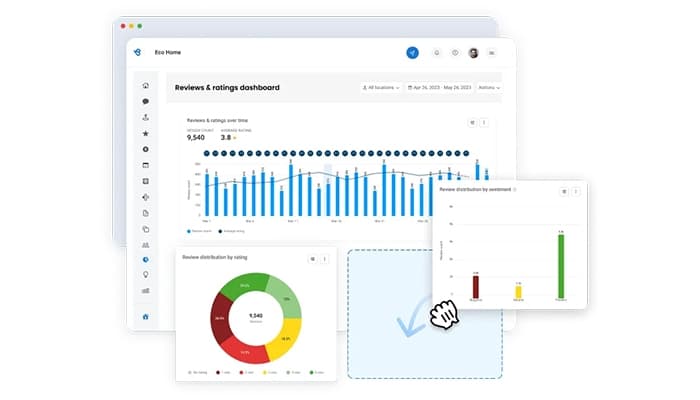
That data feeds into reporting, which shows which locations or teams need attention first. Businesses can use Birdeye to bring customer interactions and feedback from different channels into one system instead of managing separate tools for each function. Its capabilities are particularly relevant to organizations that need to monitor and manage activity across multiple business locations.
What Is Birdeye Best For?
The platform is best known for managing review requests and reputation tracking across many locations from a single login. There is no need for a separate account per site. A multi-location brand can send review invites at the location level, then roll results into one aggregate view, so a regional manager compares ten locations without switching logins. That location-level control, paired with one point of oversight, is what separates Birdeye from single-location review tools.
How Much Does Birdeye Cost?
Beyond the base price, you can expect the following additional costs:
- Add-on Modules:Optional modules can add $50–$200/location/month depending on the tools selected
- Onboarding And Implementation:Setup may cost $500–$1,500/location as a one-time fee
- Custom Integrations:Complex CRM, POS, or practice-management integrations may cost $500–$2,000 one time
- SMS Carrier Fees:SMS usage may add around $0.01–$0.03/message in carrier fees
- Search AI Usage:Search AI can incur usage-based overage charges when included prompt limits are exceeded
Users generally see Birdeye as a strong value when its reputation management and automation capabilities translate into measurable results. However, some buyers feel the software is expensive, particularly for smaller businesses.
Disclaimer: Pricing references are based on publicly available third-party information and industry benchmarks. Actual costs may vary.
Birdeye Integrations
Birdeye integrates with various business applications, including:
How Does Birdeye Work?
Here’s how you can access Birdeye and move through the platform’s main workflow:
- Log in to your Birdeye account using your credentials to access the dashboard
- Review the dashboard to check key activity across reviews, inbox messages, listings, surveys, and other areas
- Manage customer reviews from the Reviews tab by filtering feedback, responding to reviews, or contacting reviewers
- Organize customer conversations in the Inbox by reviewing messages, leads, reviews, and other interactions in one place
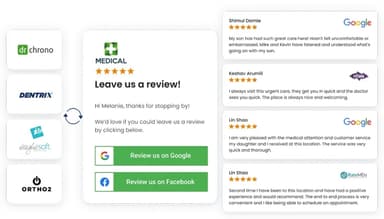
- Send review requests to customers through email or text using contacts already stored in your Birdeye account
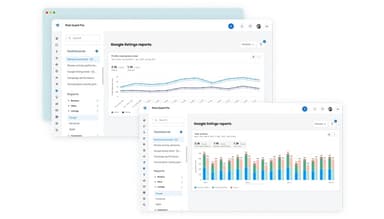
- Monitor customer activity and business performance through reports that bring data from different Birdeye products together
- Configure relevant business settings and location information to keep your account and customer-facing listings up to date
Who Is Birdeye For?
Birdeye software is designed for businesses of all sizes across various industries and sectors, such as:
- Legal
- Retail
- Restaurants
- Automotive
- Dental
- Financial services
Birdeye Use Cases
Based on our analysis of Birdeye’s current capabilities and documented use cases, we identified several scenarios where the software could be a good fit:
1. Retail Chains Managing Reviews Across Multiple Store Locations
Birdeye can be used by retail chains that need to keep track of customer reviews across a large number of stores. Each location can have its own review activity while the broader business can monitor performance across locations. This setup is relevant when customer feedback is spread across many storefronts and local teams need a consistent way to manage it.
2. Restaurants Monitoring Customer Feedback Across Their Locations
For restaurant groups, customer feedback can vary considerably from one location to another. Birdeye could be a fit when corporate teams need to see how individual restaurants are performing without treating every location as a separate operation. Looking at review activity at the location level can make it easier to spot branches with unusually low ratings, changes in review volume, or differences in how customers are responding across the group.
3. Businesses Handling Customer Messages Across Multiple Channels From One Place
Birdeye’s Inbox brings customer messages from text, email, webchat, social channels, voicemail, reviews, referrals, and surveys into one interface. A business receiving inquiries across several of these channels can manage conversations. Teams can also assign conversations to specific employees or locations and track response times, which can be useful when customer inquiries are handled by different people or teams.
4. Businesses Using Surveys To Identify Customer Experience Issues
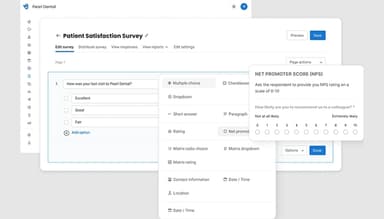
Birdeye Surveys lets businesses collect customer feedback through channels such as text, email, social messaging, and webchat. Negative responses can be routed into ticketing for follow-up, so teams can address concerns directly. This setup can suit businesses that want to capture dissatisfaction during the customer journey and investigate recurring issues before they affect the wider customer experience.
Is Birdeye Right For You?
If you are looking for a customer experience platform that can support a large, multi-location operation while meeting formal security and compliance requirements, Birdeye may be a suitable fit. The platform holds SOC 2 and ISO 27001 certifications and is HIPAA and GDPR compliant. Its customer base includes large organizations such as Aspen Dental, Cracker Barrel, Six Flags, and Jiffy Lube, which operate across hundreds of locations each.
In addition to that, Birdeye addresses regulatory concerns around online reviews. Following the FTC’s rule on fake reviews and testimonials, which took effect in October 2024, Birdeye AI is focused on soliciting and responding to reviews rather than creating or publishing them directly. It can also identify reviews that may be AI-generated and remove them. This may be relevant for organizations that include review practices in their vendor compliance checks.
Still doubtful if Birdeye is the right fit for you? Get in touch at (661) 384-7070, and we will help you make an informed decision.
Birdeye Features
Review Generation
Birdeye can automate review requests after a service or customer interaction ends. Requests are sent through email or text based on the channel a customer is more likely to respond to. This removes the need for businesses to remember to ask for reviews manually and can increase review volume at individual locations.
Review Marketing
Once a strong review comes in, this feature turns it into a branded graphic. That graphic then goes out to the business's website and social accounts. It puts someone else's experience in front of potential customers instead of the company's own claims.
Dashboards
Birdeye combines reviews, survey responses, and listings data from every location into a single score that can be benchmarked against businesses in the same industry. Its insights can also be turned into tickets with an assigned owner and deadline, so findings can be acted on rather than left sitting in a report.
Listings Management
Using Birdeye, a business can update hours, address, services, and photos once. That change pushes out to more than 100 directories automatically, covering over 50 fields per location. The same system also flags and removes duplicate listings, which otherwise confuse customers and split a location's reviews across two profiles.
Social Scheduling
This feature can be used to schedule posts and drafts across multiple accounts and networks in one action. A visual calendar tracks all of it, filterable by date, channel, location, or region. A marketing team running several locations sees what is queued for each one without opening a separate tool per account.
Pros And Cons of Birdeye
Pros
Gives multi-location teams better visibility
Makes requesting customer reviews less time-consuming
Brings review responses into one workspace
Makes brand sentiment easier to track
Helps teams monitor online reputation daily
Cons
Dashboard can feel overwhelming at first
Some reporting views need clearer organization
Certain workflows require extra setup time
Birdeye Reviews
Total 14 reviews
3.6
All reviews are from verified customers
Rating Distribution
5
Stars50%
4
Stars21%
3
Stars0%
2
Stars0%
1
Stars29%
Share your experience
Retail, 1-10 employees
Less than a year
“Very easy to manage”
Pros
I can link all my channels in one platform, making it really easy to manage.
Cons
Sometimes it takes a while to get updates across certain channels and the website layout could use some improvements.
Rating Distribution
Ease of use
10
Value for money
10
Customer Support
10
Functionality
10
Accounting, 11-50 employees
Free Trial
“Excellent quality, amazing value”
Pros
The features of this software are excellent and work well for everyone.
Cons
The feature options are limited. I think It would be better if there were more available options.
Rating Distribution
Ease of use
8
Value for money
8
Customer Support
8
Functionality
6
Product, 500+ employees
More than a year
“Outstanding review platform”
Pros
The AI-generated responses to reviews are fantastic, and the email notifications when a client submits a review are very useful.
Cons
I wish it were easier to dispute and remove a review.
Rating Distribution
Ease of use
10
Value for money
10
Customer Support
10
Functionality
10
Frequently Asked Questions
What level of support does Birdeye offer?
Birdeye offers phone support, chat, email, helpdesk, FAQs, and a knowledge base.
Who are the typical users of Birdeye?
The typical users of Birdeye are those in the legal, retail, restaurants, automotive, and dental industries.
What type of pricing plans does Birdeye offer?
Birdeye pricing starts at $349/location/month for the Standard plan, while the Professional plan costs $449/location/month. Premium pricing is custom. Request a personalized Birdeye cost estimate.
Does Birdeye have a mobile app?
Yes, Birdeye has a mobile app for both iOS and Android.
What other apps does Birdeye integrate with?
Birdeye integrates with GenBook, Quickbooks, HubSpot, Zoho Books, and more.
What language does Birdeye support?
Birdeye supports English.
Does Birdeye offer an API?
Yes, Birdeye offers an API.