


Akitu One
Last Updated
Key Takeaways
Generated from the text of customer reviews
Akitu One is a cloud-based dental practice management software for independent clinics and multi-location dental groups. Users frequently praise its ease of use, while feedback on clinical charting is mixed, and some report scheduling limitations. Recently, the vendor has released Version 2 of Akitu Imaging with additional image editing capabilities.
Our Verdict
Akitu One is a suitable option for independent dental clinics and growing multi-location practices seeking centralized clinical and administrative workflows. Reviews suggest good value for money, particularly because several features are included without supplementary applications. However, one solo practitioner found its pricing somewhat expensive. We recommend it for practices prioritizing remote access and streamlined administration.
Overall Rating
Based on 25 users reviews
4.9
Rating Distribution
Positive
100%
Neutral
0%
Negative
0%
Starting Price
$399
per month
Akitu One Specifications
- Appointment Management/Scheduling
- e-Prescriptions
- Billing and Invoicing
- Claims Management
What Is Akitu One?
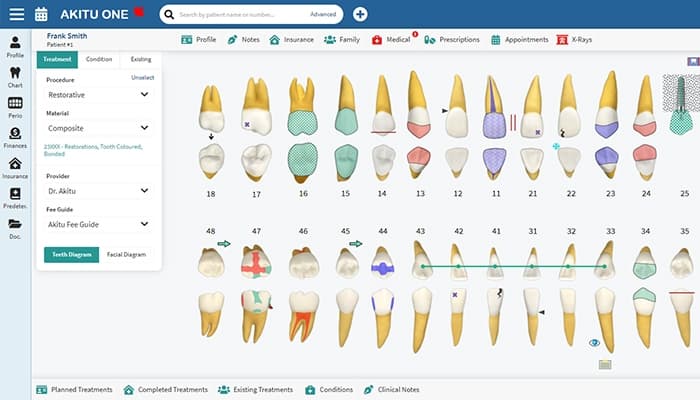
Akitu One is an all-in-one dental practice management software designed to manage clinical documentation, patient communication, and business operations in one system. It documents clinical findings, captures and manages dental images, processes electronic insurance claims, schedules appointments, facilitates patient communication, tracks practice performance through real-time dashboards, and generates financial reports. Using its 'Recare' functionality, the tool automates patient reminders and tracks hygiene appointments to support ongoing patient follow-up. Beyond standard teeth and periodontal charting, it includes dedicated facial diagrams for cosmetic injection tracking.
What Is Akitu One Best For?
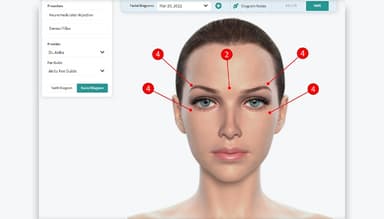
'Botox and Dermal Filler Charting' is one of Akitu One’s standout features because it allows dental providers to document facial aesthetic treatments alongside tooth and periodontal charting. Providers can create multiple facial diagrams for each patient, organize them by appointment date, and record injection points and administered units directly on the diagrams. This helps dental practices maintain Botox and dermal filler treatment histories within the same system.
How Much Does Akitu One Cost?
Akitu One cost is estimated to start at $399/month. The vendor offers custom quotes based on clinical requirements. Beyond this base cost, organizations might also need to account for the following potential costs:
- Standard Implementation And Setup: $0–$1,000 (one-time), typically depending on whether Akitu bundles setup into the subscription or charges separately for configuration
- Standard Data Migration: $0–$1,500/database (one-time), including the transfer of patient records and other supported data from an existing practice management system
- Complex Or Multi-Database Migration: $1,500–$3,000/database merge (one-time), accounting for additional location conversions or the consolidation of separate practice databases
- Extra Remote Training: $80–$150/hour, for additional instructor-led sessions focused on system configuration and daily workflows
Users generally see Akitu One pricing as offering strong value, particularly because many core features are included without requiring separate supplementary apps. Compared with alternative dental software, reviewers also found the platform more cost-effective, with functionality included that competitors may charge extra for.
Disclaimer: Pricing references are based on publicly available third-party information and industry benchmarks. Actual costs may vary.
Akitu One Integrations
Akitu One integrates with ‘DentAI’.
How Does Akitu One Work?
Here's a step-by-step guide to use Akitu One features:
- Log in to the platform with account credentials
- Set up practice information, user roles, insurance details, and other configuration settings required for daily operations
- Schedule patient appointments and manage provider availability through the practice calendar
- Record patient information, clinical notes, dental charting, periodontal findings, and relevant images within the patient record
- Manage treatment plans by documenting proposed procedures, reviewing treatment history, and updating treatment status as care progresses
- Process invoices, insurance claims, patient payments, and account adjustments through the billing workflow
- Review dashboards, reports, reminders, and practice activity to monitor operational and financial information
Who Is Akitu One For?
Akitu One software is designed for the following dental practice types and care settings:
- Solo practices
- Multi-location dental practices and DSOs
- Independent dental hygiene clinics
- General dentistry clinics
- Dental clinics offering facial aesthetic treatments
- Dental practices with multiple providers
Akitu One Use Cases
Based on our analysis of user reviews and Akitu One’s current capabilities, we have identified the following key scenarios where this software is a good fit for dental practices:
Dental Hygiene Practitioner Starting An Independent Clinic
Establishing an independent dental hygiene clinic requires setting up patient records, appointment schedules, clinical documentation, billing, and reporting, often without additional administrative staff. To manage these responsibilities, a dental hygiene practice owner can use Akitu One to handle daily clinical and administrative tasks within one system. One reviewer starting a dental hygiene clinic reported using Akitu One to manage patient records, scheduling, charting, billing, and reporting.
Clinic Manager Coordinating Schedules Across Multiple Providers
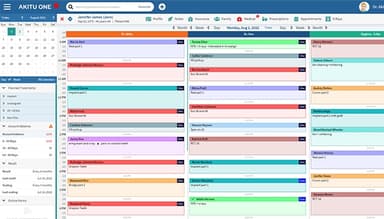
Frequent appointment changes can complicate scheduling when several clinicians share a clinic's appointment capacity. In this situation, clinic managers can use Akitu One's provider-specific calendar views to create, move, and review appointments without switching between separate schedules. Users note that these calendar views make it easier to manage multiple providers’ schedules, while the software also allows them to add multiple deposits and track outstanding collections.
Dental Hygienist Operating Without A Dedicated Receptionist
When a dental hygienist runs a clinic without a receptionist, patient calls and appointment requests can interrupt consultations and delay responses to booking inquiries. To reduce these interruptions, Akitu One allows patients to book appointments online, while automated reminders handle routine appointment notifications. Its messaging tools also let hygienists respond to patient inquiries directly. A dental hygiene practitioner reported choosing Akitu One to handle patient bookings and messages without hiring a receptionist.
Dentist Documenting Botox And Dermal Filler Treatments
Facial aesthetic treatments require ongoing documentation, particularly when patients return for repeat procedures or follow-up consultations. For dentists who provide these services alongside routine dental care, Akitu One keeps aesthetic treatment records within the existing patient management system. In this way, practitioners can review previous treatment information during subsequent visits without maintaining a separate recordkeeping system.
Multi-Practice Owner Reviewing Activity Across Dental Locations
Reviewing operational performance becomes more complicated when several dental locations maintain separate records and reporting processes. Here, Akitu One provides multi-practice owners with centralized access and analytics to examine activity at different locations. User feedback indicates that the software makes it easy to generate reports for tracking practice activity.
Is Akitu One Right For You?
Akitu One may suit dental practices seeking a cloud-based system that supports expansion to multiple locations. For example, a five-location dental group could use its multi-practice setup to centralize oversight and review operational analytics for each location rather than maintaining separate practice management systems.
When it comes to security, the vendor uses cloud-based data management, encryption, and cybersecurity measures to protect patient and financial information. Akitu One also stores practice data in a Canadian data center and performs continuous backups and audits to maintain data accessibility and integrity.
Compared with traditional server-based dental practice management systems, Akitu One offers the advantage of vendor-managed data storage and backups. This reduces the need for practices to maintain local servers and backup infrastructure, particularly when managing several locations.
Unsure whether Akitu One suits your requirements? Get in touch at (661) 384-7070, and we will help you assess it more clearly.
Akitu One Features
Clinical Charting
Akitu One's 'Clinical Charting' records dental conditions and treatment activity at the tooth level. It supports simultaneous charting of multiple teeth, organizes each tooth's history by procedure code, date, and provider, and stores related notes, X-rays, and files. Dentists can also create and compare treatment plans and search planned, completed, and existing treatments, making it easier to review clinical histories during patient appointments.
E-Fax
It enables dental practices to send and receive prescriptions and other documents electronically without printing or using a physical fax machine. Akitu One also stores sent and received fax records in the cloud, allowing administrative staff to retrieve previous correspondence directly within the practice management system.
Online Forms
Akitu One provides a drag-and-drop builder for creating patient intake, consent, and other practice forms. Staff can send these forms through email or text, while patients complete them on their own devices. The software can also use submitted information to update patient profiles, reducing the need for staff to enter the same details manually.
Online Booking
Akitu One allows patients to schedule appointments through a web-based portal. Practices can control which treatments are available for online booking and configure appointment options according to provider schedules and associated forms. This gives patients a way to book appointments without contacting reception staff by phone.
Advanced Perio
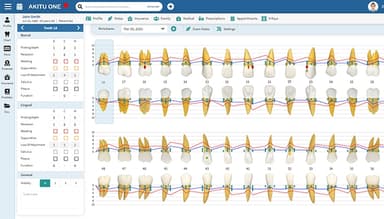
Through this feature, Akitu One enables dental hygienists and dentists to record periodontal examination findings through voice-activated charting. It maintains tooth-specific notes, examination notes, and diagnoses, while its visual interface displays periodontal illustrations and allows comparisons between examinations. 'Voice Input' also lets clinicians document findings without repeatedly switching to a keyboard during periodontal assessments.
Pros And Cons of Akitu One
Pros
Charting keeps clinical documentation organized
Multi-provider scheduling keeps calendars organized
Patient reminders make outreach easier
Reports make practice activity easy to track
Clinical note templates simplify record updates
Cons
Perio charting might exclude bleeding percentages at times
Booking colors may offer limited customization
Online booking may miss planned time units
Akitu One Reviews
Total 25 reviews
4.9
All reviews are from verified customers
Rating Distribution
5
Stars92%
4
Stars8%
3
Stars0%
2
Stars0%
1
Stars0%
Share your experience
Healthcare, 1-10 employees
Less than a year
“Akituone - The Gold Standard for Dental Software”
Pros
The support team here is exceptional. They address any issues or questions I have in a personalized, thorough, and efficient manner. I truly appreciate their dedication, especially customer service. During my online training sessions, their team was incredibly patient and spent ample time helping me understand the fundamentals.
Cons
Being a 51-year-old clinician with limited tech skills, I found the learning curve to be quite steep. I struggled particularly with creating templates and despite the excellent support provided, I couldn't quite grasp it.
Rating Distribution
Ease of use
10
Value for money
10
Customer Support
10
Functionality
10
Healthcare, 1-10 employees
Less than 6 months
“Hello this is my review”
Pros
The customer service is always quick to respond, and the interface is smooth and easy to navigate.
Cons
Adjusting schedule availability is quite cumbersome.
Rating Distribution
Ease of use
9
Value for money
10
Customer Support
10
Functionality
10
Healthcare, 1-10 employees
Less than a year
“Akituone team is excellent”
Pros
So far, the sales, service, and support have been excellent! The system is intuitive, and they regularly incorporate user feedback to make improvements.
Cons
No issues so far! I've been satisfied using the software, mainly for basic billing.
Rating Distribution
Ease of use
10
Value for money
10
Customer Support
10
Functionality
10
Frequently Asked Questions
What do user reviews reveal about Akitu One’s strengths and limitations?
Feedback from a dental practice highlights Akitu One’s remote access, straightforward billing, charting, and treatment planning. However, the same practice reported image quality issues after data migration and difficulties with voice commands during periodontal charting.
Which computer systems are compatible with Akitu One?
Akitu One works on both PC and Mac computers because it is cloud-based. Users can access the system from internet-connected phones, laptops, and tablets.
Can Akitu One migrate data from existing dental software?
Yes, Akitu One supports migration of existing patient records, appointments, and financial information from previous dental software. The vendor also offers data migration assistance during the transition.
What support options does Akitu One provide?
Akitu One provides support through email, phone, and live chat. Dental practices can use these channels to seek assistance with software-related questions.
Can Akitu One connect directly to existing X-ray sensors?
Yes, Akitu One supports compatible dental imaging sensors through TWAIN drivers or Windows Image Acquisition (WIA). Its cloud imaging module allows practices to capture radiographs and intraoral photographs directly into patient charts.