


Carestream Dental
Last Updated
Key Takeaways
Generated from the text of customer reviews
Sensei Cloud by Carestream is a dental practice management software for clinical and administrative teams across dental, orthodontic, and oral surgery practices. It brings scheduling, patient records, billing, and practice management into one system. Users appreciate remote access and quick navigation, while reporting billing discrepancies and workflow limitations. Its 2026 updates introduced login restrictions, audit reporting, and revised CDT codes.
Our Verdict
Sensei Cloud suits dental groups coordinating care across multiple offices and practices moving away from server-based systems. Its pricing may be harder to justify when additional costs are involved, particularly for smaller practices. We recommend it for dental teams that prioritize cloud access, centralized patient information, and integrated administrative workflows.
Overall Rating
Based on 16 users reviews
2.8
Rating Distribution
Positive
31%
Neutral
38%
Negative
31%
Starting Price
$450
per month
Carestream Dental Specifications
- Appointment Management/Scheduling
- e-Prescriptions
- Patient Portal
- Mobile App
What Is Carestream Dental?
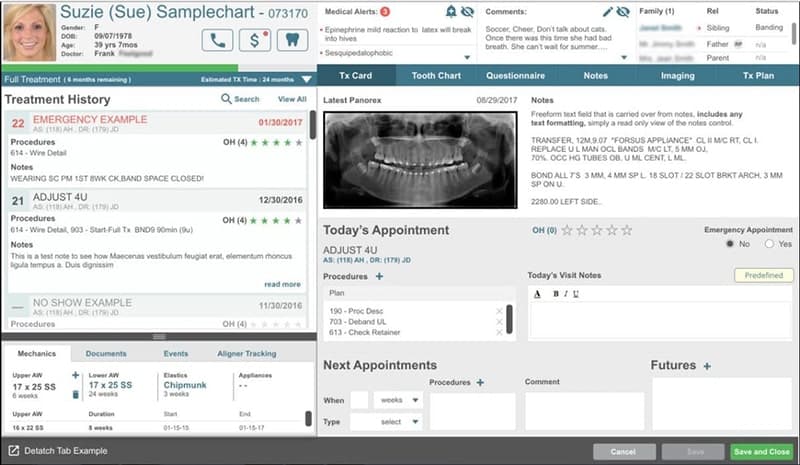
Carestream Dental offers Sensei, a cloud-based dental practice management platform that connects patient care, administrative tasks, and business operations. It serves general dentists, oral surgeons, orthodontists, and other dental specialists, with workflows tailored to their needs. Practices can use it to manage scheduling, referrals, treatment planning, and patient progress while accessing real-time data on operational, clinical, and financial performance. The platform supports single-location offices and multi-specialty dental organizations, offering centralized data, shared workflows, and enterprise-wide analytics.
What Is Carestream Dental Best For?
The platform is best known for its ‘Patient Manager’ module, which helps practices manage patient engagement through automated scheduling, communication, and outreach. Using this feature, patients can book appointments online and use digital check-in kiosks. It sends automated reminders and confirmations that can reduce manual front-desk tasks. The tool also supports recalls, follow-ups, and outreach for unfinished treatment plans to keep patients involved in their care. Additionally, it supports targeted marketing campaigns and patient review requests to help practices attract new patients and maintain their online visibility.
How Much Does Carestream Dental Cost?
Carestream Dental price is estimated to start at $450/month, according to industry benchmarks for similar dental practice management. The following plans, however, are available at custom pricing:
- Yellow Belt
- Black Belt
- Dojo
Apart from the base subscription costs, it is recommended to factor in the following potential additional expenses:
- Additional Providers: $175/provider/month beyond the first included provider
- Sensei Cloud Imaging: $250/month/practice, for buyers who don't upgrade to Dojo
- Practice Management Data Conversion: $2,500 (one-time)
- Imaging Data Conversion: $1,500 one-time
- Premium Training: $1,500 per onsite day plus travel
- Advanced Forms: $99/month
- Insights Manager (Analytics): $199/month
Views on Sensei Cloud pricing are mixed. Some users find the cost appealing, while others feel it could be lower. There are also concerns about whether the service delivers enough value to justify the premium price.
Disclaimer: The pricing is subject to change.
Carestream Dental Integrations
The platform integrates with different third-party systems. These include:
- Dental Revenue
- iCore Connect
- RevenueWell
- TeamCare Dental
- Weave software
How Does Carestream Dental Work?
Log in to the system and follow these steps to move from patient intake to treatment and follow-up:
- Create patient records to keep contact details, medical history, previous treatments, and diagnostic images together
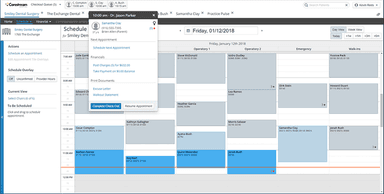
- Schedule appointments and use integrated engagement tools to send reminders and confirmations
- Collect patient information through digital forms and manage check-in when patients arrive
- Review patient histories and images to plan treatment and document care during each visit
- Verify insurance eligibility, submit claims, and track claim status as part of the billing process
- Arrange recalls and follow-ups, including outreach to patients with unfinished treatment plans
- Review practice dashboards to monitor operational, clinical, and financial performance
Who Is Carestream Dental For?
The platform is designed to support a range of dental professionals, including:
- Dentists
- Oral surgeons
- Orthodontists
Carestream Dental Use Cases
Based on Carestream Dental feature set and user feedback, we have identified the following scenarios where it may suit dental practices and multi-location organizations:
Dental Practices Following Up On Unfinished Treatment
Patients may leave a consultation without booking the recommended treatment, leaving front-desk teams to manage repeated follow-up calls. Carestream Dental’s Patient Management module supports outreach for unfinished treatment plans, recalls, and follow-up visits. This makes it a useful fit for practices that need a more structured way to reconnect with patients between appointments.
Oral Surgery Practices Managing Implant Cases Across Visits
Carestream Dental supports oral surgery teams handling cases that move from consultation through surgery and postoperative care. It allows staff to keep procedural details and implant information in the patient record. This gives clinicians a shared history to review at subsequent visits. Users particularly highlight this capability as it enables surgeons and doctors to access all patient records easily.
Orthodontic Practices Coordinating Treatment And Installment Payments
Orthodontic care often involves multiple treatment phases, recurring appointments, and payments spread over time. Teams can use Carestream Dental to schedule appointments against a case and track aligner progress as treatment continues. Office staff can also manage installments and family accounts. This makes it a practical option when clinical follow-up and payment administration run alongside each other for months.
Dental Groups Standardizing Operations Across Locations
For dental groups adding offices, differences in local processes can make oversight more difficult. Carestream Dental allows central teams to manage configurations, assign access at corporate, regional, and location levels, and establish shared workflows. Leaders can review performance across the network to identify where individual offices need attention. This suits organizations seeking consistent administration while maintaining oversight of each location.
Is Carestream Dental Right For You?
Carestream Dental’s Sensei Cloud suits dental, orthodontic, and oral surgery practices seeking to manage scheduling, clinical records, billing, and patient communication in one system. It supports both single-location offices and larger dental groups.
Practices managing multiple locations can also use centralized configurations and network-wide performance monitoring to oversee operations across offices. For security, Sensei uses encryption in transit and at rest, identity controls, and role-based access. Practices can also restrict individual users’ logins by approved IP addresses and permitted access times.
A recent industry update is the fiscal year 2027 ICD-10-CM code set, effective October 1, 2026. Sensei’s official guidance directs practices to versions of WinOMS or Sensei Cloud that include the latest codes, which is relevant for practices submitting medical claims. Sensei Cloud also incorporated the ADA’s CDT 2026 changes into its procedure lists, fee schedules, and insurance allowance tables, although practices must manually update associated fees and amounts.
Still doubtful if Carestream Dental is the right fit for you? Connect with us at (661) 384-7070 for further guidance.
Carestream Dental Features
Rx Manager
This feature lets providers create, send, and refill prescriptions directly from the patient chart using an internet-connected device. It pulls information from patient records to reduce manual transcription and gives clinicians access to medication histories when making prescribing decisions. Prescriptions are sent electronically to the patient’s preferred pharmacy, with details automatically recorded in their file.
Insights Manager
Carestream Dental includes ‘Insights Manager’ that brings practice performance data into customizable dashboards, so teams can monitor the area's most relevant to their work. For multi-location organizations, it consolidates data across practices to give leaders a broader view of operations. Teams can use these insights to identify repeated work, review resource allocation, and adjust patient engagement strategies.
eClaims
The platform lets billing teams submit insurance claims electronically, with validation checks that flag missing fields, incorrect codes, and formatting issues before submission. Staff can attach X-rays, periodontal charts, photos, and narratives, then track whether claims have been received, accepted, or denied. Reporting on denial reasons, claim performance, and payer turnaround times helps teams prioritize follow-ups and review billing processes.
eVerifications
Using this feature, staff can check insurance eligibility, benefits, coverage limitations, and claim status before a patient’s appointment. It facilitates real-time checks that reduce the need to verify plan details manually and help teams identify inactive coverage before treatment. Staff can use this information to explain the patient’s expected financial responsibility upfront, thereby reducing billing surprises and payment disputes.
Imaging
This feature stores X-rays, intraoral photos, and 3D images directly in the patient chart, alongside clinical notes, periodontal charts, and treatment history. It enables clinicians to compare, annotate, and measure images to support diagnosis and display them chairside when explaining treatment options. Billing teams can access images for electronic claim attachments, while automatic saving helps reduce misplaced or duplicated files.
Pros And Cons of Carestream Dental
Pros
Remote access to patient records and schedules
Easy patient search, intake, and scheduling
Electronic claims and insurance checks reduce manual work
Billing statements retain progress when switching tasks
Quick switching between practice locations
Cons
Syncing issues can disrupt daily work
Some routine tasks may require extra steps or workarounds
Billing balances and production figures may appear inaccurate
Carestream Dental Pricing
Yellow Belt | Black Belt | Dojo |
|---|---|---|
Custom Pricing | Custom Pricing | Custom Pricing |
|
|
|
Disclaimer: The pricing details were last updated on Sep 25, 2026 from the vendor's website. Please contact us for a tailored pricing list.
Carestream Dental Reviews
Total 16 reviews
2.8
All reviews are from verified customers
Rating Distribution
5
Stars13%
4
Stars19%
3
Stars31%
2
Stars6%
1
Stars31%
Share your experience
Dentistry, 1-10 employees
Less than a year
“Terrible customer service”
Pros
Not sure yet
Cons
Carestream is only prompt when they take your money otherwise their response time is deplorable. They continually fail to answer calls and evade all previously made telephone appointments. They are a frustrating company to deal with and have made the daily running of the dental practice quite challenging
Rating Distribution
Ease of use
3
Value for money
3
Customer Support
1
Functionality
3
Hospital & Health Care, 11-50 employees
“Perfect for dental practices”
Pros
Carestream Dental has all the essentials for running our dental practice. Plus 3D imaging is absolutely amazing and it makes managing patient records so much easier.
Cons
Occasional bugs and unexpected interruptions in operations is something I hate about it.
Rating Distribution
Ease of use
7
Value for money
7
Customer Support
7
Functionality
7
Not Specified, 1-10 employees
“Response time is too slow”
Pros
Once it's set up, it works pretty well. Also the screens are easy to navigate and usually do what they're supposed to without causing any problem. So yes I like it.
Cons
Having to wait and schedule upgrades when you need them the most is a total dealbreaker for me. It is honestly ridiculous trying to support someone using this product and then having to explain that their vendor says they need to wait three weeks for an upgrade just to fix performance issues. What a joke!
Rating Distribution
Ease of use
9
Value for money
9
Customer Support
9
Functionality
9
Frequently Asked Questions
Is Carestream Dental completely web-based?
Yes! Carestream Dental software is cloud-based and accessible through a web browser, without an on-site server. However, integrated products such as imaging software may have additional installation and system requirements.
How can I get support or contact Carestream Dental?
Support is available via phone, email, live chat, and ticket system.
Can Sensei Cloud and Sensei Cloud Apps be used without replacing an existing practice management system?
Sensei Cloud is designed to replace a traditional server-based practice management system. Sensei Cloud Apps can extend an existing Sensei product, WinOMS, SoftDent, PracticeWorks, or OrthoTrac, without requiring migration to Sensei Cloud.
What happens if the internet connection goes down while using Carestream Dental?
Carestream Dental requires an internet connection, so losing connectivity would interrupt access until a connection is restored.
Can Carestream Dental manage separate businesses within one dental group?
It supports dental groups with multiple locations, including centralized configurations, location-level access controls, and network-wide reporting.