



Last Updated
Key Takeaways
Generated from the text of customer reviews
ClinicSense is practice management software for health and wellness clinics, used by practitioners and administrative staff, particularly in massage therapy and physical therapy. Reviews highlight its ease of use and organized workflows, though some users report payment-date discrepancies after saving payments. ClinicSense now integrates with Square Terminal, which accepts in-person debit, credit, Apple Pay, and Google Pay payments sent from ClinicSense to a Square Terminal device.
Our Verdict
ClinicSense is a practical choice for independent practitioners and small wellness clinics seeking to simplify daily practice administration. Its pricing is generally viewed as reasonable for the value provided. Still, occasional price increases and appointment-based limits can concern smaller businesses. It is a solid recommendation for massage therapists and multidisciplinary wellness practices that prioritize manageable operating costs over extensive mobile functionality.
Overall Rating
Based on 47 users reviews
4.8
Rating Distribution
Positive
98%
Neutral
0%
Negative
2%
Starting Price
$39
per month
ClinicSense Specifications
- Appointment Management/Scheduling
- Mobile App
- Billing and Invoicing
- Patient Demographics
What Is ClinicSense?
ClinicSense is practice management software designed for wellness businesses. It helps staff organize appointments, client records, and administrative tasks. Documentation tools include customizable SOAP notes, treatment plans, and intake forms, while online booking and automated reminders simplify scheduling. Its No-Show Guard® lets practices require a card, deposit or full prepayment when clients book online. Automated emails send clients weekly, biweekly, or monthly availability summaries and wellness check-ins
What Is ClinicSense Best For?
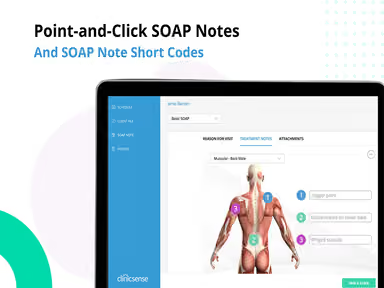
Structured SOAP documentation is one of ClinicSense's standout features. It helps practitioners record session details without spending too much time on charting. Ready-made and customizable templates, reusable notes, and point-and-click body diagrams support consistent records. Upcoming Voice-powered Notes capability aims to cut down manual typing even further.
How Much Does ClinicSense Cost?
ClinicSense price starts at $39/month for the Lite plan, with support for up to 20 appointments/month. Other paid plans are:
- Standard: $69/month (up to 200 appointments/month)
- Premium: $99/month (unlimited appointments)
There is no setup fee, and a 14-day free trial is also available. Additional practitioners can be added to both Standard and Premium plans for $20/month.
Apart from these plans, users should keep potential extra costs in mind. The following figures are based on industry benchmarks and may vary depending on provider terms:
- Payment processing fees: 2%–3.5%/transaction
- Historical paper chart scanning: $0.50–$2/page
- Data cleanup and duplicate client record correction: $100–$500
- Staff training beyond standard onboarding: $50–$150/hour
Users generally feel satisfied with ClinicSense's value for money for its scheduling, SOAP notes, and practice management features. However, some find price increases and higher-tier costs challenging as appointment volumes or staff numbers grow.
Disclaimer: The pricing is subject to change.
ClinicSense Integrations
The platform integrates with several third-party applications and systems, such as:
- Square
- Instagram software
- TELUS eClaims
ClinicSense does not publicly document API availability, developer documentation, or API access details on its official website.
How Does ClinicSense Work?
Here’s a step-by-step guide to how users can navigate the software:
- Log in to ClinicSense and complete the initial account setup with practice details, practitioner profiles, working hours, and services
- Configure scheduling preferences, appointment availability, online booking, and automated client reminders
- Open the Calendar to schedule, reschedule, or cancel appointments and manage daily bookings
- In the mobile app, go to Clients to add client profiles, access existing records, and review appointment histories
- Open client files to complete intake forms, document treatment notes, and manage consent forms and attachments
- Use the invoicing and payments tools to review invoices, record payments, and issue receipts to clients
- Access Reports to review appointment activity, revenue, payments, and other practice performance data
Who Is ClinicSense For?
ClinicSense is well-suited for wellness practices, including:
- Massage therapy
- Holistic medicine
- Physical therapy
- Chiropractic care
- Osteopathy
ClinicSense Use Cases
Based on ClinicSense’s current capabilities and user feedback, we have identified the following scenarios where the software may suit massage therapists and other health and wellness practitioners.
Independent Practitioners Moving Away From Paper Records
Solo practitioners who handle appointments, treatment notes, and client paperwork themselves can struggle to keep records organized while keeping a full schedule. ClinicSense brings client histories, intake forms, treatment notes, and appointment records into one system, so practitioners can prepare for sessions without searching through separate files. Customizable templates also support different treatment approaches, which makes the move from paper documentation easier. Practitioners who rely on desktop charting should know that the mobile app has more limited functionality for some documentation tasks.
Practices Dealing With Missed Appointments And Unpredictable Revenue
Practices that regularly lose income to late cancellations or missed appointments may need more than basic calendar management. On eligible plans, ClinicSense offers advance payment requirements, No-Show Guard, and waitlists to help soften the financial hit of empty appointment slots. The booking controls fit massage therapists and wellness providers whose revenue depends on booked treatment time. Some of these controls depend on the plan, so practitioners on the entry-level plan may need to upgrade to use them.
Multidisciplinary Clinics Standardizing Documentation Across Treatments
Clinics offering services like physiotherapy, massage therapy, chiropractic care, or osteopathy can find it hard to keep records consistent when each practitioner documents treatment differently. ClinicSense supports this through customizable SOAP note templates, service-specific intake forms, and centralized client files, so practitioners can adapt documentation to their own treatments. The template setup helps clinics that want shared administrative processes without forcing every discipline into the same note format. Practices with highly specialized clinical workflows should check whether the available templates cover their documentation requirements before switching.
Wellness Businesses Working To Bring Existing Clients Back
Practitioners who depend on repeat appointments can struggle to follow up consistently once clients stop booking or finish a treatment package. ClinicSense supports retention through automated wellness check-ins, appointment availability emails, feedback requests, and treatment packages, helping businesses stay in touch without relying entirely on manual outreach. The retention tools are relevant for massage and wellness practices where ongoing appointments and client referrals keep the business steady. Automated messages can’t replace individual follow-up, though, when a client needs specific treatment guidance or personal attention.
Is ClinicSense Right For You?
ClinicSense suits massage therapists and wellness practitioners who need to manage appointments, treatment records, and client retention without the complexity of a full clinical system.
The platform uses technical, physical, and administrative safeguards to protect personal information, including secure server data transmission; still, internet transmissions can’t be guaranteed to be completely secure. The platform also supports HIPAA and PIPEDA compliance, but practices should verify the requirements that apply to their jurisdiction and use case. Larger clinics that need advanced hospital-grade clinical workflows may find it limiting.
Still doubtful if ClinicSense software is the right fit for you? Connect with us at (661) 384-7070 for further guidance.
ClinicSense Features
Intake Forms
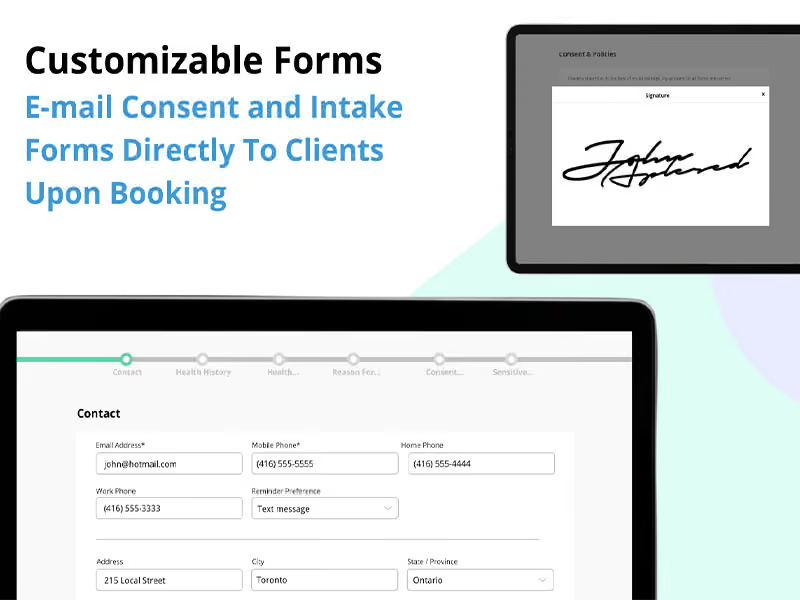
ClinicSense sends intake forms automatically based on the treatments clients book, with customizable templates, conditional questions, and built-in reminders for incomplete forms. Clients can sign consent forms digitally on any device, and completed forms and signatures are stored securely in their client files. Staff can also turn on scheduled form refreshes and use privacy mode for in-person completion.
No-Show Guard®
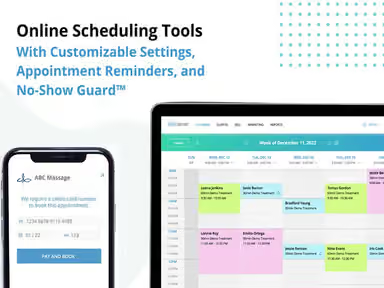
With ClinicSense's No-Show Guard®, practices can require a card, deposit, or full prepayment during online booking. Staff can target first-time clients or clients with repeated no-shows. On the other hand, regular clients book as usual. It also integrates with Square for online credit card payments and records each client’s agreement to the cancellation policy at every online booking. This way, practices can recover eligible late-cancellation or no-show fees and lose less appointment revenue.
Client Feedback Management
ClinicSense sends an automated feedback email the day after an appointment, limited to once per month per client. Clients can share private feedback or leave a Google review. Practitioners can use private responses to spot dissatisfaction and address concerns before they hurt client retention, while Google reviews help build the practice’s reputation on Search and Maps.
Online Booking
ClinicSense lets clients book appointments online at any hour using real-time availability set by the practice. At the same time, staff can configure recurring hours, block unavailable periods, add buffer time after appointments, and define booking permissions. The customizable booking page organizes services into categories, and embeddable links plus Facebook and Instagram booking options widen access. Automated confirmations and reminders further help cut down missed appointments.
Treatment Packages
Based on their choice of plans, practitioners can create tailored treatment packages for clients to buy in ClinicSense in advance, including discounted bundles that can be shared with family and friends. Pre-selling sessions brings in payment upfront and encourages clients to come back for planned treatments. That can help improve cash flow and support client retention, though recurring package discounts may lower revenue per session.
Client Records
Each ClinicSense client profile holds contact details, emergency contacts, treatment notes, intake forms, uploaded health records, and communication logs in one place. Practitioners can duplicate previous notes, review form submissions, and set client-specific memos that appear during relevant visits or services. Profiles also track outstanding balances, account credit, treatment packages, and booking restrictions. As a result, staff can reach clinical and administrative details without switching between separate records.
Payment Management
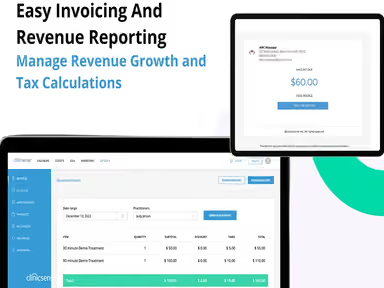
ClinicSense generates invoices from appointments, while in-person chip, tap, or swipe payments run through the Square integration. Clients can pay online before, during, or after appointments. Practices can also collect booking deposits, cancellation fees, and prepaid treatment packages. Additionally, built-in financial reports track revenue, outstanding balances, and payment trends. Canadian practices can also submit insurance claims through the TELUS eHealth portal integration.
Pros And Cons of ClinicSense
Pros
Appointment reminders help reduce no-shows and last-minute cancellations
Online booking lets clients schedule appointments outside business hours
SOAP notes keep treatment records organized and accessible
Customer support helps resolve setup issues and questions
Business reports make tracking revenue and appointments easier
Cons
Mobile charting feels limited to some users
The software lacks private screening methods, and email reminders can end up in clients’ spam folders
Client communication tools can offer more audience segmentation options, as per some users
ClinicSense Pricing
Lite | Standard | Premium |
|---|---|---|
$39 per month | $69 per month | $99 per month |
|
|
|
Disclaimer: The pricing details were last updated on Oct 23, 2026 from the vendor's website. Please contact us for a tailored pricing list.
ClinicSense Reviews
Total 47 reviews
4.8
All reviews are from verified customers
Rating Distribution
5
Stars83%
4
Stars15%
3
Stars0%
2
Stars0%
1
Stars2%
Share your experience
Healthcare, 1-10 employees
More than a year
“Do Not Recommend”
Pros
The only positive aspect of ClinicSense for us was the elimination of the need for a physical appointment book in the office.
Cons
This booking system frequently frustrates us with numerous glitches and issues. Modalities saved for a practitioner often disappear, and schedules shown to clients differ from whats on the books. Also it is challenging to get help during weekends.
Rating Distribution
Ease of use
3
Value for money
5
Customer Support
3
Functionality
2
Healthcare, 1-10 employees
More than a year
“BCMT review”
Pros
ClinicSense ease of use and its aesthetic appeal, as well as its accessibility is something I like the most.
Cons
I would love to have the ability to restrict certain patients from booking online. It would be ideal to request credit card information from patients when they self-book and charge them after the appointment. More scheduling options and flexibility are needed.
Rating Distribution
Ease of use
10
Value for money
8
Customer Support
8
Functionality
8
Not Specified, 1-10 employees
Less than 6 months
“Well-rounded”
Pros
It is very user-friendly and meets most of my requirements.
Cons
I find that some marketing campaigns have not have enough customization options.
Rating Distribution
Ease of use
10
Value for money
7
Customer Support
8
Functionality
8
Frequently Asked Questions
Is ClinicSense HIPAA-compliant?
Yes. ClinicSense states that it is HIPAA-compliant and uses Vanta, a third-party monitoring tool, to verify its compliance.
Does ClinicSense offer a free trial?
Yes. ClinicSense offers a 14-day free trial with access to its features and no credit card required.
Can I use ClinicSense on my phone?
Yes. ClinicSense supports mobile access. A mobile app for both iOS and Android users is also available.
Can ClinicSense SOAP notes be shared with other providers or insurance companies?
Yes. ClinicSense allows practitioners to share SOAP notes with other providers, multidisciplinary teams, and insurance companies for continuity of care or claims. Notes are securely stored in client files and can be accessed from anywhere.
How can users track outstanding payments in ClinicSense?
ClinicSense provides a receivables report that lists outstanding payments and identifies unpaid balances. Payment status icons also appear next to client appointments in the calendar view, making it easier to see who has paid and who still owes money.