


Last Updated
Overview
Streamline patient care tasks with Compulink EHR, a comprehensive electronic health record system. It offers various features, including appointment scheduling, prescription management, and a patient portal, providing modern healthcare practices with comprehensive solutions. Discover how Compulink EHR fits your practice.
Compulink Healthcare Specifications
- Appointment Management/Scheduling
- e-Prescriptions
- Patient Portal
- Lab Integration
Compulink Healthcare Features
Telehealth
You can revolutionize patient care with Compulink’s advanced telehealth platform. Take healthcare to the next level with an intuitive, easy-to-use solution that allows you to virtually connect with your patients and provide better quality treatment. The telehealth tool features real-time audio & video calling, secure file sharing, and patient/provider messaging.
Revenue Cycle Management (RCM)
Compulink Healthcare Solutions provides an advanced RCM (revenue cycle management) solution that empowers healthcare providers to streamline their billing processes. RCM tool kit automates many of the manual tasks required for managing patient billing. It includes features such as real-time reporting, customizable notifications, and automated follow-up processes, making it easier to take control of your revenue cycle and ensure timely patient payments.
Patient Engagement
Compulink EHR also offers an innovative patient engagement solution that helps healthcare providers improve patient care. Through automated messaging, secure file-sharing tools, and real-time reporting capabilities, healthcare providers can easily stay in touch with their patients and ensure they receive the care they need. The platform also boosts patient satisfaction with features such as personalized communication, appointment reminders, and electronic forms.
Medical Analytics
With Compulink’s advanced reporting capabilities, healthcare providers can quickly analyze patient data to identify patterns that help inform their decisions. From identifying optimal treatment protocols to measuring patient outcomes, medical analytics provide vital insights into how patients respond to services. This feature allows healthcare providers to make data-driven decisions that improve patient care.
Customizable Templates
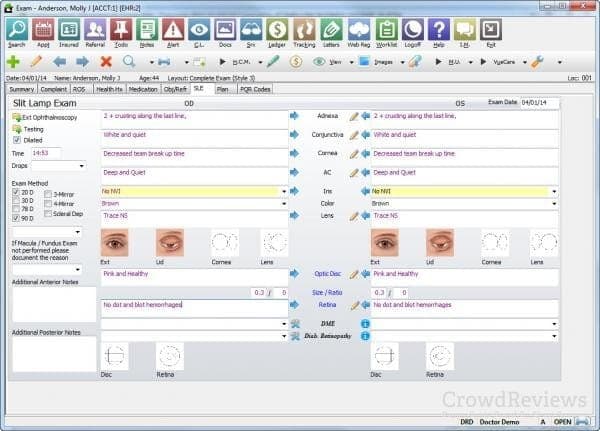
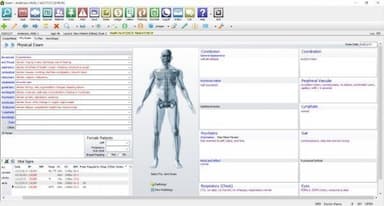
The EHR offers a range of specialty-specific templates that can be fully customized to align with each physician's unique workflows and preferences. Physicians can optimize their efficiency by reducing time spent navigating screens, allowing them to allocate more time to patient care. Additionally, this customization ensures consistent and comprehensive information capture for every patient encounter.
Visual Documentation Engine
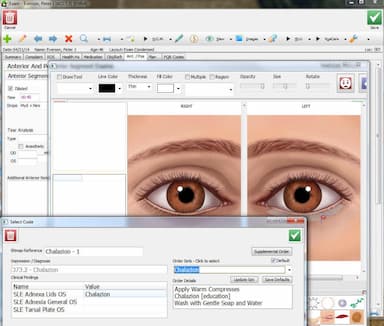
Compulink EMR offers a visual documentation engine far beyond a typical drawing tool. The engine is an intelligent assistant, automatically generating well-structured orders, billing codes, and exam documentation according to the visual findings and diagnoses entered.
Staff Productivity Tools
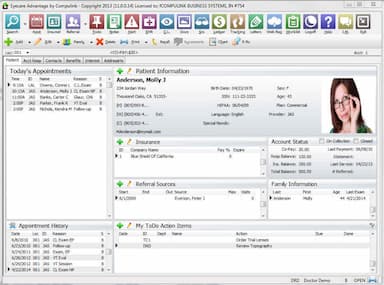
Advantage ensures your staff remains well-organized through various features like instant messaging, customizable to-do lists, worklists, and alerts tailored to your unique business requirements. Experience timely access to essential information, with real-time availability of patient records, schedules, and clinical data. Stay informed and efficient with Advantage at your fingertips, providing you with the required data when needed.
Inventory Management
Compulink EHR excels in inventory management and optical point-of-sale (POS) capabilities, streamlining the optical retail aspect of healthcare practices. It allows for precise eyewear and contact lens inventory tracking, ensuring optimal stock levels and reducing overstock or shortages. The integrated optical POS system simplifies sales, providing efficient and accurate transactions for patients purchasing eyewear or contact lenses.
Pros And Cons of Compulink Healthcare
Pros
All-in-one system streamlines practice workflows efficiently
Customizable features adapt to diverse clinical needs
Strong support team ensures smooth implementation process
Cons
Initial setup process can be time-consuming
Occasional glitches may affect overall user experience
Compulink Healthcare Reviews
Total 58 reviews
4.1
All reviews are from verified customers
Rating Distribution
5
Stars48%
4
Stars33%
3
Stars5%
2
Stars10%
1
Stars3%
Share your experience
Brooks L.
Hospital & Health Care, 51-100 employees
Less than 6 months
“Excellent for managing an optical practice”
Pros
From optical practice workflows to patient management, everything with Compulink has been excellent. The system is always accessible when I need it, I haven't run into bugs or technical issues and the customer support is consistently helpful. The security features also add a lot of confidence and overall it is well worth the money.
Cons
Honestly I don't have any complaints. As it stands out as a top-tier product to me and I really only have positive things to say about it.
Rating Distribution
Ease of use
5
Value for money
5
Customer Support
5
Functionality
5
TALOR G.
Medical Practice, 11-50 employees
More than a year
“allows us to do everything on one screen”
Pros
Compulink really shines when it comes to customization. Instead of boxing you into a complex EHR workflow, it lets you shape the system around how you actually work. You can drag and drop parts of the patient chart so the layout matches real visits. That flexibility is useful across specialties like sports medicine or optical retail as you can remove irrelevant fields and keep documentation clean. Also the OneTab screen is a huge efficiency booster. Having nearly everything visible at once means nurses and techs can often complete about 90% of their charting from a single screen. Favorites and presets also save time on routine visits, so charting can take less than three minutes. Another major strength is how well the EHR and practice management sides work together especially for offices with a retail component like optometry. It handles exams, orders and insurance claims all in one connected process. With a single shared database, there's no waiting for systems to sync and fewer front desk to back office communication issues. Newer 2026 versions added SMART Workflow and AI tools. Automated status tracking helps staff know where the patient is and what comes next, and built in coding assistance suggests codes based on documentation helping with both compliance and reimbursement. Support is also a strong point. Occasional glitches happen but its customer service is knowledgeable and easy to reach by phone. Pricing also stays relatively stable and transparent compared with software that keeps adding subscription costs.
Cons
That said it definitely has a learning curve. New users cannot just jump in and figure it out right away. The interface can feel overwhelming at first with so many buttons, tabs and configuration options. Training takes real time and many practitioners feel the initial onboarding period is too short. Navigation can also feel less user friendly than it should. Some tasks that seem simple like finding a patient ledger or editing a table can require digging through multiple menus. The design sometimes does not follow modern web logic which adds to the frustration. Frequent updates are another mixed bag. They are necessary to stay current with medical regulations but they can cause version instability. A common complaint is that an update fixes one small issue and unexpectedly creates another problem somewhere else like in scheduling or the prescription module. Updates can also disrupt established workflows by resetting custom settings or moving icons around, which forces staff to relearn habits they had already built.
Rating Distribution
Ease of use
5
Value for money
4
Customer Support
5
Functionality
5
Lynn S.
Medical Practice, 11-50 employees
More than a year
“great customer support”
Pros
One thing that keeps us happy with Compulink is how consistently they keep refining the software. The newer updates have made the screens much cleaner and cut down on a lot of unnecessary clicking. We also get a lot of value from the custom reporting tools, since they let us pull exactly the data we need when the built in reports are not enough. Having everything connected in one system is a big convenience too especially being able to move straight from a patient's exam to the eyewear section without jumping around. Another major plus is the support team. It makes a huge difference being able to talk to experienced, long time staff who really know the system inside and out instead of being handed off to someone with very limited training. When bugs or other issues come up, they respond quickly and get things handled. Also it is really encouraging to see them continuing to expand and improve the patient management side of the software.
Cons
An area for improvement is linking a resource like an OCT or Visual Field to a doctor's schedule. Right now it's not set up in a way that makes this easy for the patient representative.
Rating Distribution
Ease of use
5
Value for money
5
Customer Support
5
Functionality
4
Frequently Asked Questions
How much does Compulink Healthcare cost?
Compulink EHR, pricing starts at $149/month. Pricing may vary based on your specific requirements, so you can request a personalized Compulink EHR pricing quote from us today!
Who are the main users of Compulink Healthcare?
Compulink supports several medical specialties, including addiction, chiropractic, audiology, and behavioral health. It also supports the following: Otolaryngology, Physical Therapy, Practice Podiatry and Urology.
What are the main features of Compulink Healthcare?
What level of support does Compulink Healthcare offer?
The platform offers email, contact form, and phone support.
Is Compulink Healthcare System cloud-based?
Does Compulink EHR offer an API?
Yes, Compulink EHR provides API.
Does Compulink EHR support mobile devices?
Yes, Compulink EHR supports mobile access.
Does Compulink EHR have a mobile app?
No, Compulinks EHR doesn’t provide a mobile application.
What other apps does Compulink EHR integrate with?
Compulink Advantage EHR integrates with third-party applications including Waystar, Weave, Phreesia, and MyEyeStore.
Does Compulink EHR offer a free trial?
No, Compulink EHR does not offer a free trial.
How does Compulink EHR help health systems?
Compulink EMR software helps health systems streamline operations, optimize workflows, and enhance care coordination by automatically generating exam documentation, sending automated appointment reminders and follow-up messages, and connecting with various diagnostic devices.
What are the pros of customer support functionality in Compulink EHR?
Compulink EHR software provides various customer support functionality pros, including quick response times, expert technical assistance, and tailored solutions to meet your unique needs.