


denticon
Last Updated
Key Takeaways
Generated from the text of customer reviews
Denticon caters to dental groups and dental service organizations (DSOs), offering multi-specialty charting and revenue cycle tools for tracking claims and collections. Users appreciate its ease of use and remote accessibility, although some users report concerns about customer support and subscription costs. Denticon's recently expanded DentalOS AI Agents include an AI Receptionist that answers calls, books appointments, and handles rescheduling.
Our Verdict
Denticon software is suitable for established dental groups and DSOs that need to manage clinical, administrative, and revenue cycle workflows across locations. Although its range of tools may exceed what a smaller practice needs, particularly one that doesn’t require centralized management across multiple locations. Some users appreciate the value of its included features, while others report rising subscription fees without corresponding improvements in the software.


denticon Specifications
- Appointment Management/Scheduling
- Patient Portal
- Billing and Invoicing
- Claims Management
What Is Denticon?
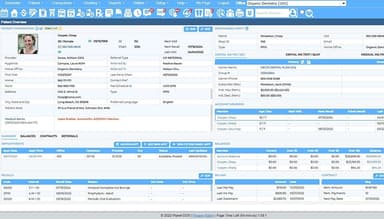
Denticon is a cloud-based practice management software built to help DSOs scale and operate efficiently. Its clinical capabilities include hands-free periodontal charting, while reporting tools provide Production and Collections Analysis dashboards. Its AutoEligibility feature automates insurance verification and provides real-time coverage details, while revenue cycle tools support batch claims submission and automatic 835 posting. Denticon supports multiple dental specialties, allowing practices to manage patient charts and customize clinical codes within one system.
What Is Denticon Best For?
Denticon stands out with its SmartAssist module that helps dental teams manage appointment requirements through an interactive checklist with real-time status indicators. Staff can review insurance eligibility, medical histories, and consent forms while identifying incomplete items. The feature supports patient activities from check-in to follow-up, with staff able to address pending requirements during visits.
How Much Does Denticon Cost?
Denticon pricing starts at $795/month, with customizable plans, features, and add-ons based on your practice’s specific size and needs. Larger DSOs and multi-location organizations may pay more depending on acquired capabilities.
In addition to the base subscription, organizations should account for the following estimated expenses:
- Final Data Conversion: Approximately $500–$1,595/conversion
- Scanned Documents (Image) Conversion: Approximately $850/image conversion, including scanned documents and patient pictures
- X-Ray Image Conversion: Approximately $900/X-ray image conversion
- Additional Training: Approximately $80/hour for remote training or $4,325/day/trainer for on-site training
Denticon users consider the software good value for managing multiple dental practices. Others report repeated subscription increases, with one reviewer citing a rise in Denticon price alongside poor support responsiveness. Additional feedback highlights concerns about frequent price hikes.
Disclaimer: Pricing references are based on publicly available third-party information and industry benchmarks. Actual costs may vary.
Denticon Integrations
The software supports integration with multiple systems and platforms, such as:
- DentalXchange
- KeyBank
- Pearl AI
- Solutionreach
- Jarvis Analytics
- Stripe
- CareCredit
- RevenueWell
How Does Denticon Work?
Here are the steps to get started with Denticon software:
- Log in to Denticon using your assigned credentials to access the practice dashboard
- Set up the practice account by configuring settings, importing existing data and images, and completing staff training
- Manage appointments through the scheduler, online booking, and digital patient forms
- Track patient tasks with SmartAssist from check-in to follow-up
- Record clinical information using integrated imaging, voice charting, and multi-specialty charting tools
- Communicate with patients through appointment confirmations, reminders, follow-ups, and two-way texting
- Manage billing and insurance by verifying eligibility, submitting claims, and tracking payments
- Review practice performance using dashboards, reports, and analytics
Who Is Denticon For?
Denticon is suitable for dental groups and organizations, including:
- Oral surgery practices
- Military dental programs
- Dental institutions
- Multi-specialty dental practices
Denticon Use Cases
Denticon supports various practice management needs for dental practices, groups, and DSOs. Here are some common use cases based on its capabilities and user feedback:
1. Multi-Location DSOs Struggling With Disconnected Patient Information
Managing patient information and comparing performance across dental offices can be challenging when each location uses separate systems. Denticon's centralized database and reporting dashboards allow teams to access shared patient records and review operational and financial data by location. User reviews also highlighted the convenience of accessing patient information and reviewing reports from a single system.
2. Dental Groups Trying To Centralize Revenue Cycle Management
Billing becomes more difficult when every location follows its own revenue cycle process. Denticon allows dental groups to manage billing and related workflows through a centralized system. Leadership can review financial operations without treating each office as a separate unit.
3. Busy Dental Offices Handling Daily Administrative Work
Busy dental offices manage insurance checks, documents, patient coordination, and other routine tasks throughout the day. Tracking these activities through separate processes can complicate front-office work. User feedback highlighted eligibility verification, document uploads, and insurance management as straightforward tasks within the system.
4. Practices Moving Away From Local Server Dependence
Server-based systems can interrupt daily operations when technical problems require maintenance or restart. Denticon's cloud-based platform reduces reliance on locally maintained servers, allowing staff to access practice information without depending on office-based infrastructure. Many users noted fewer computer-related downtime after switching from server-based systems that frequently require restarting.
Is Denticon Right For You?
Denticon is built for growing dental groups and DSOs that want multiple locations, specialties, and billing on one cloud platform with centralized reporting. Solo or single-location practices with simple scheduling and billing needs may find the capabilities advanced for their needs. Practices compare software capabilities against their practice size, workflow requirements, and budget before choosing the platform.
Planet DDS maintains SOC 2 Type 2 attestation, the HITECH Act, and HIPAA Security and Privacy Rule and follows PCI DSS Level 2 service provider standards. Dental organizations should consider these security credentials alongside their internal data protection and compliance requirements.
Still unsure about Denticon? Connect with us at (661) 384-7070 for further guidance.
denticon Features
Insightful Analytics
Denticon's Practice Analytics provides dashboards for monitoring production, collections, patient retention, and provider performance. Dental organizations can review outstanding insurance claims, unpaid patient balances, and collection trends across offices. Its reporting tools also help teams examine treatment plan acceptance and identify patients with unscheduled treatments.
Revenue Cycle Management
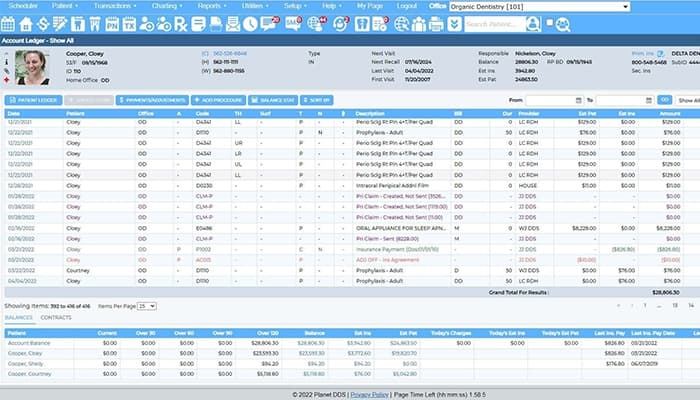
The platform supports revenue cycle workflows from insurance eligibility through claims, payments, and financial reporting. Teams can manage claim submissions, payment posting, patient billing, and related activity across locations. Denticon centralizes RCM information, allowing staff to track unpaid claims, outstanding balances, and revenue activity by location.
Cancellation Rescheduling Agent
Cancellation Rescheduling Agent, part of DentalOS AI Agents, helps practitioners contact patients with cancelled appointments. The agent uses cancellation lists generated during Denticon's nightly sync to initiate outreach and arrange new appointments. It helps practices fill vacant slots by offering patients opportunities to reschedule their visits.
Confirmation Agent
Denticon integrates with the Confirmation Agent, part of DentalOS AI Agents, to contact patients before scheduled appointments. The agent makes outbound calls within a configured timeframe to confirm visits or arrange rescheduling during the same call. Confirmation outcomes and appointment changes are recorded directly into patient records.
Online Booking And Digital Forms (MyTooth)
MyTooth allows patients to schedule dental appointments online using live provider availability and complete digital intake and consent forms before their visits. These submitted forms transfer structured data directly into patient records. Practices can also customize forms and scheduling workflows by location or appointment type. Patients can access scheduling and forms through a browser-based link without downloading an app or creating a separate account.
AutoEligibility
Denticon offers AutoEligibility to retrieve insurance eligibility and coverage information directly within the system. Staff can review deductibles, frequency limitations, and Medicaid coverage without accessing multiple payer portals. The feature provides insurance details for verifying patient benefits before appointments and managing subsequent billing and claims-related tasks.
Pros And Cons of denticon
Pros
Users appreciate its easy to navigate interface for smooth daily operations
Shared patient records support multi-location operations and data sync
Its cloud-based access allows remote logins
Conversion assistance supports practice implementation
Centralized billing simplifies financial management
Cons
Additional feature requests may take time to implement
Some users report occasional system downtime
Some users faced delayed support and ticket resolution
denticon Reviews
Total 26 reviews
4
All reviews are from verified customers
Rating Distribution
5
Stars46%
4
Stars31%
3
Stars8%
2
Stars4%
1
Stars12%
Share your experience
Dentistry, 1-10 employees
More than a year
“Awful, Awful Customer Support”
Pros
none. the lack of customer support out weighs the pros because you can't even use the software efficiently without having the support team fix your fee schedule, update your business name and email in the contract,
Cons
ZERO customer support. the number they have goes to their answering service which creates a support ticket then their support ticket rep, Juan Colombo, tells you he will have the team reach out....and they never do! We have been trying to resolve multiple issues for the last two months. Stay away from this awful software company!
Rating Distribution
Ease of use
1
Value for money
1
Customer Support
1
Functionality
1
DecisionOne dental, 101-500 employees
“Simple to Use”
Pros
It's really easy to use, which makes my workflow smoother.
Cons
X-rays don't come out as clear as they should, and the software goes down way too often.
Rating Distribution
Ease of use
9
Value for money
4
Customer Support
5
Functionality
4
Healthcare, 11-50 employees
More than a year
“Great value!”
Pros
This product is fantastic for practice owners managing multiple locations! It offers excellent value, is smooth to navigate, and continually improves.
Cons
In my opinion, the user interface and user experience seem somewhat outdated and are missing several crucial administrative features that could greatly enhance functionality and overall ease of use.
Rating Distribution
Ease of use
10
Value for money
10
Customer Support
10
Functionality
10
Frequently Asked Questions
What happens to Denticon data when a dental practice is sold?
Planet DDS supports PGID splits that can transfer relevant patient, clinical, financial, document, and office data to a new Denticon account.
How long does Denticon implementation take?
Denticon implementation typically takes around 60 days for solo practices and 8 weeks per location for DSOs. Timelines vary depending on organizational size, existing software, and conversion requirements.
Does Denticon support Single Sign-On?
Yes, Denticon supports single sign-on through Microsoft Entra ID for organizations using centralized user credentials.
Can Denticon run on Mac?
Denticon operates only on Windows and is not currently compatible with Mac.
Does Denticon offer an API for custom integrations?
Yes, Denticon provides APIs, webhooks, and batch data options for connecting patient, appointment, clinical, financial, and practice data.