


EasyRx
Last Updated
Overview
EasyRx is a cloud-based lab management platform connecting orthodontic practices and laboratories through digital prescriptions, STL files, and case tracking. While its focus on orthodontic lab workflows may limit broader clinical use, practices managing digital prescriptions and lab cases can benefit from prescription tracking and 3D model workflows.
Overall Rating
Based on 2 users reviews
4
Rating Distribution
Positive
100%
Neutral
0%
Negative
0%
Starting Price
$99
per month
EasyRx Specifications
- Lab Integration
- e-Prescriptions
- Customizable Forms
- Patient Demographics
EasyRx Features
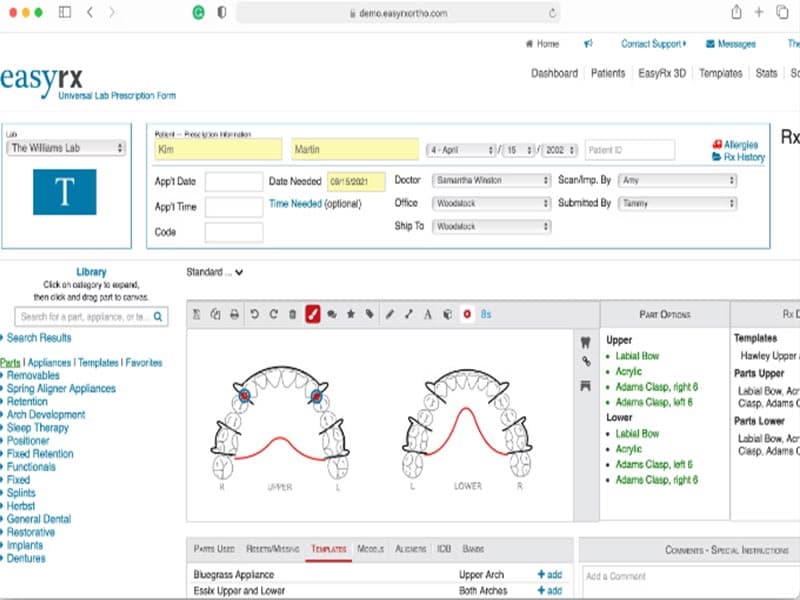
Universal Lab Prescription Form
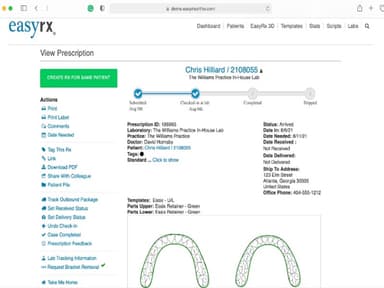
The Universal Lab Prescription Form lets practices create lab, clear-aligner, and digital prescriptions in one workflow. Users can enter prescription details and attach supporting digital files, including STL models, before submitting cases to commercial or in-house laboratories.
In-House Lab Management
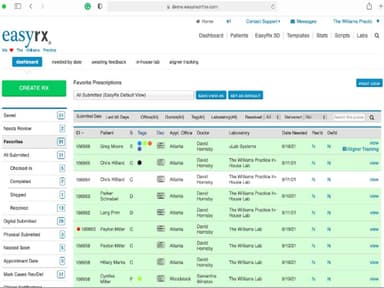
EasyRx lets practices submit prescriptions and digital files directly to their in-house laboratory. Lab users can receive prescriptions with supporting files, including STL models, while EasyRx 3D provides user-controlled and AI-powered tools for preparing files for in-house 3D printing.
Custom Prescription Templates
Practices can create and save custom prescription templates for frequently used appliances. These templates can be reused when creating new prescriptions, reducing repeated data entry. EasyRx also allows practices to digitally manage and share appliance prescriptions and their supporting files through the same workflow.
Clear Aligner Tracking
The EasyRx Aligner Tracking System provides a workflow for setting up, tracking, and managing clear-aligner cases. Practices can manage these cases alongside other lab and digital prescriptions, while third-party tracking supports services such as Invisalign, SureSmile, and Clear Aligner.
AI-Powered 3D Model Editing
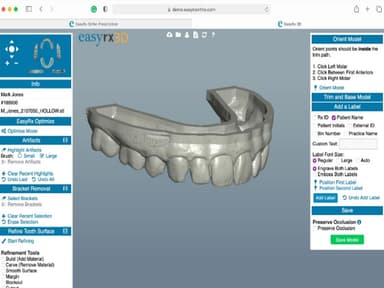
EasyRx 3D provides AI-powered tools for preparing STL files for printing. Its AI services include basing, bracket removal, and PTS trim-line file output. The platform also provides cloud-based access to saved STL files and integrates with 3D printer solutions.
3D Command Center
The 3D Command Center provides a centralized location for managing EasyRx 3D tasks. Users can review STL files, access 3D and printer integrations, request automated services such as bracket removal and auto-basing, download files, and mark files as printed.
Pros And Cons of EasyRx
Pros
Reduces practice-lab back-and-forth with digital prescriptions
Protects sensitive data with HIPAA-compliant AWS hosting
Speeds STL preparation with AI-powered 3D editing
Cons
Other specialties may find its scope limiting
AI 3D tools may exceed occasional-use budget
EasyRx Pricing
Standard | Premium | Premium + 3D AI | Lab - Standard + 3D | Lab - VisualDLPStarting at |
|---|---|---|---|---|
$99 per month | $175 per month | $269 per month | $115 per month | $210 per month |
|
|
|
|
|
Disclaimer: The pricing details were last updated on Sep 14, 2026 from the vendor's website. Please contact us for a tailored pricing list.
EasyRx Reviews
Total 2 reviews
4
All reviews are from verified customers
Rating Distribution
5
Stars0%
4
Stars100%
3
Stars0%
2
Stars0%
1
Stars0%
Share your experience
Healthcare, Employee Health, 11-50 employees
More than a year
“A reliable EMR solution”
Pros
The software has evolved our clinics prescription process. EasyRXs intuitive user interface allows us to navigate seamlessly. Moreover, the cloud-based systems flexibility in accessing patient records and prescriptions from anywhere has proven invaluable for our mobile consultations. Last but not least integration with other EMR systems has minimized data entry time which allows us to prioritize patient care excellently.
Cons
During the implementation process, we faced a few challenges. We required customized solutions for our specific needs, which is something that takes a lot of time. However, the benefits have outweighed the struggles. One more thing I would like to mention is that the customer support team is generally responsive; however, resolving complex issues at times took longer than desired.
Rating Distribution
Ease of use
9
Value for money
7
Customer Support
8
Functionality
9
Healthcare, Employee Health, 101-500 employees
Less than a year
“Great EMR but there is room for improvement”
Pros
EasyRX has been a game-changer for us. The seamless workflow and ability to manage prescriptions electronically have pretty much cut down our administrative workload. Also the softwares ability to integrate with various lab systems and pharmacies ensures that we can provide our patients with accurate and timely care. The regular updates and improvements also mean that the software evolves with our needs, which is a major plus.
Cons
The learning curve for EasyRX can be steep for staff mainly for those who are not tech savvy. We had to invest additional time in training sessions to get everyone on board. Furthermore, the pricing model can become quite expensive, especially when adding additional features or modules. Lastly, there were occasional slowdowns during peak usage times which affected our efficiency for a time being and this is annoying.
Rating Distribution
Ease of use
8
Value for money
6
Customer Support
7
Functionality
8
Frequently Asked Questions
Who are the typical users of EasyRx?
EasyRx caters to providers within general practice, orthodontics, and pediatric dentistry specialties.
What languages does EasyRx software support?
EasyRx primarily supports English.
Does EasyRx have a mobile app?
No, EasyRx does not offer a dedicated mobile app.
Does EasyRx offer an API?
The vendor has not disclosed API information publicly.
What level of support does EasyRx Software offer?
EasyRx offers support through email, phone number, help center, and online form.
How much does EasyRx cost?
EasyRx pricing starts at $99/month for the Standard practice plan, which covers up to 75 prescriptions/month to commercial labs, prescription submission and tracking, and secure lab communication. Practice tiers step up to the Premium plan at $175/month and the Premium + 3D AI plan at $269/month.
Lab subscriptions include the Lab - Standard + 3D plan at $115/month and the VisualDLP plan starting at $210/month. Get in touch with us for a personalized EasyRx cost estimate.
What other apps does EasyRx integrate with?
The platform integrates with multiple third-party tools, including CS OrthoTrac, Oasys Ortho, Eaglesoft, Cloud9 Ortho, Dolphin Management, Tops, Focus Ortho, and MaxiDent.