


Foothold
Last Updated
Key Takeaways
Generated from the text of customer reviews
Foothold is an EHR and case management platform for behavioral health and human services organizations. It serves clinical, administrative, billing, and program teams, particularly in mental health, I/DD, substance use, and supportive housing. Users frequently praise its ease of use and workflow, though some reporting processes can require restarting. Foothold continues to enhance its software to support evolving user and organizational needs.
Our Verdict
Foothold is a suitable option for mid-sized and larger human services organizations managing multiple programs or service areas. Its broad organizational use supports coordinated operations across behavioral health and community-based services. Pricing can be substantial, particularly for smaller organizations. For established agencies that can justify investment through ongoing organizational needs, Foothold is a solid recommendation.
Foothold Specifications
- Appointment Management/Scheduling
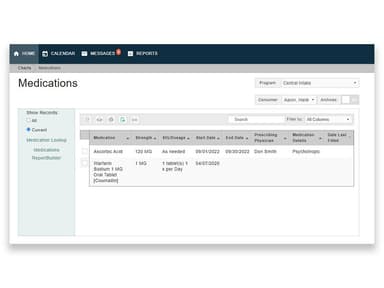
- e-Prescriptions
- Lab Integration
- Billing and Invoicing
What Is Foothold?
Foothold Technology provides human services software, offering EHR, case management, service delivery, housing, billing, reporting, HMIS, and analytics capabilities.
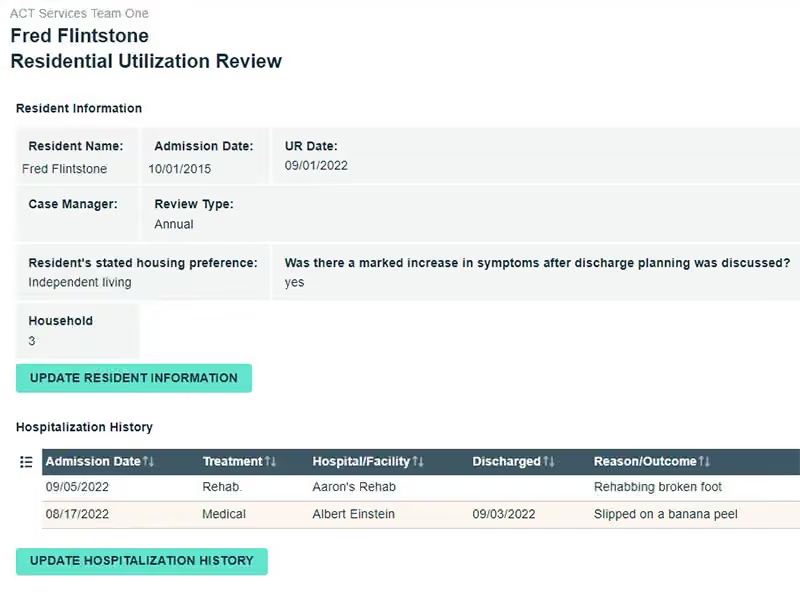
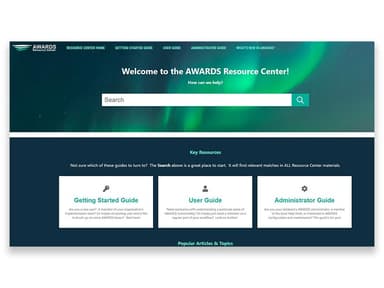
Its EHR platform, AWARDS, combines case management, client tracking, treatment planning, documentation, billing, and reporting to support service delivery across multiple programs. Service and treatment planning tools help agencies organize client goals and monitor progress, without relying on disconnected records scattered across different systems. Configurable forms and reporting tools let staff capture program-specific information and produce reports for operational and regulatory needs.
The platform supports solutions for housing and homelessness programs, including client tracking, coordinated entry, service documentation, and reporting required by the U.S. Department of Housing and Urban Development (HUD) through its Homeless Management Information System (HIMS) capabilities.
All in all, Foothold software gives human services organizations a configurable system for managing client information, service documentation, and administrative processes.
What Is Foothold Best For?
The software is noteworthy for its 'FormBuilder,' which lets human services programs create forms around the specific data required for service delivery, funding requirements, and reporting. Assessments and forms can be embedded directly into staff workflows, keeping frequently needed documentation accessible while working with clients. For practitioners, this means more control over what data gets collected and how it maps to funder requirements.
How Much Does Foothold Cost?
Foothold price is estimated to start at $2,000/feature/month, based on industry benchmarks for similar platforms. Actual costs vary and may depend on number of clinicians, size of the facility, capabilities selected, and more.
Additionally, user may incur potential extra costs. The following figures are estimated and may vary depending on provider terms:
- Implementation And Configuration: $5,000–$20,000
- Data Migration And Cleanup: $5,000–$25,000
- Custom Integrations: $3,000–$15,000/integration
- Custom Forms And Workflow Configuration: $2,000–$10,000
- Historical Document Import: $3,000–$15,000
- Custom Reporting And Analytics: $2,000–$10,000
- Staff Training Beyond Included Sessions: $500–$2,000/session
- Go-Live And Change Management Support: $2,000–$10,000
- Human Services Compliance Consulting: $2,000–$10,000
Users generally rate Foothold well for value for money, though some small facilities feel the subscription is expensive, and that paid add-ons can increase the overall cost.
Disclaimer: Pricing references are based on publicly available third-party information and industry benchmarks. Actual costs may vary.
Foothold Integrations
Foothold integrates with Quest and LabCorp (E-Labs), DrFirst Rcopia through the Surescripts network (E-Prescribing), MedAllies HISP for Direct messaging, and HIEs. Its FCM module also connects with Unite Us and FindHelp to support closed-loop referrals.
The solution also supports HL7, FHIR, and API-based connections.
How Does Foothold Work?
Here’s how to get started with the software after its successful installation:
- Log in to the platform and access the modules available for your role and organization
- Open the client management area to search for clients and review their records and service history
- Enter or update client information, assessments, admissions, and other EHR documentation
- Manage appointments, schedules, referrals, and service activities from the relevant workflow areas
- Create and update individualized treatment, service, and housing plans based on client needs
- Document delivered services, staff activities, progress notes, and other required client interactions
- Record billable services and review claims in the billing area
- Generate reports and review client, program, and operational data to monitor services and outcomes
Who Is Foothold For?
The platform supports organizations across several human services and care settings:
- Behavioral and mental health organizations
- Housing and homeless service programs
- Intellectual and developmental disability (I/DD) organizations
- Home and community-based services (HCBS) providers
- Residential care providers
- Community-based human services agencies
- Long-term services and supports (LTSS) providers
Foothold Use Cases
Based on our analysis of user feedback and Foothold software's current capabilities, we have identified some scenarios where the software may offer value:
Multi-Service Agency Keeping Clinical And Housing Records In One Place
When treatment notes sit in one system and housing records are housed separately, staff can be required to spend extra time piecing together a client’s full picture. Foothold manages clinical services, residential or supportive housing, progress tracking, billing, and compliance within a shared client record. This is particularly useful when multiple staff or programs contribute to the same client’s care and need consistent information.
Agencies Managing Multiple Programs And Funding Requirements
Foothold is suited to agencies operating several programs that collect different information or report to multiple funders. Configurable intake processes, FormBuilder, and ReportBuilder tools let organizations adapt data collection and reporting to individual program requirements. This gives agencies more flexibility to manage different service workflows without requiring every program to follow the same documentation and reporting structure.
Group-Home Provider Documenting Daily Care Across Residences
Agencies managing multiple group-home services can use the platform to centralize operational records that are difficult to maintain through paper-based processes. The platform provides ‘Daily Checklists,’ housing records for overnight absences, transportation tracking, supported-employment records, and centralized medical information. These tools allow staff to document daily activities. It also helps maintain visibility into individual goals, health information, and service-related activity across residential settings.
I/DD Agency Linking Service Documentation To Authorizations And Billing
Community-based I/DD agencies often bill across several service types, each with its own authorizations. BillingBuilder links documented services directly to claims and tracks authorizations, supporting billing for residential, day or community, employment, behavioral health, and respite services. This helps agencies manage documentation and reimbursement within the same system.
Is Foothold Right For You?
Human services agencies often have to manage complex client records, service documentation, billing, and reporting across multiple programs. Foothold Technology brings these functions together through configurable case management, treatment planning, billing, reporting, and EHR capabilities built specifically for human services providers.
Its AWARDS product is ONC-certified and supports Meaningful Use, while the platform also supports data protection using 256-bit encryption, granular permissions, and audit trails. Through its partnership with GreyCastle Security, it addresses PHI data security concerns and supports compliance with NIST, HIPAA, and other applicable regulatory requirements. Foothold also supports HIE connectivity, Direct messaging through MedAllies HISP, and HL7 and FHIR-based exchange. The vendor has not publicly announced TEFCA participation as of yet.
Overall, its experience across behavioral health, developmental disabilities, HCBS, supportive housing, and care coordination makes it particularly relevant to multi-service agencies.
Still unsure if it's the right choice for you? Call us at (661) 384-7070 and let our experienced team assist you in making an informed decision.
Foothold Features
Service Plan Management
Creating, managing, and monitoring service plans across the organization runs through Foothold's 'PlanBuilder'. This service planning functionality gives organizations a centralized way to handle plans throughout their lifecycle, with greater visibility into service planning activities and more consistent management across teams.
Flexible EHR Reporting
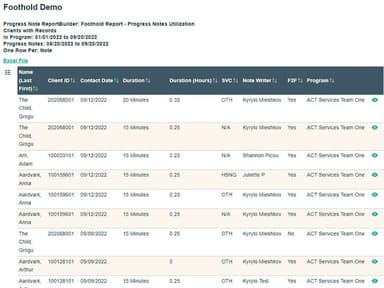
Foothold features 'ReportBuilder' that provides flexible EHR reporting tools that give agencies the data management and reporting capabilities needed to demonstrate their value to funders and credentialing bodies. Its reporting functionality also helps agencies adapt as requirements change, supporting continued data use even as organizational needs evolve.
EHR Interoperability
Client data can move between providers within the same network through Foothold's connections with Health Information Exchanges (HIEs). Data gets transmitted automatically after common data entry tasks, and interoperability features support collaboration with labs, pharmacies, and other providers, keeping client information connected across care networks.
Integrated EHR Billing
The platform's 'BillingBuilder' provides a configurable electronic billing system for managing agency billing. It connects service documentation directly to claims and supports claim submission, response files, insurance eligibility checks, and revenue management. Integration with reporting also lets agencies generate custom billing reports instantly, keeping billing data tied to reporting rather than separated from it.
Centralized Scheduling
A shared calendar handles staff, clients, programs, events, and locations through scheduling functionality. Users can view upcoming appointments, schedule program events, and add progress notes from a single page. Centralizing these activities keeps schedules organized while keeping relevant client information accessible right within the workflow.
Customizable Whole Person Care Plans
Care plans get tailored to each person's health conditions, life circumstances, and individual needs. Foothold Care Management (FCM) tools also organize care plans and align interventions with client goals and well-being, giving care teams a structured way to coordinate individualized support around each person's actual circumstances.
Comprehensive Outcomes Tracking
Foothold's DataStudio goes beyond traditional closed-loop referral metrics to assess health improvements across the community. It provides insight into population health trends, helping SCNs make strategic decisions centered on member health outcomes and supporting a more data-informed approach to improving healthcare delivery and member well-being.
Built-In HUD Reports
Built-In HUD Reports in the software let users generate key HUD reports with a single click, including System Performance Measures, LSA, CoC APR, ESG CAPER, HMIS Grantee APR, and Point In Time reports. This reduces the manual effort involved in preparing required reports and helps users access reporting outputs more efficiently.
Pros And Cons of Foothold
Pros
Flexible form builders support customized data collection needs
Simple client records keep case information organized and accessible
Responsive support teams provide timely, knowledgeable assistance
Simple workflows make onboarding and staff training easier
Multiple reporting formats are appreciated by the users
Cons
Some users find the ‘BillingBuilder’ setup time consuming
Document creation can leave excessive unused white space
Certain modules have outdated or clunky functionality
Foothold Reviews
Total 50 reviews
4.5
All reviews are from verified customers
Rating Distribution
5
Stars64%
4
Stars28%
3
Stars6%
2
Stars2%
1
Stars0%
Share your experience
Hospital & Health Care, 500+ employees
More than a year
“responsive support”
Pros
I'm impressed by their customer service and how promptly they respond to our county's needs, customer support stood by Bergen County from the very beginning when we launched this HMIS technology tool, guiding us through setup.
Cons
Occasionally we face delays when HUD issues arise which I find frustrating at times, though in the end they usually resolve the problems and deliver what's needed.
Rating Distribution
Ease of use
10
Value for money
10
Customer Support
10
Functionality
10
Medical Practice, 101-500 employees
More than a year
“flexible form builder tools”
Pros
I like the flexibility in the form builders and reporting tools, since I can design virtually any form I require and then extract the resulting data from the system with minimal effort.
Cons
I've run into problems because it doesn't integrate smoothly with Dr's First and Carasolva, maybe they're incompatible or just don't play nicely togetherand on top of that, I really feel the product lacks a proper patient portal for pushing forms to clients, collecting payments and sending appointment reminders.
Rating Distribution
Ease of use
9
Value for money
10
Customer Support
10
Functionality
7
Medical Practice, 101-500 employees
More than a year
“simple interface for easy learning”
Pros
What I really appreciate is how simple the interface is and how quickly I was able to pick it up, since the learning curve felt very gentle.
Cons
However, I get annoyed by the excessive white space that appears when I'm composing documentsbecause it bloats the length and makes files feel much longer than they need to be.
Rating Distribution
Ease of use
9
Value for money
10
Customer Support
10
Functionality
9
Frequently Asked Questions
What level of support does Foothold offer?
Foothold offers support via form submission and phone.
Who are the typical users of Foothold?
The platform supports organizations across a range of human services and care settings, including behavioral health and mental health service providers, I/DD organizations, HCBS providers, residential care providers, community-based human services agencies, and LTSS providers.
What languages does Foothold support?
Foothold software is currently available in English.
Does Foothold have an app?
Foothold does not offer a dedicated mobile app but provides mobile accessibility.
How much does Foothold cost?
Its pricing is estimated to start at $2,000/feature/month, based on industry benchmarks. Actual costs may vary depending on factors such as the number of clinicians, facility size, selected capabilities, and other requirements. Contact us to get a personalized Foothold cost quote.
What other apps does Foothold integrate with?
The vendor supports integrations with HIEs, laboratories, pharmacies, and other healthcare systems. However, specific third-party software integrations have not been disclosed.
Does Foothold Technology offer an API?
Yes, Foothold Technology provides API access.
How does Foothold cater to the needs of organizations?
Foothold's human services software provides features that meet organizations' specific demands. It offers essential tools for treatment planning, client tracking, and managing electronically protected health information.
What are the capabilities of Foothold billing software?
Foothold offers a 'BillingBuilder' that supports a configurable electronic billing system for managing agency billing.
What services does Foothold provide for implementation and training?
Foothold provides full-service implementation, training, ongoing support, and consultation services.