

iKnowMed
Last Updated
Key Takeaways
Generated from the text of customer reviews
iKnowMed is an oncology-specific EHR designed for community cancer care practices, supporting oncologists, hematologists, oncology nurses, and infusion staff. While some users report technical issues and system crashes, others appreciate its ease of locating patient reports and results and adjusting chemotherapy regimen frequency. Its migration to Microsoft Azure Cloud in January 2026 supports increased capacity and future product development.
Our Verdict
iKnowMed is best suited to oncology-focused practices that need specialized support for complex cancer care and coordination across care teams. Its estimated cost and potential implementation requirements may make it less suitable for smaller practices with limited budgets. We recommend it for established community oncology practices with multiple providers managing complex treatment regimens and ongoing patient care.
iKnowMed Specifications
- Appointment Management/Scheduling
- e-Prescriptions
- Lab Integrations
- Patient Portal
What Is iKnowMed?
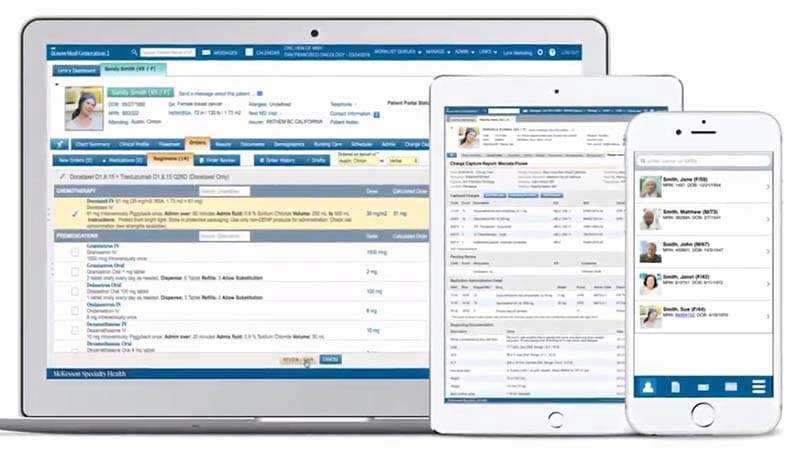
iKnowMed is a web-based electronic health record system designed for hematology and oncology practices, particularly those providing community cancer care. As part of Ontada's product portfolio, the platform allows providers to manage oncology treatment regimens, calculate drug volumes for eligible admixture orders, track cumulative drug doses, and review patient medication histories.
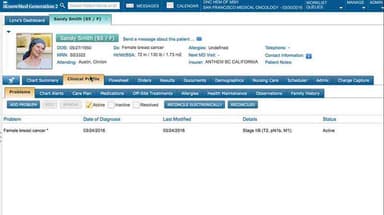
Unlike general-purpose EHRs, iKnowMed provides oncology-specific clinical decision support through evidence-based treatment pathways and biomarker testing options. Its clinical profile also supports cancer staging documentation, including updates to recorded disease stages within the patient record.
What Is iKnowMed Best For?
iKnowMed stands out for its mobile app, which gives hematologists and oncologists access to patient information through iPhone, iPad, and Apple Watch. The app supports clinical work beyond the office, including hospital rounds, where providers can review patient charts, lab results, diagnoses, treatment regimens, and medications. It also supports electronic prescribing and communication with care team members. The Apple watch integration provides access to the 'Visit List' and patient demographics, while watch-face complications display upcoming appointments and messages.
How Much Does iKnowMed Cost?
iKnowMed pricing is estimated to start at $500/user/month, with actual costs varying based on the number of users and contractual requirements. In addition to this estimated base subscription cost, practices could incur the following additional expenses:
- Implementation And Workflow Configuration: $10,000–$50,000+ (one-time), depending on the complexity of system setup, oncology workflow mapping, and configuration of templates, dashboards, order sets, and user permissions
- Data Migration: $5,000–$30,000+ (one-time), with costs varying based on the volume, format, and complexity of patient records transferred from a legacy EHR
- Interface And Interoperability Setup: $5,000–$25,000+ /interface, with pricing shaped by the type and complexity of connections required for laboratories, pharmacies, imaging systems, hospitals, billing systems, or other applications
- Interface Maintenance: $1,000–$5,000+ /interface/year, based on the number of connected systems and the level of ongoing monitoring, updates, troubleshooting, and maintenance required
Users generally view iKnowMed price as higher, with its value tied to oncology-specific workflows and decision support rather than general EHR functionality alone.
Disclaimer: Pricing references are based on publicly available third-party information and industry benchmarks. Actual costs may vary.
iKnowMed Integrations
iKnowMed EHR supports the following third-party integrations:
- Surescript
- Okta
- Carequality
How Does iKnowMed Work?
Here's a step-by-step guide to using iKnowMed features:
- Log in with authorized credentials to access the EHR
- Open the patient chart to review diagnoses, medications, history, and prior treatments
- Document the encounter using oncology-specific notes and templates
- Create or update the treatment plan and select the appropriate regimen
- Enter chemotherapy, immunotherapy, supportive care, medication, lab, or imaging orders
- Review laboratory, imaging, and molecular results
- Track treatment activity, medication administration, and patient progress
- Update the care record and coordinate follow-up with the care team
Who Is iKnowMed For?
iKnowMed is designed for hematology and oncology care providers, including:
- Oncology infusion centers
- Community oncology practices
- Multispecialty oncology practices
iKnowMed Use Cases
After evaluating the capabilities of iKnowMed software, we have identified the following scenarios in which it could perform particularly well:
Community Oncologists Selecting Patient-Specific Cancer Treatment Plans
Selecting an appropriate cancer treatment becomes difficult when clinical guidelines, biomarker findings, and patient-specific factors must be considered together. Community oncologists can use iKnowMed's 'Precision Medicine Support' to reference evidence-based treatment pathways and biomarker testing options while assessing individual cases. This helps physicians compare treatment options against relevant clinical guidance without relying entirely on separate reference systems.
Oncology Nurses Managing Chemotherapy And Infusion Doses Across Visits
Tracking chemotherapy doses across multiple infusion appointments can become complicated when prescriptions change or treatments are postponed. With iKnowMed, oncology nurses can review regimen records, medication orders, and cumulative drug doses before preparing for subsequent treatments. The record distinguishes ordered, administered, and planned treatment details—information nurses need when checking a patient's regimen against the upcoming appointment. This helps reduce the need to reconstruct treatment histories from separate records.
Hematologist-Oncologists Coordinating Treatment Across Care Settings
Fragmented clinical records can make it difficult to establish which treatments a patient has received before a hospital consultation or follow-up visit. In this scenario, hematologist-oncologists can access patient histories, medication records, and current treatment regimens through iKnowMed. Rather than relying solely on verbal updates from other clinicians, physicians can consult the documented treatment history when making decisions about continuing or adjusting care.
Medical Oncologists Assessing Laboratory And Biomarker Results
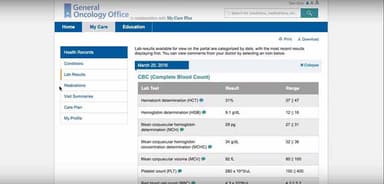
Changes in laboratory findings or biomarker results can complicate treatment decisions when earlier results are difficult to locate. To address this problem, iKnowMed gives access to diagnostic information within the patient's clinical record. Physicians can compare available laboratory findings with the documented diagnosis and treatment regimen before deciding whether further testing or treatment adjustment is appropriate.
Oncology Care Teams Managing Patient-Specific Follow-Up Communication
Follow-up instructions can become difficult to track when nurses and oncologists exchange patient updates through disconnected communication channels. iKnowMed supports patient-linked messaging, allowing oncology nurses and treating physicians to discuss clinical results and follow-up requirements in connection with the relevant record. By keeping these exchanges associated with individual patients, care teams can more readily identify the clinical context behind a message when arranging subsequent care.
Is iKnowMed Right For You?
iKnowMed could be a suitable option for growing community oncology practices that need an EHR capable of handling increasing clinical activity without moving away from cancer-specific workflows. For example, a practice expanding to 20+ oncology providers may benefit from its Microsoft Azure cloud infrastructure, which is designed to accommodate increasing workloads and data requirements.
Regarding security, iKnowMed's migration to Microsoft Azure is intended to provide secure, scalable servers managed by cloud partners. Ontada has also completed an ISO 9001:2015 Stage 2 certification audit. The software supports HIPAA privacy and security requirements, while applicable practices can manage user access through centralized identity controls such as Okta. Ontada also received the 2025 MedTech Breakthrough Award for Best Overall EHR Solution Provider.
iKnowMed supports standards-based interoperability through FHIR STU3 and FHIR R4 compatibility, SMART on FHIR-based third-party application access, and API-enabled data access.
The software also supports ‘Promoting Interoperability’ measures related to electronic prescribing, PDMP queries, public health reporting, and electronic referrals. These capabilities can help practices manage clinical data exchange and associated regulatory workflows.
Unsure whether iKnowMed suits your requirements? Get in touch at (661) 384-7070, and we will help you assess it more clearly.
iKnowMed Features
Digital Patient Engagement And Patient Portal
The patient portal connects patients to their iKnowMed health information through Ontada Health. It allows patients to access their personal health records, communicate with providers, receive announcements and notifications, complete electronic forms, and access patient education resources. Practices can send targeted announcements and manage patient portal accounts and notification preferences. They can also track submitted forms and handle patient-related communication requests through dedicated queues. The portal gives patients easier access to their health information while helping practices manage digital communication in one place.
Precision Medicine Support
iKnowMed's precision-medicine support provides oncology providers with evidence-based treatment options based on current clinical information. It brings together clinical guidelines, treatment pathways, and relevant clinical and financial information within the point of care. The tool continuously refreshes this information to help providers assess treatment options using current evidence and patient-specific context. It can support more informed treatment decisions while considering both clinical and financial factors.
Medical History
The medical history/clinical profile brings a broad range of patient information into one structured record. It allows providers to review and update problems and diagnoses, treatment history, medications and allergies, and family and social history. They can also document OB/GYN history, implantable devices, health maintenance, performance status, adverse events, care plans, and social determinants of health. The profile also captures information regarding distress, depression screening, supportive care, and patient education. It gives providers a fuller view of the patient’s medical and personal context when assessing care.
Billing
iKnowMed’s billing tool captures the billing information generated during patient visits. It records evaluation and management (E/M) codes, procedure codes, drug and drug administration codes, billable units, and associated ICD-10 diagnosis codes. The Charge Capture Report brings these charges together for review, while the Unreleased Charges Report identifies services that have been provided but not yet billed. It also records details such as the rendering provider and helps identify common charge capture issues. This gives practices a clearer record of services that need to be billed and the diagnosis codes associated with them.
Practice Analytics
This module brings data from multiple sources into one view for analyzing clinical, financial, and practice performance. It lets oncology practices examine patient journey data across areas such as quality measures, value-based care programs, productivity, performance metrics, and peer or industry benchmarks. These analytics help practice leaders identify performance trends and areas that may need attention.
Pros And Cons of iKnowMed
Pros
Makes routine navigation easier for clinicians
Helps managers monitor daily practice activities
Simplifies updates through cloud-based deployment
Displays prescription coverage before order submission
Supports quick access to relevant guidance
Cons
Frequent logouts may interrupt clinical tasks
Third-party data retrieval could be difficult
Software updates might disrupt existing workflows
iKnowMed Reviews
Total 27 reviews
3.4
All reviews are from verified customers
Rating Distribution
5
Stars22%
4
Stars33%
3
Stars19%
2
Stars15%
1
Stars11%
Share your experience
Internal Medicine, 51-100 employees
More than a year
“Terrible EMR ”
Pros
Nothing
Cons
Expensive poor quality. Can’t pull data from it self, can’t do Gleason score sum even, app takes 16 clicks to log in and logs out every few minutes will even accept prostate cancer diagnosis in female patient
Rating Distribution
Ease of use
1
Value for money
1
Customer Support
1
Functionality
1
inSite Digestive Healthcare, 101-500 employees
“My Experience with IKNOWMED”
Pros
I started using IKNOWMED EMR Software when I worked at an oncologists office. It had some very specific oncology features, and it was so easy to use as well.
Cons
I cant think of any trouble or issues I faced during the use of this software.
Rating Distribution
Ease of use
8
Value for money
9
Customer Support
10
Functionality
8
Medical Practice, 101-500 employees
“Seamless integration”
Pros
They have a very active and knowledgeable support team, they helped me merge my old system with this one and got it up and running in no time.
Cons
I have read a lot of reviews and have the same issue they reported. It tends to crash at least one day.
Rating Distribution
Ease of use
9
Value for money
9
Customer Support
7
Functionality
8
Frequently Asked Questions
Where do users find iKnowMed release updates?
Users can find iKnowMed release notes, monthly content releases, workflow updates, FAQs, and product changes on the official Ontada Guide. The site also lets users subscribe to product emails for updates on new features and improvements.
Can practices export patient records when transitioning to another EHR?
Yes, iKnowMed supports electronic health information (EHI) exports for individual patients and entire practice populations. Authorized staff can request machine-readable exports, with population-wide requests potentially taking up to one week.
Where can users find iKnowMed support and guides?
Users can access the official iKnowMed help center, which includes guidance for billing, care coordination, charts, medications, orders, patient information, reports, scheduling, mobile use, and other clinical or administrative areas. The Help Center also provides a contact option when users cannot find the required information.
What is iKnowMed Generation 2 Read Only?
It is a backup environment that lets authorized users view patient charts and other patient information when the production environment is unavailable. iKnowMed Generation 2 Read Only contains a backup of the production system, which is generally refreshed each evening. However, users cannot save changes made in the read-only environment back to the main EHR.
Can staff see third-party app data in a patient chart?
No, information stored in a patient's third-party app is not automatically shared back with iKnowMed or added to the patient chart.
Is Carequality participation available without additional charges?
Yes, practices do not pay additional fees for 'Carequality' functionality through iKnowMed. Enrollment requires a signed service agreement and a patient-consent configuration.
How does iKnowMed handle patient consent for external record sharing?
Practices can manage patient consent preferences for Carequality data exchange within iKnowMed. If a patient opts out, the system immediately stops sharing their information through the network.
Does iKnowMed natively support AJCC and FIGO staging?
Yes, iKnowMed supports AJCC staging through built-in TNM values, staging groups, templates, and a staging calculator. Its clinical content also includes AJCC Version 9 updates for supported cancer types.