

NexHealth
Last Updated
Key Takeaways
Generated from the text of customer reviews
Our Verdict
NexHealth Specifications
- Appointment Management/Scheduling
- Mobile App
- Customizable Forms
- Billing and Invoicing
NexHealth Features
Reminders
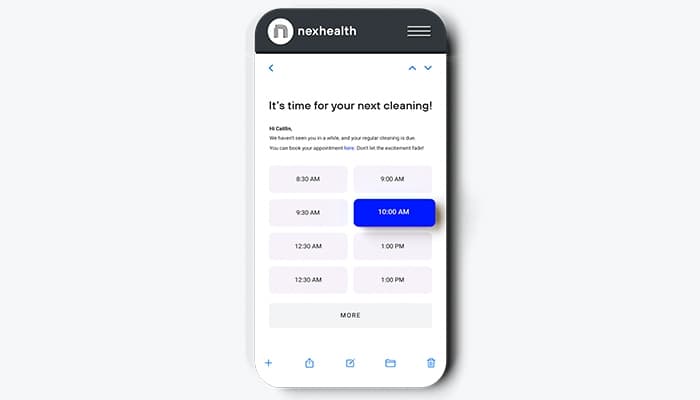
The software lets practices send automated text or email messages based on appointment type, timing, and patient status. Practices can tailor messages with appointment details, instructions, or forms, then schedule them for set times before a visit. The system reads appointment status from the health record system and updates confirmations when patients respond. This could help decrease the need for staff to send routine reminders manually and give patients a simple way to confirm or manage their appointments.
Campaigns
This feature enables practices to create targeted email or text campaigns by filtering patients based on factors such as appointment type, date, status, provider, and treatment needs. Users can use prebuilt templates and patient data from their health record system to tailor messages. The functionality is valuable for teams who want to reach specific patient groups without having to manually sort contact lists, while giving patients direct ways to book appointments. It may also be particularly useful for re-engaging patients who have not returned or promoted services to relevant groups.
Online Booking
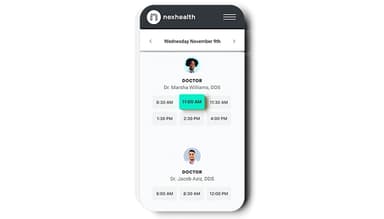
Using ‘online booking’, patients can schedule appointments through a practice website, Google Business page, social media, email, text, or QR code. Moreover, the feature allows practices to set appointment types, provider schedules, and booking rules, while patients see available times based on the provider’s schedule. Appointments then sync with the health record system. This can give patients more flexibility when they book and reduce the need for front-desk staff to manage routine scheduling requests manually.
Digital Forms
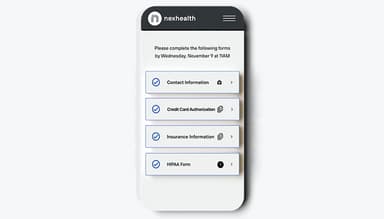
Digital forms allow patients to complete intake, medical history, consent, and other forms online from any device. Practices can automatically send the right forms based on appointment type, procedure code, or patient status, while submitted details such as medications, allergies, and conditions sync to the health record system. This could help lower manual data entry, scanning, and follow-up work for front-office teams, while helping staff receive patient information before the appointment.
Payments
This feature lets practices send digital payment requests through text or email, including invoices, statements, and payment links. It enables patients to complete payments using options such as credit cards, Apple Pay, Google Pay, or Affirm, while transactions sync back to the practice’s ledger. This could make it relatively easier for patients to settle balances without additional steps while helping decrease manual payment collection tasks for front-office teams.
Messaging
Two-way messaging supports practices in communicating with patients through text and email. The feature involves the use of a shared inbox, which lets staff view and respond to messages in one place. It allows patients to reply directly without using a separate portal or app, while practices may send routine updates such as appointment reminders, forms, or payment links. This assists staff in managing patient conversations and routine communication across different channels.
NexHealth Synchronizer
The Synchronizer connects NexHealth with a practice’s health record or practice management system, allowing patient data to move between the two in near real-time. It syncs information from online bookings, digital forms, messages, reminders, and payments back to the practice system, which could lessen the need for staff to re-enter data manually. For practices using supported systems, this helps keep patient and appointment information consistent across front-office operations and reduce duplicate administrative work.
Pros And Cons of NexHealth
Pros
Centralizes patient communication in one place
Helps simplify scheduling and administrative workflows
Offers user-friendly interface for daily operations
Simplifies patient intake processes through Online forms
Waitlist tools help fill canceled appointments
Cons
Limited flexibility for complex practice workflows
May require additional manual steps for certain tasks
Mobile app experience could be improved
NexHealth Reviews
Total 55 reviews
4.7
All reviews are from verified customers
Rating Distribution
5
Stars76%
4
Stars20%
3
Stars4%
2
Stars0%
1
Stars0%
Share your experience
Information Technology and Services, 1-10 employees
“really easy to use together”
Pros
I am really pleased that it syncs with Dentrix because it saves me time and makes using both systems seamless. It's also exciting to me how their billing platform tracks invoices for our practice reliably. I've found the team to be friendly and supportive , they had us operational fast and simplified the dashboard so it's simple to use. The onboarding crew was especially great, guiding us through setup quickly and making the whole process smooth and painless.
Cons
At this point, we haven't faced any issues with NexHealth.
Rating Distribution
Ease of use
10
Value for money
10
Customer Support
10
Functionality
10
Mental Health Care, N/A employees
“Helpful even with small problems”
Pros
Every day I count on it to take care of payments, arrange online appointments, communicate with patients, manage digital intake forms and run our campaigns. Whenever we need help, their customer support team is always willing and ready to assist.
Cons
Occasionally we run into frustrating technical problems, including lag, syncing failures and other similar hiccups.
Rating Distribution
Ease of use
10
Value for money
10
Customer Support
10
Functionality
10
Alternative Medicine, N/A employees
“Our favorite tool for everything”
Pros
I'm really impressed with how attentive the Support Team is and they respond to every concern quickly and within a reasonable timeframe. I haven't run into an issue that wasn't resolved. Beyond the people, the platform itself sticks with you because it's so easy, even if you're not the most comfortable with technology, this is one I would strongly consider. Messaging and texts to patients feel like email threads: you see the patient's name in a little bubble and a long message history opens up, including automated messages that were sent. The Home screen is especially handy, listing all the patients for the day in order of their appointment times. From that same screen I can take payments easily, check whether insurance was verified and toggle Reviews and Reminders on or off without digging through menus. It's all laid out and incredibly simple. Their Insurance Verification is outstanding. When I look at their Insurance Breakdown form, it's impeccably organized , so much so that I can tell someone with dental experience helped design it, because it's concise and presents the most important details first. After comparing Dentrix's insurance layout to NexHealth's, I honestly prefer it every time , it's visually clean and much easier to parse. The Waitlist has become my favorite tool. There are weeks when our hygiene schedule collapses with more than ten cancellations, and the Waitlist rescues us by sending a blast to everyone waiting for an earlier appointment. The patient who claims the slot first is automatically booked and it enters the appointment into our PMS for you. Watching those openings fill up feels almost like a lottery and it's satisfying to see the schedule replenish after just a couple of clicks instead of spending hours calling patients individually. It saves a ton of time and we absolutely love it. Their Payment functionality is another standout. I can send an automated text to a patient showing their balance and the service that generated it , for example, showing a balance from an uncovered exam which makes it easy for patients to understand why they owe money and remit payment without calling to ask. I can also view A/R in a list and with a single click, send a billing blast to multiple patients, which works especially well for younger patients who prefer electronic bills over paper statements. For older patients who still like paper, the system handles that too , they often receive both an email/text and a mailed statement and once that mailed copy arrives they typically call to pay immediately without questions. Overall, It has simplified many processes and made it much easier for our front desk staff to manage daily operations. It has introduced convenient, practice-focused tools that integrate smoothly with our PMS and have genuinely improved how we run the office.
Cons
I have been doing business with it for the past three years and they've improved so much in that time that it's honestly tough to find any real drawbacks.
Rating Distribution
Ease of use
10
Value for money
10
Customer Support
10
Functionality
10
Frequently Asked Questions
Is NexHealth a cloud-based solution?
Yes. NexHealth is accessed online and also has an optional Chrome desktop app.
What are NexHealth’s billing options?
It offers two billing options: month-to-month, billed monthly, or annual, paid upfront for the full year. Pricing depends on the products selected.
Does NexHealth offer a mobile app?
Yes, it has an iOS app for practice staff.
Do patients need to download an app to receive NexHealth text messages?
No, the software sends texts through standard SMS, which works on phones without an extra app.
Does NexHealth work with Dentrix Ascend?
Yes. NexHealth supports connections with cloud-based Dentrix Ascend.
Can NexHealth automatically send new patients intake forms before their appointments?
It can automatically send intake forms to new patients before an appointment. The practice must configure the form for new patients and add it to the appointment reminder sequence.