


One Medical Passport
Last Updated
Key Takeaways
Generated from the text of customer reviews
One Medical Passport is a preoperative clinical intelligence platform that is used by pre-op nurses, anesthesiologists, and administrative staff across surgical centers and hospitals to manage patient intake. Users highlight its responsive support and workflow automation, while noting that intake forms take some time to complete. Recent updates include AI-driven risk stratification and CMS health equity tracking features.
Our Verdict
One Medical Passport suits surgical centers and hospitals looking to simplify patient intake and preoperative information collection. It fits high-volume ambulatory facilities and multi-department teams managing pre-op communication. Implementation and interface costs may be harder for smaller clinics to justify, although it offers strong long-term value by lowering cancellation rates. We recommend it for mid-to-large surgical organizations focused on pre-procedure efficiency.
One Medical Passport Specifications
- Patient Portal
- Compliance Tracking
- Customizable Forms/Reports
- Document Management
What Is One Medical Passport?
One Medical Passport is a digital clinical intelligence and patient engagement platform built for surgical centers, hospitals, and anesthesia teams. It gathers patient-submitted health histories and turns raw data into clear, actionable clinical insights. Facilities use it to handle health history forms, spot high-risk cases, and match facility guidelines automatically. By simplifying pre-op assessments and communication, the platform helps surgical teams modernize their care process, stay compliant with health equity standards, and improve financial performance.
What Is One Medical Passport Best For?
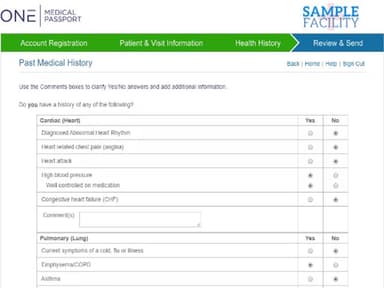
The software stands out for its smart, adaptive ‘Health History’ collection. By tailoring intake questions in real time and highlighting critical conditions, it produces complete pre-op assessments. Automating clinical risk screening makes it a great fit for busy surgery centers and hospital departments handling heavy caseloads. This intuitive setup cuts out tedious pre-op phone calls and facilitates intake, saving nursing teams valuable time.
How Much Does One Medical Passport Cost?
One Medical Passport pricing is estimated to start at $500–$1,500/month/facility, based on pricing estimates for comparable healthcare pre-admission and patient workflow software. Actual pricing may vary based on facility size, procedure volume, configuration, and selected capabilities.
In addition to the base subscription costs, organizations should account for the following expenses:
- Standard Implementation: Included for up to 20 hours; additional implementation services are available at $200/hour
- Forms Customization: $100/hour for custom Medical Passport forms or data-output formats
- EMR/EHR And Scheduling Interfaces: $2,000–$10,000, as per interface complexity and scope
- Additional Training: $200/hour for web-based training beyond the standard implementation; on-site training is also available for an additional fee
Disclaimer: Pricing references are based on publicly available third-party information and industry benchmarks. Actual costs may vary.
One Medical Passport Integrations
The software integrates with various third-party business apps, including:
- Azalea Health
- CareTracker
- Epic EMR
- MedNet
- SIS Office
- Veradigm
- Vision
How Does One Medical Passport Work?
Follow the steps below to understand how the software typically works:
- Capture health histories through smart online intake forms that adjust questions based on patient answers
- Evaluate patient risk automatically by flagging critical conditions and comparing data to facility criteria
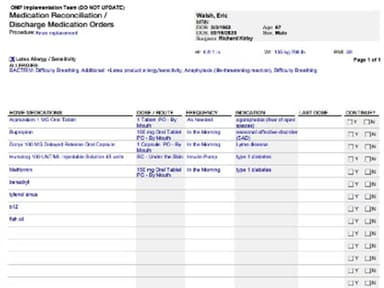
- Review formatted charts to quickly check allergies, medication lists, and clinical assessments
- Collaborate across teams by sharing progress notes, medical alerts, and key updates with anesthesiologists
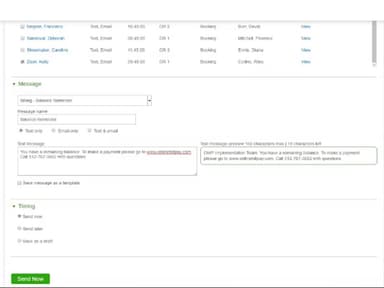
- Document pre-admission instructions like medication schedules, then send personalized copies via text or email
- Track case progress using interactive checklists to monitor pending tasks and pending items across patients
- Sync data to EHR systems to map patient details into core records with a single click
- Generate operational reports to analyze completion rates, track health flags, and verify equity compliance
Who Is One Medical Passport For?
One Medical Passport software is ideal for a wide range of industries and sectors, including:
- Ambulatory surgery centers
- Anesthesia
- Behavioral health
- Hospitals
- Imaging
- Management companies
- Ophthalmology
One Medical Passport Use Cases
Based on our analysis of One Medical Passport's current tools and offerings, we have identified the following key business scenarios where it is well-suited:
Hospital Pre-Op Nurses Losing Hours To Assessment Phone Calls
Before surgery day, One Medical Passport’s adaptive questioning collects a full health history online, and critical flags show nurses which high-risk patients to review first. The anesthesia portal then alerts anesthesiologists to patients who triggered clinically significant conditions. Reviewers at a hospital said pre-op calls now take far less time and reported fewer cancellations on the day of surgery. This is because earlier reviews catch problems sooner.
Medical Practice Staff Who Take Every History By Phone
Staff at outpatient surgery practices used to call each patient and take the history by hand, making patients feel hurried. Medical Passport lets patients complete their history from any device in their own time, and its checklist shows staff which items are done and which are still pending. User feedback noted that patients now take their time to fill out the required information to get the best medical attention.
Wellness Center Staff Choosing Speed Over Detail When Recording Histories
Wellness surgery centers often write histories while speaking to patients because it is quick, but that captures less detail. Medical Passport asks structured questions that adapt to each answer, and Pre-Admit Charting lets staff record medication stop and start times, then send them by email or text. Reviewers called the question template an excellent surgery history format and prefer it to taking notes by phone.
Imaging Providers Needing Clearances And Tests Arranged Before Procedure Day
Medical Passport's admission guideline engine flags which imaging patients need cardiac clearance, extra labs, or an anesthesia consult, so staff can arrange them early. Reports then track guideline compliance and clinically significant flags across all cases. Users said seeing histories days ahead lets staff order tests and clearances in time.
Is One Medical Passport Right For You?
If you are a surgical center or hospital looking to collect patient health information before the procedure, One Medical Passport provides online pre-admission and preoperative intelligence tools. It captures health histories in advance, identifies high-risk patients, and matches patient data with facility-specific admission criteria to support earlier clinical review and save nursing staff a significant amount of time per patient.
Medical Passport integrates with major EMR/EHR systems, which aligns with the healthcare industry's continued focus on interoperable patient data and connected clinical workflows. Its Medical Passport+ offering also uses AI-supported insights to identify patients requiring additional clearances, labs, imaging, or anesthesia consultations.
For organizations handling sensitive patient information, One Mnet Health states that it maintains HIPAA compliance and uses encryption, secure data transmission, and access controls.
Still unsure whether One Medical Passport software is the right fit for you? Contact us at (661) 384-7070 for further guidance regarding its functionality.
One Medical Passport Features
AI-Powered Risk Stratification And Clearance Matching
The software’s rule-based engine automatically flags high-risk patients straight away. It identifies required lab work, clearances, and consults based on a facility's guidelines. Surfacing these flags lets surgical teams prioritize urgent cases, remove screening guesswork, and prevent last-minute cancellations.
Anesthesia Portal And Cross-Team Collaboration
This feature links nurses and anesthesiologists with instant alerts regarding blood thinners or post-operative nausea history. Staff can easily share progress notes and log pre-admission instructions across teams. In addition to this, patient details sync straight into major EHR systems to cut workflow friction and smooth perioperative care.
Pre-Admit Charting And Interactive Checklists
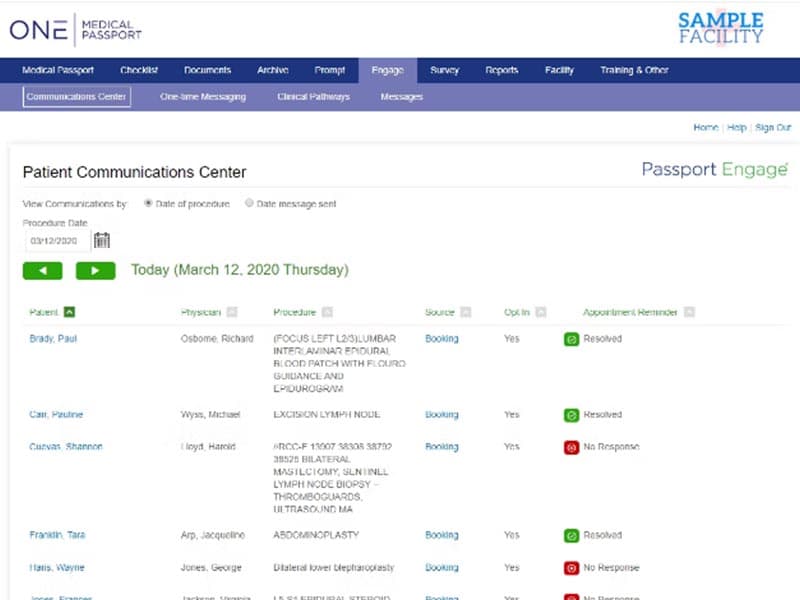
Staff can record custom instructions, such as medication schedules, and send them directly via text or email. An interactive checklist offers a clear view of overall case progress. Clinicians can also track finished tasks and pending items without hunting through individual chart sections.
Operational And Health Equity Reporting
Built-in reporting tools give administrators immediate visibility into completion rates, clinical flags, and guideline compliance. The software also simplifies tracking demographic details and social determinants of health variables. This structured data collection helps healthcare facilities confidently satisfy CMS health equity standards.
Pros And Cons of One Medical Passport
Pros
Responsive support receives positive feedback from users
It is easy to make changes whenever required
Remote access allows users to sign in from different locations
Automation reduces the amount of manual data entry
Cons
Completing some forms can be time-consuming
Patient information may appear duplicated at times
Limited medication options can make it difficult for patients to access certain medications
One Medical Passport Reviews
Total 36 reviews
4.8
All reviews are from verified customers
Rating Distribution
5
Stars81%
4
Stars19%
3
Stars0%
2
Stars0%
1
Stars0%
Share your experience
Medical Practice, 51-100 employees
More than a year
“Effective template for collecting patient history”
Pros
The questionnaire format provides a detailed template for collecting patient history, which is especially helpful for surgical procedures.
Cons
Having a single, unified location to access all passports, whether updated or not, would improve efficiency. Right now, finding passports can be confusing, as they may be in different sections depending on their download status or date.
Rating Distribution
Ease of use
10
Value for money
8
Customer Support
10
Functionality
10
Medical Practice, 11-50 employees
More than a year
“Easy to use”
Pros
Accessing medical history is made easier with a simple interface, where I can quickly select and click on options to get the information I need.
Cons
Incorporating surgical procedures as clickable options would be helpful for me, as it would streamline the process of selecting previous surgeries.
Rating Distribution
Ease of use
10
Value for money
10
Customer Support
10
Functionality
8
Medical Practice, 51-100 employees
More than a year
“Key feature for patient communication”
Pros
The feature that lets me contact multiple patients at once makes my communication process more efficient. It helps me manage conversations better and saves time.
Cons
The issue of timely communication with OCTA and Advantix needs to be addressed.
Rating Distribution
Ease of use
7
Value for money
10
Customer Support
8
Functionality
8
Frequently Asked Questions
What does One Medical Passport software do?
It replaces lengthy pre-op phone calls by enabling patients to securely enter their medical histories online from home.
Which healthcare organizations can use One Medical Passport?
It is made for healthcare facilities that need patients to complete pre-admission and medical history information online before procedures.
Can patients complete their medical history online before a procedure?
Yes. Patients can enter personal details, health information, current medications, and past surgical and medical history through their Medical Passport.
Can patients update their medical information for future procedures?
Yes! One Medical Passport states that Medical Passports can be updated for future procedures.