




Last Updated
Key Takeaways
Generated from the text of customer reviews
PIMSY is a behavioral health practice management software used by mental health, therapy, psychiatry, and residential care organizations. Users appreciate its automated billing and integration between billing and clinical documentation. One noted downside is the difficulty of configuring user permissions and security settings across different employee roles. PIMSY recently added ‘Ambient Scribe’ to its feature list, which records sessions and generates draft clinical notes for providers to review and approve.
Our Verdict
PIMSY suits behavioral health organizations of different sizes that need Electronic Health Record (EHR), practice management, and billing capabilities in one system. Its three-tier pricing structure supports growing practices, while users generally describe its pricing as reasonable compared with competitors offering similar features and customization. We recommend it for behavioral health practices that want flexible EHR and billing workflows with room to scale.
Overall Rating
Based on 87 users reviews
4.3
Rating Distribution
Positive
85%
Neutral
13%
Negative
2%
Starting Price
$99
per user per month

PIMSY Specifications
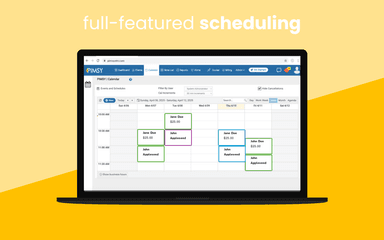
- Appointment Management/Scheduling
- e-Prescriptions
- Lab Integrations
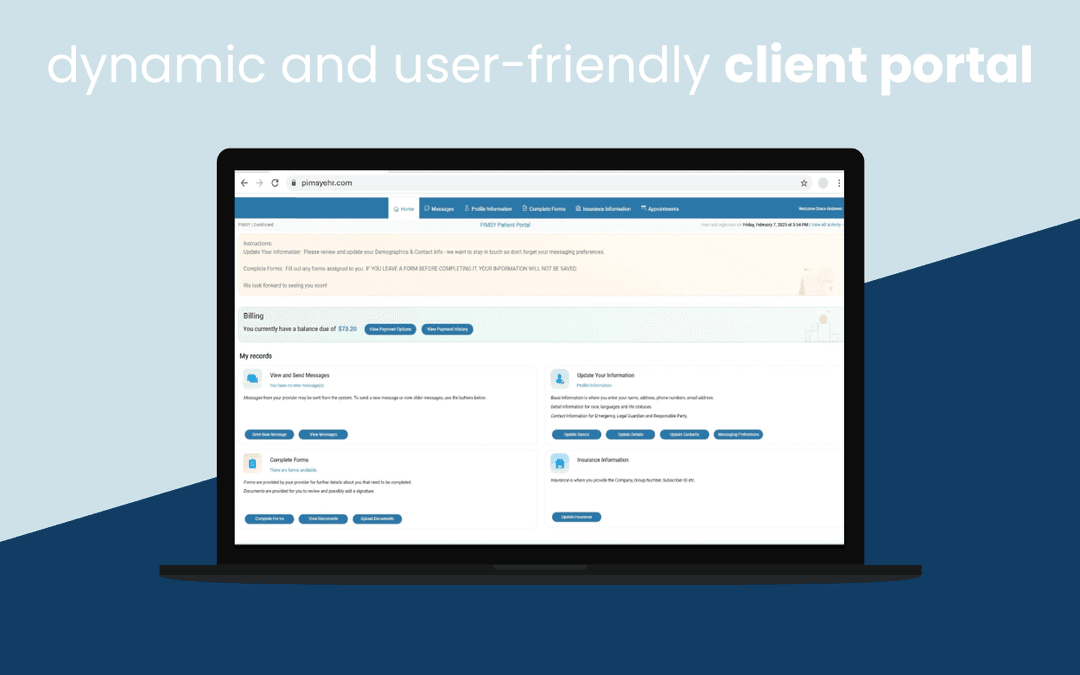
- Patient Portal
What Is PIMSY?
PIMSY is a cloud-based EHR and practice management platform built specifically for mental and behavioral health organizations. It brings scheduling, clinical documentation, billing, e-prescribing, and patient engagement tools into one system.
Its workflows are designed around behavioral healthcare rather than adapted from a general medical system. This includes specialty templates and tools for therapy, psychiatry, and substance use treatment. This gives behavioral health organizations a system that aligns with their clinical and administrative workflows.
What Is PIMSY EHR Best For?
One of PIMSY’s standout features is its ‘Ambient Scribe’, which records a session and generates a draft clinical note for review. The tool is designed for mental health and substance use disorder (SUD) practices, with documentation structured around these workflows rather than general medical visits. It also supports 42 CFR Part 2 requirements for SUD records and works within PIMSY, so generated notes populate directly into the client record instead of requiring copy-paste between systems. Clinicians review, edit, and approve each draft before it becomes part of the record.
How Much Does PIMSY Cost?
PIMSY pricing is estimated to start at $99/user/month. The vendor offers the following custom-priced plans:
- Prime
- Professional
- Platinum
Apart from base subscription price, organizations should keep the following potential costs in mind based on industry benchmarks:
- Implementation: $1,500–$15,000 (one-time)
- Data Migration: $500–$7,500 (one-time)
- Training And Onboarding: $0–$3,000 (one-time)
- Customization And Configuration: $500–$5,000 (one-time)
- Premium Support: $3,000/year
- E-Prescribing Fees: $10–$35/prescriber/month
Users generally describe PIMSY as a reasonably priced option for therapists and behavioral health practices. Reviews highlight its relatively affordable monthly cost while still offering a broad set of EHR and practice management features, making the pricing feel proportionate to the functionality.
Disclaimer: Pricing references are based on publicly available third-party information and industry benchmarks. Actual costs may vary.
PIMSY EHR Integrations
The software supports integration with platforms such as:
- Waystar
- DataMotion
- Claim.MD
- Microsoft Azure
- Twilio software
- SecureVideo
How Does PIMSY EHR Work?
Once you've logged in using your credentials, follow these steps to manage your behavioral health practice:
- Set up your practice, users, roles, and basic settings
- Schedule appointments based on provider availability
- Document sessions using behavioral health templates and clinical notes
- Record sessions with Ambient Scribe and generate draft clinical notes
- Review and edit the generated notes before signing them
- Manage prescriptions using integrated e-prescribing tools
- Process charges, claims, payments, and outstanding balances
- Review clinical, financial, and operational data through reporting tools
Add client profiles with demographic, insurance, and clinical information
Who Is PIMSY For?
PIMSY EHR is suitable for a range of behavioral health specialties, practice types, care settings, and treatment programs, including:
- Substance use and recovery
- Psychiatry
- Multi-specialty practices
- Group and outpatient
- Intensive Outpatient Programs (IOP)
- Medication-Assisted Treatment (MAT) programs
- Inpatient and residential
PIMSY Use Cases
Based on our analysis of PIMSY’s features and user reviews, we identified the following scenarios where the software can support specific behavioral health workflows:
1. Mental Health Practices Combining Therapy And Prescribing
PIMSY suits mental health practices that provide both therapy and medication management. The Prime tier includes the ‘Wiley Treatment Planner’, while group therapy scheduling supports multiple facilitators in a single session and includes group notes. Prescribers can use integrated e-prescribing through DrFirst and H2H, with drug interaction alerts available during prescribing.
2. Behavioral Health Agencies Running IOP And PHP Programs
Agencies offering intensive outpatient (IOP) and partial hospitalization (PHP) programs can manage these services alongside standard outpatient care. PIMSY includes workflows for IOP and PHP programs, while UB-04 billing supports IOP, PHP, and residential services. Authorization Management also tracks approved service units in real time.
3. SUD And Addiction Treatment Programs Handling Protected Records
PIMSY fits substance use disorder (SUD) programs that need specialized documentation and privacy controls. The platform supports 42 CFR Part 2 requirements for protected SUD records and can bring HL7 lab results into the client record, including drug tests, urinalysis, and toxicology screens. MAT tools and eMAR are also available.
4. Residential Programs Providing 24/7 Structured Living With Treatment
PIMSY supports residential facilities that combine structured living with ongoing clinical treatment. Its real-time ‘Bed Board’ directly communicates with patient electronic MAR charts, clinical nursing notes, and financial billing systems to automate occupancy-based residential claims. Residential programs can also use eMAR with barcode scanning and audit trails, along with medication inventory tracking.
Is PIMSY EHR Right For You?
PIMSY EHR is designed for mental and behavioral health organizations that need clinical, administrative, and billing workflows in one system. Its feature set becomes particularly relevant for practices that scale beyond individual therapy and add group treatment, IOP, PHP, or residential programs.
The platform runs on Microsoft Azure and supports HIPAA, PIPEDA, and 42 CFR Part 2 requirements. These capabilities may make PIMSY a practical fit for behavioral health and SUD organizations with more complex clinical and operational workflows than a standard therapy practice.
Still not sure whether PIMSY EHR is worth an investment? Contact us at (661) 384-7070, and our support team will help you make an informed choice.
PIMSY Features
PAISLY AI Assistant
PIMSY’s PAISLY AI Assistant generates clinical narratives from information clinicians already enter into assessment, progress, and therapy notes. Providers can choose standard formats such as SOAP, BIRP, DAP, DAIR, PIE, and biopsychosocial notes, or create their own templates. PAISLY only uses supplied chart information and lets clinicians review and adjust the generated narrative before saving it.
Notes And Documentation
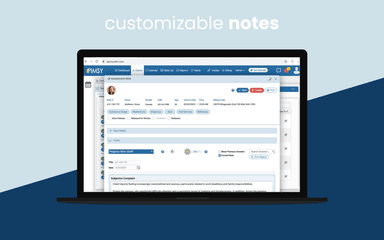
The software provides customizable clinical note templates that can be configured for different programs, specialties, and documentation requirements. Its ‘Note Builder’ supports structured fields alongside free-text documentation, while clinical notes can connect with treatment plans and other information in the client record. PIMSY also comes with preloaded assessment and note templates that organizations can modify during implementation.
Treatment Planning
PIMSY’s Treatment Plan Builder lets providers create individualized plans with goals, objectives, interventions, and measurable outcomes. Its Wiley Practice Planner integration adds evidence-based treatment options and can populate treatment-plan content based on the client’s diagnosis. Providers can also build plans around Strengths, Needs, Abilities, and Preferences and track progress over time.
E-prescribe
The platform integrates e-prescribing through DrFirst and H2H Solutions, with prescribing handled directly within the patient record. The workflow includes PDMP checks, medication history, interaction checking, and EPCS for controlled substances. PIMSY also supports MAT medications, including Suboxone and methadone, while prescription history remains visible to the care team in the client chart.
eMAR
PIMSY’s eMAR brings medication orders, barcode verification, inventory counts, and dose documentation into the same patient chart. Staff can verify medications against orders before administration and document doses at the time they are given. The system also supports real-time dose alerts and inventory pill counts, making it particularly relevant to residential, SUD, eating disorder, and other medication-administering programs.
Telehealth
PIMSY’s telehealth keeps video sessions and clinical documentation within the same EHR workflow. Providers can conduct individual or group sessions without switching to a separate application, with features including group video support and waiting rooms. After a session ends, PIMSY opens the related note, reducing the need to transfer session details from a separate video platform into the client record.
Group Notes
PIMSY’s Group Notes allow multiple facilitators to document the same group session while tracking attendance by client. The shared session documentation can then produce individualized progress notes for participating clients, which providers can review and sign. PIMSY also supports recurring group appointments, group note templates, and telehealth group sessions with breakout rooms.
Pros And Cons of PIMSY
Pros
Reduces double entry between billing and clinical notes
Lets clinicians complete notes and tasks from the scheduling system
Offers extensive patient portal features, including reminders and alerts
Supports custom note templates, surveys, and client documents
Lets clinicians start video sessions from the calendar without a separate app
Cons
Patient-specific appointment history is not readily accessible from the calendar
User permissions can be difficult to configure for different employee roles
Patient portal navigation and signature capture can be challenging
PIMSY Pricing
Prime | Professional | Platinum |
|---|---|---|
Custom Pricing | Custom Pricing | Custom Pricing |
|
|
|
Disclaimer: The pricing details were last updated on Sep 25, 2026 from the vendor's website. Please contact us for a tailored pricing list.
PIMSY Reviews
Total 87 reviews
4.3
All reviews are from verified customers
Rating Distribution
5
Stars61%
4
Stars24%
3
Stars6%
2
Stars7%
1
Stars2%
Share your experience
Hospital & Healthcare, 101-500 employees
Less than a year
“Ideal for mental and behavioral health organizations”
Pros
From my experience, PIMSY feels like a system built specifically for mental and behavioral health organizations of different sizes. Even smaller practices can really benefit from it. I also feel confident using it because the data protection measures are strong, which is important in this field.
Cons
What throws me off is how the calendar behaves. I wish I could easily view a client's past appointments along with the upcoming ones right from the dropdown instead of clicking around to find that information.
Rating Distribution
Ease of use
9
Value for money
8
Customer Support
9
Functionality
8
Health, Wellness and Fitness, 11-50 employees
More than a year
“fits our requirements”
Pros
For our agency, which sees thousands of sessions a year, PIMSY has fit our needs well. As we've grown, their team has guided us in adjusting features to support our changing workflows. There are still many features we haven't even used yet so it feels like there is room to expand over time.
Cons
My main issue isn't with the software but with not having enough time to really dig into everything it can do. There's so much available that I haven't fully used yet.
Rating Distribution
Ease of use
10
Value for money
10
Customer Support
10
Functionality
10
Individual & Family Services, 1-10 employees
More than a year
“Helps me get organized”
Pros
PIMSY keeps me organized and helps me stay on schedule when handling clinical records, which takes off a lot of stress during busy days.
Cons
There are times when I try to get my notes or treatment plans done and the system goes down, which slows everything down and throws off my workflow.
Rating Distribution
Ease of use
9
Value for money
9
Customer Support
9
Functionality
8
Frequently Asked Questions
Is there a PIMSY app?
Yes. PIMSY EHR offers its users a mobile app at no additional cost. The app gives providers access to the ‘Provider Portal’ from mobile devices. Clinicians can access their calendars, create and release notes, and work remotely. PIMSY also offers mobile access to the ‘Client Portal’, where clients can manage appointments and access telehealth sessions.
Does PIMSY offer a free trial or free plan?
According to official PIMSY sources, there is no free plan available.
What support and training does PIMSY offer?
All plans include training, support, and access to a knowledge base. Support is available by phone, email, chat, help desk, and an online form.
How much does PIMSY cost?
PIMSY pricing is estimated to start at $99/user/month. The platform offers three pricing plans, named Prime, Professional, and Platinum. Get your custom PIMSY cost quote here.
Does PIMSY support Telehealth?
Yes. PIMSY EHR supports individual and group telehealth sessions. Providers can manage participants through waiting rooms, mute or remove attendees, add participants using secure links, adjust video resolution, and use in-session chat. Telehealth appointments can be managed through PIMSY's scheduling workflow.
What does PIMSY EHR integrate with, and does it have an API?
PIMSY lists integrations with Wiley, DrFirst, SecureVideo, Twilio, Claim.MD, Waystar, TriZetto, H2H Solutions, Dominion Diagnostics, Office Ally, MeldRx, and Fiserv, among others. An API is also available.