


Praxis EMR

Last Updated
Key Takeaways
Generated from the text of customer reviews
Praxis EMR is a template-free electronic medical record system that learns from physicians’ charting. Users consistently praise how it adapts to their documentation style, while conversely noting that building the initial knowledge base takes time. Praxis recently introduced Reflective Ambient Intelligence (RAI), which pairs ambient listening with each physician's knowledge base.
Our Verdict
Praxis EMR is a strong choice for established independent physicians who want documentation shaped around their own clinical habits and can commit time to setup. Its license-to-own pricing is fair for stable solo and small practices including those planning to expand their provider teams or specialties. We recommend it for practices planning to stay on one system long term.
Praxis EMR Specifications
- Appointment Management/Scheduling
- e-Prescriptions
- Lab Integration
- Patient Portal
What Is Praxis EMR?
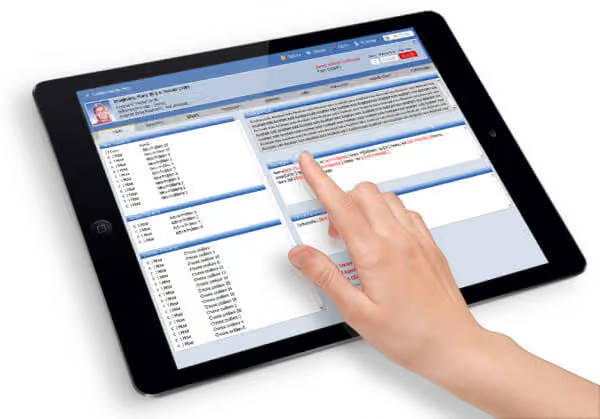
Praxis EMR is an ONC-certified electronic medical record system (EMR) that replaces fixed templates with documentation shaped by each physician's prior notes. Practices can run it through Praxis cloud hosting or on their own servers, and access it from computers, iPads, and other mobile devices. Alongside charting, the platform covers e-prescribing and EPCS through Surescripts, lab results delivered to the chart, telemedicine, and a patient portal. Developed by Infor-Med Inc., Praxis is built for physicians who prefer to chart in their own words rather than click through structured forms.
What Is Praxis EMR Best For?
Praxis EMR stands out for its Concept Processor, an AI engine that learns from each physician's charting rather than relying on pre-built templates. When a new case resembles one the physician has documented before, Praxis surfaces that physician's own prior notes to adapt. This suits practices where template-driven charting slows providers down or produces inconsistent notes, since documentation gets faster as the system learns.
How Much Does Praxis EMR Cost?
Praxis EMR pricing typically starts at $279 as a one-time cost for the base license. Praxis uses a license-based pricing model, with the actual cost customized based on provider requirements, deployment, interfaces, and optional services.
In addition to the initial licensing cost, practices should account for the following estimated additional expenses when evaluating the total cost of ownership:
- Implementation And Setup: $3,000–$15,000+, depending on configuration and deployment requirements
- Data Migration: $2,000–$10,000, based on the volume and structure of legacy data
- Additional Training: $1,500–$6,000 for training beyond any included provisions
- Lab Or Billing Interface: $3,000–$15,000/interface, depending on the system and integration requirements
- Custom FHIR Integration: $15,000–$30,000+ for a basic read-only connection, with bidirectional or more complex implementations potentially costing more
Users often describe Praxis EMR pricing as justified for its highly customizable, physician-driven design and ownership model. While some cite higher upfront effort and long contracts, many feel the long-term cost savings and workflow efficiency outweigh the initial investment.
Disclaimer: Pricing references are based on publicly available third-party information and industry benchmarks. Actual costs may vary.
Praxis EMR Integrations
Praxis EMR integrates with multiple tools, including:
- athenahealth
- Allscripts EMR
- Azalea Health
- CollaborateMD
- Healthwind
- Tebra
- medent
- Medisoft
How Does Praxis EMR Work?
Here's how you can access Praxis EMR and start using its core workflow:
- Log in with your Praxis credentials to access the platform
- Document patient encounters using your own words instead of fixed templates
- Generate prescriptions, lab orders, referrals, and other encounter-related documents
- Schedule follow-ups based on established clinical and scheduling patterns
- Configure Praxis Agents to automate reminders and workflow notifications
- Review previous patient encounters and clinical information available in the patient record
- Continue documenting encounters so the Concept Processor adapts to your workflow over time
Who Is Praxis EMR For?
Praxis EMR suits the needs of medical providers in multiple specialties, including:
- Allergy and immunology
- Neurosurgery
- Rheumatology
- Sleep medicine
- Dermatology
- Hematology
- Oncology
Praxis EMR Use Cases
Based on our analysis of user feedback and Praxis EMR features, we have identified key scenarios where this software is a good fit:
Solo And Small Practices Prioritizing Efficiency Over Templates
Physicians in solo or small group practices often find that click-through templates slow them down and produce notes that don't reflect their reasoning. Setting up a system around a practice's specialty and documentation needs can take time. Praxis's Knowledge Exchanger lets practices import specialty knowledge from colleagues, which may help shorten the initial setup process.
Clinicians Managing High-Volume Patient Loads Without Scribes
For providers seeing a full schedule without scribes, documentation can extend beyond scheduled clinic hours. Praxis's Reflective Ambient Intelligence™ listens during the visit and reconciles the conversation with the physician's own knowledge base, which helps keep notes consistent with how that physician already documents. This can reduce after-hours charting without handing note-writing over to generic AI text.
Practices Focused On Longitudinal Care And Chronic Condition Management
In internal medicine, family practice, and chronic disease care, each visit builds on the last, so tracking changes over time matters. Praxis draws on the physician's earlier encounters, and Datum+ captures discrete values from free-text notes so they can be tracked across visits. Providers can follow a patient's progress without re-entering the same data into separate fields.
Clinics Seeking An ONC-Certified EMR With A Purchased License
Some practices prefer a one-time license over an open-ended subscription, particularly when they plan to stay on the same system for many years. Praxis EMR is ONC-certified and sold through provider licenses that practices own once the plan term ends. Clinics that want control over hosting can also run Praxis on their own servers instead of cloud hosting.
Praxis EMR User Sentiments
Most Positive Sentiments | Least Positive Sentiments |
|---|---|
Concept-Based Documentation | Learning Curve And Setup Complexity |
|
|
Users consistently praise Praxis’s template-free, AI-driven documentation model. It learns from the physician’s language and logic, enabling faster, more personalized charting. A user said, “Praxis learns how I think and documents accordingly—it’s like having a second brain.” | While long-term gains are noted, many users find the initial onboarding process demanding. Training the concept processor requires time and effort. A user said, “It’s powerful, but you need to invest time upfront to train it properly.” |
Speed And Efficiency | Third-Party Integration Limitations |
|
|
Clinicians managing large patient loads without scribes report significant time savings through Concept Processor. The system becomes more efficient over time, reducing repetitive data entry and streamlining documentation. A user said, “I can finish my notes in minutes—Praxis gets smarter the more I use it.” | Praxis does not integrate as easily with external billing systems, labs, or patient engagement tools. Custom integrations often require developer support. A user said, “Integration isn’t plug-and-play—you’ll need help connecting to other systems.” |
Customization And Clinical Autonomy | User Interface And Visual Design |
|
|
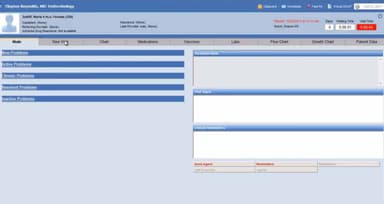
Physicians value the ability to define their own workflows and terminology. The platform easily adapts to individual practice styles. A user said, “I’m not forced into someone else’s template—Praxis lets me practice medicine my way.” | The interface is described as functional but a bit dated. Users suggest that the design could benefit from modernization to improve navigation and aesthetics. A user said, “It works well, but the interface feels old—definitely not flashy.” |
Is Praxis EMR Right For You?
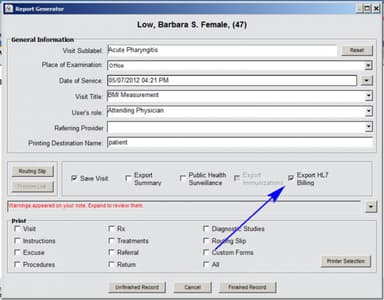
If your organization needs an adaptable EMR for multi-provider or multi-specialty environments as your practice grows, Praxis EMR is worth an evaluation. Its interoperability options include HL7 interfaces, laboratory and billing integrations, e-prescribing, patient demographic systems, and a FHIR API supporting US Core, USCDI, SMART App Launch, and Bulk Data standards.
For practices with specific security and reporting requirements, Praxis offers DirectTrust-accredited secure messaging, HIPAA-compliant cloud hosting, encrypted data transmission, and capabilities for MACRA/MIPS-related reporting. Its Datum+ feature also supports reporting for Meaningful Use requirements.
Still not sure about Praxis EMR? Contact us at (661) 384-7070, and we can help you make an informed decision.
Praxis EMR Features
Knowledge Exchanger™
Praxis EMR's Knowledge Exchanger lets physicians import clinical knowledge bases built by colleagues and share their own with peers. Users choose which knowledge to bring in, while their personal Praxis knowledge base remains separate and continues learning from their own charting. This can give new users a starting point by providing specialty-specific knowledge rather than requiring them to build their knowledge base from scratch.
Datum+
Praxis EMR's Datum+ embeds discrete clinical data inside the physician's own narrative text, so values documented once in a note can be stored and reported later. Physicians can document clinical parameters within their narrative rather than entering them into separate fields, while the captured data supports quality reporting for programs such as MACRA and MIPS.
Practice Guidelines And Queries
This feature lets practices define clinical rules and run queries on any parameter in their records, either prospectively as patients are seen or retrospectively across past charts. With the Query Builder, providers can create queries without programming, and the DataMiner runs them and exports results to Excel, Word, HTML, or XML. The tools also support health maintenance, population management, clinical research, and quality reporting.
Praxis Agents
Praxis Agents are automated messengers embedded in the patient note that notify staff, patients, or other clinics at a set time or when a condition is met. For example, an Agent can remind staff to schedule a follow-up MRI six months later, or trigger at the patient's next visit. If a message is not read within the defined timeframe, the sender can be alerted, and Agents can become available in similar future cases.
AI-Driven Patient Intake
AI-Driven Patient Intake uses the assessment in the Concept Processor to send each patient intake forms that match their condition. It supports Welcome Packages containing letters, handouts, and consent forms, delivered by email, while completed forms are returned through Agents and stored in the SOAP note. Intake forms support multiple languages.
Integrated Patient-Provider Portal
The Praxis Patient Portal provides individualized patient information based on the patient's condition and care needs, with options for patients to self-schedule appointments. Praxis also supports personalized questionnaires, intake forms, consents, and patient updates through the portal.
Pros And Cons of Praxis EMR
Pros
AI-driven charting cuts down clicks during documentation
Built-in MIPS tools simplify quality reporting submissions
Quick clinical pathway setup supports consistent care
Cons
Remote connection may run slow at times
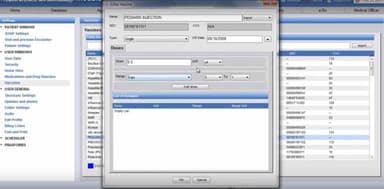
Prescriptions may stall with multiple dose variations
Praxis EMR Reviews
Total 229 reviews
4.9
All reviews are from verified customers
Rating Distribution
5
Stars91%
4
Stars6%
3
Stars2%
2
Stars1%
1
Stars0%
Share your experience
Medical Practice, 1-10 employees
More than a year
“Smart layout design”
Pros
Working with EMR software can be pretty involved but this system organizes the screens and links in a way that makes my job much more manageable than it could have been. Since I was new to EMRs and dealing with the complexity of the data entry, I ran into a few issues at first. The IT help desk has been a huge asset throughout that process. Everyone there has been friendly, patient and genuinely helpful. They even remembered my doctor after she had not contacted them for several years which gave a very personal and reassuring feeling. I also really value the fact that their support is free especially compared with many other software vendors that charge as much as $200 per hour. Please keep up the good work.
Cons
This is not really the software's fault but the remote connection can be fairly slow at times. I started using computers back in 1957 so I know what slow really looks like. Once the connection gets going though, it usually runs very fast, except for the occasional delay when it is clearly searching through a massive database.
Rating Distribution
Ease of use
9
Value for money
9
Customer Support
10
Functionality
10
Not Specified, N/A employees
More than a year
“Great for physicians”
Pros
As a physician, this lets me think, work and write in one connected flow. It captures medical knowledge well while still leaving room to think beyond the obvious and approach cases creatively.
Cons
I really don't have any complaints. For someone completely new though, it can feel a bit intimidating at first because it pushes you to actively practice medicine and expects a great understanding of it.
Rating Distribution
Ease of use
10
Value for money
10
Customer Support
10
Functionality
10
Medical Practice, 1-10 employees
More than a year
“Perfect EMR fit”
Pros
Building my own EMR around the way my practice works has made a huge difference. It's incredibly flexible which has helped me become much more efficient with patient management, note-taking, lab interfaces and moving through tasks like medication refills. Pulling lab values directly into the record also feels very aligned. On top of that, the customer support has been outstanding and the value for the cost has been excellent in making my workflow much more manageable. There are also plenty of secure ways to use the patient portal for sharing information and responding to patient questions.
Cons
Honestly, this has worked better for me than any other program I've used. I wouldn't want to switch back to anything else.
Rating Distribution
Ease of use
9
Value for money
10
Customer Support
9
Functionality
10
Frequently Asked Questions
How does Praxis EMR work for psychiatry and other specialties with complex patient histories?
Praxis manages Patient Assessments at the point of treatment and learns from each psychiatrist's documentation, so notes reflect the provider's own treatment approaches rather than a fixed template. The same Concept Processor approach applies across other specialties Praxis supports.
How long does it take to learn Praxis EMR?
Praxis includes about 20 hours of one-on-one training per provider, focused on building each physician's knowledge base.
Does Praxis EMR require a remote desktop connection, and does hosting affect performance?
No, Praxis cloud hosting is accessed through a secure link in a standard web browser such as Chrome, Edge, Firefox, or Safari. Praxis also runs on VMware and traditional server setups. For cloud users, Praxis recommends a hardwired connection in the clinic rather than Wi-Fi for the best performance.
How can practices export their Praxis EMR data before switching to another EHR?
Praxis Version 9 is ONC-certified for Electronic Health Information (EHI) export under criterion §170.315(b)(10). Practices can use its Data Export Utility to export all or selected patient records, including patient and visit summaries in CDA format for import into another ONC-compliant EMR, inserted notes with .doc files and attachments in their original file formats.
What support is available if an interface or the system stops working?
Practices can submit a ticket, use live chat, or call support Monday through Friday, 8 am to 8 pm, with weekend and overnight support available by request. The support portal also includes troubleshooting guides, manuals, and an online user forum. Additionally, Praxis cloud hosting runs automatic backups.