

PRONTO EMR
Last Updated
Overview
Simplify mental and behavioral health workflows with Pronto software. Whether you're a seasoned professional or new to the field, its user-friendly design simplifies your tasks. Elevate patient care through telemedicine, e-prescriptions, and efficient billing. Streamline your administrative tasks with Pronto EMR software. Get started today!
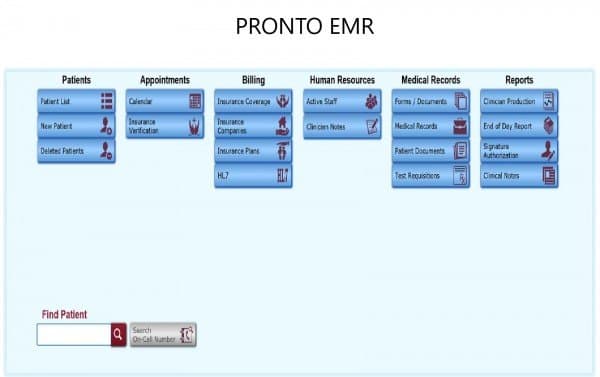
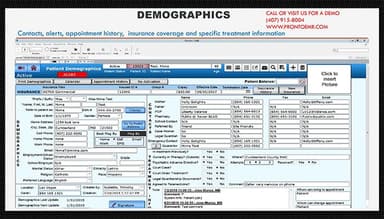
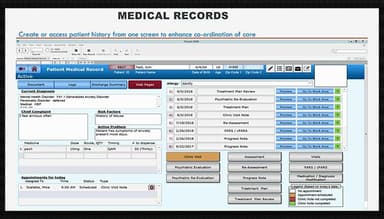
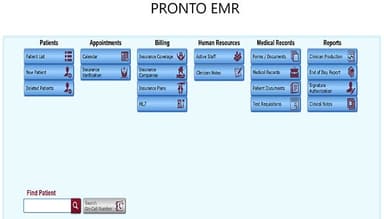
PRONTO EMR Specifications
- Appointment Management/Scheduling
- e-Prescriptions
- Lab Integration
- Patient Portal
PRONTO EMR Features
Billing Module
The billing module optimizes the entire billing process, from creating invoices and claims to monitoring payments and managing accounts. With an intuitive interface, practitioners can swiftly generate and submit insurance claims, mitigating the risk of claim denials and expediting reimbursement. This module also supports electronic billing, simplifying interactions with insurance companies and streamlining the revenue cycle.
Documentation
The software offers customizable templates and tools for creating comprehensive patient records. Medical service providers can accurately record patient information, clinical assessments, and treatment plans, ensuring that medical records are precise and up-to-date. This minimizes the risk of errors, enhancing patient safety and the overall quality of care the practice provides.
Patient Calendar
The patient calendar provides healthcare professionals with a centralized view of their appointments, simplifying the management and coordination of patient visits. It aids in reducing scheduling conflicts and efficiently allocating time for various patient types or appointment reasons. Patients can also receive timely reminders, decreasing no-show rates and enhancing the overall patient experience.
e-Prescriptions
Clinicians can efficiently transmit prescriptions to pharmacies electronically, minimizing the risk of errors associated with handwritten prescriptions. Additionally, the system checks for potential drug interactions, allergies, and dosage errors, ensuring patients receive the correct medications.
Reporting
Users can effortlessly generate personalized reports to meet their specific requirements using a range of customizable templates and an intuitive report generator. These reports encompass critical aspects such as patient demographics, financial performance, appointment scheduling, and clinical outcomes. Moreover, the system's automated report generation capability saves time and minimizes potential errors.
Telemedicine
The telemedicine feature enables practitioners to conduct virtual appointments with patients, improving accessibility and convenience. Supporting secure video conferencing, it allows clinicians to diagnose, treat, and follow up with patients remotely from their homes.
Pros And Cons of PRONTO EMR
Pros
The software provides links for retrieving patient documents
Offers inventory management to streamline the tracking of medical supplies
The patient flow sheet has all patient data
The billing module can be used with EMR integration
A user-friendly interface for easy navigation
Cons
Additional editing options in the Alerts/Notifications feature are needed, according to some user reviews
Logging into the software can be slow at times
Making changes to notes can be a bit complex
PRONTO EMR Reviews
Total 15 reviews
4.6
All reviews are from verified customers
Rating Distribution
5
Stars60%
4
Stars40%
3
Stars0%
2
Stars0%
1
Stars0%
Share your experience
Coastal Mental Health, 50-99 employees
“Great EHR Pronto ”
Pros
It is very easy to use and master. The software is very user-friendly. We can fix anything almost immediately.
Cons
There is nothing wrong with the software.
Rating Distribution
Ease of use
8
Value for money
10
Customer Support
8
Functionality
10
Coastal Mental Health Care, 10-49 employees
“Wonderful experience”
Pros
It is compliant with the guidelines and we can easily navigate through it. It is time-efficient and we can link it to the system as well.
Cons
The psych documentation has too many options.
Rating Distribution
Ease of use
9
Value for money
9
Customer Support
8
Functionality
8
Coastal Mental Health Center, 50-99 employees
“Medical insurance is a breeze”
Pros
It helps me verify medical insurance claims and I use it every day and it has made my job so much easier than before.
Cons
I cannot open the patient portal and schedule at the same time. It Must be updated.
Rating Distribution
Ease of use
9
Value for money
8
Customer Support
9
Functionality
9
Frequently Asked Questions
Who are the typical users of Pronto software?
The typical uses of Pronto software include behavioral and mental health practices.
What are the primary features of Pronto EMR?
The primary Pronto EMR features include a clinician dashboard, reporting, billing module, documentation, medication management, and an automatic calling system that eliminates the need for providers to manually dial patient phone numbers.
How much does Pronto EMR cost?
The Pronto software cost varies depending on your organization's specific needs and requirements. Contact us for more information.
How to use Pronto software?
Users can get started with Pronto by following a few simple steps. The software can be installed on your device. For further help, schedule a free demo.
What is Pronto software used for?
Doctors and physicians use pronto EMR to manage clinical operations and reduce administrative burdens.
How does Pronto EMR help health systems?
Pronto EMR software offers flexible features and necessary tools, enabling administrators to manage workflows and tasks easily. It helps enhance practice efficiency for better patient outcomes.