


TheraPlatform
Last Updated
Key Takeaways
Generated from the text of customer reviews
TheraPlatform is a practice management and EHR platform for therapists, counselors, and allied health professionals that supports clinicians and administrative staff. Users like its ease of use and centralized practice management, but some find adding custom forms challenging. In a recent update, TheraPlatform introduced AI note-taking tools for clinical documentation, including text-to-text note generation, voice dictation, and telehealth session transcription.
Our Verdict
TheraPlatform is worth considering for solo therapists and small-to-growing therapy practices seeking an integrated system for clinical and administrative work. Pricing is generally appreciated for its value for money, though occasional price increases may concern budget-conscious practices. We recommend it for therapy providers seeking an accessible interface and consolidated workflows.
Overall Rating
Based on 37 users reviews
4.3
Rating Distribution
Positive
86%
Neutral
8%
Negative
5%
Starting Price
$39
per month
TheraPlatform Specifications
- Appointment Management/Scheduling
- Patient Portal
- Telemedicine
- Billing and Invoicing
What Is TheraPlatform?
TheraPlatform is a web-based EHR and practice management platform that combines clinical documentation, client management, billing, and teletherapy for therapy practices. Clinicians write notes and treatment plans from customizable templates and track client progress with automatically scored outcome measures. The scheduling module can handle online booking, recurring appointments, and automated reminders. Billing helps cover invoicing, payments, and insurance claims, while a client portal handles intake forms, shared resources, and secure messaging.
What Is TheraPlatform Best For?
TheraPlatform stands out for its HIPAA-compliant telehealth capabilities that combine secure video conferencing with a wide array of interactive therapy tools like whiteboards, screen sharing, therapy games, and in-session chat. Clinicians can share worksheets and videos, record sessions for supervision, and view the times when each participant joins and leaves a session.
How Much Does TheraPlatform Cost?
TheraPlatform pricing starts at $39/month for the Basic plan. Other paid plans are:
- Pro: $69/month ($39/additional provider)
- Pro Plus: $79/month ($49/additional provider)
The Basic plan is limited to a single provider. A 30-day free trial is also available with access to the selected plan, along with support and training on request. No yearly contract is required, and subscriptions can be canceled at any time. There is no setup fee.
Optional add-ons, such as Custom Domain, Single Sign-On, and Mail Documents, are also available, and the AI Notes add-on is priced at $30/provider. Availability of add-ons may vary with plans.
TheraPlatform also charges published usage fees for some services:
- Electronic Claim Filing (Integrated Clearinghouse): $0.25/claim
- Insurance Verification And Coverage Reports: $0.10/request
- Text Appointment Reminders: $0.02/message
- Fax: $0.10/fax + $10/month
- Automatic Client Document Processing: $0.05/document
- Wiley Treatment Planner (Add-on): $15/provider
Beyond these fees, users should budget for potential extra costs. The following figures are estimated based on industry benchmarks and may vary depending on provider terms and requirements.
- Data Migration From Previous EHR: $500–$3,000
- Workflow Customization: $200–$1,500
- Speech-language Assessment Resource Licensing: $100–$500/Year
- Clinical Documentation Template Customization: $100–$500
- Additional Secure Data Storage: $10–$100/Month
- Practice Transition And Go-live Support: $300–$1,500
Users often consider TheraPlatform reasonably priced for its bundled telehealth, scheduling, and billing tools. However, some feel price increases are not justified by meaningful improvements, raising concerns about overall value.
Disclaimer: The pricing is subject to change.
TheraPlatform Integrations
TheraPlatform integrates with several third-party applications and systems, such as:
- Wiley Treatment Planners
- Stripe
API availability is not confirmed. Contact the vendor to confirm API access and compatibility with your requirements before committing to a plan.
How Does TheraPlatform Work?
Here’s a step-by-step guide to how users can navigate TheraPlatform:
- Log in to TheraPlatform through the sign-in page to access the practice management dashboard
- Set up the calendar by entering availability, scheduling appointments, creating recurring sessions, and configuring email or text reminders
- Manage client records by accessing client charts and organizing clinical information, treatment plans, and documentation
- Prepare session notes using existing templates or the note template builder to customize notes and complete them during or after sessions
- Conduct therapy sessions through built-in teletherapy tools, using secure chat, screen sharing, and interactive therapy resources when needed
- Manage client communication through the client portal, where clients can complete digital forms, access resources, book appointments, and communicate securely
- Handle billing and insurance by generating invoices, collecting payments, submitting insurance claims, tracking claim statuses, and creating superbills
Who Is TheraPlatform For?
TheraPlatform is used by solo practitioners as well as multi-provider or group practices. Typical users include:
- Mental health therapists
- Psychologists
- Counselors
- Speech-language pathologists
- Occupational therapists
- Physical therapists
- Social workers
TheraPlatform Use Cases
Based on our review of TheraPlatform’s current capabilities, we have identified various scenarios where the platform can address specific administrative and clinical workflow challenges for therapy practices.
Solo Therapists Managing Clinical And Administrative Work
Independent therapists often balance patient care with appointment management, clinical documentation, billing, and intake paperwork, usually without dedicated administrative support. TheraPlatform brings these workflows into one system, so practitioners can run their practice without coordinating several standalone tools. Customizable documentation templates and integrated telehealth also support therapists who offer both in-person and remote care. Practices with highly specialized documentation requirements should look at how well the available templates fit their workflows.
Group Practices Coordinating Multiple Providers
When a practice adds therapists, scheduling across different calendars and keeping administrative processes consistent gets harder. TheraPlatform supports centralized scheduling, provider-specific calendar views, role-based permissions, and administrative access for schedulers and billers, so teams can coordinate responsibilities without giving everyone unrestricted access to clinical records. This fits growing therapy organizations that need clearer oversight across providers. Larger practices with complex structures should check whether the available permissions and reporting meet their management needs.
Therapists Wanting To Reduce Documentation Backlogs
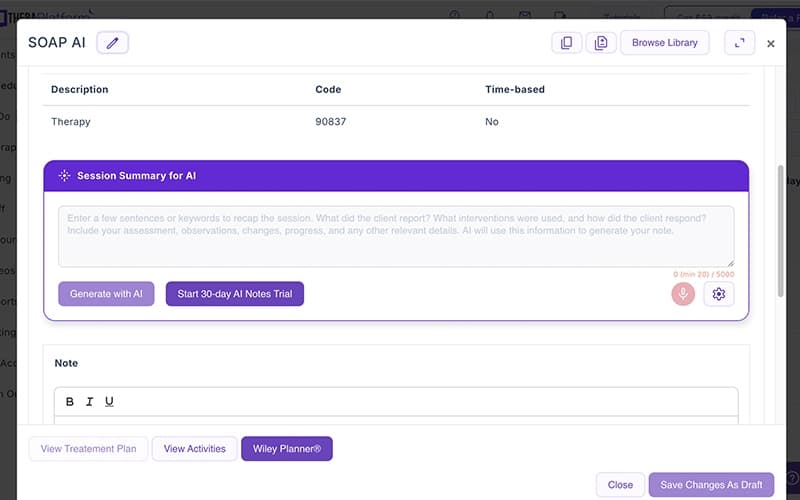
Clinicians who see several clients a day can struggle to finish session notes promptly while keeping records consistent. TheraPlatform offers AI-assisted note creation through text-to-text generation, dictation, and telehealth transcription, along with customizable clinical templates and a tracker for incomplete notes. Therapists can turn session details into structured documentation and spot outstanding records before they pile up. AI-generated notes still need clinician review, and the AI tools are optional add-ons rather than a replacement for professional documentation responsibilities.
Practices Delivering Interactive Remote Therapy
Speech, occupational, and other therapy providers can find that standard video conferencing falls short when sessions involve activities, visual instructions, or exercises done together. TheraPlatform pairs telehealth with screen sharing, a digital whiteboard, shared materials, and therapy games, which supports more interactive remote sessions than a video call alone. This helps clinicians who need to demonstrate tasks or engage younger clients during virtual appointments. How well it works depends on whether the available therapy aids match the client’s age, treatment goals, and clinical needs.
Is TheraPlatform Right For You?
Therapists who struggle to balance clinical documentation, scheduling, billing, and remote sessions may find TheraPlatform useful for managing all of it from a centralized system.
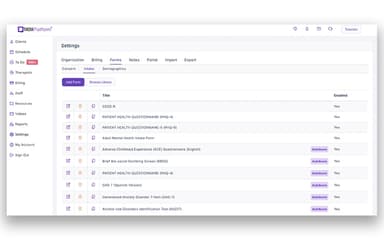
The software offers built-in assessments, including PHQ and GAD questionnaires, with manual scoring based on publisher guidelines or automatic scoring for supported measures. This helps clinicians track client symptoms over time.
TheraPlatform prioritizes security and states that it is HIPAA-compliant and offers a Business Associate Agreement (BAA) at no additional charge. Its stated safeguards include AES-256 encryption, encrypted backups, role-based access controls, audit trails, and multi-factor authentication. Practices that need extensive customization, complex enterprise-level workflows, or specialized capabilities beyond its therapy-focused tools should assess its limitations before committing.
Still doubtful if TheraPlatform software is the right fit for you? Connect with us at (661) 384-7070 for further guidance.
TheraPlatform Features
Scheduling Management
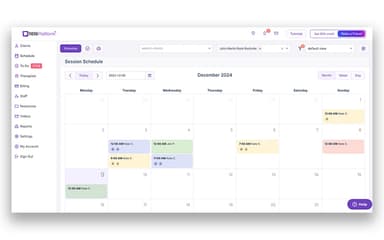
TheraPlatform lets clients book themselves through a secure portal or website widget, while staff manage the calendar with drag-and-drop tools, recurring and group appointments, and color-coded scheduling. Customizable email and text reminders let clients confirm appointments and add sessions to their personal calendars. Waitlist management also helps staff reach out to clients when earlier slots open up. As a result, practices may end up filling cancellations faster and doing less manual scheduling.
Therapy Documentation
The software’s centralized approach allows clinicians to document from their calendar, client chart, task list, or even during a session. Also, TheraPlatform features optional built-in AI that turns typed keywords, voice dictation, or session transcripts into structured clinical notes. Clinicians can also use customizable templates, duplicate existing notes, and pick ICD-10 codes from a searchable library that carries codes into treatment plans and progress notes. Note duplication cuts repetitive entry, and the ICD-10 library keeps diagnostic codes consistent across records.
Billing Automation
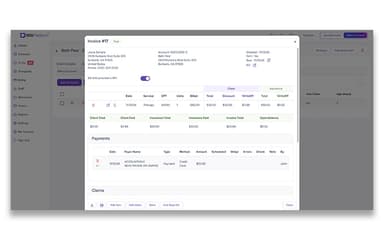
Invoices and superbills are generated within TheraPlatform's EHR, along with batched insurance claims and managed EOB/ERA records. It also supports customizable billing rules that assign services by appointment length and apply payer-specific rates, modifiers, and service units. Practices can automate card charges, send payment reminders, and track aging invoices through reports, so billing teams spend less time on repetitive entry and can spot overdue payments without reviewing every transaction by hand.
Claims Management
TheraPlatform checks claims for missing NPI numbers, client information, and billing details before submission. Practices can automate claim creation, batching, submission, eligibility checks, and ERA/EOB posting, with customizable rules for payers, session types, and locations. Real-time tracking highlights pending, unpaid, or denied claims. This way, billing teams may catch preventable errors, prioritize outstanding claims, and spot recurring denial patterns through payer-specific reports.
Client Portal
Through TheraPlatform's client portal, clients can self-schedule appointments, complete and e-sign intake forms and consents, upload insurance cards, and pay for sessions online. Therapists can send secure messages and share worksheets, PDFs, videos, and audio files that clients can open anytime, and uploaded insurance details can populate client charts automatically. As paperwork, communication, scheduling, and payments all connect to the EHR, duplicate data entry and administrative follow-up may both be reduced.
Pros And Cons of TheraPlatform
Pros
Combines scheduling, billing, documentation, and telehealth in one platform
Users praise the built-in therapy games for engaging online sessions
Automated reminders and self-scheduling help reduce appointment coordination workload
Customizable clinical notes and forms accommodate different therapy workflows
Client telehealth access requires no software downloads or installations
Cons
Video sessions occasionally lag with unstable client internet connections
Advanced reporting options remain limited for complex practice analysis
Some appointment availability settings can make recurring schedule changes tedious
TheraPlatform Pricing
Basic | Pro | Pro Plus |
|---|---|---|
$39per month | $69per month (+ $39/additional provider) | $79per month (+ $49/additional provider) |
|
|
|
Disclaimer: The pricing details were last updated on Oct 23, 2026 from the vendor's website. Please contact us for a tailored pricing list.
TheraPlatform Reviews
Total 37 reviews
4.3
All reviews are from verified customers
Rating Distribution
5
Stars57%
4
Stars30%
3
Stars3%
2
Stars5%
1
Stars5%
Share your experience
Healthcare, 1-10 employees
More than a year
“If I can do it, you can too!”
Pros
I am not a computer or billing expert but this system has transformed the most burdensome parts of my practice into something so easy! Once its set up, scheduling and billing become quick and simple. Whenever I need help, it is readily available and very useful.
Cons
I found some of the setup and reminder features to be more than I needed but I figured out how to disable or reconfigure them.
Rating Distribution
Ease of use
10
Value for money
10
Customer Support
10
Functionality
10
Healthcare, 1-10 employees
Less than a year
“Perfect for my small practice”
Pros
I really like how the schedule looks. Adding and deleting information is not hassle anymore. I love that I can send initial client consent and intake forms directly to clients and get their responses back quickly for review. This platform is perfect for my small private practice and the price is right. I'm also thrilled to have access to teletherapy through TheraPlatform.
Cons
Adding my forms to the system was a bit challenging and there is a learning curve as with any new EMR. However, TheraPlatforms customer service team is fantastic at answering questions quickly. They also offer a help option and video tutorials that are always available.
Rating Distribution
Ease of use
10
Value for money
10
Customer Support
10
Functionality
10
Healthcare, 1-10 employees
Less than 6 months
“I am fully satisfied with this tool”
Pros
The tutorials, customer service and on-demand webinars have been very helpful.
Cons
I am frustrated by the inability to delete clients who never became active participants.
Rating Distribution
Ease of use
10
Value for money
10
Customer Support
10
Functionality
10
Frequently Asked Questions
Can TheraPlatform submit insurance claims?
Yes, TheraPlatform supports electronic claim submission, claim validation, payment posting through electronic remittance advice (ERA), and claim tracking.
Does TheraPlatform have a mobile app?
No. TheraPlatform does not offer a dedicated mobile app, but clinicians and clients can use the platform through a mobile browser.
Does TheraPlatform charge extra for adding staff such as schedulers or billers?
No. TheraPlatform lets practices add as many staff members as they need, such as schedulers and billers, with no additional fees. Extra clinicians are billed at discounted per-provider rates.
Can practices use their own credit card processor with TheraPlatform?
Yes. The software integrates with Stripe, but practices can use their own processor outside the platform and still post payments in TheraPlatform.
What training and support does TheraPlatform offer?
TheraPlatform offers a library of training videos, one-on-one training, and tech support. It also publishes a free library of therapy worksheets, note templates, and practice forms on its website.