


Valant EHR

Last Updated
Key Takeaways
Generated from the text of customer reviews
Valant EHR is a behavioral health EHR platform used by therapy and psychiatry clinicians. Users praise its multi-location tracking and PHQ-9 screening, though some find the notes overly detailed, adding extra review time. Recently, Valant introduced Claim Assist, that uses 100+ behavioral-health-specific billing rules to identify and correct charge errors before claims are submitted.
Our Verdict
Valant is a dependable choice for practices that want a system built around mental health care. Solo psychiatrists, PMHNPs, and multi-practice organizations benefit most from its consistency. The pricing may be high for small practices, but most feel it justified by the value the software delivers. We recommend it to prescribers and growing multi-provider practices that can accommodate its pricing.
Valant EHR Specifications
- Appointment Management/Scheduling
- e-Prescriptions
- Patient Portal
- Mobile App
What Is Valant EHR?
Valant is a behavioral health EHR and practice management solution designed to address common challenges in clinical documentation, scheduling, billing, and patient intake. Providers can use it to document encounters, manage appointments, process claims, and collect patient information. The platform also supports telehealth, ePrescribing, and treatment planning.
What Is Valant EHR Best For?
Valant EHR stands out for its clinical documentation tools, which allow providers to generate clinical narratives and use templates designed for Dialectical Behavior Therapy (DBT), Cognitive Behavioral Therapy (CBT), Marriage And Family Therapy (MFT), and Transcranial Magnetic Stimulation (TMS). Additionally, AI-powered templates structure notes in SOAP, DAP, BIRP, or custom formats, while macros store content for recurring interventions.
How Much Does Valant EHR Cost?
The price of Valant EHR typically ranges between $100–$300/provider/month based on industry benchmark data for similar products. The final cost is customized to an organization’s needs. Other than the base subscription, buyers should also consider the following estimated additional costs:
- Implementation And Training: $500–$2,500 for small practices or $5,000–$10,000 for complex setups
- Data Migration: $500–$7,500 based on the volume of patient and billing records
- API And Third-party Connections: $25–$750 monthly based on API volume, plus $0.03/call above 25,000
- AI Notes Assist: $20–$100/provider/month based on comparable AI scribe tools
User feedback suggests Valant EHR is relatively expensive, particularly for smaller practices. However, users frequently link the higher cost to the platform’s strong functionality and practical value, with some describing the investment as worthwhile for prescribers and practices seeking comprehensive behavioral health care support.
Disclaimer: Pricing references are based on publicly available third-party information and industry benchmarks. Actual costs may vary.
Valant EHR Integrations
Valant EHR software supports integration with platforms such as:
How Does Valant EHR Work?
Here's how a behavioral health practice can move a patient from intake through billing within Valant EHR:
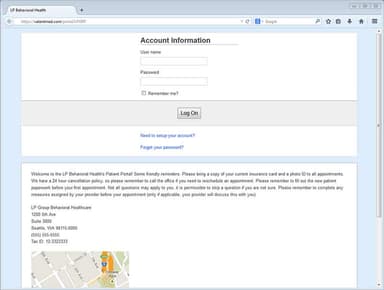
- Log in with your credentials to reach your practice dashboard
- Bring the patient on board through automated intake, so their information ports directly into their chart
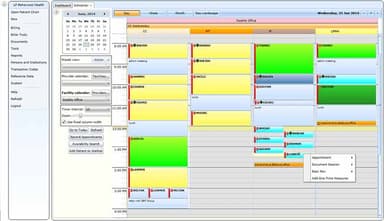
- Schedule the appointment, searching provider availability for one-time or recurring sessions
- Hold individual or group telehealth sessions with billing and attendance workflows connected
- Start the clinical note and open the client's chart from the same screen as the appointment
- Prescribe directly from the clinical note, with PDMP access built into the workflow
- Enable patients to handle forms, updates, and communication themselves through the patient portal
Who Is Valant EHR For?
Valant EHR is designed for behavioral health professionals and practice teams, including:
- Therapy clinicians
- Psychiatry clinicians
- Practice owners
- Billers
- Practice managers
Valant EHR Use Cases
Based on our analysis of Valant EHR's current capabilities, we have identified the following key scenarios where it is well suited:
School District Counseling Programs Managing Paper Documentation
Counselors working across dozens of schools often lose hours each month catching up on paper progress notes, since each document has to be written, printed, signed, and sometimes re-approved before billing can even begin. Valant's customizable clinical documentation lets counselors complete county-approved notes directly in the system, with productivity reports generated automatically instead of compiled by hand.
Solo Behavioral Health Providers Balancing Patient Care And Note-Taking
A solo provider without support staff often has to divide attention between listening to a patient and writing down what's said, a tradeoff that can affect both the session and the time spent documenting afterward. Valant's AI Notes Assist generates clinical notes from the session itself, so the provider can stay focused on the patient rather than splitting attention. For the provider, that means more personal time outside work that would otherwise go to evening and weekend note review.
Multi-State Behavioral Health Practices Managing New Patient Intake
Behavioral health practices operating across multiple states may struggle to manage incoming patient information consistently, particularly when inquiries come from different locations and virtual care services. Valant's prospective patient management allows staff to collect demographic and pre-visit information before creating a patient record. Practices can use these details to organize prospective patient information and prepare for initial appointments.
Growing Mental Health Practices Managing Operations Across Locations
As mental health practices expand across locations and add clinicians, coordinating scheduling, billing, and administrative workflows can become increasingly difficult. Valant's practice management tools help teams manage appointments, billing activities, and performance reporting as operations grow, giving practice administrators greater visibility into activities across the organization.
Is Valant EHR Right For You?
If your practice serves outpatient clients or runs Intensive Outpatient (IOP) and Partial Hospitalization Programs (PHP), Valant may be a good fit. Valant is HIPAA-compliant and holds HITRUST i1 Certification. In 2026, Valant was shortlisted for Best SaaS Product for Healthcare and Life Sciences at the SaaS Awards, advancing to the second round of judging from a global pool of entries.
Still evaluating whether Valant EHR is the right fit for you? Connect with us at (661) 384-7070 if you need help making the right decision.
Valant EHR Features
Integrated Telehealth
Valant EHR lets clinicians launch telehealth sessions from the EHR. Patients join through a portal account, browser, mobile app, or guest link. Sessions support up to 30 participants for groups or family counseling, and permissions control who can use chat, screen share, and whiteboard features.
Intake And Assessment Automation
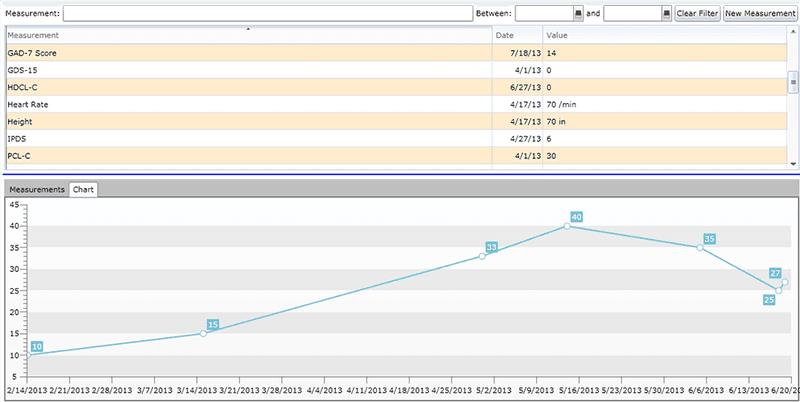
Practices can use Valant to send intake forms and assessments to new patients automatically based on program, provider, or level of care. Staff can choose from numerous outcome measures and schedule ongoing assessments. Completion tracking shows which assessments were sent, started, or completed, so staff see where follow-up is needed.
ePrescribing
Valant's ePrescribing tools can be used by providers to add and update medications and allergies from notes or charts. A secure EPCS portal supports controlled substances, and PDMP integration connects to prescription databases. Providers can also review medication history, receive interaction alerts, track prescription status, and submit prior authorizations.
Prospective Patient Management
Valant EHR provides practices with a way to collect inquiries that capture treatment preferences and insurance details. Patients can request an appointment with a chosen provider. Staff track outreach history, and a matching score compares providers on conditions treated, expertise, and insurances. UTM tracking shows which campaigns bring inquiries.
Revenue Cycle Management
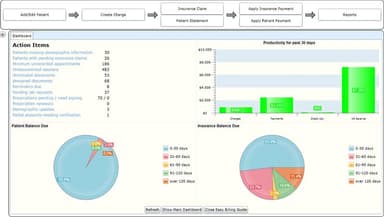
Valant EHR lets practices hand off claim submission to billing specialists, who also manage clearinghouse submissions and monitor claim status. The team addresses denied claims and files appeals when appropriate. Payments are posted, EFT details are updated, and accounts receivable reports show outstanding balances.
Billing Software
The billing tool within Valant helps billing teams run eligibility checks from appointment and payer data. Charge review rules fix errors automatically and flag issues for review. Billing teams can submit 837i institutional claims for IOP/PHP, post payments through ERA processing, and assign the correct Tax ID.
Pros And Cons of Valant EHR
Pros
Helps providers spot missing encounter details with AI notes
Appointment reminders help patients keep visits and maintain care continuity
Staff activity view lets managers monitor team output at a glance
Cons
Lack of provider mobile app limits on-the-go clinical access
Limited manual posting tools slow billing reconciliation
Valant EHR Reviews
Total 299 reviews
4.2
All reviews are from verified customers
Rating Distribution
5
Stars56%
4
Stars22%
3
Stars11%
2
Stars5%
1
Stars6%
Share your experience
Mental Health Care, 1-10 employees
“Fits my needs”
Pros
Built specifically for behavioral health, this software fits the way I work really well. The interface is simple to handle and the AI features have been a big plus. I also appreciate being able to view my patients' other medications and get an estimated cost for prescriptions. It has helped me save a significant amount of time.
Cons
I really don't have any major complaints about it. If I had to point out one downside, it would be the cost since it is a bit on the expensive side.
Rating Distribution
Ease of use
10
Value for money
9
Customer Support
10
Functionality
10
Mental Health Care, 1-10 employees
“essential part of my workflow”
Pros
Being a strong note taker has never been my thing, going all the way back to school. Since opening my private practice, this EHR has been a really valuable part of my workflow for the past five years. The AI has been fantastic at capturing everything discussed, including small details I absolutely would have forgotten to document later. That's going to be especially valuable moving forward, particularly for prior authorizations which used to get held up because they were missing key information needed for approval.
Cons
I wish it had a student version to use alongside PMHNP precepts. There are occasional inconveniences here and there but they usually get addressed quickly.
Rating Distribution
Ease of use
10
Value for money
10
Customer Support
10
Functionality
10
Medical Practice, 500+ employees
“Reasonably priced”
Pros
Its a very versatile system. The pricing is very reasonable so it feels like a solid value for the money. Customer support has also been helpful whenever I've needed assistance. I don't handle billing or payments so I can't really speak to that side of the product. I also really appreciate how secure the system is when it comes to storing sensitive information.
Cons
Honestly I don't have a specific least favorite part of it. It's user-friendly and the layout gives me the flexibility to be as detailed as I need to be.
Rating Distribution
Ease of use
10
Value for money
10
Customer Support
10
Functionality
10
Frequently Asked Questions
Is Valant EHR easy to use?
User feedback on Valant EHR's usability shows that clinicians describe the interface as clunky and slow, with navigation and documentation taking more time than expected. Front-desk staff also report that scheduling appointments can take longer because of the way charts are organized.
How is Valant EHR's customer support?
Customer support feedback is mixed, with some users describing unresolved tickets and delayed callbacks. Other users report more positive experiences. Buyers should review the vendor's support channels, expected response times, and escalation processes. Currently, Valant EHR offers support through phone, email, and chatbot.
What problems occur during data migration?
Some users report missing data after switching to Valant, with billing work delayed as a result. Buyers moving from another EHR should ask how Valant handles data conversion, what information transfers, and how missing or mismatched records are addressed.
What questions to ask during a Valant EHR demo?
Buyers should ask questions about and test the workflows they use most frequently rather than relying only on a general product tour. User feedback specifically highlights the importance of checking areas such as lab results, e-prescribing history, recurring assessments, scheduling, and how imported information appears in patient charts.
Does Valant EHR sync with Google Calendar?
Yes, Valant EHR can sync with Google Calendar.