


VSee

Last Updated
Key Takeaways
Generated from the text of customer reviews
VSee is telemedicine platform with users ranging from solo practices to federal health agencies. Users rate video quality and ease of use highly, though some report that patients find the app download requirement cumbersome. Recent updates include VSee Messenger 4.29, which adds the ability to edit sent messages, reply in threads, bookmark key information, and copy links to specific messages.
Our Verdict
VSee fits government-funded programs, rural health organizations, and multi-site health systems that need a compliance-ready, configurable telemedicine platform. Its free tier works for solo practitioners, though capabilities like AI notes, RPM, and white-label branding require Enterprise pricing with a custom quote. We recommend it specifically for federal agencies and rural providers navigating FedRAMP and CMS grant requirements.
Overall Rating
Based on 70 users reviews
4.1
Rating Distribution
Positive
77%
Neutral
17%
Negative
6%
Starting Price
$29
per month per provider
VSee Specifications
- Appointment Management/Scheduling
- e-Prescriptions
- Patient Portal
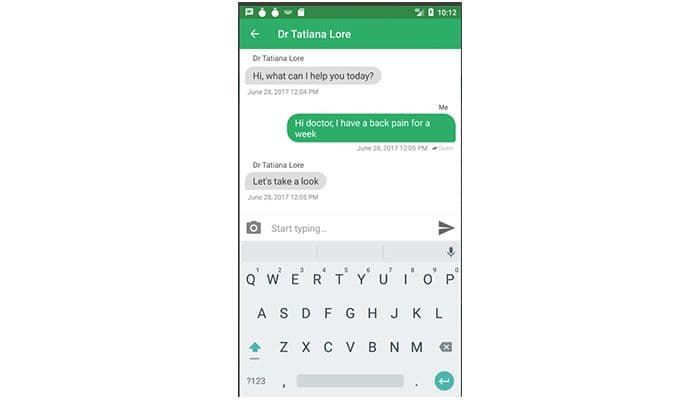
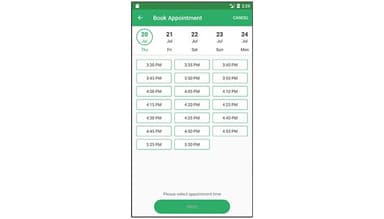
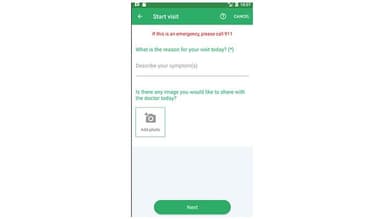
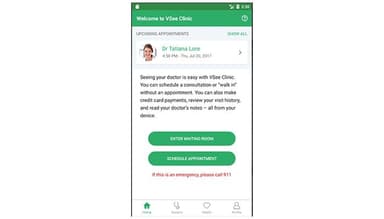
- Mobile App
What Is VSee?
VSee is a telehealth software that enables healthcare providers to conduct virtual visits, communicate with patients, and manage remote care interactions. It delivers video visits, remote patient monitoring, AI-generated clinical notes, patient intake, and EHR integration — all in a modular setup organizations can configure for different workflows. It also supports customizable workflows, scheduling, clinical documentation, patient engagement, and revenue cycle management.
What Is VSee Best For?
A notable strength of VSee is its suitability for federal healthcare programs handling high-impact health data. The platform holds a FedRAMP High ATO issued by HHS ASPR, allowing it to support telehealth deployments that must meet stringent federal cloud security requirements. This makes VSee particularly relevant for government healthcare organizations that need virtual care capabilities within a FedRAMP High-authorized environment.
How Much Does VSee Cost?
VSee pricing starts at $29/month/provider for the Plus plan. The platform also offers a 14-day Plus trial for eligible Free Clinic users, while Enterprise VSee Clinic provides limited-time trials for certain features. Other plans include:
- Free: $0/month/provider
- Plus: $29/month/provider
- Premium: $49/month/provider ($200 one-time setup fee)
- Enterprise: Custom pricing
Beyond the subscription, estimated additional costs may include:
- Implementation/Setup: Organizations should budget around $200–$10,000+ for implementation, depending on deployment complexity and customization requirements
- Additional Provider/Staff Seats: Organizations should budget around $29–$49+/provider/month for additional providers or staff, with Enterprise pricing depending on the agreement
- EHR/EMR Integration: Organizations should budget around $5,000–$30,000+/integration, depending on the EHR system and integration complexity
VSee pricing feedback is mixed, with some providers finding VSee affordable for regular use, while others consider the cost higher after upgrading. Several users indicate that the price feels manageable at their current level, but higher-tier costs can become a concern depending on usage and plan requirements.
Disclaimer: The pricing is subject to change.
VSee Integrations
The platform integrates with multiple tools, including:
How Does VSee Work?
Here's how you can access VSee and start delivering virtual care:
- Log in with your provider credentials through VSee Clinic or supported VSee application
- Configure your branded waiting room, intake forms, consent requirements, and eligibility verification settings
- Invite patients through email or SMS and have them complete required intake information
- Review patient intake details, eligibility results, and payment information, depending on the configured workflow, before the visit
- Conduct video visits with one-on-one or group sessions with options for device connectivity, annotation tools, and interpreter or family-member participation
- Generate AI Doctor Notes in supported formats, then review and finalize the documentation
- Monitor remote patients through connected devices and review available monitoring alerts and patient data
- Manage scheduling, user access, payments, reports, and analytics through administrative tools
Who Is VSee For?
The platform caters to the following specialties:
- Mental health
- Dentistry
- Primary care
- Dermatology
- Concierge medicine
- Pediatrics
- Physical therapy
- Internal medicine
- Psychiatry (ER)
VSee Use Cases
Based on our analysis of VSee features and user feedback, we have identified several scenarios where the platform fits best:
Clinicians Spending Significant Time On Post-Visit Documentation
Back-to-back video visits leave providers with little time between sessions to document care accurately. VSee’s AI Doctor Notes captures visit audio and generates structured clinical notes in formats such as SOAP, DAP, or BIRP that providers review and adjust rather than dictate from scratch. Practices can also customize note templates for different visit types and integrate them into existing workflows. This can reduce the documentation work left after back-to-back visits, allowing clinicians to review generated notes instead of creating them from scratch once appointments end.
Mental Health Practices Simplifying Virtual Visit Access And Check-In
Mental health practices may need to accommodate patients who have difficulty attending scheduled sessions in person or navigating complex telehealth setups. VSee lets providers share a clinic web link that patients can use to enter a personalized waiting room without downloading software or creating an account. Providers can monitor patients as they move from Getting Ready to Ready for Visits and In Progress in the Waiting Room Dashboard, while the Plus plan adds SMS/email invitations and reminders. This helps practices reduce barriers to joining virtual sessions while giving staff visibility into each patient’s progress from check-in through the visit.
Rural Hospitals With Limited On-Site Specialist Coverage
Rural and critical access hospitals may have limited access to on-site specialists for stroke response, wound care, ICU coverage, and behavioral health. VSee’s telemedicine and remote consultation tools connect care teams with off-site specialists for inpatient, emergency, and specialty consultations, supporting clinical decision-making and potentially reducing avoidable transfers.
Health Systems Monitoring Patients With Chronic Conditions Between Clinic Visits
Patients managing diabetes, hypertension, or heart failure need ongoing oversight, but in-person check-ins between scheduled appointments are difficult to scale. VSee's remote patient monitoring module connects patients to supported devices — glucometers, blood pressure cuffs, pulse oximeters — and routes readings to providers organized by alert level. Providers can review patient data and start a video visit or schedule an appointment directly from the patient profile when follow-up is needed.
Is VSee Right For You?
If your organization needs virtual care that scales across sites, specialties, or regulatory environments, VSee's modular platform can support. FedRAMP High ATO from HHS supports its use in federal healthcare environments handling sensitive data. VSee also has SOC 2 Type II certification and supports HIPAA-compliant workflows through BAAs. The platform is used across settings ranging from FQHCs to large health systems and clinical research programs, including Novant Health’s 50+ clinics and an NIH-funded Phase 3 stroke rehabilitation trial at UCLA.
Still not sure about VSee? Contact us at (661) 384-7070 and we can help you make an informed decision.
VSee Features
AI Doctor Notes
AI Doctor Notes captures visit transcriptions and generates structured clinical notes in formats such as SOAP, DAP, and BIRP. Providers can customize note templates for different visit types and review, edit, and sign the generated notes before saving them. VSee also provides an AI SOAP Notes workflow that converts recorded call transcriptions into SOAP documentation.
Remote Patient Monitoring
Remote Patient Monitoring connects medical and wellness devices, including blood pressure cuffs, digital scales, glucometers, and pulse oximeters. Providers can view patients by alert level, set risk ranges and alerts, review collected data, and email, message, call, start a video visit, or schedule an appointment directly from the patient profile.
Video Visits
Video Visits support one-on-one and group sessions, with options to add family members, interpreters, and other care team members. Providers can also share and annotate images, documents, and websites during visits and stream supported healthcare devices such as digital otoscopes and dermatoscopes.
Appointment Scheduling
Appointment Scheduling supports 1-to-1, group, and multi-provider appointments. Users can allow patients to self-schedule follow-up visits and configure automated email and SMS reminders. A shared calendar helps coordinate provider availability, scheduled visits, and walk-in appointment slots.
SOAP Notes With Prompts
VSee’s SOAP Notes provide structured sections with prompts for documenting patient encounters. Clinicians can use the prompts within each SOAP section when creating visit notes, helping structure documentation around the key elements of a patient encounter. The updated functionality is available under the existing Notes tab for users with SOAP Notes enabled. The feature can be enabled through the VSee Clinic account manager.
On-Call Scheduling
VSee’s On-Call Schedule lets clinics assign individual clinicians or clinician groups to designated on-call slots. Clinics can automatically open or close walk-in access based on scheduled coverage. The feature also sends alerts to assigned clinicians and supports custom alert groups with an escalation order when a walk-in visit remains unanswered.
Pros And Cons of VSee
Pros
Delivers secure HIPAA-compliant internal staff communication
Provides specialized security built for clinical conversations
Ensures patient data stays safe during remote consultations
Cons
Audio and video connections might experience lag
Screen sharing could temporarily interrupt camera feeds
VSee Pricing
Free | Plus | Premium | Enterprise |
|---|---|---|---|
$0 per month per provider | $29 per month per provider | $49 per month per provider | Custom Pricing |
|
|
|
|
Disclaimer: The pricing details were last updated on Sep 25, 2026 from the vendor's website. Please contact us for a tailored pricing list.
VSee Reviews
Total 70 reviews
4.1
All reviews are from verified customers
Rating Distribution
5
Stars47%
4
Stars30%
3
Stars14%
2
Stars3%
1
Stars6%
Share your experience
Mental Health Care, 1-10 employees
Less than 6 months
“Love using this platform”
Pros
The waiting room is fantastic. Also the video is dependable.
Cons
The only trouble I am facing is that I couldn't find a feature to input my appointment times.
Rating Distribution
Ease of use
10
Value for money
10
Customer Support
9
Functionality
10
Medical Practice, 1-10 employees
More than a year
“Fantastic product”
Pros
I used this software in the medical field during and after the pandemic. It was the most simplest product I came across and the providers were extremely happy with it.
Cons
Honestly there is nothing bad to say. It is the best telemedicine product I have come across, and I highly recommend it to anyone.
Rating Distribution
Ease of use
10
Value for money
10
Customer Support
10
Functionality
10
Medical Practice, 1-10 employees
Less than 6 months
“Reliable for virtual doctor appointments”
Pros
I like the fact that I can consult with my doctor without having to visit their office and have the appointment from the comfort of my home. It is like a house call.
Cons
I must admit it was a bit confusing to figure out how to use it for the first time as well as downloading the software.
Rating Distribution
Ease of use
7
Value for money
7
Customer Support
7
Functionality
7
Frequently Asked Questions
Who are the typical users of VSee?
VSee is used by professionals working in mental health, dentistry, primary care, dermatology, concierge medicine, pediatrics, physical therapy, internal medicine, and psychiatry (ER).
Does VSee have a mobile app?
Yes. VSee offers mobile apps for iOS/iPadOS and Android, including VSee Clinic and VSee Messenger.
What level of support does VSee offer?
VSee offers support that varies by plan. Free includes a knowledge base and email support, while Premium adds live chat and phone support. Enterprise includes a dedicated phone support line, with additional support resources available through VSee’s Helpdesk. It also offers a ticketing system.
How much does VSee cost?
VSee software pricing starts at $29/month/provider with the Plus plan. The platform also offers a 14-day Plus trial for eligible Free Clinic users, while Enterprise VSee Clinic provides limited-time trials for certain features. Other plans include Free at $0/month/provider, Premium at $49/month/provider, and Enterprise with custom pricing. Get in touch with us for a personalized VSee cost estimate.
What language does VSee support?
VSee supports English, Simplified Chinese, Traditional Chinese, and Spanish, with additional language support including Arabic, Filipino, French, Korean, Portuguese, and Vietnamese.
Does VSee offer an API?
Yes. VSee offers APIs and SDKs that developers can use to build telehealth applications and integrate features such as video visits, chat, scheduling, patient engagement, device connectivity, and clinical workflows.
What other apps does VSee integrate with?
VSee integrates with multiple tools, including Epic, athenahealth, Oracle GovCloud, Azure Data Catalog, PointClickCare, NextGen Enterprise EHR, and Oracle Health.