Last Updated

Key Takeaways

Generated from the text of customer reviews

ZenMaid is a business management and scheduling solution designed around the needs of residential cleaning companies. Maid service owners and office staff are its main users. Reviews often mention its cleaning-focused design, simple interface, and responsive support. Some users have reported occasional app slowdowns, gaps in automation, and restrictions when changing recurring bookings. ZenMaid has recently introduced Zoe, an AI assistant built for cleaning businesses and available through a preview waitlist.

Our Verdict

The tool is designed for small and mid-sized residential cleaning businesses with recurring appointments and staff schedules. Its workflow is centered on maid service operations rather than the wider needs of general field-service companies. Smaller teams may find the pricing easier to manage, although the total cost increases as more users are added. The software covers cleaning schedules and related business tasks without trying to serve as a broader field-service system.

ZenMaid Specifications

  • Scheduling & Dispatching
  • Mobile Access
  • Customer Management
  • Invoicing & Billing

What Is ZenMaid?

ZenMaid is a scheduling and business management software made for residential maid services. Cleaning companies can use a shared schedule to arrange recurring appointments and assign jobs to cleaners. Clients can receive updates about their appointments, while cleaners can view their assigned jobs through the mobile app. ZenMaid also includes online booking and payment collection, bringing these parts of the cleaning service into one system.

What Is ZenMaid Best For?

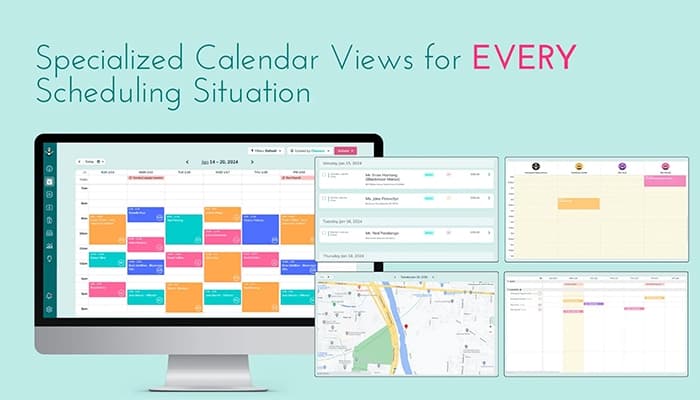
ZenMaid is best for its cleaning-focused scheduling system. Residential cleaning companies can use it to arrange recurring appointments, assign jobs to cleaners, and make changes to schedules from one place. The calendar supports drag-and-drop changes along with multiple viewing options. Automated reminders keep clients and cleaners updated once appointments are scheduled.

How Much Does ZenMaid Cost?

ZenMaid pricing starts at $19/month for the Starter plan, which supports up to 40 appointments/month. All plans offer 14 free trial. Other plans include:

  • ZenMaid Pro: $39/month
  • ZenMaid Pro Max: $49/month

In addition to ZenMaid's base plans, the following costs may apply:

  • SMS Usage: Around $0.01–$0.05/SMS. The exact rate depends on the message type, destination, and volume
  • Payment Processing: Stripe or Square fees are charged separately. In the U.S., these are typically around 2.9% + $0.30 per transaction.
  • Data Migration: $0 for standard client and calendar imports. ZenMaid states that this service is included at no extra charge
  • Training/Optimization: $0 for the 1:1 optimization call included with Pro and Pro Max. Additional consulting beyond the included support could cost around $500–$2,000+
Request a personalized ZenMaid price quote for your business!

Disclaimer: The pricing is subject to change.

ZenMaid Integrations

ZenMaid has integration arrangements with other apps, including:  

How Does ZenMaid Work?

Here’s how cleaning businesses can get started with ZenMaid and organize their day-to-day scheduling:

  • Sign in to your ZenMaid account with your login details
  • Upload your current client list and let ZenMaid organize the information for you
  • Add cleaning appointments using the drag-and-drop calendar and assign each job to the right team member
  • Turn on automatic confirmations, reminders, and arrival updates to keep both clients and cleaners informed
  • Add the instant booking form to your website or share its direct link so customers can request services online
  • Handle invoices and payments through Stripe or Square while keeping payment history and reminders organized in ZenMaid
  • Provide cleaners with access to the mobile app, where they can check their schedules, clock in and out, and leave notes
Get a free ZenMaid demo to see how its scheduling and cleaning business management tools fit into a typical workflow.

Who Is ZenMaid For?

ZenMaid is designed for the following industries and services:

  • Residential cleaning companies
  • Maid service businesses
  • House cleaning companies
  • Commercial cleaning businesses
  • Cleaning service franchises

ZenMaid Use Cases

Based on our review of ZenMaid's capabilities, we’ve identified several situations where this software can be a good fit for residential cleaning businesses:

1. Solo Cleaners Moving From Paper Schedules To Digital Booking

This particularly suits independent cleaners who are moving away from notebooks, spreadsheets, or Google Calendar as their appointment volume increases. ZenMaid fits this transition because its scheduling process is designed around cleaning appointments rather than generic calendar events. The software provides a clearer way to manage bookings as the business grows.

2. Maid Services Managing Weekly And Biweekly Recurring Jobs

Cleaning companies with several staff members have to keep customer appointments in line with each cleaner’s work schedule. Different hours and planned days off can make this difficult, especially with recurring jobs. ZenMaid lets managers check cleaner availability and time off while viewing customer appointments. They can see who is free before assigning a job and avoid double bookings.

3. Cleaning Companies Coordinating Office Schedulers And Field Cleaners

Once a cleaning company grows, the person assigning jobs may no longer be the person completing them. Office staff can coordinate cleaner assignments while field staff check their own upcoming work through the ZenMaid mobile app, keeping information about daily assignments accessible to both sides.

4. Maid Services Adjusting Schedules Around Cleaner Availability

This becomes important when several cleaners have different working days, planned time off, or changing availability. ZenMaid's newer availability and PTO tracking gives managers information they can use when assigning recurring jobs. Keeping cleaner schedules alongside customer appointments also makes it easier to account for staff availability when planning the schedule.

5. Cleaning Businesses Turning Website Visitors Into Bookings

For companies receiving a steady flow of cleaning inquiries, collecting customer details and arranging appointments can take up considerable office time. ZenMaid's online booking form lets prospective customers submit service information through a website or direct link, providing a booking process geared toward cleaning services instead of relying entirely on phone calls, emails, or a general appointment form.

Is ZenMaid Right For You?

ZenMaid is best suited to residential cleaning businesses that are moving beyond owner-managed operations. It serves companies ranging from solo operators to teams with up to 100 cleaners. Customer payment data is processed through Stripe or Square, so card information is handled by those payment providers rather than stored on ZenMaid’s servers. For cleaning companies planning for growth, ZenMaid is worth considering when scalability, cleaning-specific workflows, and payment security are key requirements.

Still unsure whether ZenMaid is a good fit for your business? Call (661) 384-7070 to discuss your requirements and get help evaluating your options. 

ZenMaid Features

Employee Management

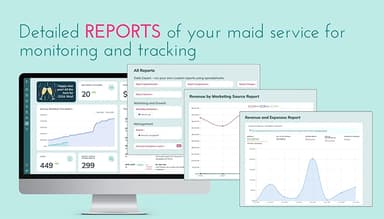
ZenMaid stores cleaner records along with their availability, PTO, and pay details. A manager can view a cleaner's availability when assigning work and use GPS clock-ins to record the time spent on a job. Payroll reports can be viewed by cleaner or by job. The system supports hourly pay, per-job pay, and percentage-based pay.

See How It Works
Automated Client And Cleaner Communications

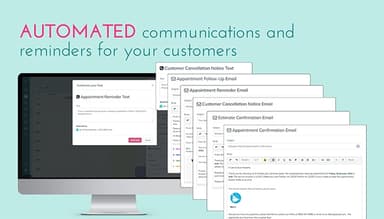
Appointment updates can be sent to customers and cleaners by email or SMS. These include confirmations, reminders, and on-the-way messages. Once the appointment is scheduled, the related notifications can be handled through the system rather than being sent manually each time.

See How It Works
Online Booking And Quoting

Businesses can place an instant booking form on their website or share it directly with potential customers. The customer can enter the details of the cleaning they need and choose from the options the business has made available. The form can also reflect the company's services, pricing, and appointment availability.

See How It Works
Cleaner Mobile App

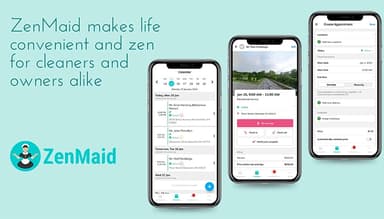
Cleaners can open their assigned jobs from the mobile app while working in the field. Client information is available there as well. They can clock in and out, add notes or photos, complete job checklists, and update the status of an appointment.

See How It Works
Invoicing And Payment Processing

After a cleaning job, the appointment can be used to create an invoice. The system keeps track of what has been billed, what remains unpaid, and previous payments. Stripe and Square can handle card payments, while cash and check payments can be entered into the records.

See How It Works
Cleaner Availability And PTO Tracking

Cleaner availability is shown alongside the appointment schedule. Managers can see when someone is working and when they have time off before assigning a job. Planned PTO can also be taken into account when recurring appointments need to be scheduled or reassigned.

See How It Works

Pros And Cons of ZenMaid

Pros

  • Cleaning-specific workflows suit the daily needs of maid services

  • The interface keeps routine tasks relatively easy to navigate

  • Regular updates add changes requested by cleaning business owners

  • The system can accommodate different cleaner pay arrangements

  • Pricing offers reasonable value for smaller cleaning operations

Cons

  • Accounting functions may not cover every local business requirement

  • Automated message templates have limits for specialized communication needs

  • Some workflows require configuration before they fit specific business processes

ZenMaid Pricing

ZenMaid Starter

eye

View Price

What's Included

  • Up to 40 appointments per month

  • Calendar, dispatch, and map scheduling

  • Limited SMS and email templates

  • Mobile app without GPS tracking

  • Cleaner SOS alerts

  • Stripe and Square payments with invoicing

  • Chat-only support

ZenMaid Pro

eye

View Price

What's Included

  • Unlimited appointments

  • Digital appointment checklists

  • Cleaner GPS tracking

  • Website booking forms with ZenMaid branding

  • Expanded SMS and email templates

  • Payroll and reporting

  • Spotfinder for recurring customer scheduling

  • Includes all Starter features

ZenMaid Pro Max

eye

View Price

What's Included

  • Cleaner availability and PTO tracking

  • Customer service ratings

  • All automated SMS and email templates

  • Business data export

  • Mailchimp and Zapier integrations

  • Branded booking forms

  • Priority support

  • Unlimited appointments

  • Includes all Starter and Pro features

Disclaimer: The pricing details were last updated on Aug 03, 2026 from the vendor's website. Please contact us for a tailored pricing list.

ZenMaid Reviews

Total 192 reviews

4.7

All reviews are from verified customers

Rating Distribution

5

Stars

79%

4

Stars

16%

3

Stars

3%

2

Stars

1%

1

Stars

2%

Share your experience

SD

Stefan D.

Hospital & Health Care, 1-10 employees

5.0
December 2025

Helps us assign tasks

Pros

We're thrilled with ZenMaid because its booking and revenue tracking for our business works brilliantly and we can color-code teams to see how many jobs each has scheduled that day. So when a new lead rings, we can instantly tell which team has capacity to squeeze in one more appointment.

Cons

When we're dispatching cleaners to jobs, a built-in feature that assigns cleaners to each job would speed things up because we publish shifts every week. Also bulk invoicing and bulk dispatching would save us a lot of time.

Rating Distribution

Ease of use

10

Value for money

10

Customer Support

10

Functionality

9

LD

Liz D.

Clinic, 11-50 employees

5.0
December 2025

Always open to suggestions!

Pros

I really appreciate that the software is tailored specifically to the cleaning business industry! They constantly roll out new features and are open to suggestions for improvements or additions. Their customer support is absolutely incredible and they provide personalized support!

Cons

When I first started using ZenMaid around three years ago, a few features I needed weren't available but they've since introduced those missing capabilities.

Rating Distribution

Ease of use

10

Value for money

10

Customer Support

10

Functionality

10

MH

Michael H.

Chemicals, 11-50 employees

5.0
November 2025

Helps me with scheduling

Pros

Its very easy to figure out and learn. For me, managing clients and the schedule is crucial. You can't grow without a solid client management system. If you skip one you'll not grow.

Cons

I do notice glitches sometimes but every piece of software we rely on has hiccups now and then so it's basically unavoidable. We would love an AI assistant for different tasks.

Rating Distribution

Ease of use

10

Value for money

9

Customer Support

10

Functionality

9

Frequently Asked Questions

Does ZenMaid offer an API?

No. ZenMaid does not currently offer an API.

Does ZenMaid have a mobile app?

Yes. ZenMaid has a mobile app available for Android and iOS.

What language does ZenMaid support?

ZenMaid is available in English, Portugese, and Spanish.

What types of pricing plans does ZenMaid offer?

ZenMaid pricing starts at $19/month for the Starter plan, which includes up to 40 appointments per month and a 14-day trial. The Pro plan costs $39/month, while the Pro Max plan costs $49/month. Businesses can also request a tailored ZenMaid cost quote.

What other apps does ZenMaid integrate with?

ZenMaid integrates with Salesforce, ActiveCampaign, Mailchimp, HubSpot, QuickBooks Online, Zoho CRM, and FreshBooks.

Who are the typical users of ZenMaid?

ZenMaid is mainly used by maid service owners and cleaning business operators. It is particularly suited to small and medium-sized cleaning companies.

What level of support does ZenMaid offer?

Support is available through email, Help center, and ZenMaid's knowledge base.