


Xakia
Last Updated
Overview
Xakia software simplifies legal workflow, matter management, and collaboration with a powerful yet affordable platform for in-house legal teams of all sizes. While some users find features like user management and client portal login, less intuitive, real-time dashboards and ready-to-use reports deliver valuable insights.
Xakia Specifications
- Case Management
- Document Management
- Client Management (CRM)
- Billing & Invoicing
Xakia Features
Legal Matter Management
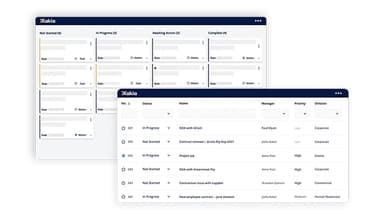
Xakia streamlines legal matter management workflows by capturing matters directly from the inbox and organizing them into a structured dashboard. It tracks work in progress, assigned team members, deadlines, priority levels, and strategic impact.
Legal Intake &Triage
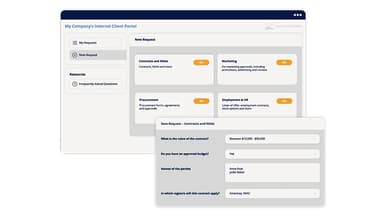
The software offers a powerful legal intake and triage system that simplifies request submissions with a centralized portal, automated workflows, and self-service tools. It enables seamless collaboration, automates document generation, and provides quick access to FAQs for improved efficiency and accuracy.
Legal Spend Management
Xakia's legal spend management solution centralizes budgeting and expense tracking for corporate Legal Departments. It streamlines invoice processing, enforces billing guidelines, provides real-time financial insights, and enhances cost control through interactive dashboards and detailed analytics.
Legal Contract Management
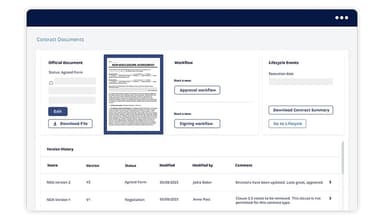
The contract lifecycle management system centralizes contract storage, streamlines drafting with templates, and automates approval workflows. It tracks negotiation highlights, ensures version control, and monitors approval status for efficient contract finalization and renewal management.
Dashboards & Reports
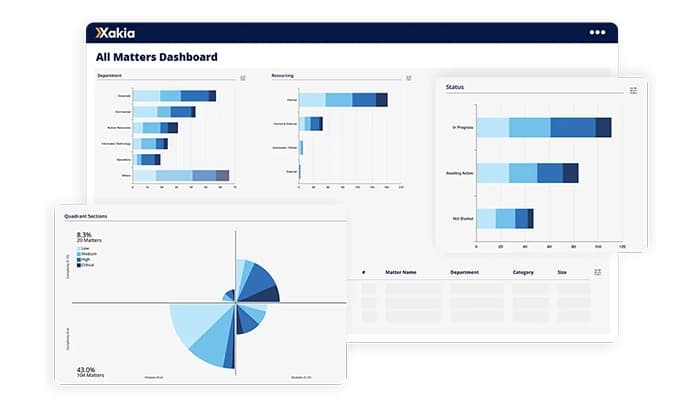
The platform provides real-time insights through interactive dashboards and automated reports. It tracks work volume, resource allocation, legal spending, and strategic priorities, enabling corporate Legal Departments to optimize efficiency and showcase their impact with data-driven decisions.
Xakia Reviews
Total 17 reviews
4.8
All reviews are from verified customers
Rating Distribution
5
Stars76%
4
Stars24%
3
Stars0%
2
Stars0%
1
Stars0%
Share your experience
Law Practice, 1-10 employees
More than a year
“Very interactive!”
Pros
It is really interactive and efficient, and managing and tracking matters feels practically easy. It has helped align our workflows and provided far greater visibility across all of our matters, which has been a huge advantage for our team. On top of that, I have to highlight our account manager, she is unfailingly helpful, very responsive and always ready to jump in with answers or training whenever we need it. Her proactive help and genuine dedication to making sure we fully benefit from Xakia have made our overall experience noticeably better.
Cons
I don't have any negatives to report.
Rating Distribution
Ease of use
10
Value for money
10
Customer Support
10
Functionality
10
Law Practice, 1-10 employees
More than a year
“smooth plugin with great reports”
Pros
Using the Outlook Classic (M365) plugin lets me create matters smoothly right from my inbox, and I find the reporting analytics excellent and really easy to use.
Cons
Honestly, my only complaint is that there isn't anything about it I dislike, I just wish a lot more people would recognize and adopt the advantages this system offers.
Rating Distribution
Ease of use
9
Value for money
9
Customer Support
9
Functionality
9
Law Practice, 11-50 employees
More than a year
“Real-time insights for legal operations teams”
Pros
As a legal operations professional, I can access real-time, objective insights about the work my legal team is handling which helps me make data-driven choices about how tasks are distributed, what to prioritise and where to apply technology to cut down on manual effort.
Cons
I've noticed it can be challenging to achieve consistent adoption, usage and engagement across larger teams, which leads to patchy, inconsistent data. Also even though I believe it is top-tier for matter management, its document workflow and automation features feel less mature and connecting it to other systems isn't simple (and from my perspective, that's not a problem unique to Xakia).
Rating Distribution
Ease of use
9
Value for money
7
Customer Support
9
Functionality
7
Frequently Asked Questions
Does Xakia have a mobile app?
Xakia does not offer a dedicated mobile application.
What other apps does Xakia integrate with?
Xakia integrates seamlessly with various third-party applications, including Microsoft Teams, SharePoint, Brightflag, Salesforce, iManage, Okta, Slack, Checkbox, Ironclad, Gmail, Microsoft Outlook, Neota, Josef, and Azure Active Directory.
What level of support does Xakia offer?
Xakia provides support through 24/7 live representatives, phone assistance, an email help desk, live chat, a comprehensive knowledge base, FAQs, and community forums.
What types of pricing plans does Xakia offer?
Xakia provides a flexible and cost-effective pricing structure tailored for teams of all sizes, from 2 to 200, with plans including Advance at $95/user/month, Professional at $115/user/month, and Enterprise at $155/user/month. Users can request a detailed Xakia cost analysis.
Does Xakia offer an API?
Xakia offers API access.
Who are the typical users of Xakia?
Xakia supports in-house legal teams of any size, from small legal departments to large corporate legal divisions.
What language does Xakia support?
Xakia supports multiple languages, including English, Japanese, Spanish, French, Danish, Dutch, and Brazilian Portuguese.