


Axonify
Last Updated
Key Takeaways
Generated from the text of customer reviews
Axonify is a frontline training and enablement platform used in retail, grocery, hospitality, and logistics. Although some admins report a learning curve and time-consuming content setup without bulk uploads, users praise its ease of use and daily gamified microlearning. In 2026, the platform added ‘Max Coach’ to its training arsenal, giving users a role-play tool to practice difficult conversations by voice with an artificial intelligence (AI) model.
Our Verdict
The platform suits mid to large-sized organizations with a heavy frontline or deskless workforce across multiple locations. Pricing is quote-based and depends on team size, locations, and features, which makes it harder for smaller teams to compare costs upfront. We recommend it for organizations that want daily microlearning, communications, and task management in one platform, rather than a traditional course-based LMS.
Overall Rating
Based on 87 users reviews
4.7
Rating Distribution
Positive
98%
Neutral
2%
Negative
0%
Starting Price
Custom pricing
Axonify Specifications
- Activity Dashboard
- Activity Tracking
- Collaboration Tools
- Asynchronous Learning
What Is Axonify?
Axonify is a cloud-based frontline enablement platform designed to help organizations train, support, and communicate with frontline employees. It combines immersive microlearning, reporting, and AI-powered guidance to deliver personalized training sessions. The platform also brings workplace communications and task management into one place. This helps teams stay informed and on the same page about their daily work.
Additionally, its analytics and readiness tools provide insights into employee knowledge, confidence, and operational needs. This allows managers and training teams to identify potential skill gaps and act before they affect frontline performance.
What Is Axonify Best For?
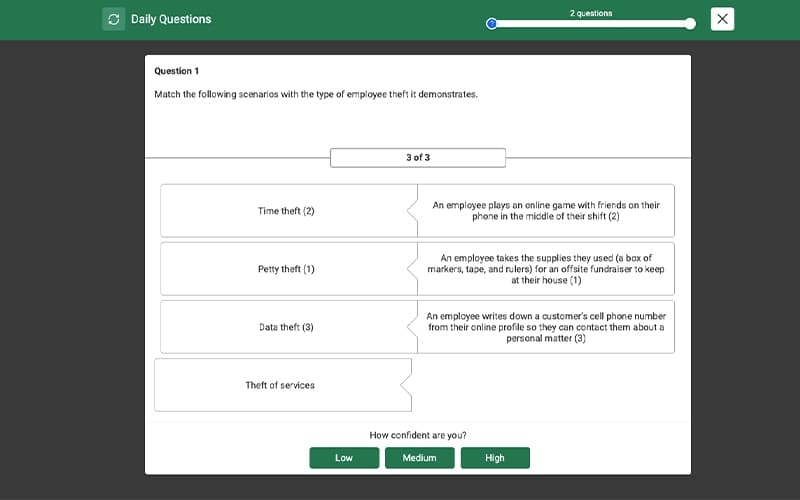
Axonify is best known for its ‘Max Coach’ for frontline employee coaching and skill development. Employees practice real-world scenarios by voice through AI roleplay and receive a scored evaluation with feedback after each session. Admins create scenarios and assign them to specific groups, so employees can practice on their own without live coaching. This suits organizations preparing frontline staff for customer interactions and other high-stakes conversations. Max Coach is available in the Pro and Premium packages.
How Much Does Axonify Cost?
Axonify pricing is estimated to start at $10/user/month for its basic plan. The platform publishes three pricing tiers on its official website without mentioning any starting figures though. The final quote depends on your team size, locations, and the features you need. The three plans are as follows:
- Core Plan: Custom pricing
- Pro Plan: Custom pricing
- Premium Plan: Custom pricing
Other than the base subscription cost, buyers should also account for the following factors when budgeting for an LMS like Axonify:
- Implementation / Setup: $5,000–$25,000, with complex enterprise rollouts potentially exceeding $50,000
- Data Migration: $1,000–$20,000, or $0 if starting without legacy data
- Training And Onboarding: $500–$5,000
- Premium Support (SmartStart Advantage): $3,000–$10,000+ per year
- Content Creation: $5,000–$50,000+ if content development is outsourced
- Third-party Integrations: $2,000–$25,000 per integration, plus ongoing maintenance
Users generally place Axonify on the high end of the general LMS pricing spectrum. While many of them often consider its feature set and return on investment (ROI) to justify the cost, the platform may still be better suited to organizations with sufficient budget for a premium learning and enablement solution.
Disclaimer: Pricing references are based on publicly available third-party information and industry benchmarks. Actual costs may vary.
Axonify Integrations
The platform supports integrations with popular HR, workforce management, communication, and enterprise platforms, including:
- Workday Enterprise Resource Planning (ERP) Tool
- Zebra
- SAP SuccessFactors HCM
- Microsoft Teams
- UKG
- OpenSesame
How Does Axonify Work?
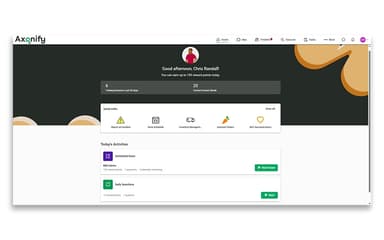
Once you have logged in, you can navigate the dashboard and make use of the Axonify LMS features with the following step-by-step guide:
- Configure the platform based on your organization’s workforce, roles, and training requirements
- Add employees by importing their information or connecting with existing workforce systems
- Create training content using AI-powered tools or select courses from Axonify’s content marketplace
- Deliver personalized microlearning based on employees’ roles, knowledge, and training needs
- Assign AI roleplay scenarios so employees can practice real-world conversations
- Share communications, tasks, and AI guidance with employees during their daily work
- Monitor employee knowledge, confidence, and readiness through analytics and AI-powered recommendations
- Provide targeted training and support where gaps appear
Who Is Axonify For?
The software is designed for organizations with large frontline workforces, particularly those in:
- Retail
- Grocery
- Hospitality
- Fast food and beverages
- Logistics
Axonify Use Cases
Based on our analysis of user reviews and Axonify’s features, the platform fits several common training needs, including:
1. Retail And Frontline Teams Building Product And Service Knowledge
Store associates, cashiers, and other frontline employees often have limited time for lengthy training. Axonify uses short, mobile-friendly microlearning to deliver training based on what employees already know and revisit areas where they need more reinforcement. Its Content Marketplace provides access to 900+ microlearning topics covering frontline roles. As a result, retailers, restaurants, and contact centers can keep product and service knowledge consistent across multiple locations.
2. Regulated And High-Risk Workplaces Reinforcing Safety And Compliance
Employees in retail, logistics, and other safety-sensitive workplaces need to retain important policies and procedures beyond initial training. Axonify uses AI-powered reinforcement to bring key safety and compliance topics back to employees at regular intervals. Its analytics also help teams identify knowledge gaps and see where additional training may be needed. This gives compliance and safety teams the information they need to plan follow-up training.
3. High-Turnover Teams Onboarding New Hires Quickly
Organizations that regularly hire seasonal or frontline workers need to get new employees up to speed without taking them away from their daily work for long periods. Axonify supports onboarding and early skills development through short daily learning sessions that fit around employees’ schedules. Gamification features, including points, leaderboards, and rewards, can also encourage participation. For HR and L&D teams looking to support faster onboarding and time-to-productivity, this makes the platform relevant and useful.
4. Distributed Deskless Teams Receiving Operational Updates
Warehouse, store, and restaurant employees may not have regular access to a desktop computer, making it harder to deliver company-wide updates. Axonify combines learning with two-way communication and feedback, allowing operations and corporate teams to share product launches, policy changes, and process updates within the employee experience. Managers can also track whether employees received the information and collect feedback from them. Companies with large, distributed frontline teams can rely on it to keep everyone informed.
Is Axonify Right For You?
Axonify may be a suitable choice if your organization needs to train and keep large frontline teams up to date across multiple locations. It brings learning, reinforcement, and employee communication into one platform. This combination can be useful for retailers, restaurant and hospitality groups, contact centers, and telecom or financial services companies with deskless workers.
Security and privacy also matter when training and compliance data is being managed at this scale. Axonify supports enterprise security requirements, including SOC 2 Type II GDPR alignment and accessibility standards, and lets organizations choose their hosting region. Prominent organizations, including Walmart, Kroger, Marriott, Lowe’s, and AT&T use Axonify to support their distributed workforces.
Still deciding if Axonify is the right system for your business? Call us at (661) 384-7070 and we'll help you figure out if it's fit.
Axonify Features
Personalized Learning Paths
This feature helps trainers tailor the learning experience to each employee's existing knowledge and role. Employees can test out of content they have already mastered and move straight to the skills they still need. As a result, new hires and experienced employees can move through training at different speeds, which can shorten onboarding for those who already know parts of the material.
Adaptive Reinforcement
Adaptive Reinforcement is Axonify’s approach to keeping training content active after the initial learning session. Employees receive short, recurring questions that adjust according to their responses and progress. Topics that require more reinforcement can appear more frequently, while areas an employee consistently answers correctly receive less attention. This creates an ongoing learning cycle rather than treating training as a one-time course.
Co-Creator (AI Content Creation)
Co-Creator is Axonify's AI content creation tool. It converts existing courses, standard operating procedures, and other source material into adaptive reinforcement content. Instead of writing every item manually, learning and development teams start from materials they already have. This shortens content creation time and makes it easier to keep training current.
Gamification
Gamification adds points, leaderboards, games, and rewards to Axonify’s learning experience. Employees can earn points through their training activity and see their performance relative to other participants. Organizations can use these elements within recurring learning programs to introduce competition and track participation without changing the underlying training content.
Communications
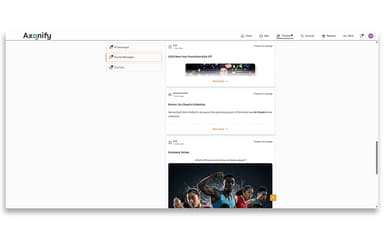
This feature provides a dedicated channel for distributing information to frontline employees. Organizations can create location-based channels to target specific sites or groups, while two-way messaging allows employees to respond to announcements. The feature supports different types of frontline communication, including product announcements, policy updates, operational information, and other messages that need to reach employees across shifts and locations.
Tasks, Audits, And Inspections
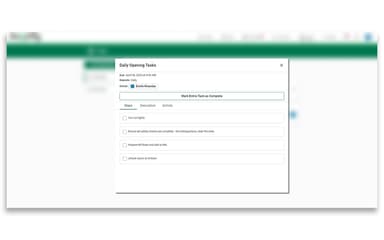
Axonify combines task management with structured audits and inspections for frontline operations. Managers can assign checklists and standard procedures to individual employees, roles, or locations and monitor their completion. Audit and inspection forms can include photo capture and timed checkpoints, while failed checks can trigger automated follow-up actions. This brings routine operational tasks and checks into the same platform as training.
Max Assistant
Max Assistant is an on-demand workplace assistant that gives frontline employees access to information from their organization’s content library during the workday. Employees can ask questions about company procedures, policies, or specific tasks and receive answers based on the information available in the organization’s content. The assistant supports more than 60 languages, allowing employees to access workplace guidance in their preferred language.
Knowledge And Confidence Scores
Knowledge and Confidence Scores provide two measures of employee readiness. ‘Knowledge Scores’ indicate how well employees understand the material covered in training, and ‘Confidence Scores’ capture how prepared they feel to apply that knowledge. Managers can view these measures through team dashboards that highlight areas where employees may have knowledge or confidence gaps.
Pros And Cons of Axonify
Pros
Keeps employees informed quickly with urgent updates sent straight to their home screens
Reinforcement questions and microlearning sessions help retain training over time
Confirms that important company-wide updates actually reach employees through view tracking
Saves admins time by turning existing Word documents into training content with AI
Supports rewards alongside points and gamification to encourage participation
Cons
Cannot easily overwrite individual changes in historical import data
Adding content to existing programs can reopen completed learning paths
Offers limited customization over visual styling, icons, and learning content
Axonify Pricing
Core | Pro | Premium |
|---|---|---|
Custom pricing | Custom pricing | Custom pricing |
|
|
|
Disclaimer: The pricing details were last updated on Sep 25, 2026 from the vendor's website. Please contact us for a tailored pricing list.
Axonify Reviews
Total 87 reviews
4.7
All reviews are from verified customers
Rating Distribution
5
Stars70%
4
Stars28%
3
Stars2%
2
Stars0%
1
Stars0%
Share your experience
Marketing and Advertising, 1-10 employees
Less than a year
“Great for learning safety protocols”
Pros
What's great is how it lets our team go over safety protocols in an enjoyable and inventive manner. It also awards points and encouraging comments to the people who use it most often.
Cons
A few of the games are confusing to figure out. Even though I am pretty good with technology, I sometimes cannot understand how I'm supposed to play them.
Rating Distribution
Ease of use
8
Value for money
10
Customer Support
8
Functionality
9
Retail, 1-10 employees
Free Trial
“Has a very distinctive training method”
Pros
People speak highly of Axonify because it has a distinctive method for handling employee training and development.
Cons
Although it has a lot of great qualities, but I feel like a few aspects might not fully meet the needs of certain users.
Rating Distribution
Ease of use
10
Value for money
9
Customer Support
10
Functionality
10
Marketing and Advertising, 1-10 employees
Less than 6 months
“Good cost and mostly simple”
Pros
Axonify cost for the different plans is really good and it is mostly simple, though we do run into a few tricky parts now and then.
Cons
One thing I noticed is that you really need to dedicate time to get to know the software properly and cannot rush the process.
Rating Distribution
Ease of use
9
Value for money
8
Customer Support
9
Functionality
9
Frequently Asked Questions
Does Axonify offer an API?
Yes, it provides API access.
What language does Axonify support?
Axonify software supports content creation and learning in 60+ languages.
What other apps does Axonify integrate with?
The software supports integration with several HR, learning, and workforce management systems, including Workday, UKG, Cornerstone, Ceridian, ADP, and SAP SuccessFactors.
Does Axonify have a mobile app?
Yes, it has a native mobile app available for both iOS and Android.
What types of pricing plans does Axonify offer?
The pricing is likely to start at around $10/user/month, but final costs depend on your business. Axonify offers three tiers: Core, Pro, and Premium. Get customized Axonify cost breakdown for your business today.
Who are the typical users of Axonify?
The platform mainly serves industries such as hospitality, fast food chains, food and beverages, retail, grocery stores, and other front-line organizations.
What level of support does Axonify offer?
Axonify offers support through a live chat, a help center portal, and a dedicated ‘Customer Success Manager’.