


Open LMS
Last Updated
Overview
Introducing Open LMS, the learning management system designed for scalability, customization, and security. With its open-source flexibility, you can tailor your online learning solution to perfection. Though new users may face a slight learning curve, its industry-leading customer service and secure hosting on AWS ensure a premier experience.
Overall Rating
Based on 11 users reviews
4.6
Rating Distribution
Positive
100%
Neutral
0%
Negative
0%
Starting Price
Custom Pricing
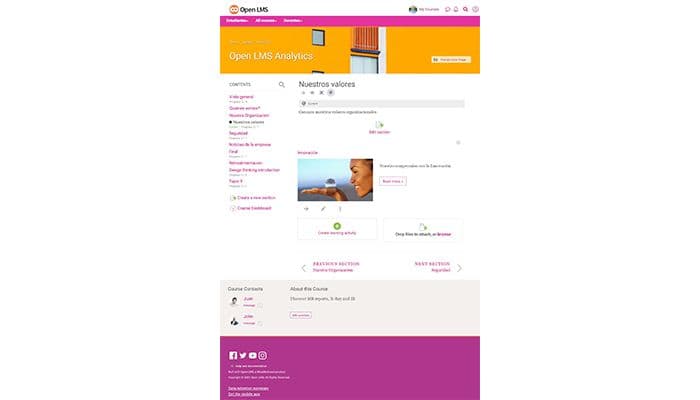


Open LMS Specifications
- Activity Dashboard
- Asynchronous Learning
- Activity Tracking
- Access Controls/Permissions
What Is Open LMS?
Overview
Open LMS is an award-winning, cloud-based learning management system (LMS) designed to be scalable, customizable, and secure. The platform empowers businesses to streamline training operations, improve knowledge retention and monitor learner progress from anywhere through an intuitive online dashboard. It offers various services, including content creation, training, hosting, and support.
What Is Open LMS Best For?
The software is best known for its high customizability and flexibility as an open-source learning management system. Organizations have the freedom to tweak and modify the user interface, themes, and features to perfectly suit their specific needs and brand. Thus, you can sculpt an online learning solution that works exactly how you need it.
Open LMS Pricing
The software offers a variety of pricing plans based on the number of active users and the features you need. The details are as follows:
- For Education: Custom pricing
- For Corporations: Custom pricing
- For Enterprise: Custom pricing
Open LMS Integrations
Open LMS seamlessly integrates with various thord-party tools, including:
- SMOWL
- K16 Solutions
- OpenSesame
- Ease Learning
- Sumadi
How Does Open LMS Work?
Follow this step-by-step guide to efficiently navigate the key areas of the Open LMS platform after logging in:
- Select 'Courses' to build and manage your course catalog, enabling you to create from scratch or import from various sources
- Go to 'Users' from the menu and enter learner mode to enroll in available courses
- Click on the desired course to have access to lessons, learning materials and assessments
- Navigate to course discussions to communicate socially with other learners at the community site
- Go to the 'Analytics' option to monitor learner engagement and performance across all courses
Who Is Open LMS For?
This LMS solution can be used by businesses of any size and in a variety of industries, including:
- Retail
- Healthcare
- Hospitality
- Non-profit
- Business services
Is Open LMS Right For You?
If you're struggling to deliver consistent, engaging training or lack the resources to create your eLearning content, Open LMS can be a valuable solution. It allows organizations to build engaging eLearning experiences. Security is a major concern for any LMS, and Open LMS addresses this with secure hosting on Amazon Web Services (AWS) and industry-standard compliance protocols. This ensures your data is protected and that your organization meets any relevant regulations.
Moreover, Open LMS has won numerous awards, including Financial Review, The Educator 2021 (5-Star Service Provider Awards), ILP - Learning Provider of the Year 2021 (Finalist), and ILP - Onboarding Solution of the Year 2021 (Winner).
Not sure if Open LMS is the perfect fit for your organization? Contact us at (661) 384-7070, and we will answer any questions you have.
Open LMS Features
Content Management And Creation
Open LMS empowers users to effortlessly create and store a wide range of courses conveniently organized in one centralized location.It also gives offline access to courses, empowering users to access the content anywhere and anytime. From captivating video lectures to interactive quizzes and assignments, businesses can craft engaging and informative courses.
Performance And Progress Tracking
It allows instructors to track user progress, performance, and other data points, enabling them to ensure that their learners are meeting their goals. It also provides detailed reports on user activity, completion rates, and assessment scores.
Assessments
The platform empowers companies to create quizzes, surveys, customized tests, and grade assignments. Automated grading, results analysis, and reports take the hassle out of assessments, allowing for a seamless evaluation process.
Analytics And Reporting
The software encompasses in-depth metrics that provide insights into course completions, pass rates, time spent on lessons and more. Instructors can evaluate the effectiveness of learning programs and identify focus areas for continuous improvement.
Pros And Cons of Open LMS
Pros
Accommodates additional users without affecting performance
Tailored learning experience
Secure hosting on AWS
Industry-leading customer service and support
Cons
Learning curve for new users
Customer support times may vary, as per Open LMS reviews
Open LMS Pricing
For Education | For Corporations | For Enterprise |
|---|---|---|
Custom Pricing | Custom Pricing | Custom Pricing |
|
|
|
Disclaimer: The pricing details were last updated on Oct 09, 2026 from the vendor's website. Please contact us for a tailored pricing list.
Open LMS Reviews
Total 11 reviews
4.6
All reviews are from verified customers
Rating Distribution
5
Stars64%
4
Stars36%
3
Stars0%
2
Stars0%
1
Stars0%
Share your experience
Education Management, 101-500 employees
More than a year
“good supportive team”
Pros
The team has been genuinely supportive and quick to help whenever questions come up. The platform itself works well but because there are a lot of settings, there are times you'll still want to reach out to support to get things sorted. The good part is that they're always responsive and willing to guide you. Compared to other LMS options, Moodle could improve on the design and overall look but each update seems to bring meaningful refinements. Since it's an open-source LMS, there's a wider community involved so more people can contribute ideas and improvements over time. OpenLMS also adds new features to our Moodle setup thoughtfully so the changes feel purposeful. On top of that it's a more affordable option and instructors can handle the core tasks needed to teach courses without feeling blocked.
Cons
Some bugs can take longer than you'd expect to get fixed and depending on how serious the issue is, it may require one or even a couple of updates before a real solution lands.
Rating Distribution
Ease of use
10
Value for money
10
Customer Support
10
Functionality
9
Education Management, 101-500 employees
More than a year
“Friendly UI”
Pros
It is very approachable for both students and instructors and it's simple to move around the platform without getting lost. For administrators, the overall setup is clear and the built-in course templates make it efficient to launch new courses. On the faculty side especially for course developers the content creation and organization tools work nicely and the broad selection of activities really helps drive collaboration and more meaningful student-teacher interaction. Support also deserves credit as when you submit a ticket, responses are typically quick and helpful. Overall it delivers excellent value for the money.
Cons
That said some workflows like course customization or system improvements can take longer than expected to get implemented particularly when they depend on support handling or backend related changes.
Rating Distribution
Ease of use
10
Value for money
10
Customer Support
9
Functionality
8
E-Learning, 51-100 employees
More than a year
“Highly flexible Moodle-based LMS”
Pros
From an admin standpoint it stands out for its basically limitless flexibility. Since it's built on Moodle, we're not stuck in a complex setup. When we need something specific, there's usually a plugin, an LTI integration, or some configuration option to accomplish it. The Personalized Learning Designer has been a real game-changer for our team. It lets us automate administrative tasks, send targeted alerts and build custom learning paths without having to pull in a developer. On top of that the managed hosting gives us a lot of peace of mind. We still get the deep customization of open source but with the reliability, security and high-quality customer support you'd expect from a premium SaaS. Their support team is fast to respond, genuinely knowledgeable and seems more like a partner than just a help desk.
Cons
Because the platform is packed with features and power, there's a learning curve when you first step into backend administration. Getting granular role permissions and advanced reports set up properly takes a bit of initial time. That said it's a small trade-off considering how customizable the system is and their documentation and help desk are always available to walk you through more complex configurations.
Rating Distribution
Ease of use
8
Value for money
10
Customer Support
10
Functionality
8
Frequently Asked Questions
Does Open LMS offer an API?
Yes, it offers an API.
What language does Open LMS support?
Open LMS supports different languages, including Portuguese, French, Japanese, Spanish, and English.
What other apps does Open LMS integrate with?
The software seamlessly integrates with several third-party apps, such as Sumadi, Intelliboard, Class Collaborate, Kaltura, and Ease Learning.
Does Open LMS support mobile devices?
Yes, it is optimized for mobile device.
What types of pricing plans does Open LMS offer?
Open LMS offers customized pricing plans for different organizational needs, such as For Education, For Corporations, and For Enterprise. Request an Open LMS cost quote today.
Who are the typical users of Open LMS?
Businesses from various industries, including healthcare, retail, hospitality, non-profit, and business services.
What level of support does Open LMS offer?
The software's customer support services offer a help desk and knowledge base.
Does Open LMS have alternatives?
Yes, Open LMS alternatives include Canvas, Systeme.io, and Duolingo.
Does Open LMS have a mobile app?
Yes, the Open LMS mobile app can be downloaded on iOS and Android.