

Last Updated
Overview
Streamlining employee training can be a challenge, but Traineaze provides a solution. It offers a complete online training system to simplify course creation, progress tracking, and content management. The software focuses on efficient learning solutions, offering a straightforward approach to training management. Explore Traineaze features to start online training today!
Traineaze Specifications
- Activity Dashboard
- Asynchronous Learning
- Activity Tracking
- Access Controls/Permissions
Traineaze Features
Content Creation
The platform lets you create online training courses by uploading various types of content, including videos, PowerPoints, images, PDFs, and audio clips. It allows you to utilize existing resources, reducing the need to create new content from scratch. Furthermore, Traineaze offers flexibility in the type of content that can be used, catering to different learning styles and preferences.
Quizzes and Surveys
The software allows quizzes and surveys to be added to training modules. Traineaze LMS assissts users in assessing learners' understanding and retention. Additionally, the system lets you send survey questions to learners. It helps you gather valuable feedback to verify learner comprehension, which can be used to improve future training sessions.
Award Certificates
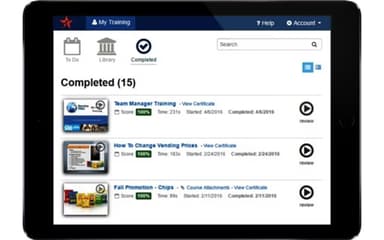
Traineaze enables the awarding of certificates to learners upon completion of training. This recognition of their efforts and record of their accomplishments can be used as a motivational tool to encourage learners to complete their training.
Track Online Training Progress
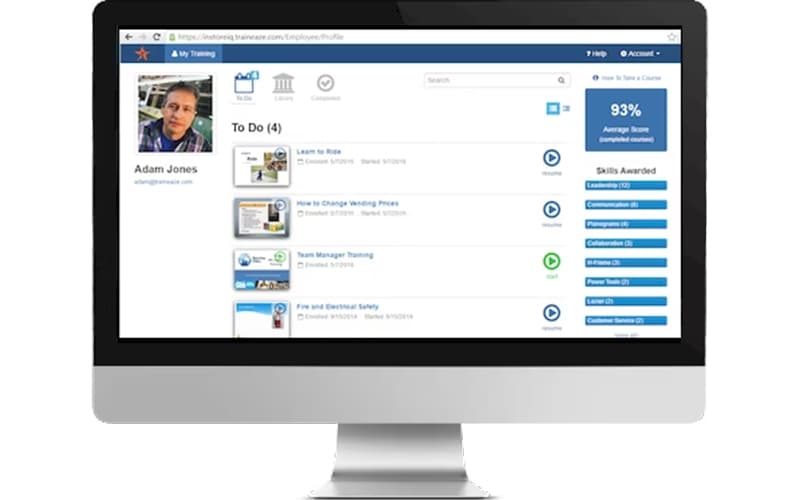
This functionality enables effective management of training programs, ensuring that all learners are progressing. It also provides valuable data that can be used to identify areas where additional support may be needed.
Assign Teams
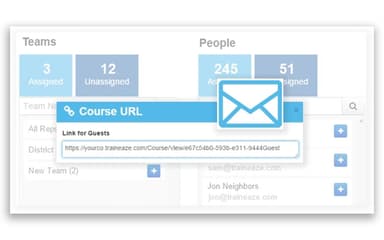
The system allows the segmentation of the workforce for easy assignment and reporting. It simplifies the management of large teams and ensures that everyone receives the appropriate training. Furthermore, Traineaze enables managers to easily track their team’s progress, ensuring that training objectives are met.
Access Course Library
Traineaze software provides a course library where courses can be added and learners can self-enroll in training programs, they are interested in. It promotes continuous learning and development within the organization. The platform also allows learners to choose courses that align with their career goals and interests.
Pros And Cons of Traineaze
Pros
User-friendly tools for creating engaging training courses
Allows the use of various content types like videos, PDFs, and more
Easily integrate quizzes to assess learner understanding
Recognizes learner achievements with customizable certificates
Provides insights into individual and team training progress
Efficiently assigns and tracks training for large teams
Cons
Some users may find the platform slightly complex initially
Reporting capabilities could be more advanced for in-depth analysis, according to some reviews
Initial setup complexity
Traineaze Reviews
Total 18 reviews
4.9
All reviews are from verified customers
Rating Distribution
5
Stars89%
4
Stars11%
3
Stars0%
2
Stars0%
1
Stars0%
Share your experience
Anonymous
Not Specified, 11-50 employees
Less than 6 months
“Was very pleased with the customer service and prompt responses to all of my questions.”
Pros
I am impressed by the functionality and the ability to customize training plans. It's convenient to categorize courses into collections, and I can easily track the progress of my clients.
Cons
The software's functions can be overwhelming at first, but once I grasped the flow and became familiar with the tools, I started feeling more comfortable.
Rating Distribution
Ease of use
10
Value for money
10
Customer Support
10
Functionality
10
Ross
Not Specified, N/A employees
Less than 6 months
“New to program, seems easy to use.”
Pros
The software is incredibly user-friendly, and I have no trouble navigating through its features. The customer service provided is excellent, always responsive and helpful.
Cons
Currently, there are no issues or concerns.
Rating Distribution
Ease of use
10
Value for money
10
Customer Support
10
Functionality
10
Amanda
Not Specified, 51-100 employees
Less than 6 months
“So much easier and better for the cost than other programs like it”
Pros
The ease of use, excellent customer service and cost-effectiveness. I like it mainly for the fact that I am being able to adjust subscriptions regularly to save money when users are inactive.
Cons
I find a few elements counter-intuitive, such as how slides upload and the process for downloading content after it is uploaded. However, considering the cost and the excellent customer service, it is worth it.
Rating Distribution
Ease of use
8
Value for money
10
Customer Support
10
Functionality
10
Frequently Asked Questions
Does Traineaze offer an API?
Yes, Traineaze offers an API.
What language does Traineaze support?
Traineaze supports the English language.
What other apps does Traineaze integrate with?
The vendor has not disclosed any information about the third-party applications it integrates with.
Does Traineaze support mobile devices?
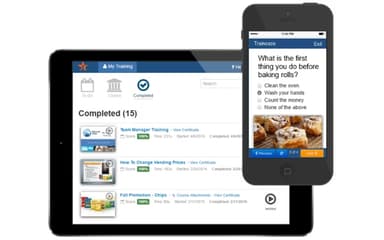
Yes, Traineaze supports mobile devices.
What types of pricing plans does Traineaze offer?
The software has four pricing plans: $40/month for 20 users, $99/month for 50 users, $125/month for 125 users, and $299/month for 250 users. Get a personalized Traineaze pricing quote tailored to your organization's size and requirements.
Who are the typical users of Traineaze?
Traineaze is used in several industries, including marketing, construction, information technology, retail, healthcare, and advertising.
What level of support does Traineaze offer?
Traineaze offers several support options, including FAQs, forums, email, a help desk, phone, chat, and a knowledge base.
How does Traineaze compare to traditional methods of training?
Unlike traditional training methods, Traineaze offers a digital platform for easy content creation, progress tracking, and user management.