

Paperless Parts
Last Updated
Key Takeaways
Generated from the text of customer reviews
Paperless Parts is a manufacturing quoting and estimating platform, mainly used by job shops and contract manufacturers. Users generally praise its ease of use, quoting workflow, and customer support, while some mention limitations in a few functionalities. It recently launched Wingman 2.0, adding deeper AI-powered print intelligence to the quoting process.
Our Verdict
Paperless Parts is suitable for small to mid-sized businesses with more complicated quotes to manage. Some users consider Paperless Parts pricing affordable for the features it offers; however, others mention that pricing can be expensive, particularly for smaller businesses as they scale. We recommend it for manufacturers that handle a mix of CNC, sheet metal, additive, and other manufacturing work.
Paperless Parts Specifications
- Discrete Manufacturing Software
- ETO Manufacturing Software
- Job Shop Software
- Metal Fabrication Software
What Is Paperless Parts?
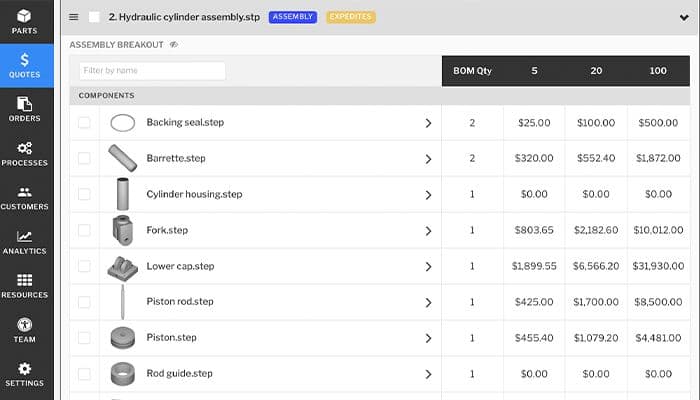
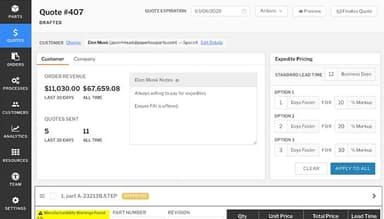
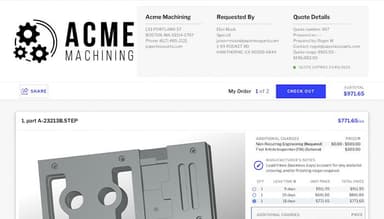
Paperless Parts is a quoting and manufacturing software that helps manufacturers turn part and project details into cost estimates and customer quotes. Users can enter information such as materials, labor, and machine costs to calculate the expected cost of a job. The software can also work with part files to identify details that may affect an estimate. From there, users can apply their pricing rules and prepare a quote based on the estimated costs. It also keeps the related quote information and documents together, making them easier to access when needed.
What Is Paperless Parts Best For?
Paperless Parts is known for Wingman, its AI tool for reviewing manufacturing requirements. It reads technical drawings and RFQ documents and pulls out details such as materials, tolerances, finishes, threads, and other specifications. These details appear in the quoting workflow for users to review. Wingman can also flag requirements and apply rules based on them. It can work with information from different documents and bring those details into the quoting process for review.
How Much Does Paperless Parts Cost?
Paperless Parts pricing is estimated to start at $1,500/month with the actual cost varying based on the feature set required by your organization.
Other than the base subscription, users can consider the following factors that can potentially increase the Paperless Parts cost:
- ERP / System Integration: Approximately $5,000–$15,000 one-time for connecting Paperless Parts with an existing ERP; complex custom API integrations can reach $15,000–$30,000+
- Implementation And Onboarding: Around $5,000–$15,000 one-time for implementation, configuration, process setup, data preparation, and deployment
- Custom Costing And Workflow Configuration: Between $3,000–$10,000 one-time for configuring shop-specific costing formulas, machine rates, labor, materials, margins, approval workflows, and quoting rules
- Additional Users / Locations / Higher RFQ Volume: Ranges from $5,000–$20,000+/year depending on the number of quoting users, manufacturing locations, shop complexity, and RFQ volume
- Training And Change Management: Generally $2,000–$8,000 one-time for additional user training, administrator training, workflow training, and the internal effort required to move estimators from existing spreadsheet/manual processes
- Ongoing Integration And IT Maintenance: Typically $2,000–$8,000/year for maintaining ERP/API connections, troubleshooting data synchronization, updating integrations, managing users, and supporting changes to the company's quoting workflow
Disclaimer: Pricing references are based on publicly available third-party information and industry benchmarks. Actual costs may vary.
Paperless Parts Integrations
Paperless Parts software integrates with various third-party applications, including:
- E2 Shop
- JobBOSS
- JobBOSS²
- Epicor
- MIE Trak Pro
- Infor VISUAL
How Does Paperless Parts Work?
Here's how you can get started with the Paperless Parts software after logging into the system using your credentials:
- Open Paperless Parts and review the dashboard to access its main tools
- Add customer and part information for the job you want to quote
- Upload technical drawings, models, or RFQ documents for review
- Review extracted part details and manufacturing requirements
- Enter material, labor, machine, and other job costs
- Apply pricing rules to calculate the estimated selling price
- Build the quote using the job and customer information
- Review the completed quote before sending it to the customer
Who Is Paperless Parts For?
Paperless Parts software caters to small to mid-sized businesses. Some of the industries using Paperless Parts software include:
- Machinery
- Aviation and aerospace
- Mechanical or industrial engineering
- Defense and space
- Electrical/electronic manufacturing
Paperless Parts Use Cases
Based on our analysis of Paperless Parts features and capabilities, we have identified a few key scenarios where this platform is a practical fit for specific operational buyers:
Estimators Reviewing Detailed Aerospace Requirements
An aerospace manufacturer receives drawings with detailed material, tolerance, and finishing requirements. Paperless Parts’ requirements review reads the technical documents and identifies the requirements contained in them. Estimators can review those requirements within the quote and create rules for requirements that need to be handled consistently across similar jobs.
Manufacturing Groups Managing Work Across Multiple Sites
A manufacturer operates several facilities with different processes and ERP systems. The platform's multisite manufacturing lets the organization manage quoting across its locations while connecting each site with its existing ERP system. Quotes can be routed to the facility handling the relevant manufacturing process without requiring every location to use the same ERP system.
CNC Teams Working From Detailed 3D Models
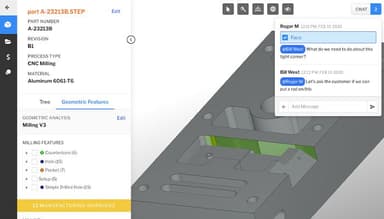
A CNC machining team receives a 3D model containing multiple features. The software part analysis capability examines the model and identifies geometry such as holes, pockets, and other machining features. Estimators can view the extracted information when determining the operations and costs associated with the part
Medical Manufacturers Building Process-Specific Routings
A medical-device manufacturer needs to include inspection and production requirements in its job costing. Paperless Parts’ Routing Templates let estimators create reusable routings containing operations and requirements such as first article inspection, material traceability, sampling plans, and production controls. The appropriate routing can then be applied when preparing a quote.
Is Paperless Parts Right For You?
Paperless Parts may be worth considering for organizations that want their manufacturing information, customer files, and quoting activity handled within a dedicated manufacturing platform. It can also suit businesses where technical data needs controlled access and secure storage. The platform is ITAR registered, FedRAMP Moderate Equivalent, and designed to support CMMC Level 2 compliance, with AWS GovCloud hosting and U.S.-based system administrators and support. Its customer examples include KMM Group and LADESA, giving potential buyers examples of different organizations already using the software.
In recent years, manufacturing software vendors have been adding AI and automation to manufacturing processes. Paperless Parts follows this trend with Wingman and requirements to review functionalities that use AI to extract requirements from technical drawings and RFQ documents.
Still unsure about investing in the Paperless Parts software? Contact us at (661) 384-7070 to make the right decision.
Paperless Parts Features
Costing And Pricing Automation
This functionality uses part geometry and manufacturing information to calculate estimated costs. Users can configure costing logic for materials, processes, labor, and other cost inputs. The platform also supports customizable pricing logic, allowing pricing calculations to be configured for different quoting requirements.
Automated Quoting
Paperless Parts automates parts of the quoting process from RFQ intake through quote creation. Its Smart RFQ form can collect information and automatically create a quote with critical details entered. The platform can also analyze part geometry and use the resulting information in quoting calculations.
Requirements Review
Requirements Review extracts technical information from prints and models and turns identified requirements into review items. Users can create rules based on print extractions, document text, model information, and other quote data. The feature also supports assigning review items and recording decisions through the quoting workflow.
Manufacturability Warnings
The feature identifies potential manufacturing issues in part geometry. Paperless Parts provides configurable checks for different manufacturing processes and allows thresholds to be adjusted according to factors such as material, process, or work center. For CNC machining, the software can identify difficult or impossible features that may add cost or complexity.
Multisite Manufacturing
Paperless Parts features multisite manufacturing which provides a centralized quoting platform for organizations operating across multiple facilities. It can standardize quoting data across different locations and ERP systems. Its API-based architecture connects the platform with ERPs and other systems, while users can manage, assign, and review RFQs across locations.
Pros And Cons of Paperless Parts
Pros
Improves the quotation process and minimizes the time spent creating estimates
Makes it easy for novice estimators to understand and use
Keeps quotation information and relevant files in one location
Reduces manual labor while processing part files and bids
Allows for simpler management and tracking of a large number of quotations
Cons
It takes time to design the system around unique business operations
Manual modifications may be required to fit the existing quotation procedures
When ERP integration is not accessible, it may be necessary to enter duplicate data
Paperless Parts Reviews
Total 24 reviews
4.9
All reviews are from verified customers
Rating Distribution
5
Stars92%
4
Stars8%
3
Stars0%
2
Stars0%
1
Stars0%
Share your experience
Auto Dealership, 1-10 employees
Less than a year
“Added value”
Pros
Paperless Parts has revolutionized quoting, bringing it into the 21st century. It has significantly improved both the speed and quality of our quoting process. This tool is incredibly powerful for communication with customers, vendors and internally. Our customers are thrilled with the convenience of submitting quotes easily and selecting order size and delivery time.
Cons
I honestly have no major complaints about it. This software continues to improve every day, and whenever we discover an issue, the Paperless Parts team quickly releases an update with the necessary change. It's fantastic to provide feedback to a software company and witness the implementation of changes within just a few weeks.
Rating Distribution
Ease of use
10
Value for money
9
Customer Support
9
Functionality
10
Product, 11-50 employees
Less than 6 months
“Making Sales Easy”
Pros
The fact that our customers can facilitate their own orders, from RFQ requests to placing orders, adds significant value and saves time. We can turn quotes around quickly, and Paperless Parts listens to its customers and implements changes on the fly. They are open to accommodating our needs, and the software remains very user-friendly.
Cons
The only downside is that it doesn't currently integrate with our manufacturing system. However, this is not their fault, as the other software manufacturer is currently unwilling to integrate.
Rating Distribution
Ease of use
10
Value for money
10
Customer Support
10
Functionality
10
Engineering, 1-10 employees
Less than a year
“Buy the software and get the paperless team!”
Pros
Paperless serves as our in-house process and management software. It operates smoothly and is very user-friendly once you configure your custom parameters. Paperless has completely organized our job management process and provides valuable analytics to keep us on track and well-informed.
Cons
We encountered a couple of usability issues, but the Paperless team swiftly resolved them, making it hardly worth mentioning.
Rating Distribution
Ease of use
10
Value for money
10
Customer Support
10
Functionality
10
Frequently Asked Questions
What type of pricing plan does Paperless Parts offer?
Paperless Parts pricing is estimated to start at $1,500/month with the actual cost varying based on the feature set required by your organization. Get in touch for a personalized Paperless Parts cost based on your business’s specific needs.
Who are the typical users of paperless PARTS?
It caters to small to mid-sized businesses. Some industries using Paperless Parts include machinery, aviation and aerospace, mechanical or industrial engineering, defense and space and electrical/electronic manufacturing.
What languages do paperless PARTS support?
The platform supports the English language.
What other apps does paperless PARTS integrate with?
It integrates with E2 Shop, JobBOSS, JobBOSS², Epicor, MIE Trak Pro and Infor VISUAL.
Does Paperless Parts offer a mobile app?
No, it does not offer a mobile app.
What level of support do paperless Parts offer?
It offers support via email, phone, knowledge base, and resource center.
Does paperless Parts offer an API?
Yes, it offers an API.