


Solid Edge
Last Updated
Key Takeaways
Generated from the text of customer reviews
Solid Edge is a CAD-centered product development platform used by engineering and manufacturing teams, especially in industrial machinery. Reviewers often praise Solid Edge's ease of use and fast model edits. The most common complaint is sluggish performance with large assemblies. This year, Siemens released Designcenter Solid Edge 2026 with AI tools for faster assemblies, automated drawings, and a built-in Copilot.
Our Verdict
Solid Edge suits mid-sized engineering and manufacturing teams managing complex product-development workflows and expecting gradual growth. Its entry pricing is relatively accessible for professional CAD teams, although higher tiers better fit broader engineering budgets. We recommend it for industrial manufacturers handling recurring design revisions, configurable products, and expanding engineering operations.
Overall Rating
Based on 41 users reviews
4.3
Rating Distribution
Positive
88%
Neutral
12%
Negative
0%
Starting Price
$99.74
per user per month
Solid Edge Specifications
- Bill Of Materials (BOM)
- Product Lifecycle Management (PLM)
- Collaboration Tools
- Document Management
What Is Solid Edge?
Solid Edge is a connected 3D CAD product designed by Siemens to help engineers design, simulate, and manufacture mechanical and electromechanical products. It covers 3D modeling, sheet metal, weldments, surfacing, drafting, simulation, generative design, wiring harnesses, PCB design, CAM, technical publications, and data management. Photorealistic rendering turns engineering models into lifelike images and animations, applying lighting, shadows, reflections, and materials. Its KeyShot-powered rendering also produces cutaway views and effects such as fog or smoke, so teams can review designs without physical prototypes. The result is clearer stakeholder approvals, fewer prototype iterations, and marketing visuals created straight from the CAD model.
What Is Solid Edge Best For?
Synchronous Technology is Solid Edge’s standout feature, combining direct modeling flexibility with parametric design control in one 3D CAD workflow. Engineers can edit dimensions and push or pull faces to make design changes without rebuilding models or dealing with feature failures. The technology also lets users modify imported CAD models as if they were native Solid Edge files, reducing the time spent recreating parts from supplier or customer designs.
How Much Does Solid Edge Cost?
Solid Edge pricing starts at $99.74/user/month for its Designcenter Solid Edge Design and Drafting plan. The vendor also offers a 30-day free trial option. All plans are billed annually, and other pricing options include:
- Designcenter x Solid Edge Standard: $234.15/month
- Designcenter x Solid Edge Advanced: $290.85/month
- Designcenter x Solid Edge Premium: $416.85/month
- Solid Edge x Value Based Licensing 50 PK: $945/month
- Solid Edge x Value Based Licensing 25 PK: $472.50/month
- Solid Edge x Value Based Licensing 10 PK: $189/month
Additional costs might include:
- Training: Typically $1,000–$3,000/user, one-time, depending on whether the business uses instructor-led CAD training, advanced module training, or third-party courses beyond the software’s included learning resources.
- Implementation And Onboarding: Usually $2,000–$5,000, one-time, based on the scope of license deployment, environment setup, standards configuration, and onboarding support required.
- CAD Data Migration: Often $5,000–$40,000+, one-time, depending on the volume and complexity of legacy CAD files that need conversion, cleanup, validation, and organization.
- PDM/PLM Integration: Commonly $10,000–$50,000+, one-time, depending on the complexity of connecting Solid Edge with PDM, PLM, ERP, CAM, MES, or other engineering systems.
- Custom Configuration And Automation: Generally $5,000–$25,000+, one-time, based on the amount of custom template creation, design-standard setup, macros, automation, and workflow configuration involved.
- Technical Support And Consulting – Typically $3,000–$20,000+/year, depending on the level of reseller assistance, specialist consulting, or engineering support required beyond standard support arrangements
Disclaimer: The pricing is subject to change.
Solid Edge Integrations
The Solid Edge software integrates with different third-party platforms, such as:
- KeyShot
- SmapSwood
- Edge Layout
How Does Solid Edge Work?
Here's a step-by-step guide to use Solid Edge features:
- Log in with your credentials and open Solid Edge to access your projects, design files, and licensed tools
- Create a new part, sheet metal component, or assembly, and build the initial geometry with sketches, dimensions, and 3D modeling tools
- Modify the model with Synchronous Technology to make quick geometry changes without rebuilding features
- Assemble components into a complete product model, using Magnetic Snap Assembly to place parts with the right constraints automatically
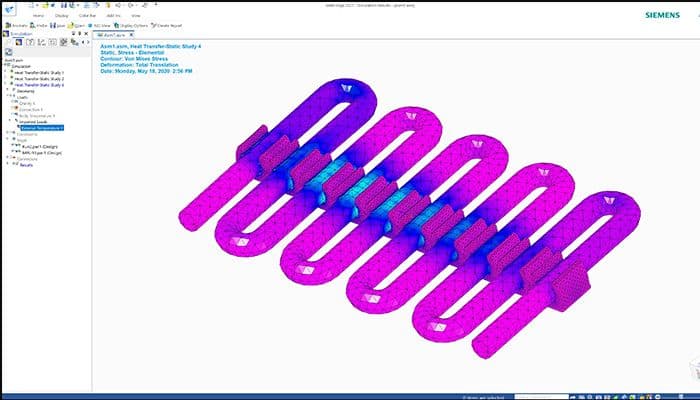
- Validate the design with motion and structural simulation to check how parts fit, move, and hold up before production
- Generate engineering drawings, dimensions, and annotations from the 3D model, or let Automatic Drawing create them for you
- Manage design revisions and share files with your team through built-in data management and cloud collaboration
- Prepare approved models for CNC machining, additive manufacturing, or nesting through supported partner tools
Who Is Solid Edge For?
Solid Edge serves organizations in the following industries:
- Industrial machinery and heavy equipment
- Automotive supply chain and aftermarket
- Energy and utilities equipment
- Consumer durables
- Medical devices
- Electronic devices
- Industrial food-processing equipment
Solid Edge Use Cases
After evaluating Solid Edge capabilities, we identified several situations in which it could perform particularly well, including:
Mechanical Engineers Revising Customer CAD Files
Mechanical engineers work with customer and supplier models created in different CAD systems. When design changes are needed, they use Solid Edge’s Synchronous Technology to open imported geometry and modify it without rebuilding the original feature history. This approach lets contract manufacturers and engineering service providers revise incoming models within one direct workflow.
Design Engineers Developing Packaging Automation Machines
District web administrators managing multiple school websites need to keep news, calendars, directories, and athletics information consistent across the district. The platform gives them a centralized environment for publishing shared content once and controlling which administrators can edit or publish individual pages. Users share that this kind of centralized publishing reduces duplicate editing.
Sheet Metal Designers Preparing Fabrication Work
Sheet metal designers prepare components for cutting and bending based on fabrication requirements. Through Solid Edge, they can create the part as a 3D model, inspect its geometry, and unfold it into a production-ready flat pattern. This workflow helps teams move from design to fabrication without manually translating 2D drawings.
CAD Designers Managing Engineer-To-Order Configurations
CAD designers handle engineer-to-order products that require different dimensions, assemblies, or component combinations for customer orders. They can use configurable models and reusable design content to adapt established product structures — rather than rebuild each variation from scratch. According to feedback, users note that this setup supports product families that share a common engineering foundation while accommodating order-specific changes.
Is Solid Edge Right For You?
Solid Edge may suit mid-sized engineering and manufacturing companies with around 100 to 150 employees that expect their design operations to expand. Siemens’ IP Automation Design (IPAD), a 120-employee company, scaled from one Solid Edge license to 15 seats by adding more Solid Edge users as its multidisciplinary engineering work and custom product configuration needs increased.
For a mid-sized manufacturer managing additional designers, product variants, and engineering data, this suggests a pathway to expand the Siemens environment without replacing the core CAD platform. The vendor also supports assemblies ranging from a few components to hundreds of thousands of parts, which adds another layer of scalability for increasingly complex products. Clients include Shark Factory, Thermoplan, IHC Merwede, UWC Holdings, and Kimball International.
Unsure whether Solid Edge suits your requirements? Get in touch at (661) 384-7070, and we will help you assess it more clearly.
Solid Edge Features
Subdivision Modeling
It creates stylized 3D forms through a polygonal cage that controls the model’s shape. Designers manipulate and subdivide that cage to add detail, combine smooth surfaces with sharp edges, and refine complex product geometry inside the Solid Edge environment.
Solid Edge Model-Based Definition
The feature embeds Product Manufacturing Information and related metadata into 3D models, then communicates that model intelligence through formats such as 3D PDF. It carries dimensions, annotations, and manufacturing data with the model, so downstream teams can reference the same digital definition.
Generative Design
The functionality uses specified material, design space, loads, and constraints to calculate an optimized component shape. Solid Edge applies topology optimization to generate reduced-mass geometry while accounting for the structural conditions defined in the study.
Solid Edge Wiring Design
This feature provides a graphical environment for creating electrical wiring diagrams and service documentation. Its built-in libraries supply electrical symbols, components, and simulation models, while integrated analysis checks conditions such as short circuits, voltage drop, fusing, and wire sizing during design.
Pros And Cons of Solid Edge
Pros
Drafting tools support detailed annotations well
Sheet metal tools simplify flat-pattern work
Parts libraries reduce repeated component modeling
Configurable assemblies streamline product variant creation
Drawing associativity keeps views automatically updated
Cons
Large assemblies may load more slowly
Drafting tools might need extra cleanup
Rendering updates could produce minor glitches
Solid Edge Reviews
Total 41 reviews
4.3
All reviews are from verified customers
Rating Distribution
5
Stars51%
4
Stars37%
3
Stars7%
2
Stars5%
1
Stars0%
Share your experience
Graphic Design, 51-100 employees
Less than 6 months
“Review”
Pros
The features provide a great experience and using it is not a problem even without training.
Cons
In terms of visualization and graphics, it can be improved a bit more.
Rating Distribution
Ease of use
9
Value for money
9
Customer Support
10
Functionality
10
Product, Small Business, 51-100 employees
More than a year
“easiest 2D 3D CAD , assembly and standard parts program”
Pros
What I like the most about Solid Edge is its user-friendly and efficient 2D drawing CAD tools, 3D tools, as well as the ability to easily select planes and surfaces for assembling.
Cons
I am not a fan of error messages that don't offer troubleshooting or provide sufficient information for solving the issue.
Rating Distribution
Ease of use
10
Value for money
10
Customer Support
9
Functionality
9
Healthcare, 11-50 employees
Less than a year
“Very good 3D model from great Company”
Pros
Solid Edge has plenty of positives, like its user-friendly interface and wide range of functions, but what I truly loved was how it seamlessly integrated with Siemens peripheral tools.
Cons
I have noticed that Solid Edge has limitations when it comes to file types.
Rating Distribution
Ease of use
10
Value for money
9
Customer Support
10
Functionality
10
Frequently Asked Questions
What types of pricing plans does Solid Edge offer?
Solid Edge price starts at $99.74/user/month for the Designcenter Solid Edge Design and Drafting plan. Designcenter X Solid Edge Standard costs $234.15/user/month, Advanced $290.85/user/month, and Premium $416.85/user/month. Add-ons include Value-Based Licensing packs at $189, $472.50, and $945/month (10, 25, and 50 packs) and Advanced Simulation at $283.50/month. All prices are billed annually. A 30-day free trial is also available. Get a flexible Solid Edge cost based on your organization’s requirements and size.
Who are the typical users of Solid Edge?
Typical users include organizations across industries and sectors such as industrial machinery, heavy equipment, automotive supply chain, energy and utilities equipment, consumer durables, medical devices, electronic devices, and industrial food-processing equipment.
What language does Solid Edge support?
The user interface is localized in 14 languages, including English, Chinese, French, German, Japanese, Korean, Portuguese, Russian and Spanish.
What other apps does Solid Edge integrate with?
It integrates with KeyShot, SmapSwood, and Edge Layout.
Does Solid Edge offer a mobile app?
Yes, the platform offers a dedicated mobile app for both Android and iOS.
What level of support does Solid Edge offer?
Support options include access to the Support Center and assistance through an online message form.
Does Solid Edge offer an API?
Yes, the vendor offers an API.