Last Updated
Key Takeaways
Generated from the text of customer reviews
Adobe Campaign is an enterprise marketing automation platform used to manage and optimize multi-channel campaigns. Users appreciate its ease of creating detailed and effective sales reports but often report delayed resolution of software bugs affecting workflow efficiency. The platform has also recently introduced a generative AI assistant that provides step-by-step product guidance.
Our Verdict
As an enterprise-grade marketing automation platform, Adobe Campaign is best suited for large organizations managing complex, multi-channel campaigns at scale. While it delivers strong capabilities in personalization and automation, its high cost and complexity make it less suitable for smaller teams. Therefore, we recommend it for enterprises with advanced marketing needs.
Overall Rating
Based on 5 users reviews
4.4
Rating Distribution
Positive
100%
Neutral
0%
Negative
0%
Starting Price
Custom Pricing
Adobe Campaign Specifications
- Campaign Management
- Customer Segmentation
- Email Marketing
- Analytics And Reporting
What is Adobe Campaign?
Adobe Campaign is a marketing automation solution geared primarily towards helping large enterprises automate, manage, and optimize marketing activities across several different channels, including email, direct mail, and mobile text. Users are provided with tools to create and share dynamic personalized campaigns across multiple online and offline channels at the same time. Offered features include direct mail, segmentation, personalized emails, deliverability, email management, cross-channel marketing, and campaign management.
What Is Adobe Campaign Best For?
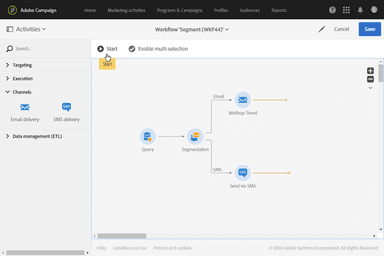
One of the platform’s notable capabilities is its redesigned user interface that simplifies cross-channel campaign creation. It offers a more intuitive workflow canvas for building, organizing, and managing campaigns across email and other channels. The new interface also aligns with Adobe Experience Platform, making it easier to share audiences and manage campaigns across Adobe applications. This allows marketing teams to streamline complex journey design and execute coordinated, large-scale campaigns more efficiently in enterprise environments.
How Much Does Adobe Campaign Cost?
The price of Adobe Campaign starts at an estimated $2,000/month for 50,000 emails and scales as the number of emails increases. The platform also offers the following custom-priced plans:
- Advanced
- Enterprise
Apart from the base subscription costs, organizations may also incur the following additional estimated expenses:
- Onboarding: Included with Adobe onboarding services; custom onboarding projects may cost $5,000 - $20,000+
- Implementation: $5,000 - $20,000 (small deployments); $50,000 - $250,000+ (enterprise)
- Data Migration: $10,000 - $50,000+
- Integrations: $10,000 - $50,000+/major integration project
- Customization: $10,000 - $50,000+
- Training: $500 - $3,000+/user
- Ongoing Support: 15% - 25% of implementation cost annually or $2,000 - $15,000/month
Disclaimer: Pricing references are based on publicly available third-party information and industry benchmarks. Actual costs may vary.
Adobe Campaign Integrations
Adobe Campaign connects third-party business systems, such as:
- Salesforce
- Microsoft Dynamics 365
It also integrates with several Adobe Experience Cloud applications, including:
- Adobe Experience Platform
- Adobe Experience Manager (AEM)
- Adobe Analytics
- Adobe Journey Optimizer
- Adobe Target
- Adobe Workfront
How Does Adobe Campaign Work?
Here’s how to get started with Adobe Campaign after logging in:
- Access the home page to view available modules, recent activities, and campaign management tools
- Navigate to the Explorer menu to organize and manage campaigns, audiences, workflows, and marketing resources
- Review existing recipient and audience data to understand customer segments and targeting options
- Create or open a marketing campaign and define its objectives, channels, and delivery schedules
- Use the workflow designer to automate campaign processes, audience selection, approvals, and message deliveries
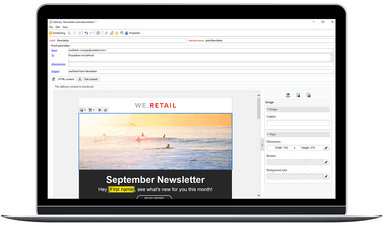
- Build and personalize email, SMS, push notification, or direct mail content using the platform’s content editing tools
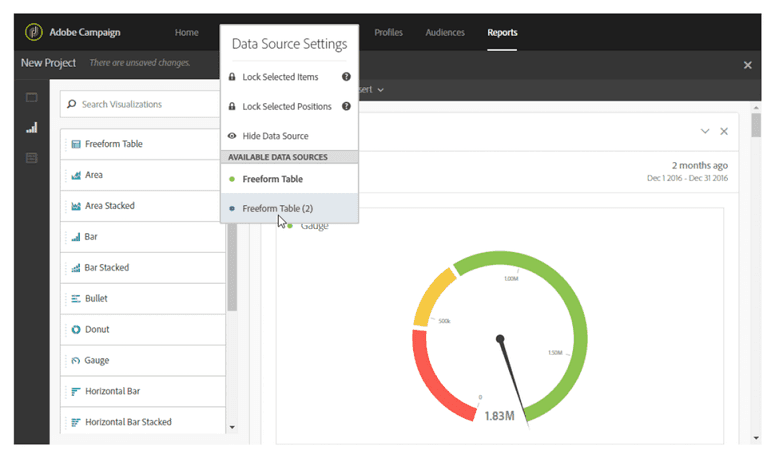
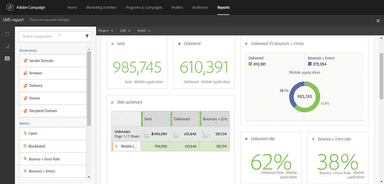
- Monitor campaign performance through reporting dashboards that track delivery, engagement, and response metrics
Who Is Adobe Campaign For?
The platform’s features prove beneficial for a wide range of industries, including
- Financial services
- High tech
- Healthcare and life sciences
- Government
- Retail
- Manufacturing
- Media and entertainment
- Sports and fan experience
Adobe Campaign Use Cases
Based on our analysis of Adobe Campaign’s capabilities and user reviews, we identified several scenarios where the platform is particularly well-suited for enterprise marketing teams:
Global Brands Coordinating Multi-Channel Customer Communications
Organizations operating across multiple regions often struggle to maintain consistent messaging while adapting campaigns to local audiences. Adobe Campaign is a strong fit for enterprises that need to coordinate email, mobile, direct mail, and other outreach channels from a centralized environment. This helps marketing teams balance global oversight with regional execution.
Retailers Delivering Personalized Marketing At Scale
Retail and e-commerce businesses with large customer databases can use Adobe Campaign to manage highly segmented promotional and loyalty campaigns. The platform is well-suited for organizations that need to tailor communications based on customer behavior, purchase history, and engagement patterns while maintaining high campaign volumes throughout the year.
Financial Services Firms Managing Ongoing Customer Engagement
Banks, insurers, and financial institutions often need to communicate with customers across different lifecycle stages while adhering to strict operational requirements. Adobe Campaign works well in environments where marketing teams must coordinate onboarding, retention, cross-sell, and service-related communications across multiple customer segments.
Telecommunications Providers Running High-Volume Campaigns
Telecommunications companies frequently manage millions of customer interactions across diverse products and service plans. Adobe Campaign is a practical choice for organizations that require centralized campaign management, audience segmentation, and coordinated outreach to support customer acquisition, retention, and upselling initiatives.
Enterprises Modernizing Customer Experience Programs
Large organizations looking to unify customer engagement efforts across business units can benefit from Adobe Campaign’s role within broader digital experience ecosystems. It is particularly effective for enterprises seeking to connect customer data, marketing operations, and campaign execution while reducing reliance on disconnected tools and manual processes.
Is Adobe Campaign Right For You?
Are you a marketing team looking for a platform to manage personalized campaigns across multiple channels from a single environment? Adobe Campaign may be a strong fit for organizations with complex customer engagement strategies and large-scale marketing operations. It excels as a cross-channel campaign management platform that helps marketers manage campaigns, customer data, resources, and reporting in one place, improving efficiency and marketing performance at scale.
As part of Adobe Experience Cloud, it offers enterprise-grade security, role-based access controls, encryption, and compliance-focused governance capabilities. Its cloud-native architecture could support growing campaign volumes.
Contact us at (661) 384-7070 to determine whether Adobe Campaign aligns with your organization's requirements.
Adobe Campaign Features
Customer Profile And Audience Segmentation
Users can access combined customer data from multiple sources to create unified profiles and highly targeted audience segments. Marketing teams can use these insights to deliver personalized campaigns across online and offline channels while tracking engagement and performance metrics to refine future outreach.
Multi-Channel Marketing
The platform enables organizations to coordinate customer communications across email, SMS, push notifications, direct mail, and web channels from a single platform. Teams can create consistent customer experiences, manage cross-channel campaigns more efficiently, and optimize engagement through built-in testing and experimentation tools.
Campaign Management
Teams can automate campaign execution with dynamic workflows that support audience engagement, governance policies, and personalized content delivery through this feature. Marketers can preview customer journeys, refine targeting before launch, and streamline collaboration across teams to improve efficiency and campaign performance.
Enterprise Infrastructure And Governance
Adobe Campaign provides cloud-native infrastructure designed to support high-volume marketing operations while maintaining performance and reliability. The platform includes enterprise-grade security, access controls, compliance management, and ongoing support services to help organizations scale campaigns while protecting customer data.
Pros And Cons of Adobe Campaign
Pros
Strong content integration across marketing workflows
Easy creation of detailed and effective sales reports
Strong end-to-end campaign automation from creation to performance analysis
Improved interface supports ease of use
High-speed data handling enabling rapid upload and sharing of large files
Cons
Slow customer support response times during technical issues
Limited selection of pre-built templates in the library
Rolling back changes is a cumbersome process
Adobe Campaign Pricing
Advanced
View Price
What's Included
Service quality KPI reporting
Throughput monitoring based on Adobe recommended targets
Quarterly service reviews of ongoing operations
Annual health check and capacity reviews
Enterprise
View Price
What's Included
Throughput and workflow monitoring based on customer specified targets
Service quality KPI reporting
Monthly service reviews of ongoing operations
Monthly health check and capacity reviews
General advisory support (up to 4 requests per month)
Disclaimer: The pricing details were last updated on May 29, 2026 from the vendor's website. Please contact us for a tailored pricing list.
Adobe Campaign Reviews
Total 5 reviews
4.4
All reviews are from verified customers
Rating Distribution
5
Stars40%
4
Stars60%
3
Stars0%
2
Stars0%
1
Stars0%
Share your experience
Sandeep
Global logic, 500+ employees
“Great marketing product”
Pros
It is the most ideal tool in my opinion. We run marketing campaigns with the help of this tool. I haven't heard any kind of complaints from my marketing team. They do all the work with the help of this tool, like planning the budget, monitoring processes, and building strategies.
Cons
The price can be a con, as it is quite pricey. But apart from that I have been using it for 3 years and still haven't found any cons.
Rating Distribution
Ease of use
8
Value for money
9
Customer Support
9
Functionality
8
Amanda
Randstad USA, 500+ employees
“Effective marketing solution”
Pros
This tool has been a great help in advertising our campaigns. It automates marketing services. It is easy to attach several files at once and even heavy files, are sent in seconds. Everything is organized and my experience has been great.
Cons
I feel the price is high, and it might not be a suitable tool for small marketing companies like ours.
Rating Distribution
Ease of use
7
Value for money
7
Customer Support
7
Functionality
8
Lenee
Zekelman Industries, 500+ employees
“Reliable tool for managing marketing campaigns”
Pros
Adobe Campaign is an impressive and versatile software. It provided me with all the services that I needed, and I did not have any problems with the tool. It is an efficient tool and managing company information and monitoring the performance of the campaigns is easy and great. Anyone can rely on this tool for its advanced features.
Cons
None so far.
Rating Distribution
Ease of use
7
Value for money
8
Customer Support
9
Functionality
8
Frequently Asked Questions
Does Adobe Campaign offer an API?
Yes, API access is available.
Does Adobe Campaign have a mobile app?
No, the platform does not offer a dedicated mobile app.
What language does Adobe Campaign support?
Adobe Campaign software supports English, German, Spanish, French, Italian, Portuguese, Chinese, and Korean languages.
What types of pricing plans does Adobe Campaign offer?
Adobe Campaign pricing starts at around $2,000/month for approximately 50,000 emails and increases as email volume scales. The platform is offered under Advanced and Enterprise plans, which vary based on scale, features, and organizational requirements. Request a customized Adobe Campaign cost estimate for your business today.
What other apps does Adobe Campaign integrate with?
Adobe Campaign integrates with third-party business systems such as Microsoft Dynamics 365 and Salesforce, as well as Adobe Experience Cloud applications including Adobe Workfront, Adobe Target, Adobe Journey Optimizer, Adobe Analytics, Adobe Experience Manager (AEM), and Adobe Experience Platform.
Who are the typical users of Adobe Campaign?
The platform’s features are beneficial across a wide range of industries, including retail, healthcare and life sciences, financial services, media and entertainment, high tech, manufacturing, government, and sports and fan experience.
What level of support does Adobe Campaign offer?
The platform offers support via ticketing and a resource center.
Is Adobe Campaign part of Creative Cloud?
No, Adobe Campaign is not part of Adobe Creative Cloud. It belongs to Adobe Experience Cloud, which is a separate suite focused on marketing, customer experience, and enterprise analytics rather than creative design tools.