



Last Updated
Overview
Planable supports marketing teams with content planning, approvals, and scheduled publishing across multiple social platforms. However, it may not include a built-in stock image library for content creation. Nevertheless, the platform's automated publishing after approval and organized review process make Planable a compelling choice for collaborative content management.
Overall Rating
Based on 10 users reviews
5
Rating Distribution
Positive
100%
Neutral
0%
Negative
0%
Starting Price
$39
per workspace per month


Planable Specifications
- Social Media Management
- Content Management
- Campaign Management
- Collaboration Tools
Planable Features
Schedule
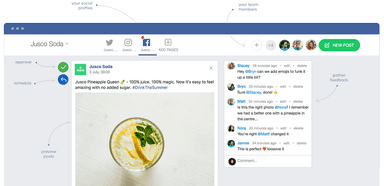
Planable software lets teams schedule content across Facebook, Instagram, LinkedIn, X, YouTube, TikTok, Pinterest, Google Business Profile, and Threads. It allows users to prepare posts, stories, reels, LinkedIn PDFs, or recurring content. They can also add thumbnails, alt text, audience targeting, and first comments. Once a post receives approval, the system automatically publishes it without requiring another manual step.
Create
This functionality provides a shared workspace for creating social posts, blog content, newsletters, and campaign briefs. It lets teams prepare one draft, then customize platform-specific versions without starting over. It also includes built-in image editing, Canva import, version history, and AI-assisted writing tools to help maintain consistent brand messaging. The platform gives contributors the flexibility to adjust content for different audiences.
Engage
The system brings comments from connected social accounts into a unified inbox, allowing teams to respond without switching between platforms. Notifications appear in one place, making new interactions easier to monitor. It allows users to reply to, react to, or remove comments when necessary. Users can also organize conversations by status to identify pending responses and completed discussions.
Plan
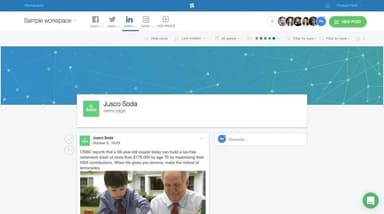
The platform organizes content with visual calendars, feed layouts, grid previews, and list views, allowing teams to review publishing schedules from different perspectives. Posts can be rearranged through drag-and-drop, while custom labels and filters keep campaigns easy to locate. Additionally, Planable’s dedicated workspaces and role-based permissions capabilities help agencies manage multiple brands while keeping client content separate.
Reporting And Analysis
Planable features reporting tools that highlight high-performing posts and audience trends after content is published. It allows teams to review engagement metrics and follower demographics from the same reporting area. Users can also compare campaign performance over time to identify successful content. The software provides reports through PDF exports or direct links, and monthly reports can be generated automatically.
Pros And Cons of Planable
Pros
Reduces publishing errors with structured approval workflows
Improves client collaboration while protecting internal work
Helps identify opportunities through competitor benchmarking
Enables faster responses to brand conversations and trends
Simplifies client reporting with customizable exports
Cons
Content editing options could be more flexible
Daily reminders for scheduled posts would be helpful
Lacks support for adding songs or collaborators to posts
Planable Pricing
Basic | Pro | Enterprise |
|---|---|---|
$39 per workspace per month | $59 per workspace per month | Custom Pricing |
|
|
|
Disclaimer: The pricing details were last updated on Sep 02, 2026 from the vendor's website. Please contact us for a tailored pricing list.
Planable Reviews
Total 10 reviews
5
All reviews are from verified customers
Rating Distribution
5
Stars100%
4
Stars0%
3
Stars0%
2
Stars0%
1
Stars0%
Share your experience
Alona
digiRUSSIAN Russian Marketing and Advertising Agency, 1-10 employees
“Best tool”
Pros
This has made posting a lot easier for us. It is easy to use and to post. Writing Facebook posts is easy and helpful. Navigating through the system is seamless. We can schedule our posts for whatever time we want it to get posted at. It is convenient for me that whenever an employee writes a post, I get alerted, so I could go over, approve and plan it when to post. It is easy to just drag and drop the posts on the calendar.
Cons
They should connect the system with a free database of images. This would make things a lot easier for us.
Rating Distribution
Ease of use
8
Value for money
10
Customer Support
10
Functionality
10
Jos Antonio
Havas Media Group, 500+ employees
“Planning content made easy.”
Pros
This tool has been the greatest problem solver for us. It improved my approval workflow, before this, it was a complete mess to keep track of everything through emails or sheets, etc. It handles things in a really fancy way. Its been great for us. My clients, my team and I really dig this tool.
Cons
The Instagram publishing is not direct, you can only do it through the notification of the app.
Rating Distribution
Ease of use
8
Value for money
9
Customer Support
10
Functionality
9
Sumant
Blogospedia, 1-10 employees
“Highly recommended.”
Pros
The user interface of this system is great. It is simple and easy to use, no hassles. The system’s functionalities are all good, and it is a great tool for an individual, freelancer or any agency. Highly recommended software for social media management.
Cons
They should add something for hashtag researching or content analyser, these both would be of great help.
Rating Distribution
Ease of use
10
Value for money
8
Customer Support
10
Functionality
10
Frequently Asked Questions
Does Planable offer an API?
Yes, Planable offers a Public API.
What other apps does Planable integrate with?
Planable integrates with Zapier, Slack, and Canva.
What type of pricing plans does Planable offer?
The software offers three pricing plans: Basic ($39/workspace/month), Pro ($59/workspace/month), and Enterprise (custom pricing). It also offers a free trial for up to the first 50 posts. Additionally, social inbox and analytics capabilities are available as add-ons for $9 and $14/workspace/month. Get a custom Planable price quote today.
What level of support does Planable offer?
Planable offers in-app chat, email, and a self-serve help center. Additionally, organizations that opt for the Enterprise plan also get a dedicated account manager and priority support.
Does Planable have a mobile app?
Yes, Planable has a mobile app available on Android and iOS devices.
What language does Planable support?
Planable supports the English language.
Who are the typical users of Planable?
The software is designed for agencies and marketing teams that need scalable visual collaboration, structured approvals, and efficient multi-client content management.