


Medsphere
Last Updated
Overview
Medsphere improves patient care and operational efficiency with user-friendly EHR and RCM tools. While some users mention the setup process can be time-consuming, Medsphere's robust features and seamless integrations make it a reliable choice for healthcare facilities. Discover its capabilities and see how it can transform your practice.
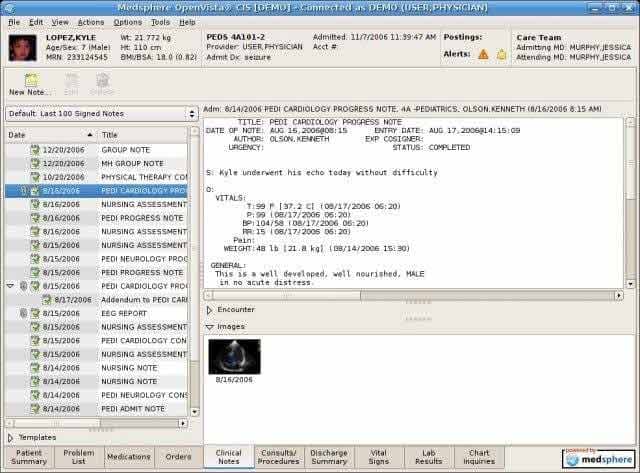
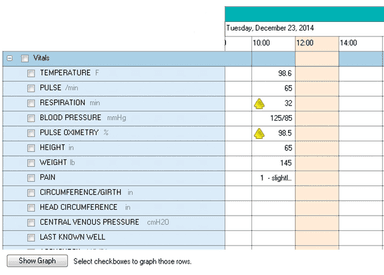
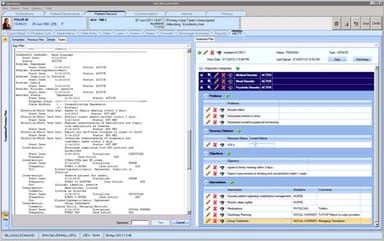
Medsphere Specifications
- Appointment Management/Scheduling
- e-Prescriptions
- Lab Integration
- Patient Portal
Medsphere Features
Patient Tracking
Medsphere EHR allows healthcare providers to monitor patient progress throughout their care journey. It includes tracking appointments, treatments, and outcomes, ensuring comprehensive and continuous care. The system also facilitates the identification of any gaps in care, enabling timely interventions.
Medication Management
This functionality enables medical practices to manage patient medications efficiently, including e-prescribing and medication reconciliation. It helps reduce medication errors and ensures patients receive the correct medications at the right times, enhancing patient safety and treatment efficacy.
Clinical Documentation
The platform enables practitioners to create, store, and retrieve patient records. It supports voice input and customizable templates, making documentation faster and more accurate, which improves overall clinical efficiency. Additionally, Medsphere software also ensures compliance with regulatory standards, safeguarding patient data integrity.
Communications
This feature facilitates secure messaging between healthcare providers and patients. It supports appointment reminders, follow-up messages, and patient inquiries, improving patient engagement and satisfaction by ensuring timely and effective communication.
Pros And Cons of Medsphere
Pros
User-friendly interface, making it easy for healthcare professionals to adapt quickly
Comprehensive suite of EHR and RCM solutions that streamline clinical workflows
Efficient patient tracking feature helping providers monitor patient progress
Customizable clinical documentation templates improve accuracy and efficiency
Cons
Some users may find the initial setup process to be time-consuming
Customer support response times can sometimes be slower than expected
Medsphere Reviews
Total 19 reviews
4.4
All reviews are from verified customers
Rating Distribution
5
Stars58%
4
Stars26%
3
Stars11%
2
Stars5%
1
Stars0%
Share your experience
Sunshine Clinic, 10-49 employees
“Simple and Powerful!”
Pros
One thing I admire about this system is that they continue to release updates for the software with the passage of time. This makes accessing patient files and customizing templates very easy. We are pleased with both the product and the service.
Cons
Nothing worth mentioning right now.
Rating Distribution
Ease of use
9
Value for money
10
Customer Support
10
Functionality
9
MediCare Plus, 2-9 employees
“The Smart Way to go!”
Pros
It has made billing and filing insurance claims far easier than ever. We can easily monitor sales and get updates.
Cons
Early on, there was some difficulty with the patient portal, but this was quickly overcome by customer support.
Rating Distribution
Ease of use
9
Value for money
8
Customer Support
8
Functionality
10
Private practice, 2-9 employees
“A YES from us!”
Pros
Our office has been much more efficient and profitable after we purchased Medsphere Systems. Great team, great customer service. Overall experience, Perfect.
Cons
Some features might use some slight improvement, as they arent as good as some of the other software Ive used.
Rating Distribution
Ease of use
7
Value for money
7
Customer Support
7
Functionality
7
Frequently Asked Questions
Does Medsphere have an app?
Yes, Medsphere has a mobile app.
What languages does Medsphere support?
The software supports the English language.
How much does Medsphere cost?
The cost of Medsphere is subscription based and varies based on the specific needs and size of the healthcare facility. Get custom Medsphere cost according to the needs of your organization.
Does Medsphere support mobile devices?
Yes, Medsphere supports mobile devices.
Does Medsphere offer an API?
Yes, Medsphere offers an API to its users.
What level of support does Medsphere offer?
The software offers several support options, including customer support services, online help desk, email, and phone assistance.
Who are the typical users of Medsphere?
Typical users of Medsphere include urgent care centers, orthopedic specialists, acute care, critical access and behavioral health hospitals, and EDIS departments.
Is Medsphere free?
No, Medsphere is not free software.
What other apps does Medsphere integrate with?
The software integrates with several applications, but the vendor has not disclosed the names of its third-party integrations.