


Office Ally Practice Mate
Last Updated
Key Takeaways
Generated from the text of customer reviews
Our Verdict
Overall Rating
Based on 184 users reviews
4.3
Rating Distribution
Positive
85%
Neutral
10%
Negative
5%
Starting Price
Start for Free Transactional fees may apply
Office Ally Practice Mate Specifications
- Appointment Management/Scheduling
- e-Prescriptions
- Lab Integration
- Patient Portal
Office Ally Practice Mate Features
Appointment Scheduling System
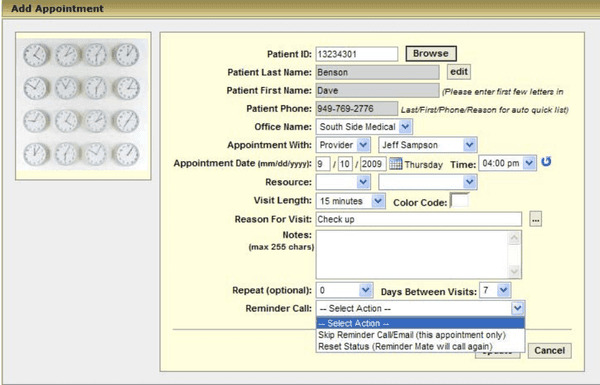
The software has intricate scheduling capabilities. Clinicians can color-code and categorize patient visits by date to effectively separate them. Moreover, you can quickly add unique patient notes and schedule recurring visits.
Document Patient Information
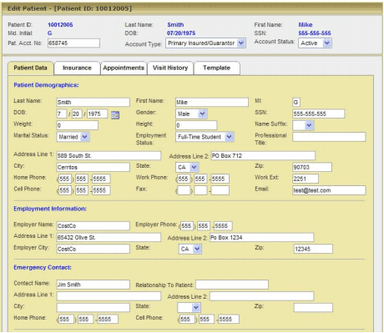
Patient Ally is indispensable for streamlining patient medical records. When registering for the patient portal, patients provide key information such as insurance details and medical history only once. This data is automatically transferred into the EHR system, minimizing the need for manual data entry. Additionally, Excel can be used to upload supplementary files from third-party sources.
Automated Patient Transactions
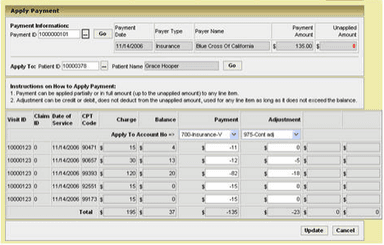
You can establish default procedures and perform diagnostic coding with Office Ally. It serves an essential function in medical procedures, particularly in mental health clinics. This is the most user-friendly method for entering patient payment information. Additionally, the program handles all billing operations on your behalf to maximize revenue. This enables you to focus on your primary duty: providing high-quality patient care.
Management Of Insurance Claims
Office Ally’s claims verification software is fully integrated with the EHR system and features transparent, intuitive displays for identifying rejected claims and analyzing outcomes. Therefore, denied claims are easily revised and resubmitted on time. You can rest easy knowing that your billing is in the hands of experts who will help increase your revenue.
Control Payment Statements
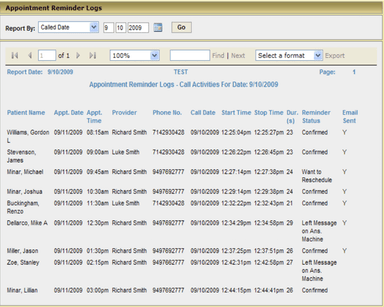
The Practice Mate software expedites the viewing of patient statements in the EHR. These statements are also available for printing. You can also add personalized notes before generating payment statements. Practice Mate's reporting features also include efficient patient charting and reporting. It monitors the frequency of scheduled patient visits, as well as your routine collections, allowing you to evaluate performance patterns. The expansion of your healthcare practice requires vigilant monitoring and analysis of these factors.
Pros And Cons of Office Ally Practice Mate
Pros
User-friendly interface for easy navigation and adoption
Comprehensive appointment scheduling and patient management features
Integration with billing and payment processing systems for streamlined revenue cycle management
Customizable templates and forms for patient intake and medical records
Real-time eligibility verification for insurance coverage
Cons
Additional costs for certain add-on features
Limited customization options with the free features
Limited scalability for larger practices, according to Office Ally Practice Mate reviews
Office Ally Practice Mate Pricing
Office Ally Service Center | Office Ally Practice Mate | Office Ally EHR 24/7 | Office Ally EDI Clearinghouse | Office Ally Payer Gateway |
|---|---|---|---|---|
Start for Free Transactional fees may apply | $0No monthly fee | $44.95/month/provider | Customized Pricing | Start for Free |
|
|
|
|
|
Disclaimer: The pricing details were last updated on Sep 14, 2026 from the vendor's website. Please contact us for a tailored pricing list.
Office Ally Practice Mate Reviews
Total 184 reviews
4.3
All reviews are from verified customers
Rating Distribution
5
Stars62%
4
Stars23%
3
Stars6%
2
Stars4%
1
Stars5%
Share your experience
THE CLAIMS GO OUT BEFORE I CAN ADJUST THEM SOMETIMES. CERTAIN THINGS WON'T SAVE LIKE THEY ARE SUPPOSED TO IN CHARTS., 1-10 employees
“Multiple Navigation Options”
Pros
It's fairly easy to navigate, and I like that there are multiple ways to get things done.
Cons
The claims process is clunky, and it takes too many steps before I can make adjustments.
Rating Distribution
Ease of use
8
Value for money
7
Customer Support
6
Functionality
6
Healthcare, 1-10 employees
Less than 6 months
“One of the best EHRs out there”
Pros
The simplicity of managing stats and other tasks is what made me keep the software for about a month, especially after Office Ally was cleared.
Cons
Honestly, there are not any real alternatives. This is solid medical management software for whats available.
Rating Distribution
Ease of use
10
Value for money
10
Customer Support
10
Functionality
10
General Surgery, Neurology, Family Practice, Rheumatology, Medicine, 1-10 employees
More than a year
“Love this product”
Pros
I found it really easy to learn and it integrates with Ofiice Ally's EHR system pretty easily.
Cons
I suggest that appointments' column should have more content for a better and convenient display. But I think the billing should improve a little as well.
Rating Distribution
Ease of use
10
Value for money
10
Customer Support
10
Functionality
10
Frequently Asked Questions
Who are the typical users of Office Ally Practice Mate?
The typical users of Practice Mate include solo and small group physicians, startup clinical practices, and healthcare providers managing their own practice.
Is Office Ally Practice Mate cloud-based?
Yes, Practice Mate is cloud-based.
Is Office Ally Practice Mate free?
Practice Mate Office Ally has some free plans. However, some add-on features like patient reminders, intake, and e-prescribing have additional costs associated with them.
What level of support does Practice Mate Office Ally provide?
Practice Mate EHR software provides live chat and phone support options.
What are the main features of Office Ally Practice Mate?
The main features of Office Ally Practice Mate software include appointment booking, integrations, eligibility verification, and patient count management. Furthermore, it also simplifies revenue cycle management, manages patient appointments, and offers online patient eligibility checking.
What does Office Ally Practice Mate cost?
The software offers pricing plans for Practice Software, Clearinghouse and Revenue Cycle. The plans start for free and offer customized pricing based on individual needs.
Does it offer denial management assistance?
The software understands the frustration of denied insurance claims in healthcare practices. Our staff can help you navigate the appeals process and fight for the coverage you deserve. We can assist with gathering necessary documentation and communicating effectively with your insurance company.
What languages does Office Ally Practice Mate support?
The platform primarily supports the English language.
Does Office Ally Practice Mate have a mobile app?
No, the software doesn’t offer a mobile app.
What other apps does Office Ally Practice Mate integrate with?
Office Ally Practice Mate integrates with Updox, The PLD Group, Aptus Health, and antidote.
Does Office Ally Practice Mate offer an API?
Yes, the software offers an API.
What does Office Ally Practice Mate cost?
Office Ally offers a variety of pricing options depending on the selected services and features. For small to medium providers, the Service Center and Practice Mate are free to start, with possible transactional fees and optional add-ons. The Ally Practice EHR 24/7 plan costs $44.95/provider/month. High-volume solutions like EDI Clearinghouse and Payer Gateway, as well as Revenue Recovery Products, are available with custom pricing. Get a personalized Office Ally pricing quote today!