


Workiro
Last Updated
Overview
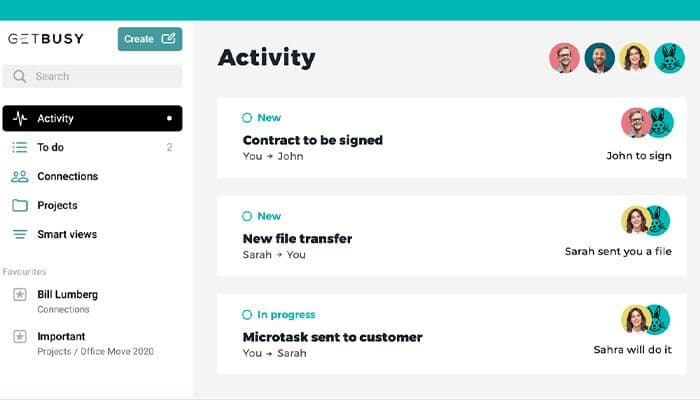
Is fragmented communication and lost documents hindering your team’s productivity? Workiro offers a centralized, collaborative workspace where teams thrive, information flows smoothly, and work gets done easily. Moreover, the Workiro app also streamlines your business processes without any hassle and helps you unlock seamless productivity.

Workiro Specifications
- Time Tracking
- Task Management
- Reporting
- Budget Management
Workiro Features
Centralized Document Hub
Effortlessly organize, store, and retrieve all your business documents from a single, secure location. Enjoy powerful search tools and robust version control for maximum efficiency. This eliminates time wasted searching for files and ensures everyone works with the most up-to-date information.
Collaborative Workspaces
Foster real-time teamwork with dedicated discussion threads tied to projects, documents, or clients. Tag colleagues, share updates, and centralize feedback to streamline decision-making and accelerate progress. Stay connected with your team and avoid misunderstandings due to scattered communication.
Simplified Task Management
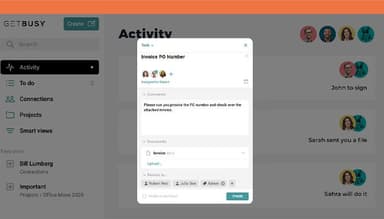
Break down complex projects into manageable tasks with clear assignments, deadlines, and progress tracking. Ensure accountability, keep everyone on the same page, and promote successful project delivery. No more missed deadlines or confusion about who's responsible for what.
Effortless E-Signatures
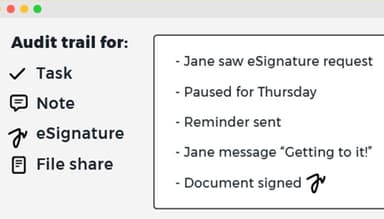
Speed up approvals and contracts with legally binding electronic signatures integrated effectively into your workflow. Enhance client experience, get paperwork signed faster, and reduce the administrative burden associated with signing documents.
Secure Instant Messaging
Ditch fragmented, insecure email chains. Communicate directly within Workiro's platform, keeping conversations organized, easily searchable, and linked to relevant projects. Streamline internal discussions and maintain a secure record of important decisions for future reference.
Pros And Cons of Workiro
Pros
Intuitive and user-friendly interface
Seamless document organization and searching
Enhanced team collaboration and communication
Powerful task management features
Secure platform for sensitive data
Cons
Some advanced features require training
Occasional updates impacting the interface, according to some Workiro reviews
Not ideal for unstructured project styles
Workiro Reviews
Total 16 reviews
4.8
All reviews are from verified customers
Rating Distribution
5
Stars81%
4
Stars19%
3
Stars0%
2
Stars0%
1
Stars0%
Share your experience
Professional Indemnity, 11-50 employees
Less than a year
“Workiro”
Pros
I can easily assign tasks to my staff members and they receive reminders to complete them.
Cons
I am frustrated by not being able to remove old staff and not being able to create multiple assignments at once.
Rating Distribution
Ease of use
8
Value for money
8
Customer Support
10
Functionality
8
Accounting, 1-10 employees
Less than 6 months
“A Software Solution I Actually Use!”
Pros
Workiro is incredibly user-friendly, and their customer service is unmatched. Whenever I've had a question, I've received almost instant responses.
Cons
At first, the simple interface confused me a little bit because it looked too basic. But actually, I realized that most of the features are in the area to which they apply. This way, I can stay focused rather than having a cluttered view that constantly reminds me of other things I need to do.
Rating Distribution
Ease of use
10
Value for money
10
Customer Support
10
Functionality
10
Trucking Accounting, 1-10 employees
Less than a year
“Grange Farm”
Pros
My team and I appreciate the simplicity of Workiro's interface. Updating tasks, especially via smartphone, is effortless.
Cons
I am using the software to also cover some of our H&S work, and some of the features don't quite suit this. However, some of the recent updates have helped, and with the great customer service I receive, I can suggest changes that would better suit my needs.
Rating Distribution
Ease of use
10
Value for money
8
Customer Support
8
Functionality
8
Frequently Asked Questions
Does Workiro offer an API?
Yes, the software has an API available.
What language does Workiro support?
The software supports the English language.
What other apps does Workiro integrate with?
Workiro integrates with various third-party applications, including HubSpot, Salesforce, Xero, Celigo, Glide, Office 365, and Turnkey.
Does Workiro support mobile devices?
Yes, Workiro does support mobile devices.
What types of pricing plans does Workiro offer?
Workiro provides a simple pricing structure for professionals, charging £35/per user/per month. However, you can also inquire about a personalized Workiro pricing plan.
Who are the typical users of Workiro?
Workiro software is a versatile solution that benefits mid to large-sized businesses, serving departments like HR, Sales, and Finance.
What level of support does Workiro offer?
The Workiro project management software offers support through various channels, including Chat, Email/Help Desk, Knowledge Base, Phone Support, and FAQs/forums.
Can Workiro handle my growing business's unlimited enterprise content management needs?
Yes! Workiro offers scalable solutions designed to grow your business. The software also helps you to utilize the easy-to-use interface to store work without any storage limits.
How does Workiro streamline processes for incredible work?
For incredible work, Workiro brings your content, communication, and tasks all in one platform, eliminating scattered information and fostering efficient collaboration. Automatic reminders and task management tools keep everyone on track for exceptional results.