


Last Updated
Overview
FloristWare optimizes floral business operations with advanced POS, order management, marketing, and reporting features. It enhances efficiency, customer engagement, and sales tracking. Although occasional system upgrades can be complex, its dedicated support from experienced professionals of FloristWare ensures seamless implementation and ongoing success in a competitive retail environment.
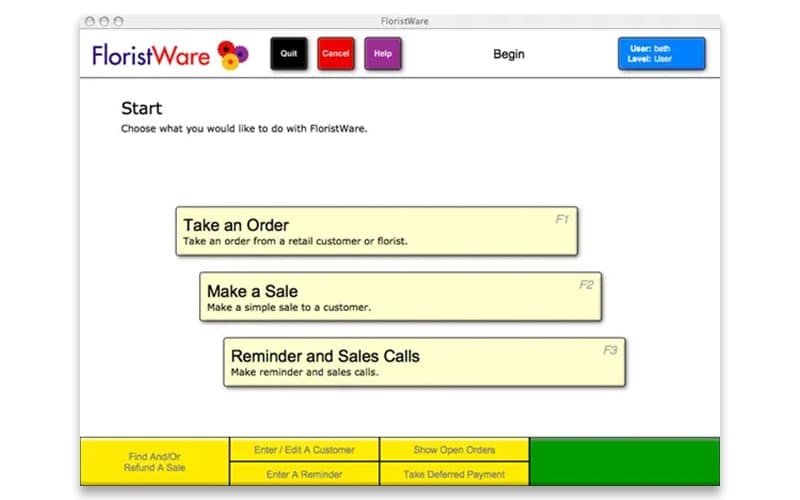



FloristWare Specifications
- Sales Orders
- Invoicing
- Sales Tracking
- Customer Management
FloristWare Features
Flower Delivery Management And Route Optimization
FloristWare enhances delivery efficiency with a map-based route optimization system. It enables drivers to follow the most time-saving routes while allowing customized priorities. It also helps ensure timely deliveries and reduces operational costs.
Mobile Floral Delivery App
This dedicated mobile app for users improves delivery accuracy and reduces costs by equipping drivers with real-time order details. Its robust capabilities enhance customer satisfaction by streamlining the delivery process and minimizing errors.
FSN Website And Relay Integration
FloristWare supports integration with Flower Shop Network, offering FSN florists a seamless solution for managing relay and web orders. This integration enhances order processing efficiency while maintaining a smooth workflow.
Real-Time Delivery Confirmations
Customers receive instant delivery confirmations through automated notifications. This feature improves transparency, enhances customer trust, and reduces follow-up inquiries, ensuring a smooth and hassle-free experience.
Printer Automation
The software directs specific print jobs to the correct printer without manual intervention. Thus, FloristWare eliminates repetitive steps, enhances workflow efficiency, and ensures smooth, uninterrupted order processing.
Pros And Cons of FloristWare
Pros
Easy to use and intuitive interface
Non-proprietary software, compatible with various hardware and payment processors
Robust marketing and reporting tools for data-driven insights
Strong delivery management with route optimization
Cons
Standing orders require manual input rather than automatic scheduling
Multi-screen order entry can be challenging at times
Sales reports could use more advanced filtering options, according to some software users
FloristWare Reviews
Total 7 reviews
4.4
All reviews are from verified customers
Rating Distribution
5
Stars57%
4
Stars29%
3
Stars14%
2
Stars0%
1
Stars0%
Share your experience
Anonymous
Consumer Goods, 1-10 employees
More than a year
“Great for local flower stores”
Pros
For our shop with three employees, it works perfectly. It helps us run things properly and allows us to stay organized. Also we can easily handle cash and carry sales, pick up orders and deliveries. Overall we have not had any issues with the system and it does not require much training. It is really user friendly.
Cons
At times, it seems that there are too many steps involved in completing a transaction which annoys me.
Rating Distribution
Ease of use
9
Value for money
10
Customer Support
9
Functionality
8
Keith
Events Services, 11-50 employees
More than a year
“Totally love using it”
Pros
As a busy floral shop, Floristware helps us keep our orders on track. We love the software, how easy it is to use and all the extra features.
Cons
I feel like it would be great to have automatic pop ups or print outs for standing orders.
Rating Distribution
Ease of use
10
Value for money
10
Customer Support
10
Functionality
10
Anonymous
Retail, 11-50 employees
Less than 6 months
“The best for keeping buyers in the loop”
Pros
For seasonal items like poinsettias and other flowers, it makes it easy for our nursery to keep track of our customers.
Cons
After a while we decided to phase this software out and switch to a larger platform to manage our CRM.
Rating Distribution
Ease of use
10
Value for money
10
Customer Support
10
Functionality
7
Frequently Asked Questions
Does FloristWare have a mobile app?
Yes, FloristWare offers a dedicated mobile app.
What types of pricing plans does FloristWare offer?
The FloristWare cost structure is transparent, with no contracts or hidden fees. It features three plans: Basic at $149/month, Advanced at $199/month, and Enterprise at $500/month. You can request a detailed pricing rundown of FloristWare to pick a plan that fits your needs.
Does FloristWare offer an API?
Yes, FloristWare provides API access.
What level of support does FloristWare offer?
FloristWare provides support through FAQs, forums, email, phone, and a knowledge base.
Who are the typical users of FloristWare?
FloristWare is typically used across the floral industry by all sizes of businesses and stores.
What other apps does FloristWare integrate with?
FloristWare supports integrations with third-party applications like Google Pay, Shopify, Apple Pay, Mailchimp, OnFleet, Clover, GravityFree, and QuickBooks.
What languages does FloristWare support?
Although English is the primary language in FloristWare, it supports multiple languages for Advanced and Enterprise plans.