


AccountEdge
Last Updated
Key Takeaways
Generated from the text of customer reviews
AccountEdge is accounting software for small businesses, with desktop, network, and hosted editions. Owners, bookkeepers, and finance teams use it the most. Users often value its ease of use and detailed accounting tools, though some report limited reporting flexibility. AccountEdge has recently updated its Network Edition guidance for simultaneous multi-user access.
Our Verdict
AccountEdge is best suited to small businesses that prefer detailed accounting tools and desktop-based data management. Its pricing is affordable for single-user teams, although paid support can increase overall costs. We recommend it for businesses that value detailed accounting control over cloud-first collaboration.
Overall Rating
Based on 76 users reviews
4.2
Rating Distribution
Positive
79%
Neutral
20%
Negative
1%
Starting Price
$20
per month
AccountEdge Specifications
- Financial Reporting
- Invoice Management
- Expense Tracking
- Tax Management
What Is AccountEdge?
AccountEdge is desktop accounting software for small businesses that manage sales, purchases, banking, inventory, and financial reporting. It keeps company data on local computers, while the Hosted edition provides remote access for teams that need to work off-site. The software supports detailed inventory tracking across multiple locations, along with item variations, serial numbers, kits, and price levels. Using the software, businesses can also track income and expenses by job or project, which helps them measure costs and profitability across different areas of the business.
What Is AccountEdge Best For?
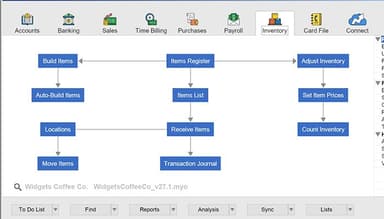
The platform stands out for its inventory management feature. It lets businesses track stock across multiple locations, create product variations, and monitor serialized items with warranty details. Teams can also build finished products from individual components and set minimum stock levels for reordering. These controls can help businesses maintain more accurate inventory records and manage stock alongside their accounting data.
How Much Does AccountEdge Cost?
AccountEdge pricing starts at $20/month for the AccountEdge Pro plan. It supports a single user and includes core capabilities such as local desktop/on-premises access, invoicing, free email support, inventory, reporting, and time billing. The other pricing plans include:
- AccountEdge Network Edition: $30/month for 2 users
- AccountEdge Hosted: $50/user/month
The vendor provides a 30-day free trial as well.
Beyond the base fee, users should also factor in the following additional costs:
- Payroll: $20/month for unlimited employees
- Workstation License: $10/month/computer
- Telephone Support: $10/month
- Bank Feeds: $5/month
- AccountEdge Connect: Starting at $15/month
- Additional Company Files: $10/file/month after the 10 included files
- Payment Processing: Starting at 2.99%
Users generally consider the software reasonably priced compared with a similar accounting tool. However, some reviewers note that support may require additional payment, which can increase the overall cost.
Disclaimer: The pricing is subject to change.
AccountEdge Integrations
The AccountEdge software supports integration with multiple third-party systems such as
- Shopify software
- Microsoft Office
- Bank Feed
- Dropbox
- UPS
- Square
- Microsoft Power BI
How Does AccountEdge Work?
Log in to your registered AccountEdge company file and follow these steps to access its accounting tools:
- Create your chart of accounts using a predefined list or your own setup
- Set up the records and products your business works with, to manage your business
- Manage sales by creating invoices and quotes, and track purchases and expenses as they come in
- Connect your bank accounts through Bank Feeds for transaction matching and reconciliation
- Track inventory levels and stock activity
- Process employee payroll, with direct deposit available as an optional service
- Generate financial reports from your company file
Who Is AccountEdge For?
AccountEdge is mainly suitable for small to medium sized businesses in the following industries:
- Manufacturing
- Construction
- Automotive
- Retail
- Nonprofit
- Healthcare
AccountEdge Use Cases
Based on what we have analyzed from AccountEdge features and user reviews, the following are the key scenarios where this software is a good fit.
Manufacturers Managing Complex Inventory
Manufacturers can use AccountEdge to keep inventory activity and production costs connected with their accounting records. It supports product variations, built items, and job costing for production-related work. Users noted that inventory variations helped track products at different stages, and job codes made it easier to follow costs for specific projects.
Accounting Firms Preparing Client Books For Tax Season
AccountEdge helps accounting firms manage multiple client files during tax season by keeping ledger activity and transaction changes easy to review. Its audit trail supports checks before month-end and year-end close, especially when adjustments need to be traced. Reviewers also highlight its ledger customization and audit trail for tax-season and year-end reviews.
Teams Sharing Company File Across Departments
Businesses with several departments may need multiple employees to work in the same company file at the same time. AccountEdge ‘Network Edition’ supports simultaneous access for multiple users. This makes it a practical fit for teams that need shared access to the same accounting records without switching between separate files.
Small Businesses Handling Accounting In-House
AccountEdge is a good option for businesses that manage their books internally without a large finance team. Its desktop setup supports everyday accounting from a single company file. Reviewers describe the software as easy to learn and practical for daily accounting. This makes it a good fit for lean teams that handle their own books.
Is AccountEdge Right For You?
AccountEdge is a good fit for small and mid-sized businesses that prefer desktop-first accounting and need detailed control over financial records, jobs, and reporting. Its general ledger and job-tracking capabilities support a detailed view of transaction history and project-level financial performance.
The platform adds security controls for businesses using its online services. It uses 256-bit SSL to encrypt data in transit and AES encryption for sensitive information.
Its desktop accounting capabilities have also received recognition. Forbes named AccountEdge Best for Advanced Data Management and Reporting in its 2024 accounting software roundup. CNN also recognized it as Best Desktop Accounting Software.
Tax reporting is also changing for U.S. businesses in 2026. The Form 1099-NEC threshold increased from $600 to $2,000 for qualifying nonemployee compensation. AccountEdge supports 1099 vendor tracking, printing, and e-filing, which makes it useful for businesses managing contractor payments under the updated reporting requirements.
Still deciding if AccountEdge is the right accounting software for your business? Call us at (661) 384-7070, and we will help you work through it.
AccountEdge Features
Invoicing
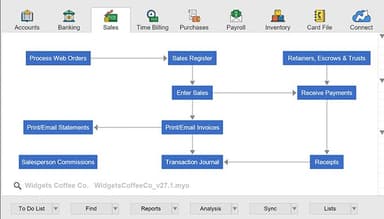
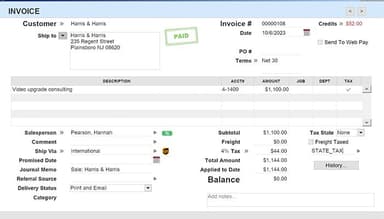
This capability manages sales from quotes and orders through invoicing and payment. Businesses can bill for products, services, or time, use progress billing for staged work, and set up recurring sales. Accounts receivable reports also show open invoices and customer payments.
Expenses
The platform records purchases, vendor bills, payments, and recurring expenses. Purchase orders can be converted into bills without entering the same information again, while recurring transactions can be created automatically or set as reminders. Users can also review outstanding payables through vendor and payment reports.
Time Billing
AccountEdge records billable and non-billable work through activity slips and timesheets. Users can set custom billing rates, assign time to jobs, and turn recorded activity into invoices. Job tracking also shows income, expenses, and profit margins for individual projects.
Banking
This feature connects bank and credit card accounts through Bank Feeds and imports transactions for matching and reconciliation. Users can review banking activity from the Bank Register, prepare deposits, transfer funds, and record spend or receive money transactions directly.
Payroll
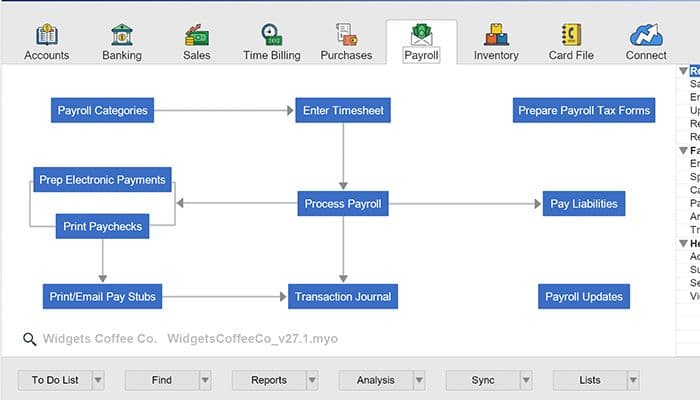
The software processes employee pay and maintains payroll records within the same environment. It supports timesheets, recurring pay, payroll categories, accruals, and payroll tax table updates. Direct deposit, payroll tax forms, and e-filing are available through separate services where applicable.
Pros And Cons of AccountEdge
Pros
Handles complex journal entries reliably
Keeps client account mappings consistent
Supports detailed inventory tracking efficiently
Imports client ledger data smoothly
Provides useful form customization options
Cons
Corrections can require several reversal steps
Forms may need updates after upgrades
Historical data access can feel limited
AccountEdge Pricing
AccountEdge Pro | AccountEdge Network Edition | AccountEdge Hosted |
|---|---|---|
$20 per month | $30 per month | $50 per user per month |
|
|
|
Disclaimer: The pricing details were last updated on Sep 25, 2026 from the vendor's website. Please contact us for a tailored pricing list.
AccountEdge Reviews
Total 76 reviews
4.2
All reviews are from verified customers
Rating Distribution
5
Stars49%
4
Stars30%
3
Stars13%
2
Stars7%
1
Stars1%
Share your experience
Advertising, 1-10 employees
More than a year
“Lag time is unacceptable ”
Pros
The software was OK, until they switched to web-based hosting. :\
Cons
Now AppsForRent hosts them, we need to connect to a remote desktop to use the application. There are significant lag times, poor customer, and overall frustration with having to be on a remote desktop.
Rating Distribution
Ease of use
3
Value for money
3
Customer Support
3
Functionality
3
Recruitment, 500+ employees
More than a year
“Wonderful platform”
Pros
It is an effective accounting software I have ever used.
Cons
There are no cons.
Rating Distribution
Ease of use
9
Value for money
10
Customer Support
10
Functionality
10
Product, Manufacturing, Small Business, 11-50 employees
More than a year
“Our romance with AccountEdgePro is rocky”
Pros
I purchased AccountEdge Pro for our farm with the intend to install it on multiple machines. The multiuser login feature worked brilliantly, although there were a couple of quirks. Since we have individual desktop setups (x5), we used a mesh network on the farm to connect the desktops and input inventory transfers as we grew or propagated plants. Unfortunately, we don't have internet coverage from our Starlink satellite for these outlying desktops, so a web-based subscription wasn't suitable. The one-time payment option was a significant factor for us as seasonal farmers, considering our fluctuating account balance throughout the year. The integration with Shopify was the major selling point as it allows our staff to update our inventory in real-time online through the sync link between the two software platforms on the main computer. This was essential for us as we have stock in both the USA and Australia, and it saved us a lot of administrative time after team meetings, which often faced time difference issues. The Inventory Variations feature was a gamechanger for us since we manufacture plants and being able to track the different stages of plant growth in our inventory provided valuable information to our sales teams. Previously, we would have to physically count plants and call the customer back, but now we could suggest alternate plants for earlier delivery, leading to potential extra sales. Job Codes were also brilliant for separating different projects on the farm or the research component of our business, allowing us to track project costs. This particular component disappeared when MYOB went web-based around six years ago. Having used Australian MYOB since 1996, I found that AccountEdge Pro was an immediate replica with additional features, making the transition incredibly smooth. I've been using AccountEdge Pro since 2019.
Cons
Until last year, we didn't have any cons with AccountEdge. However, when we purchased upgraded licenses for all five computers, we encountered a major issue. Despite having the multiuser function, it no longer allows simultaneous data input from multiple computers. We discovered that the other computers can only input data if they are logged out while the main computer remains logged on. This rendered the licenses useless, as our main computer is always logged on. We tried reinstalling the older version, but it wasn't possible once the account backup came from the upgraded version. Support then advised us to switch to the web-based version, but with three computers without internet access and the need for subscriptions for each active computer, it became financially and logistically unfeasible to sustain the fees for 12 months a year. The Shopify link disappeared, and despite promises of a new solution since May last year, nothing has been delivered. We didn't receive any prior notice, and our customers started complaining about undelivered orders, which alerted us to the problem. As a result, we now have to enter data separately from two locations, the USA and Australia. Moreover, we can no longer access our account through the MyAccount page, as we are geofenced to the Australia MYOB page. The same limitations apply to Community support and the Support Team, which we have paid for. Speaking of payments, AccountEdge Pro switched to web-based monthly subscriptions. We strongly prefer one-time payments when required, as they are much easier to manage. Unfortunately, after a great experience initially, we have decided to stop upgrading. We hired someone with Python knowledge to create sync capability with Shopify. Luckily, I have a database diploma and can work with reports as CSV imports from the desktop computers located around the farm, but this has consumed a significant amount of my time.
Rating Distribution
Ease of use
10
Value for money
2
Customer Support
2
Functionality
4
Frequently Asked Questions
Does AccountEdge offer an API?
The vendor has not disclosed information regarding its API.
What language does AccountEdge support?
AccountEdge primarily supports English.
What other apps does AccountEdge integrate with?
The software supports integration with several third-party systems such as Dropbox, UPS, Power BI, Square, and Shopify, and Bank Feeds.
Does AccountEdge have a mobile app?
No, it does not have a dedicated mobile app.
What types of pricing plans does AccountEdge offer?
The vendor offers three monthly subscription plans: AccountEdge Pro at $20/month, AccountEdge Network Edition at $30/month, and AccountEdge Hosted at $50/user/month. Get in touch for custom AccountEdge cost estimates.
Who are the typical users of AccountEdge?
AccountEdge is mainly suitable for small to medium-sized businesses, manufacturers, retailers, accountants, and bookkeepers.
What level of support does AccountEdge offer?
The platform provides support through live chat, phone, email, and knowledge base.