



Last Updated
Key Takeaways
Generated from the text of customer reviews
Our Verdict
Accounting Seed Specifications
- Financial Reporting
- Invoice Management
- Expense Tracking
- Budgeting and Forecasting
Accounting Seed Features
Customizable General Ledger
This feature enables users to manage all financial transactions with ease, from journal entries to account reconciliation. This customization-friendly feature allows businesses to tailor financial data management to fit specific reporting needs, enhancing financial oversight and control.
Project Accounting
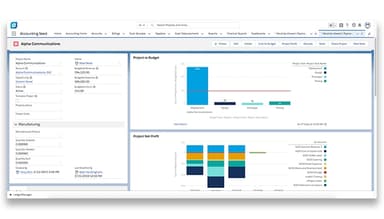
The project accounting feature simplifies project-based financial tracking, allowing users to assign and manage budgets, track expenses, and analyze project profitability. This functionality is ideal for service-oriented businesses that need visibility into project-specific financial performance.
Automated Billing And Invoicing
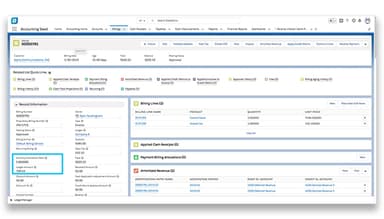
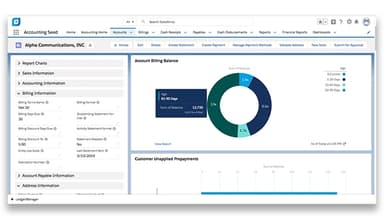
The platform simplifies the invoicing process through automated billing and invoicing, enabling recurring billing schedules and customized invoice creation. This feature minimizes manual tasks and enhances accounting automation for improved financial management.
Multi-Currency Management
Accounting Seed’s multi-currency management feature allows users to handle transactions in multiple currencies, making it ideal for companies with international clients or vendors. This functionality automatically converts currencies based on real-time exchange rates, simplifying global transactions and ensuring accurate financial reporting across different markets.
Reporting And Analytics
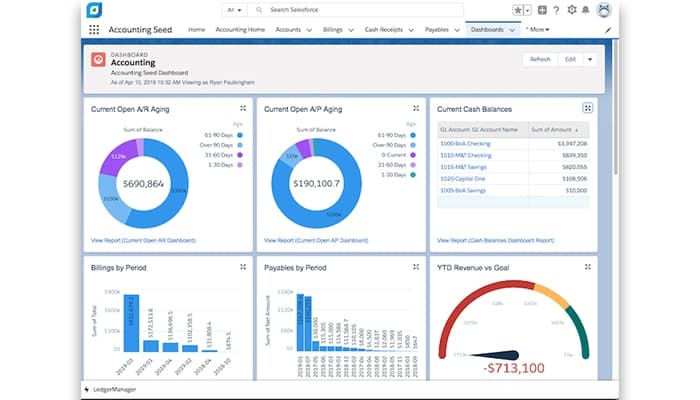
With robust reporting and analytical tools, Accounting Seed delivers detailed financial insights through customizable reports and dashboards. This feature empowers decision-makers with accurate, real-time data to support strategic planning and improve financial forecasting.
Pros And Cons of Accounting Seed
Pros
Seamless integration with Salesforce enhances data management
Robust reporting capabilities for detailed financial insights
Automated billing streamlines invoicing processes efficiently
Project accounting feature simplifies tracking project finances
Cons
Cash application process can be time-consuming
Financial reports may require additional formatting efforts
Certain features necessitate third-party applications for full functionality
Accounting Seed Reviews
Total 40 reviews
4.5
All reviews are from verified customers
Rating Distribution
5
Stars55%
4
Stars40%
3
Stars3%
2
Stars3%
1
Stars0%
Share your experience
Rit
IT, 11-50 employees
More than a year
“Flexible and powerful accounting software in Salesforce platform”
Pros
It can be customized to fit with existing Salesforce business processes and it offers powerful reporting and dashboard features.
Cons
The user interface is tied to Salesforce design, which makes it a bit click-heavy.
Rating Distribution
Ease of use
10
Value for money
10
Customer Support
10
Functionality
10
Andrea
Insurance, 11-50 employees
Less than a year
“Honest take on this software”
Pros
Features like Bank Connect and the option to replicate payable lines and journal entries stand out to me. Those are some of the best features available for sure.
Cons
Payment processing in Accounts Payable is a bit limited since all payable components like vendors, insurance companies and producers share the same general ledger account.
Rating Distribution
Ease of use
10
Value for money
10
Customer Support
10
Functionality
10
Christi
Social Media, Advertising, Marketing, 51-100 employees
Less than a year
“New to Accounting Seed, not new to accounting.”
Pros
it is ok however I am quite new to Accounting Seed so it is s a bit tricky when it comes to posting entries. You really need a solid understanding of accounting to understand it properly.
Cons
Well it is difficult to link reports to Salesforce data.
Rating Distribution
Ease of use
7
Value for money
7
Customer Support
3
Functionality
7
Frequently Asked Questions
Does Accounting Seed offer an API?
Yes, Accounting Seed offers an extended Salesforce API.
What language does Accounting Seed support?
Currently, Accounting Seed comes with the Translation Workbench and can be translated into any language from the user interface perspective. However, their error messages, support, and technical documentation are still in English only.
Does Accounting Seed support mobile devices?
No, Accounting Seed does not offer any app for any mobile device.
How much does Accounting Seed cost?
Accounting Seed pricing starts at $750/company/month for entry-level configurations. It can be customized based on user needs. You can request a personalized Accounting Seed cost quote from our website.
What other apps does Accounting Seed integrate with?
The official website only lists Salesforce as a native integration.
Who are the typical users of Accounting Seed?
Accounting Seed features can be used by small-to-medium-sized businesses to manage financial operations.
What level of support does Accounting Seed offer?
The software offers in-app AI assistance, FAQ, online support, email, phone, and a knowledge base.