


Last Updated
Overview
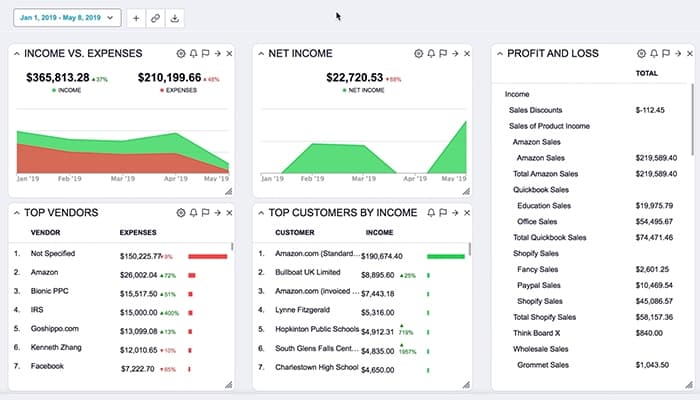
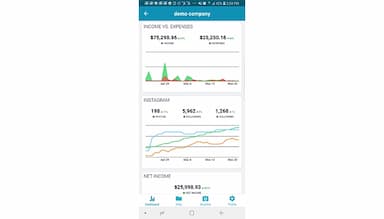
Botkeeper is an accounting software that transforms bookkeeping by automating tasks and integrating with QuickBooks Online. It supports real-time dashboards, payroll, and invoicing. While sometimes it may cause bank connection issues, Botkeeper cuts time on updates and reconciliations. With its AI-enabled tools, the software is efficient for overall accounting purposes.
Botkeeper Specifications
- Financial Reporting
- Invoice Management
- Expense Tracking
- Tax Management
Botkeeper Features
Transaction Manager
With its AI-support capabilities, this feature helps manage and categorize transactions efficiently. It seamlessly integrates flawless transactions into the system and flags transactions requiring review. It ensures that financial data is accurate and well administered.
Smart Connect
The software eliminates issues with incorrect passwords and manual logins. It links a customer’s financial data and provides quick and easy access to necessary information without intermediaries, enhancing security and workflow efficiency.
Journal Entry (JE) Automation
Botkeeper automates the creation and management of amortization schedules and loan categories in real-time. This feature streamlines the posting of financial transactions and manages complex entries. It also syncs directly with the general ledger and simplifies the processes.
Activity Hub
The feature offers a centralized space for all interactions, feedback, and task priorities. It facilitates standardized communication and ensures smooth interactions between firms and clients. Users can easily collaborate and update tasks in one location.
Client And User Management
It provides comprehensive control over user access. You can invite users, define roles, and set permissions on both firm and client levels. Data, documents, and tasks are managed securely since Botkeeper supports approval access to ensure utmost security.
Pros And Cons of Botkeeper
Pros
Easy client onboarding
Insightful and timely reports
Saves time on updates and reconciliations
Excellent customer service
Cons
For some tasks, manual uploading is still required
Occasional bank connection issues
According to some users, offline availability would be a huge help
Botkeeper Reviews
Total 42 reviews
4.4
All reviews are from verified customers
Rating Distribution
5
Stars60%
4
Stars24%
3
Stars14%
2
Stars2%
1
Stars0%
Share your experience
Nathan
Accounting, 11-50 employees
Less than 6 months
“Botkeeper has turned our bookkeepers into account managers”
Pros
Botkeeper software biggest advantage for me has been getting rid of those repetitive, boring tasks that bookkeepers usually handle. Now they can become real account managers and can focus on more on high-level responsibilities like quality control and spending more time working with clients in areas beyond just bookkeeping.
Cons
There are a few minor aspects of the system that could be improved a bit more but they do not impact the overall work. Since the company is still growing, I trust that these concerns will be addressed in the product roadmap.
Rating Distribution
Ease of use
9
Value for money
10
Customer Support
10
Functionality
10
Cindy
Accounting, 51-100 employees
Less than a year
“botkeeper performs routine tasks and gives me back time for other important client services”
Pros
Using Botkeeper for tracking income, expenses and bank reconciliations has been really helpful for me. I found it easy to get my clients set up and start using the Botkeeper service without much effort.
Cons
I do not find the client management reports very much useful maybe because our company uses a specific format for financial reporting.
Rating Distribution
Ease of use
8
Value for money
8
Customer Support
8
Functionality
8
Joseph
Accounting, 1-10 employees
Less than a year
“Botkeeper Accounting should improve theri UI”
Pros
I really like how they take care of things and keep communication open about what the clients need.
Cons
Botkeeper software is not the easiest to use and the UI could definitely be improved in several areas. They are updating it frequently which is a positive sign.
Rating Distribution
Ease of use
6
Value for money
6
Customer Support
8
Functionality
8
Frequently Asked Questions
What types of pricing plans does Botkeeper offer?
The Botkeeper cost is $69/per license/month for its Infinite Platform plan.
What language does Botkeeper support?
Botkeeper supports only the English language.
Does Botkeeper offer an API?
Yes, Botkeeper offers an API.
What other apps does Botkeeper integrate with?
Botkeeper does not disclose its integration details. Schedule a Botkeeper demo to discover its integration options.
Who are the typical users of Botkeeper?
Besides accounting firms, the typical users of Botkeeper include financial professionals from small and medium-sized businesses.
What level of support does Botkeeper offer?
Botkeeper offers support through email, FAQs/forums, a knowledge base, ticket submission, and a client portal.