



Last Updated
Overview
ExpensePoint expense management software is a cutting-edge solution designed to simplify and automate the tracking, submission, and management of employee expenses, empowering businesses of all sizes to streamline expense reporting and enhance financial control. Join a community of satisfied clients who have transformed their expense management process with ExpensePoint.
ExpensePoint Specifications
- Financial Reporting
- Invoice Management
- Expense Tracking
- Tax Management
What Is ExpensePoint?
Overview
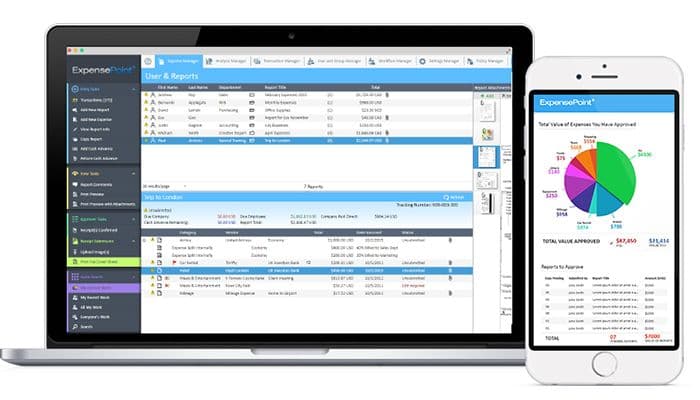
ExpensePoint accounting software is a cloud-based solution that streamlines employee expense reporting for businesses of all sizes. It offers comprehensive features, including multi-currency support, reading and imaging capabilities, approval routing, and policy implementation. ExpensePoint allows users to quickly generate, submit, approve, and process expense reports in a unified platform.
ExpensePoint Pricing
Disclaimer: The pricing is subject to change.
ExpensePoint Integrations
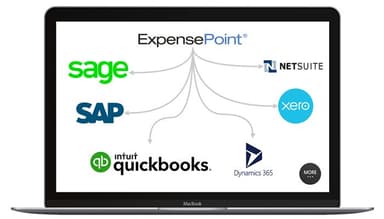
ExpensePoint software integrates with various popular accounting applications, including:
- QuickBooks
- Sage
- Xero
- Microsoft Dynamics 365
- NetSuite
This integration allows for smooth data transfer and synchronization between ExpensePoint and these accounting systems.
Who Is ExpensePoint For?
ExpensePoint is used in various industries and sectors, including:
- Non-Profit Organization Management
- Construction
- Financial Services
- Insurance
- Machinery
Is ExpensePoint Right For You?
ExpensePoint, a software developed by Global Point Technologies, has a long-standing history dating back to 2000. It provides businesses with top-notch expense reporting and management capabilities. The software aims to streamline expense management processes, helping companies to achieve efficiency and effectiveness.
By integrating ExpensePoint with their preferred accounting software, users can ensure precise and streamlined expense data management, simplifying their organization's overall financial workflow. You can also go through Expensepoint reviews to learn more about it through real users.
Still not sure about ExpensePoint? For further information, contact our experts on (661) 384-7070 to help you make the best decision.
ExpensePoint Features
Multiple Reporting Currency
ExpensePoint supports multiple currencies, allowing users to easily manage expenses in different currencies and generate reports in their preferred currency.
Spend Control
The platform provides tools to set spending limits, enforce policy compliance, and monitor expenses in real time. It helps businesses maintain control over their spending and prevent overspending.
Reimbursement Management
ExpensePoint automates the reimbursement process, making tracking and managing employee reimbursements easy. It streamlines the submission, review, and approval of reimbursement requests, ensuring timely and accurate reimbursements.
Expense Approval
The platform offers a streamlined approval process for expenses. Users can define custom approval workflows, set rules, and automate notifications, allowing for efficient and hassle-free expense approvals.
Time & Expense Tracking
ExpensePoint enables comprehensive tracking of both time and expenses. Users can easily record and categorize their time spent on projects or tasks and track various expense types, ensuring accurate and detailed expense tracking.
Pros And Cons of ExpensePoint
Pros
User friendly
Saves time
Intuitive User interface
Easy to upload
Cons
Expense report issues
Balance limits
Occasional system lag
ExpensePoint Reviews
Total 46 reviews
4.8
All reviews are from verified customers
Rating Distribution
5
Stars80%
4
Stars15%
3
Stars4%
2
Stars0%
1
Stars0%
Share your experience
IT, 1-10 employees
“The ultimate solution for my expense reports”
Pros
My favorite aspect of this platform is how intuitive and convenient it makes the entire process of managing expenses. With its receipt scanning feature, I can simply snap photos of my receipts and avoid the hassle of dealing with paperwork and manually entering details.
Cons
I've encountered location accuracy issues that led to incorrect mileage calculations. Also, I find the mobile interface of the app could be more intuitive and easier to navigate.
Rating Distribution
Ease of use
8
Value for money
8
Customer Support
10
Functionality
10
Renewables & Environment, 1-10 employees
Less than 6 months
“customer service team is a gem! Helped me to make sense of managing expenses for our team.”
Pros
Integrating with this platform has been seamless. The customer service is exceptional, and I would highly recommend it to anyone looking to simplify their expense reporting.
Cons
My experience has been good so far. I've faced challenges with the downloaded desktop version, but I've found using the mobile app and website as a workaround works for me!
Rating Distribution
Ease of use
10
Value for money
10
Customer Support
10
Functionality
10
Nonprofits, 1-10 employees
Less than 6 months
“Critical Software for Non-profit”
Pros
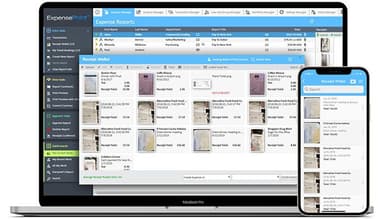
The ExpensePoint system is robust in its capability to manage and track expenses effectively. The mobile app is particularly very easy to navigate, and the ability to upload receipts with automatic OCR scanning significantly enhances usability.
Cons
The main web interface feels outdated and confusing to me. While functional, there are features on the website that aren't accessible through the mobile app, like adding an email address for receipt uploads.
Rating Distribution
Ease of use
9
Value for money
10
Customer Support
10
Functionality
10
Frequently Asked Questions
What types of pricing plans does ExpensePoint offer?
ExpensePoint price is based on a subscription model, with its price starting from $8.50/user/month.
Does ExpensePoint offer an API?
Yes, ExpensePoint offers an API.
What language does ExpensePoint support?
ExpensePoint supports Arabic, Chinese (Simplified), Czech, Dutch, English, French, German, Hindi, Italian, Japanese, Korean, Portuguese and Spanish language.
What other apps does ExpensePoint integrate with?
ExpensePoint integrates with various accounting applications, including QuickBooks, Sage, Xero, Microsoft Dynamics 365, and NetSuite.
Does ExpensePoint support mobile devices?
Yes, ExpensePoint supports Android, iPad and iPhone.
Who are the typical users of ExpensePoint?
ExpensePoint caters to businesses of all sizes in various industries.