Last Updated

Overview

Melio supports accounts payable and receivable activities for small and mid-sized businesses. Although some users note limited third-party integrations, Melio allows businesses to pay vendors by bank transfer, card, or check. Its payment scheduling and approval controls make it a practical option for managing business payments.

Melio Specifications

  • Accounts Payable Software
  • Accounts Receivable Software
  • AI-Charged Accounting Tools
  • Billing and Invoice Software
View All Specifications

What Is Melio?

Melio is a cloud-based accounting platform that allows users to pay suppliers by ACH transfer, credit/debit card, or mailed check from a single account. It allows businesses to schedule future payments and send payments to vendors that do not accept cards. The platform includes bill data extraction from uploaded invoices and approval controls for payment requests, helping finance teams track outgoing payments more accurately.

What Is Melio Best Known For?

Melio is well known for its pay-by-card capability, which allows businesses to pay vendors with a credit card even when those vendors do not accept card payments. It routes card-funded payments through supported settlement methods such as ACH or other transfer channels. The platform provides an additional way for businesses to initiate vendor payments without requiring vendors to change how they accept funds.

How Much Does Melio Cost?

The platform’s starting price is $25/month. This package, known as the Core plan, includes several features, such as fast/instant payments, AI bill capture, a dedicated bill inbox, and more. Additional Melio pricing tiers are as follows:

  • Go – $0/month
  • Boost – $55/month
  • Unlimited – $80/month
  • Platinum – Custom pricing

In addition to the base subscription costs, organizations should account for the following expenses:

  • Implementation And Onboarding: May range from $0–$1,000 depending on business size and accounting integration needs
  • Payment Processing Fees: Transaction charges typically range around 2.5%–3% for card payments
  • FX And International Transfers: May incur approximately 1%–3% per transaction based on currency routes and banking partners
  • Integrations And Add-Ons: Might add roughly $10–$100/month, depending on functionality scope
  • Expedited Payments: May cost about $0.50–$20 per transaction

Users describe Melio’s pricing as relatively affordable for small businesses, especially due to free or low-cost ACH payments. However, some users note confusion around card processing fees and occasional transaction charges that can add up with heavy usage.

For accurate pricing based on your organization’s needs, it’s recommended to request a custom Melio price estimate.

Disclaimer: The pricing is subject to change.

Melio Integrations

The software supports integration with multiple systems and platforms, such as:

How Does Melio Work?

Here is how to get started with the software:

  • Access the main dashboard to review upcoming bills, recent payments, account balances, and payment activity
  • Connect business bank accounts and payment cards that will be used for outgoing payments and fund collection
  • Add vendors, contractors, landlords, and suppliers by entering their payment details or contact information
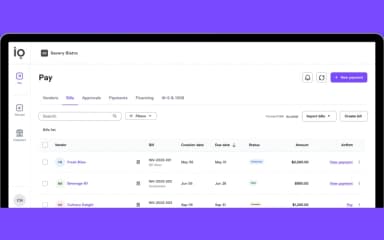
  • Upload invoices through the Bills tab using document uploads, emailed invoices, accounting software syncs, or CSV imports
  • Configure approval rules and assign permissions based on payment amounts, departments, or designated approvers
  • Schedule one-time payments, recurring bills, batch payments, or international transfers from the payments workspace
  • Monitor payment status, completed transactions, vendor activity, and pending approvals through account dashboards
  • Generate payment requests and share payment links with customers to receive funds directly into the connected bank account
Book a free Melio demo to learn more about its capabilities.

Who Is Melio For?

Melio is ideal for businesses across several industries and sectors, including:

  • Construction
  • Retail
  • Healthcare
  • Logistics
  • Wholesale
  • Food and beverage
  • Wine and spirits

Melio Use Cases

Based on our analysis of Melio’s capabilities, we have identified several scenarios in which the platform is particularly well-suited for small businesses, accounting professionals, and organizations that manage recurring vendor payments:

1. Small Businesses Paying Vendors That Do Not Accept Credit Cards

Many growing businesses rely on suppliers, contractors, or service providers that only accept bank transfers or checks. It can limit payment options and create challenges when cash needs to be reserved for other expenses. Melio is frequently used in these situations because businesses can continue working with existing vendors while funding payments through a credit card when needed.

2. Accounting Firms Managing Payments Across Multiple Clients

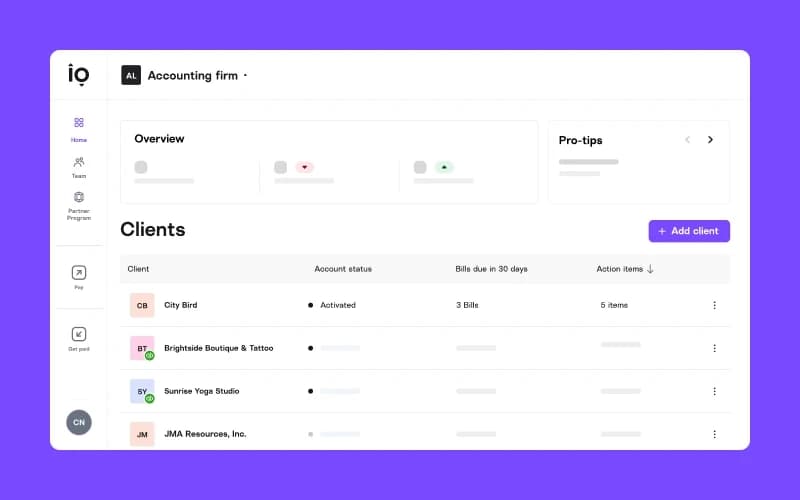
Bookkeeping firms and outsourced accounting providers often oversee bill payments for numerous clients with different approval requirements and payment schedules. Handling these activities through banking portals can create unnecessary administrative work. The platform can be well-suited to firms that need a centralized environment for tracking bills, coordinating approvals, and processing payments across multiple client accounts.

3. Businesses Working With International Suppliers

Organizations that regularly pay vendors in different countries often face delays, manual data entry, and inconsistent payment processes when relying on traditional wire transfers. Melio software could be a practical option for companies that need to manage domestic and international vendor payments on a single platform while maintaining visibility into payment status and transaction costs.

4. Remote Teams Coordinating Accounts Payable Activities

Companies operating with distributed finance teams may struggle when payment approvals, invoice reviews, and vendor communications depend on paper documents or in-office processes. The software may support businesses that need to review bills, approve payments, and monitor outgoing transactions without requiring employees to work from a single location.

5. Product-Based Businesses Managing High Supplier Spending

Distributors, wholesalers, and inventory-focused companies often need to pay suppliers before collecting customer revenue. It can place pressure on available cash reserves, particularly during busy purchasing periods. Melio is commonly used by businesses that process substantial supplier payments and require additional flexibility when scheduling outgoing funds throughout the month.

Is Melio Right For You?

If you are a small or mid-sized business that needs to take control of vendor payments without the overhead of traditional AP systems, then Melio might be the right choice. It allows businesses to pay any vendor by credit card, even when that vendor doesn't accept cards, making it valuable for companies looking to earn rewards or extend their cash runway.

Additionally, the software is SOC 2 Type II, ISO 27001, ISO 27017, ISO 27018, and PCI Level 1 Compliant, ensuring the security and privacy of confidential user data. Trusted by businesses such as The PEYD Group, Doria Wines, QBench, and Antares Advisors, the software is highly scalable to meet the needs of growing companies.

Still have queries about the Melio software? Contact our expert team at (661) 384-7070, who will answer all your questions to help you make an informed decision.

Melio Features

ACH Bank Transfer

Melio software allows users to send and receive ACH payments directly through a connected bank account. It supports scheduled payments, recurring bills, batch payments, and split bill payments. Businesses can track transfer activity online while keeping bank account details private when exchanging payments with vendors or customers.

See How It Works
AI Assistant

Melio features an AI assistant, Agent Mel, that answers accounts payable questions using data stored within the account. It lets users ask about vendor spending, recurring payments, overdue bills, or payment activity in natural language. Responses are generated from live transaction records, eliminating the need to manually review reports.

See How It Works
Easy Bill Capture

This functionality allows organizations to add bills through invoice uploads, emailed documents, CSV imports, accounting software connections, or manual entry. The platform extracts invoice information and places bills in a centralized workspace. Additionally, synced accounting records can also be categorized automatically using previously reviewed corrections.

See How It Works
International Payments

This functionality allows businesses to pay vendors in multiple countries by bank transfer or payment card, while vendors receive funds in USD or their local currency without creating a Melio account. Before confirmation, the payment details, exchange rate, settlement amount, and any applicable fees are displayed.

See How It Works
Payment Link

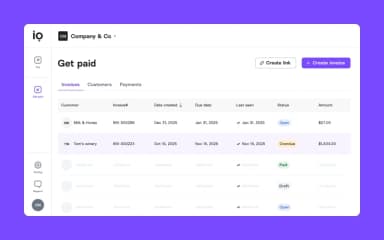
The system lets businesses create a branded payment link and share it through invoices, emails, websites, or direct messages. Customers can pay by ACH transfer or card without having to access separate portals. Funds are deposited into the connected bank account, while banking details remain hidden from customers.

See How It Works

Pros And Cons of Melio

Pros

  • Makes managing multiple vendors easier

  • Helps keep payments organized and on schedule

  • Secure payments reduce risk of transaction issues

  • Reminders help prevent missed payments

  • Reduces manual bookkeeping work

Cons

  • Limited visibility into payment status

  • Reporting and customization options are limited

  • Advanced payment workflows need more flexibility

Melio Pricing

Go

eye

View Price

What's Included

  • 5 free ACH/month

  • Fast/Instant payments

  • Pay by ACH, wire, or check

  • Pay any bill by card

  • Set auto-pay

  • Dedicated bills inbox

  • AI bill capture

  • Pay internationally

Core

eye

View Price

What's Included

  • Everything in Go, plus:

  • 20 free ACH/month

  • Xero sync

  • QuickBooks Online sync

  • Approval workflows

  • Batch payments

  • 1099 automation

  • W-9 collection

  • Priority chat support

  • AI assistant

Boost

eye

View Price

What's Included

  • Everything in Core, plus:

  • Apply vendor credits

  • Advanced user roles 

  • Set classes & locations

  • Custom approval workflows

  • Premium phone support

  • QuickBooks Desktop sync

Unlimited

eye

View Price

What's Included

  • Everything in Boost, plus:

  • NetSuite sync

  • Unlimited user seats

Platinum

eye

View Price

What's Included

  • Preferred card fees

  • Custom transaction fees 

  • Faster settlement times

  • Priority payment processing

  • Discounted exchange rates

  • White-glove account management

  • Custom integrations & API access

Disclaimer: The pricing details were last updated on Jun 12, 2026 from the vendor's website. Please contact us for a tailored pricing list.

Melio Reviews

Total 24 reviews

4.5

All reviews are from verified customers

Rating Distribution

5

Stars

79%

4

Stars

4%

3

Stars

8%

2

Stars

0%

1

Stars

8%

Share your experience

KS

Krzysiek S.

Translation and Localization, 1-10 employees

Free Trial

5.0
June 2026

Has everything I need!

Pros

Keeping invoices and vendor payments together in one place has been the biggest advantage for me. It makes everything much more organized, and the platform seems user friendly enough that getting started did not take much effort. Even without wanting to spend a lot of time learning a new finance tool, the setup and day to day use was not a hassle. I also really like the range of payment options and how it helps simplify transfers and vendor payments overall.

Cons

A few parts of the workflow could still be improved especially when occasional delays come up, extra verification is needed or small interface issues get in the way. Support has usually been helpful when I have reached out but faster response times would make a difference when something urgent happens. It would also help if fees and processing timelines were presented more clearly before a payment is finalized.

Rating Distribution

Ease of use

9

Value for money

10

Customer Support

8

Functionality

9

KM

Katsia M.

Information Technology and Services, 11-50 employees

More than a year

5.0
June 2026

quick invoice processing

Pros

At last I am not stuck waiting around for invoices to get processed anymore. I was honestly a little shocked the whole network didn't crash once the sync finished. It even seems to have picked up on my coding style which was a nice surprise.

Cons

One annoying thing is that when I go back in and hit the back button to look for a specific vendor, it sometimes throws me straight onto the New Invoices page instead of taking me back to where I was. Also with the custom colors section, typing into the date field can make the whole system freeze like it's processing something for about two seconds before I can keep going.

Rating Distribution

Ease of use

9

Value for money

10

Customer Support

10

Functionality

9

MK

Marina K.

Computer Software, 11-50 employees

More than a year

5.0
May 2026

reliable invoice scanning

Pros

It's been a pleasant surprise how accurately this automated invoice scanning system reads text most of the time. AI tools usually mess up vendor categories but this one has handled that part well. The scan has also synced with QuickBooks without any issues.

Cons

Yesterday the screen completely froze while I was trying to log in on my cell phone from the break room, it told me my password was wrong even though I knew it wasn't. Apparently it was only because I was using a new device. International wire transfers also take a very long time. It can take 7 to 8 business days for funds to clear into a vendor's account, and then I end up getting emails from vendors complaining because there was no arrival date information provided. On top of that there's no simple way to merge duplicate vendors when someone enters a name incorrectly.

Rating Distribution

Ease of use

8

Value for money

10

Customer Support

10

Functionality

8

Frequently Asked Questions

Does Melio have a mobile application?

Yes, Melio offers a mobile app for both Android and iOS devices.

Does Melio offer an API?

Yes, Melio offers an API to its users.

What language does Melio support?

The Melio software is primarily available in English.

What level of support does Melio offer?

The platform provides support through a help center.

What other apps does Melio integrate with?

Melio integrates with various third-party applications, including Amazon Business, NetSuite, Xero, and QuickBooks.

What types of pricing plans does Melio offer?

The software offers five pricing plans: Go ($0/month), Core ($25/month), Boost ($55/month), Unlimited ($80/month), and Platinum (custom pricing). Get a flexible Melio cost now.

Who are the typical users of Melio?

Typical users of Melio include professionals across industries such as wholesale, food and beverage, healthcare, wine and spirits, construction, logistics, and retail.