

NolaPro
Last Updated
Overview
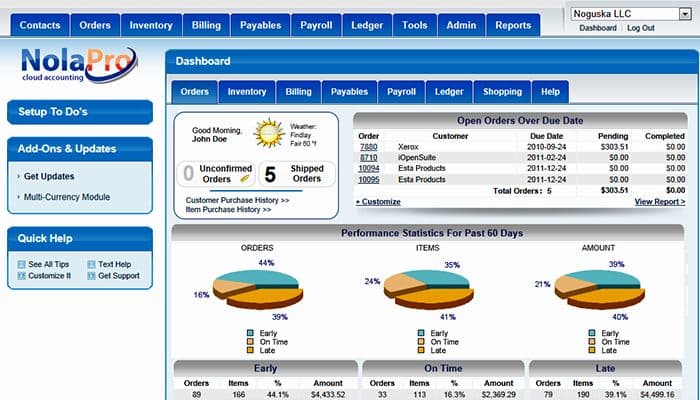
NolaPro stands as the cornerstone for all-encompassing financial management. Boasting features like general ledger, invoicing, and inventory tracking, the software enables businesses to optimize accounting processes, enhance accuracy, and propel financial success. Elevate your business with NolaPro today.
NolaPro Specifications
- Financial Reporting
- Invoice Management
- Expense Tracking
- Tax Management
What Is NolaPro?
NolaPro is a cloud-based accounting software that caters to a wide range of industries and users. It offers comprehensive financial management tools and business solutions to streamline operations, manage expenses, and enhance productivity. NolaPro addresses the problems of manual accounting, providing a robust alternative to simplify financial processes.
How Much Does NolaPro Cost?
NolaPro starts at $6/month with their starter plan, also offering a free version with access to over 70+ reports. It has the following three plans:
- Starter Plan: Has a 30-day free trial, with pricing at $6/month
- Enterprise Plan: Has a 30-day free trial, with pricing at $12/month
- Corporate Plan: Quote-based pricing
NolaPro Integrations
NolaPro seamlessly integrates with several popular business applications. These include Shopify, Vtiger CRM, FedEx Ship Manager, RingCentral Fax, UPS Ready, Shift4Shop, Dynamic Web Twain, Billtrust, Levelset, osCommerce, and Zen Cart.
Who Is NolaPro For?
The software is designed for businesses of all sizes across various industries. It is ideal for companies that need to efficiently manage their customers and vendors. NolaPro caters to the following organizations: accounting, retail, manufacturing, service-based, and non-profit.
Is NolaPro Right For You?
NolaPro offers a cost-effective and reliable option for companies seeking efficient accounting and business management software. It is scalable and secure, placing a heavy emphasis on data security. It has industry-adaptable features, and price options for NolaPro are suitable for companies of all sizes.
Read NolaPro reviews to know what its users think. Or get in touch with our customer support team at 661-384-7070, who will help you make the best decision.
NolaPro Features
Customer Management
The software allows businesses to efficiently organize and track customer data. It simplifies communication, streamlines sales processes, and offers insights into customer behavior. This improves customer relationships and enhances sales strategies.
Vendor Database
This helps manage supplier information, facilitating seamless procurement and payment processes. It ensures timely vendor communication, efficient inventory management, and cost control, ultimately leading to better supplier relationships and reduced operational costs.
Lead Tracking
NolaPro enables businesses to monitor and nurture potential sales opportunities. It offers insights into lead progress, automates follow-ups, and enhances conversion rates. This results in a more organized and effective sales pipeline, increasing revenue potential.
Payroll Suite
This feature simplifies payroll processing, automating tasks like salary calculations, tax deductions, and compliance reporting. It minimizes errors, ensures timely payroll disbursement, and helps businesses remain compliant with tax regulations, reducing legal risks.
Timeclock System
NolaPro's timeclock system assists in tracking employee work hours accurately. It enhances payroll accuracy, enforces labor policies, and monitors attendance. This leads to efficient labor cost management, improved workforce accountability, and better resource allocation.
Pros And Cons of NolaPro
Pros
Excellent customer support
Easy to set up
Customizable
Robust suite of tools
Mobile app
Cons
Learning curve
NolaPro Reviews
Total 4 reviews
4.3
All reviews are from verified customers
Rating Distribution
5
Stars75%
4
Stars0%
3
Stars0%
2
Stars25%
1
Stars0%
Share your experience
Accounting, 1-10 employees
Less than a year
“The Glitch Box”
Pros
It is what was here at my new job.
Cons
Clean-up is a constant necessity, always glitching, constantly having to have support fix things that are not straight forward in use. Deposits are the worst and reconciliations a 9-month nightmare! I am still fixing things from last year, double deposits, missing payments you can see in one report and not in another. Run, I say run the other way quick.
Rating Distribution
Ease of use
3
Value for money
3
Customer Support
6
Functionality
4
Accounting, 500+ employees
“Great to have in your industry!”
Pros
I'm amazed by the fact that wide range of options are available of finance and accounting modules. This is truly impressive and highly productive.
Cons
One thing I really wish for is that they would make this available for IOS as well, not just Windows systems. It has great potential for broader usage in the future.
Rating Distribution
Ease of use
9
Value for money
10
Customer Support
10
Functionality
10
Public Sector, 1-10 employees
More than a year
“cloud version”
Pros
Personally, I've been using the online version for 5 years now, and it fulfills all my needs, including handling employee commissions. Not only is billing is simple task now but generating end-of-year reports is also easy. The affordability and reasonableness of the online usage price make it an excellent choice for both large companies and small-scale users like myself.
Cons
I'm a user of multiple ecommerce carts, and unfortunately, this program only links to 3Dcart, which is a hosted store. I think it would greatly improve its usefulness if it could integrate with more ecommerce platforms.
Rating Distribution
Ease of use
9
Value for money
10
Customer Support
10
Functionality
10
Frequently Asked Questions
Does NolaPro offer an API?
Yes, NolaPro offers an API.
What language does NolaPro support?
NolaPro supports English, Estonian, French, German, Danish, Dutch, French, Spanish, and Swedish.
What other apps does NolaPro integrate with?
NolaPro integrates with Shopify, Vtiger CRM, FedEx Ship Manager, RingCentral Fax, UPS Ready, and Shift4Shop.
Does Nolapro support mobile devices?
Yes, NolaPro supports Android and iOS devices.
What types of pricing plans does NolaPro offer?
Please click Get Pricing for a tailormade pricing guide.
Who are the typical users of NolaPro?
The typical users of NolaPro are the retail, non-profit, and accounting organizations.
What level of support does NolaPro offer?
NolaPro offers email, helpdesk, and FAQs.