


Quicken
Last Updated
Key Takeaways
Generated from the text of customer reviews
Quicken is a finance and accounting platform for contractors, self-employed professionals, and small business owners. Users praise how it pulls and categorizes transactions from connected accounts automatically. A common complaint is that setting up the system is time-consuming. Quicken has recently added support for instant, one-step sales receipts at the point of sale.
Our Verdict
Quicken works best for individuals and small business owners who want personal and business finances in one place. One plan covers multiple businesses, which makes the yearly cost reasonable for self-employed users. Pricing is seen as fair by most reviewers. We recommend it for SMBs who want to manage their books without hiring an accountant.
Overall Rating
Based on 116 users reviews
3.9
Rating Distribution
Positive
74%
Neutral
13%
Negative
13%
Starting Price
$6.99
per month
Quicken Specifications
- Financial Reporting
- Expense Tracking
- Tax Management
- Budgeting and Forecasting
What Is Quicken?
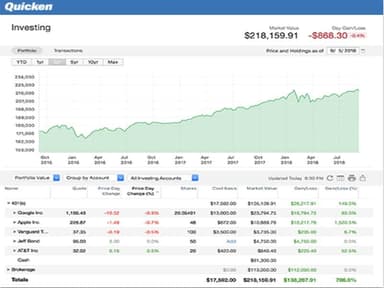
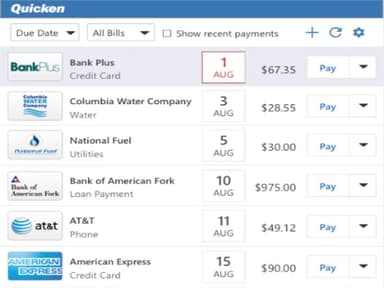
Quicken is a finance and accounting platform for individuals and small business owners in the United States and Canada. It tracks income, expenses, budgets, and investments in one place. Self-employed users and small business owners use it to separate personal and business finances. Built-in tax tools, bill tracking, and investment monitoring cover the full financial picture. The platform connects with multiple financial institutions to pull transactions automatically.
What Is Quicken Best For?
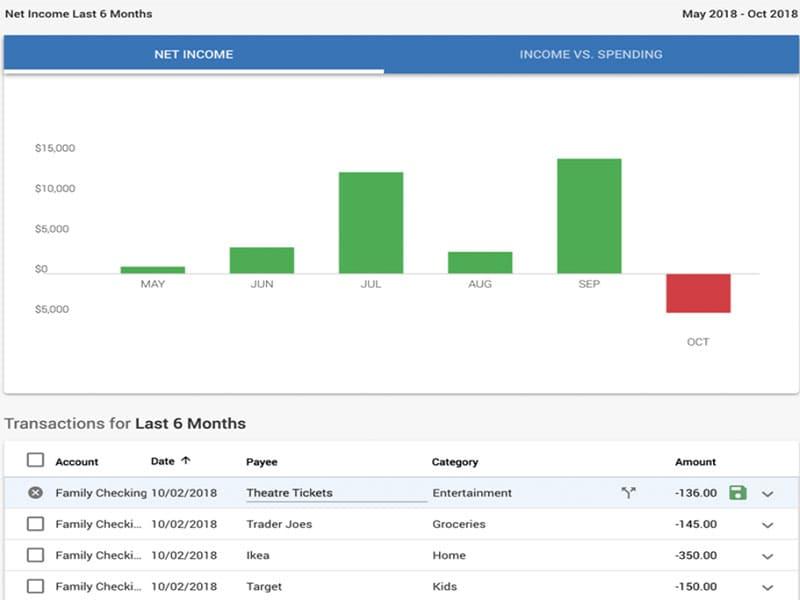
Quicken is best known for its Financial Reports. It pulls income and expense data from connected accounts automatically and maps each transaction to the right tax category. Most people piece this together from bank statements and spreadsheets at the end of the year. Quicken keeps those records organized throughout the year instead. Built-in Schedule C, E, and F reports mean tax preparation does not require starting from scratch.
How Much Does Quicken Cost?
Quicken pricing starts at $6.99/month for Quicken Simplifi. This plan is aimed at personal financing. It also offers Quicken Business and Personal starting at $8.99/month. Both of these plans are billed annually. The vendor also offers a documents management add-on called Lifehub starting at 3.99/month (billed annually).
In addition to the base subscription costs, users should account for the following potential expenses:
- Data Migration And Account Setup: estimated to be around $500, depending on the number of financial accounts, historical transactions, and data-import requirements
- Training And Onboarding: can fall around $1,000 for third-party assistance with more complex financial setups
- Additional Features And Services: $50–$200+/year, depending on the investment portfolio or multi-business budget tracking and syncing
Most reviewers find Quicken offers good value for money because of its range of tools. However, some users consider it expensive and feel yearly updates come with added costs. Long-time users mainly dislike the move from a one-time purchase to a required annual subscription.
Disclaimer: The pricing is subject to change.
Quicken Integrations
The vendor integrates with various third-party systems and applications, including Stripe and PayPal.
How Does Quicken Work?
Here's how users can get started with Quicken software after logging in:
- Connect bank accounts, credit cards, and investment accounts to pull in transactions automatically
- Set up spending categories and budgets tailored to your income and financial goals
- Review auto-categorized transactions and correct any that need adjusting
- Track business income and expenses separately from personal spending using the business finance tools
- Send invoices to clients and track payment status through the business invoicing feature
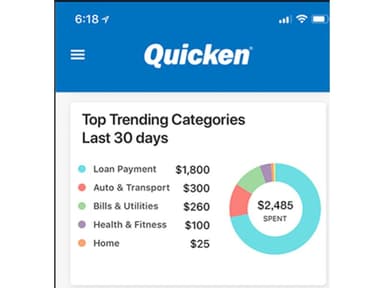
- Monitor spending trends and savings progress through the dashboard and spending plan
- Generate tax schedule reports for Schedules C, E, A, and B with transactions already mapped by category
- Attach receipt photos to individual transactions and review quarterly tax estimates for record-keeping
Who Is Quicken For?
Quicken software is suitable for a range of professionals, including:
- Accountants
- Small business owners
- Independent contractors
- Trust fund managers
Quicken Use Cases
Based on our analysis of user reviews and Quicken features, we have identified key scenarios where the platform is a strong fit self-employed professionals and small business users:
1. Sole Proprietors Completing Sales Without A Formal Invoice
A business that takes payment at the point of sale, rather than invoicing after the fact, still needs a documented record of the transaction. Instant sales receipts let a transaction be recorded and issued as a receipt directly, without requiring a full invoice-and-payment cycle for a sale that's already been completed. The receipt draws from the same items list used for invoicing, so pricing stays consistent across both.
2. Freelance Consultants Standardizing Pricing Across Repeat Invoices
A consultant billing multiple clients for the same service types often re-types the same line items and prices on every invoice, which leads to inconsistent rates when details are entered from memory. Quicken's centralized items list lets a consultant build their full-service catalog once, then pull the same entries into every invoice or estimate without re-entering them. This keeps a client's rate consistent across every document they receive.
3. Rental Property Owners Separating Business and Personal Transactions
A landlord using one bank account for both a rental property and personal spending has to manually sort transactions by hand at tax time to figure out which expenses are deductible. Quicken's dual account management splits transactions into business and personal categories as they're entered, and its Rental Property Manager applies Schedule E categorization directly to rental income and expenses, so a property owner isn't reconstructing that split from bank statements later.
4. Rental Property Owners Tracking Deductible Vehicle Mileage
Landlords driving to a rental property for showings, inspections, or repairs often log that mileage inconsistently, sometimes in a notebook, sometimes not at all, and then have to reconstruct trips from memory at tax time. Quicken's Vehicle Mileage Tracker records each trip to and from a rental property as it happens, automatically applying the correct tax-deductible mileage category with the associated tax schedule line item already attached. This means a trip is categorized whenever it's logged, not sorted out later at tax time.
Is Quicken Right For You?
Quicken suits contractors, self-employed professionals, and small business owners who want to manage business and personal finances in one place. Its Business & Personal plan combines tools for tracking income and expenses, managing cash flow, creating invoices, accepting payments, and generating financial reports. Users can keep business and personal transactions separate while still viewing how business performance affects their overall financial position.
Quicken has more than 20 million customers who have used its products. On the security side, the platform holds SOC 2 Type II certification (audited annually) and PCI DSS compliance, with data hosted on AWS infrastructure and multi-factor authentication required for sign-in.
Still evaluating and not sure if Quicken is the right fit? Contact us at (661) 384-7070 for guidance.
Quicken Features
Spending Plan
Income, bills, and expenses all update in real time as transactions come in. The balance left to spend shows after accounting for every cost and savings goal. Any budgeting method works, including zero-sum, envelope, and 50-30-20. Unused spending or savings rolls over into the next month.
Invoices
Quicken’s invoicing feature allows users to create and track invoices without maintaining separate spreadsheets. Services and expenses can be added to invoices, with receipts included where needed. It supports unlimited clients, projects, and invoices, while unpaid invoices can be tracked in real time. Users can also add their business name and logo to invoices and accept online payments through a connected Stripe account.
Business Cash Flow
All invoices show in one view by payment status, so no unpaid invoice slips through. One-click invoices include a payment link so clients can pay fast. Income and expenses sync from over 14,000 banks, removing manual entry from bookkeeping.
Business Tax Prep
Every transaction is auto categorized as business or personal as it comes in. Tax schedule reports for Schedules C, E, F, A, and B map each number line by line. Receipt photos are attached with every transaction. Quarterly estimates show what will be owed based on current income and expenses.
Pros And Cons of Quicken
Pros
Bank integration reduces manual work when checking finances
Expense tracking helps avoid mistakes during tax preparation
Autofill and recurring payments make check recording faster
Online transaction downloads keep financial information updated automatically
Straightforward design helps non-accountants manage finances with fewer mistakes
Cons
Downloaded transactions can sometimes appear in wrong accounts
Correcting entries sometimes takes more steps than needed
Custom categories take time to prepare useful reports
Quicken Pricing
Quicken Simplifi | Quicken Business and Personal |
|---|---|
$6.99 per month | $8.99 per month |
|
|
Disclaimer: The pricing details were last updated on Oct 02, 2026 from the vendor's website. Please contact us for a tailored pricing list.
Quicken Reviews
Total 116 reviews
3.9
All reviews are from verified customers
Rating Distribution
5
Stars50%
4
Stars24%
3
Stars8%
2
Stars5%
1
Stars13%
Share your experience
Real Estate, 1-10 employees
“Everything is well-organized”
Pros
Everything feels well organized, with plenty of options, categories and charts that clearly show your budget, balances and other financial details. It is easy to find information due to the well structured interface.
Cons
The downside is the glitches. At times after an update, the system stops pulling data automatically and it can go unnoticed for a while. Bank and credit card updates may not come through for days, weeks or even months which means pending transactions get missed depending on when you catch it. When that happens, you end up having to enter everything manually.
Rating Distribution
Ease of use
9
Value for money
8
Customer Support
8
Functionality
8
Accounting, 1-10 employees
“All my finances in one place”
Pros
Being able to use Simplifi both on my phone and on the website has been a big plus. I also really appreciate that I can connect my bank accounts, credit cards and liability accounts so everything is pulled together automatically in one place for me.
Cons
My only real complaint is that accounts needing extra authentication or frequent password updates sometimes get disconnected from the app. It's not really the software's fault but it can still be a bit inconvenient.
Rating Distribution
Ease of use
10
Value for money
10
Customer Support
10
Functionality
10
Veterinary, 1-10 employees
“Interface feels logical”
Pros
The interface felt very natural because it mirrors a checkbook register. The way transactions are categorized and the reporting tools are set up makes it simple to track down older expenses and wrap up IRS tax prep with just a click. I was especially happy when tags were introduced since they let me get very specific without having to create a bunch of extra subcategories. On top of that, when I had a highly technical question about a process, customer support got back to me quickly with a helpful answer.
Cons
I can understand why the company shifted to an annual subscription model and moved more toward an online platform. Even so, I felt more secure with the desktop-only version, where I could back up my data to external hard drives myself. That setup also seemed more cost-effective to me.
Rating Distribution
Ease of use
10
Value for money
9
Customer Support
10
Functionality
10
Frequently Asked Questions
Does Quicken offer an API?
No, Quicken does not offer an API.
Does Quicken software have a mobile app?
Yes, Quicken does offer a mobile app for iOS and Android users.
What language does Quicken software support?
Quicken primarily supports English.
What types of pricing plans does Quicken software offer?
Quicken offers two pricing plans: Quicken Simplifi ($6.99/month) and Quicken Business and Personal ($8.99/month). Both of these plans are billed annually. Request a personalized Quicken cost estimate for your business.
What other apps does Quicken software integrate with?
The software integrates with PayPal and Stripe.
Who are the typical users of Quicken software?
Quicken is a versatile financial management solution tailored for consultants, self-employed professionals, freelancers, and small business owners.
What level of support does Quicken software offer?
Quicken offers support via phone, help desk, chat, and a knowledge base.