


Shoeboxed
Last Updated
Key Takeaways
Generated from the text of customer reviews
Our Verdict
Overall Rating
Based on 43 users reviews
4.5
Rating Distribution
Positive
86%
Neutral
12%
Negative
2%
Starting Price
$9
per month
Shoeboxed Specifications
- Financial Reporting
- Expense Tracking
- Tax Management
- Customizable Reports
Shoeboxed Features
Receipt Organization
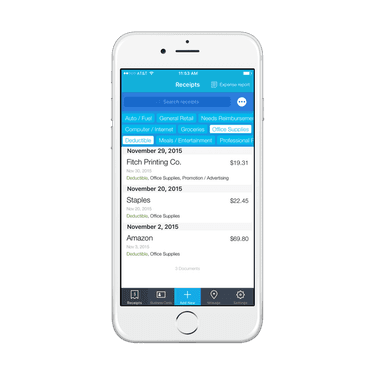
This feature extracts key information from receipts using OCR and categorizes the data into 15 common tax categories. Users can search, edit, and manage receipts, create custom reports with attached receipts, and add custom category tags and rules. The platform also supports account sharing, accounting software integrations, and sub-user access for bookkeepers and accountants.
Track Mileage
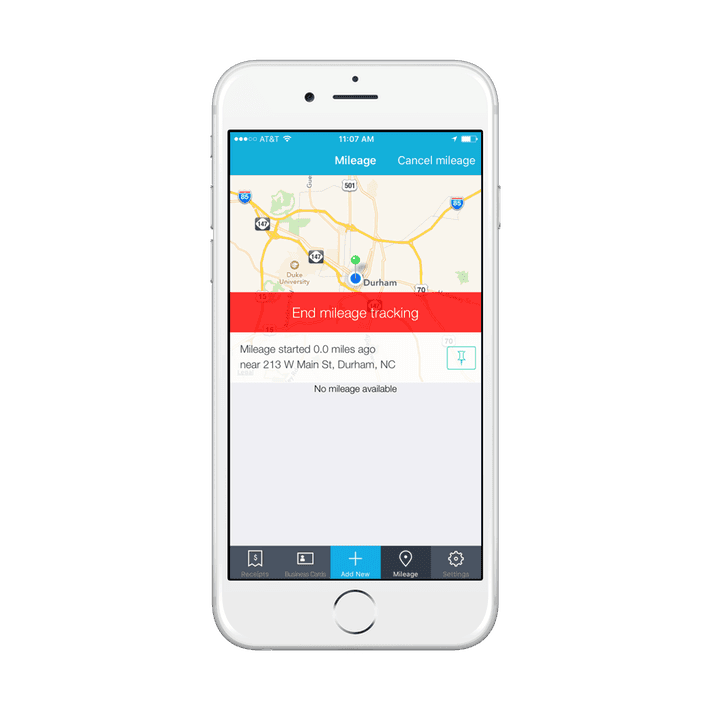
Track Mileage uses the phone’s GPS to track business trips, allowing users to start and stop mileage tracking as needed. Once a trip ends, the system calculates mileage using the standard mileage rate and adds the result to the receipts section, where users can enter trip details and save the record for future reference.
Audit-Ready Receipt Scans
Shoeboxed converts receipts into legible digital images and categorizes them for easy retrieval when needed for an audit. These organized digital records can be used for audit purposes with the Internal Revenue Service (IRS) and Canada Revenue Agency (CRA), while searchable storage keeps the receipt documentation accessible when required.
Home Office Deduction Calculator
It uses the user’s home address to retrieve property details such as square footage, property taxes, and home value, which are then combined with the office size, tax bracket, and home expenses entered by the user. Based on this information, it compares the simplified and actual expense methods and generates a completed IRS Form 8829 PDF for the user or their accountant.
Expense Reports
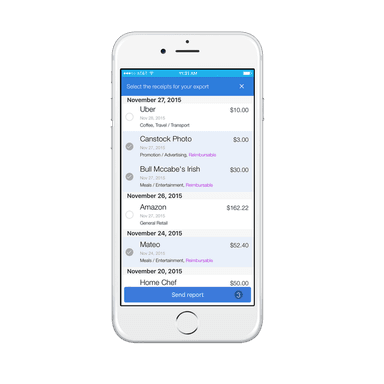
Shoeboxed allows users to create expense reports from the web or mobile device by selecting the relevant receipts and attaching their images. The reports compile expense details and supporting receipt images into a single record that can be sent for expense reporting.
Pros And Cons of Shoeboxed
Pros
Easy receipt submission and return simplify physical document handling
Searchable portal makes stored receipts easier to locate when needed
Tax-category receipt tracking makes expense classification easier and more consistent
Gmail receipt syncing reduces manual entry for frequently emailed receipts
Mobile receipt capture helps users log offline receipts from anywhere
Cons
OCR limitations can require users to manually correct extracted receipt information
Inflexible card management makes updating or removing unused numbers more difficult
Lack of new features can make the software feel less adaptable
Shoeboxed Pricing
Starter | Pro | Plus | Paper Plus |
|---|---|---|---|
$9 per month | $29 per month | $79 per month | $179 per month |
|
|
|
|
Disclaimer: The pricing details were last updated on Sep 14, 2026 from the vendor's website. Please contact us for a tailored pricing list.
Shoeboxed Reviews
Total 43 reviews
4.5
All reviews are from verified customers
Rating Distribution
5
Stars67%
4
Stars19%
3
Stars12%
2
Stars0%
1
Stars2%
Share your experience
IT, 1-10 employees
Less than 6 months
“Shoeboxed user review”
Pros
I find its search and retrieval functions highly efficient, with excellent expense reporting and organized receipt management.
Cons
This product might seem pricey compared to similar options, with limited mobile functionalities and a bit of a learning curve for new users.
Rating Distribution
Ease of use
9
Value for money
7
Customer Support
7
Functionality
7
Human Resources, 1-10 employees
More than a year
“Shoeboxed: A Convenient and Efficient Tax Receipt and Document Management Solution”
Pros
Shoeboxed, a receipt management software, offers numerous advantages for both businesses and individuals. Among its standout features are streamlined receipt management, easy integration with email and cloud services like Dropbox and Google Drive, time-saving receipt imports, and simplified financial data access. It also boasts advanced capabilities such as business card and expense report management, and secure data handling through SSL encryption and automatic backups. Overall, Shoeboxed is an excellent tool for enhancing financial efficiency and simplifying receipt management.
Cons
While Shoeboxed offers several benefits, there are drawbacks to consider: It's relatively costly compared to other receipt management solutions. The monthly subscription limits the number of documents you can scan; exceeding this incurs additional fees. Depending heavily on scanning receipts may not suit those preferring traditional finance management methods. For international users, dealing with U.S.-based billing and currency support can be challenging. Despite its effectiveness in receipt management, Shoeboxed lacks advanced features found in other accounting or expense management solutions.
Rating Distribution
Ease of use
8
Value for money
8
Customer Support
10
Functionality
8
Full Stack, 1-10 employees
Less than 6 months
“inside the application”
Pros
This application is fascinating as it consolidates various essential resources into one platform, eliminating the need to seek them out separately.
Cons
It's crucial to grasp its operational mechanics to avoid getting lost. Improved practicality could encourage more frequent use.
Rating Distribution
Ease of use
7
Value for money
7
Customer Support
8
Functionality
7
Frequently Asked Questions
Does Shoeboxed offer an API?
Yes, Shoeboxed offers an API.
What language does Shoeboxed support?
Shoeboxed software is primarily available in English.
What other apps does Shoeboxed integrate with?
Shoeboxed supports integration with a variety of third-party applications, including Bench, QuickBooks Online, Xero, HP, and Evernote.
Does Shoeboxed support mobile devices?
Yes, the software offers a mobile app for both Android and iOS devices.
What types of pricing plans does Shoeboxed offer?
Shoeboxed price starts at $9/month for the Starter plan, while the Pro plan costs $29/month, the Plus plan costs $79/month, and the Paper Plus plan costs $179/month. A 30-day free trial is also available. Request a detailed Shoeboxed cost breakdown for your organization today.
Who are the typical users of Shoeboxed?
The typical users of Shoeboxed include businesses in real estate, healthcare, technology and SaaS, and hospitality and food services.
What level of support does Shoeboxed offer?
Shoeboxed provides support through FAQs, email, phone, and a contact form.