



Last Updated
Overview
Telpay accelerates financial operations for accountants with automated bill payments, secure payroll deposits, and streamlined cash flow management. While advanced reporting options are limited, its centralized platform ensures accurate transactions and improved approvals. It is ideal for finance teams, bookkeepers, and small to mid-sized businesses managing frequent payables.
Overall Rating
Based on 10 users reviews
4.4
Rating Distribution
Positive
80%
Neutral
20%
Negative
0%
Starting Price
$10
per month
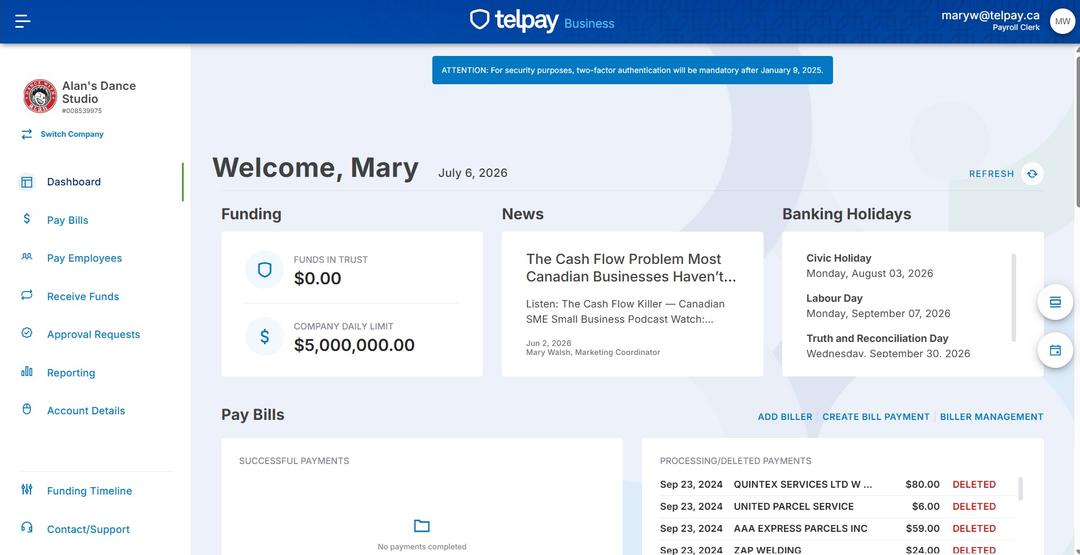
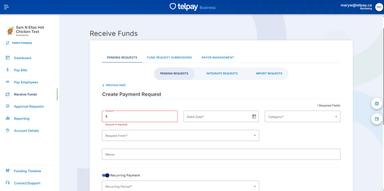
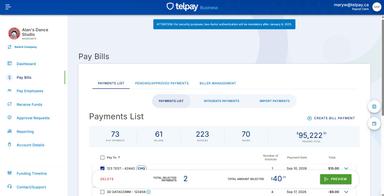
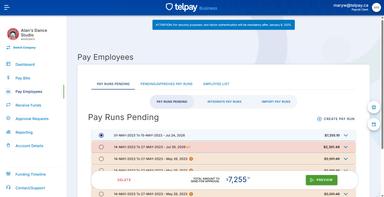
Telpay Specifications
- Accounts Payable
- Vendor Management
- Cash Management
- Cash Flow Management
What Is Telpay?
Telpay is a Canadian-owned electronic payment system that gives businesses a unified electronic hub for managing both accounts payable and accounts receivable — supplier payments, payroll, CRA remittances, and collections. The platform automates and tracks every transaction, syncing with accounting software such as QuickBooks or Sage to help reduce data re-entry. By helping reduce manual cheques and giving businesses control over payment timing, Telpay improves cash flow visibility and reduces the administrative burden of month-end reconciliation.
How Much Does Telpay Cost?
The Telpay cost starts at $10/month. This basic plan, known as Starter, supports 1–14 transactions/month and includes essential payment features such as bill payments and employee payments. Further pricing tiers of the software are as follows:
- Telpay Standard: $24/month
- Telpay Max: $39/month
- Telpay CRA-only: $10/month
In addition to the base subscription costs, organizations should account for the following expenses:
- Implementation: Charges $49–$99 one-time setup, depending on the plan
- Transaction Fees: $0.55–$1.50/transaction, depending on plan and payment type
- Payment Exceptions And Adjustments: $10–$30/returned or failed transaction; $25+ for manual tracing or adjustments
- Staff Training: $500–$3,000 depending on team size and accounting workflow complexity (industry benchmark)
- Accounting Integrations: $0–$5,000 depending on integration depth with platforms like QuickBooks or Sage
Disclaimer: The pricing is subject to change.
Telpay Integrations
The software supports XLS and CSV file formats and integrates with multiple platforms, such as:
- QuickBooks Online
- Sage 50
- Sage Business Cloud Payroll Professional
- Adagio Accounting
Who Is Telpay For?
Telpay is ideal for a range of industries, including:
- Property and real estate
- Retail
- Professional services
- Hospitality
- Construction
- Agriculture
Is Telpay Right For You?
Many businesses and their accountants and bookkeepers struggle with fragmented workflows — approval processes, manual reconciliation, and limited visibility into payment status — leading to administrative delays and cash flow uncertainty. Telpay addresses these pain points with secure online payment processing, multiple approvers, and streamlined approvals that keep transactions transparent and on schedule — including for clients with strict signing requirements, like non-profit boards requiring two signatures.Telpay has processed electronic payments for Canadian businesses since 1985, handling over $28 billion annually for more than 13,000 businesses nationwide. Trusted by firms such as The Nerdery Bookkeeping, which uses Telpay to manage client fund transfers without breaching board signing authorities, Telpay serves organizations that prioritize accuracy, efficiency, and compliance.
Still not sure about Telpay? Contact our team at (661) 384-7070 for further guidance.
Telpay Features
Cashflow Management
Telpay provides real-time cash flow visibility, enabling businesses to schedule payments, monitor incoming funds, and manage liquidity efficiently. Finance teams can optimize timing for payables and receivables, reducing overdrafts and ensuring smooth operations while maintaining control over all outgoing payments.
Account Payable
Automated accounts payable streamlines vendor payments and approval workflows from a centralized dashboard. This reduces manual errors, accelerates disbursements, and improves financial accuracy. It helps organizations maintain strong supplier relationships and efficient operational processes.
Payroll Direct Deposit
Telpay features a payroll direct deposit service that allows businesses to deposit employee salaries directly into any Canadian bank account on schedule. It reduces administrative workload, maintains a clear audit trail, and enhances employee satisfaction. This empowers HR and accounting teams to focus on higher-value financial management activities.
CRA Payments
Telpay enables businesses to pay federal and provincial remittances, including taxes and deductions, accurately with built-in CRA remittance forms. Automated payments minimize compliance risks, reduce manual form errors, and ensure organizations meet all statutory obligations without administrative delays.
Accounts Receivable
Telpay software helps organizations collect funds efficiently via pre-authorized debits and electronic invoicing. It improves receivables turnover and accelerates cash inflows by setting up recurring payments. It also offers better visibility on pending payments, supporting financial planning and reducing delays in revenue recognition.
Pros And Cons of Telpay
Pros
Efficient electronic funds transfer processing
Secure multi-level payment approval workflows
Seamless integration with major accounting software
Cons
Limited advanced automation
Payment recall is challenging
Telpay Reviews
Total 10 reviews
4.4
All reviews are from verified customers
Rating Distribution
5
Stars60%
4
Stars20%
3
Stars20%
2
Stars0%
1
Stars0%
Share your experience
Virginia M.
Financial Services, N/A employees
“timely payments and clear reports”
Pros
Reviewing the reports for accuracy was simple and payments were processed on time.
Cons
Trying to recall a payment was complicated and took quite a while to resolve.
Rating Distribution
Ease of use
10
Value for money
10
Customer Support
10
Functionality
10
Toby L.
Retail, N/A employees
“Vendor payments save time”
Pros
Being able to send payments straight to vendors without having to issue a cheque is a big plus. It cuts down the time usually spent writing cheques and mailing them out which makes the whole payment process much more efficient.
Cons
The interface feels very outdated. There's no option to upload invoice documents so the date, invoice details and payment amount all have to be entered manually. It would also be much better if it connected with accounting software like QuickBooks Online since more automation is really needed.
Rating Distribution
Ease of use
7
Value for money
8
Customer Support
8
Functionality
7
Daniel H.
Accounting, N/A employees
“fast processing and amazing support”
Pros
Processing is very quick, the software is simple to navigate and the customer service has been amazing.
Cons
I'd love to see an online version with mobile capabilities so it works better for businesses that need to manage things while on the go.
Rating Distribution
Ease of use
10
Value for money
10
Customer Support
10
Functionality
10
Frequently Asked Questions
Who are the typical users of Telpay?
Typical users include accountants, bookkeepers, and finance teams in small to mid‑sized organizations, construction, and many more industries who do business in Canada.
What language does Telpay support?
Telpay is primarily available in English.
Does Telpay have a mobile app?
Telpay does not currently offer a dedicated mobile application.
What other apps does Telpay integrate with?
Telpay integrates with QuickBooks, Sage 50/Business Cloud, and Adagio.
What level of support does Telpay offer?
It offers support via a help center, live chat, call, and email.
Does Telpay offer an API?
The vendor has not shared information regarding its API.
What types of pricing plans does Telpay offer?
Telpay offers Starter ($10/month), Standard ($24/month), Max ($39/month), and CRA‑only plans ($10/month). Request a personalized Telpay pricing quote for your business.