Last Updated
Key Takeaways
Generated from the text of customer reviews
Xledger is a cloud-based financial management platform built for businesses with complex and detailed financial needs. It is built on automation, real-time insight, and scalability to support growing organizations. While filters and reports may demand extra effort for seamless navigation, Xledger provides essential tools, empowering effective financial management and fueling organizational ambition.
Our Verdict
Xledger is best suited for mid-sized to large organizations that need strong financial management capabilities across multiple entities, locations, or countries. The platform stands out for its cloud-native architecture, automation features, and ability to handle complex accounting operations. Overall, Xledger is a strong recommendation for organizations seeking an enterprise-grade ERP system with automation and multi-entity support at its core.
Overall Rating
Based on 11 users reviews
4.5
Rating Distribution
Positive
100%
Neutral
0%
Negative
0%
Starting Price
Custom
Xledger Specifications
- Invoice Management
- Financial Reporting
- Tax Management
- Expense Tracking
What Is XLedger?
Xledger is an Enterprise Resource Planning (ERP) solution for mid-sized and large businesses. It was designed for the cloud so that it can easily be accessed from anywhere and at any time. This ERP solution was created by keeping the customers in mind. It provides automated ERP solutions to 10,000+ clients in 50+ countries.
What Is XLedger Best For?
The software has three value pillars that it follows: automation, insight, and scalability. It automates the processes ranging from bank reconciliation to invoice entry and provides real-time insight which supports the decision-making process. It helps businesses grow in size and scope without the need for extra personnel required to operate, support, and maintain data on the ERP system.
How Much Does XLedger Cost?
XLedger price is estimated at around $750/month. The vendor offers custom plans, making it suitable for businesses with diverse requirements.
Besides the base subscription cost, users should also account for the following potential expenses:
- Implementation And Configuration Fees: $10,000 – $150,000+
- Data Migration Costs: $5,000 – $50,000+
- Custom Integrations: $5,000 – $10,000+
- Professional Services Support: $150 – $300/hour
- Reporting And BI Customization: $3,000 – $40,000+
Disclaimer: Pricing references are based on publicly available third-party information and industry benchmarks. Actual costs may vary.
XLedger Integrations
The platform integrates with several third-party applications, including:
- Salesforce
- Bank Of America
- Microsoft Dynamics 365
- Goldfinch Cloud Solutions
How Does XLedger Work?
Once you have logged in, you can navigate the dashboard and make use of the XLedger features with the following step-by-step guide:
- Configure the chart of accounts, dimensions, tax rules, and approval workflows to align with your organizational structure
- Create and import transactions such as supplier invoices, customer invoices, journal entries, and bank data into the system
- Manage payables and receivables by processing approvals, scheduling payments, and reconciling incoming receipts
- Track budgets and project costs by assigning transactions to dimensions and monitoring actuals against planned figures
- Consolidate financial data across multiple entities to produce group-level reporting and intercompany eliminations
- Generate financial statements and management reports using built-in dashboards and export tools for internal and external revie
Who Is XLedger For?
XLedger caters to several industries and sectors, including:
- Real Estate
- Energy
- Education
- Nonprofit
- Professional Services
XLedger Use Cases
Based on an analysis of user reviews and XLedger’S current capabilities, here are some scenarios where the software can be a good fit:
Multi-Entity Organizations Requiring Centralized Financial Control
Mid-sized groups operating with multiple subsidiaries or international entities can adopt XLedger to handle financial data within a cloud environment. The platform’s ability to manage intercompany transactions and produce consolidated reports without relying on external spreadsheets can offer companies better financial control over their accounts. This is particularly relevant for holding companies and growing corporate groups seeking structured oversight across legal entities.
Organizations That Need To Track Expenditures On A Project-By-Project Level
Professional services firms like consultancies and grant-funded organizations use XLedger to monitor costs and revenues at a granular project level. The dimension-based accounting structure, which allows transactions to be categorized by project, department, or funding source, is useful for project-based workflows. This makes it suitable for businesses that need visibility into margin performance across multiple concurrent initiatives rather than viewing results solely at the company level.
International Companies Handling Multi-Currency Operations
Companies operating across different borders can rely on XLedger to handle transactions in different currencies while maintaining consolidated reporting in a base currency. The system’s ability to manage exchange rate adjustments and produce standardized financial statements across regions. This makes it relevant for distribution businesses, NGOs, and global service firms managing cross-border financial operations.
Organizations Seeking Structured Audit Trails And Governance
Finance teams in regulated or audit-sensitive industries use XLedger to maintain clear approval hierarchies and traceable transaction histories. This context is particularly applicable to nonprofit entities, education institutions, and corporate groups that require formal governance without maintaining separate compliance tracking tools.
Is XLedger Right For You?
If you’re looking for an advanced financial management system built to handle complex accounting structures, Xledger is the right choice. It is commonly adopted by companies that have outgrown basic accounting tools and need stronger financial oversight across different departments or subsidiaries.
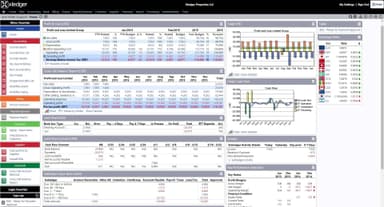
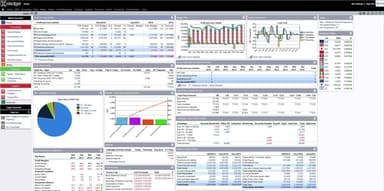
With features like billing, invoicing, real-time reporting, graphs, dashboards, and business intelligence, Xledge allows organizations to manage financial data in a centralized and organized environment. Furthermore, organizations benefit from its tools for workflow collaborations, payroll management, asset management, accounts receivable, and payable management. The changes made by users are in real-time, making the data accurate and reliable.
Still unsure whether Xledger aligns with your financial management requirements? Contact us at (661) 384-7070 to discuss your use case and explore your options.
Xledger Features
Budgeting And Forecasting Tools
The platform includes budgeting features that allow finance teams to create, revise, and monitor budgets across departments. Users can compare actuals against forecasts through interactive reports and dashboards. This helps decision-makers assess performance trends and adjust projections throughout the fiscal cycle.
ulti-Entity Accounting
Xledger Allows organizations with multiple subsidiaries to manage entity-level accounting while maintaining group reporting. Finance teams can process intercompany transactions, eliminate balances, and generate financial statements within the same system. This reduces reliance on separate systems or manual consolidation spreadsheets during month-end close.
Project Accounting And Resource Tracking
XLedger supports project-based financial management by linking time capture and cost tracking directly to accounting records. Organizations can monitor project profitability, allocate shared expenses, and automate invoicing based on tracked activities.
Allocations Management
Xledger automates allocation processes by distributing costs or revenues across projects or entities based on predefined rules. This reduces manual journal entries and spreadsheet calculations, enabling finance teams to apply consistent allocation logic while maintaining traceability within the accounting framework.
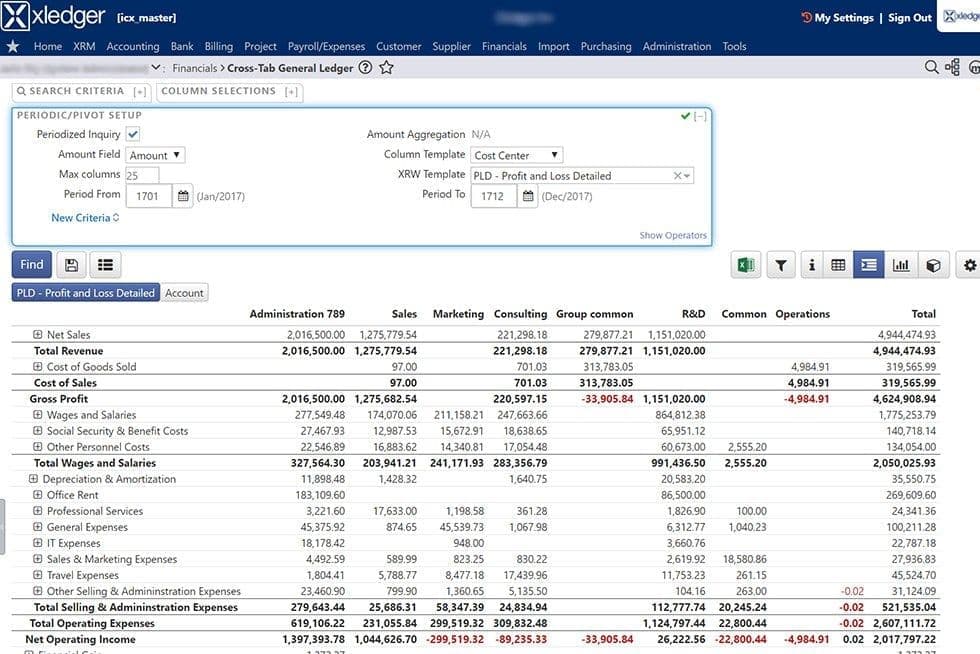
ross-Tab General Ledger
The platform’s accounting engine supports general ledger, accounts payable, accounts receivable, and cash book functions within an integrated structure. Its cross-tab capabilities allow users to analyze transactions across multiple dimensions, helping finance teams review balances, drill into activity, and maintain structured oversight of financial data.
Time And Expense Tracking
Employees can record time and submit expense claims directly within the system, while managers review and approve entries through defined workflows. Approved data flows into accounting and project records, supporting accurate billing, cost tracking, and reimbursement processes without separate tracking tools.
Pros And Cons of Xledger
Pros
Effective licensing model makes it easy to scale up or down without being locked in
The OCR engine reduces the need for manual data entry
Comes with a drill down feature so users don't have to keep changing screens
Cons
The platform has unclear communications regarding fixing schedules
Lack of automated bookkeeping
Xledger Reviews
Total 11 reviews
4.5
All reviews are from verified customers
Rating Distribution
5
Stars55%
4
Stars45%
3
Stars0%
2
Stars0%
1
Stars0%
Share your experience
JABIR
Accounting, 1-10 employees
“Easy to customize ERP software”
Pros
Xledger software has a highly intuitive design, which makes it quite easy to navigate. Even people with little accounting experience on our team able to get the hang of it pretty quickly.
Cons
Like any cloud-based platform, I do have some concerns regarding data security.
Rating Distribution
Ease of use
9
Value for money
9
Customer Support
9
Functionality
9
Anonymous
Not specified, 1-10 employees
Less than 6 months
“Quite easy to install...”
Pros
Their OCR engine for purchase invoices has really helped speed up our processing time and we no longer need to manually enter data. Plus, the automatic postings for bank entries have made managing our finances much easier, so we can focus on other important parts of the business.
Cons
I feel like the interface could be more simple. Additionally, navigating the filters and reports takes a bit more effort than I expected. However, Xledger still provides valuable financial management features.
Rating Distribution
Ease of use
8
Value for money
9
Customer Support
10
Functionality
9
Magnus
Architecture, 101-500 employees
More than a year
“Good but could be better”
Pros
I really like how simple it is to use. Plus billing customers for mileage on the company car is quite easy too.
Cons
Sometimes, it feels a bit too complex for me with so many functions available at once.
Rating Distribution
Ease of use
8
Value for money
8
Customer Support
9
Functionality
7
Frequently Asked Questions
What types of pricing plans does Xledger ERP offer?
The pricing is estimated to start at $750/month. Get in touch with us for a personalized XLedger cost estimate.
What language does Xledger ERP support?
Xledger ERP software supports multiple languages, including English, Norwegian, Swedish, and Finnish languages.
Does Xledger ERP offer an API?
Yes, XLedger offers an API.
What level of support does Xledger ERP offer?
Xledger ERP offers support through email, dedicated webinars, and a dedicated Zendesk support portal.
What other apps does Xledger ERP integrate with?
Xledger integrates with multiple third-party systems, including GoldFinch Cloud Solutions, Salesforce, Microsoft Dynamics 365, and the Bank of America.
Who are the typical users of Xledger ERP?
The software caters to small business owners across several industries, including real estate, energy, education, accounting, and more.
Does XLedger offer a mobile app?
Yes, Xledger ERP offers a mobile app for Android and iOS.