Last Updated
Key Takeaways
Generated from the text of customer reviews
Brokermint is a real estate back-office and transaction management platform that offers features to simplify administrative tasks for real estate professionals. Users frequently value its transaction management, commission tracking, document storage, and task management functionalities. However, some reviewers report limitations in reporting depth, occasional outages, and performance slowdowns.
Our Verdict
Brokermint works best for growing residential real estate brokerages that need better coordination across transactions, commission management, compliance, and back-office administration. It fits teams looking to centralize operational processes without relying on disconnected systems. While smaller offices may find the pricing difficult to justify, we recommend the platform for brokerages seeking stronger administrative oversight as operational demands increase.
Overall Rating
Based on 238 users reviews
4.4
Rating Distribution
Positive
88%
Neutral
8%
Negative
4%
Starting Price
Custom
Brokermint Specifications
- Task Management
- Reporting
- Budget Management
- Employee Management
What is Brokermint?
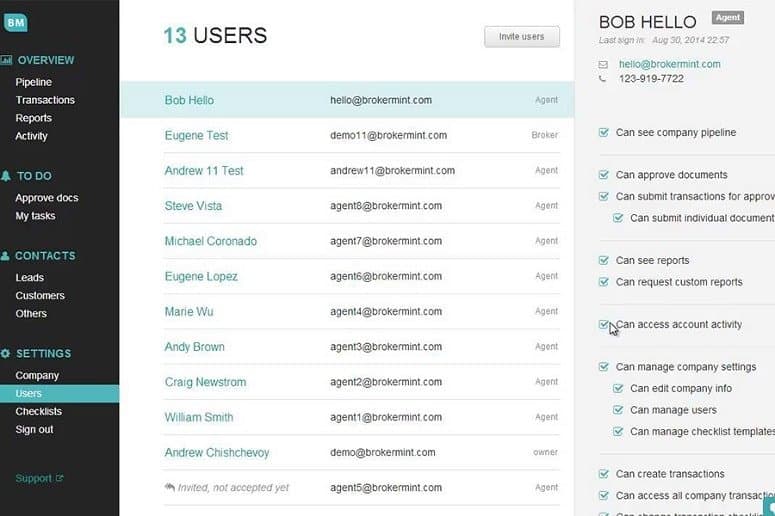
Brokermint is a cloud-based back-office management solution for real estate accountants. The solution assists businesses in managing and streamlining day-to-day tasks, listings, transactions, and contacts. It allows administrators, agents, brokers to seamlessly centralize and efficiently organize the entire customer journey management from contract to closing, with full transaction management with e- signature and state forms, commission tracking, and agent statements, the ability to utilize existing reports or set up your own, agent onboarding as well as document templates, analytics and much more.
What Is Brokermint Best For?
The platform stands out for its ‘Commission Automation’ feature. It automatically handles commission splits, deductions, caps, and payouts without relying on spreadsheets or manual calculations. The feature also keeps transactions organized and easy to review, helping teams avoid errors and speed up approvals.
How Much Does Brokermint Cost?
Brokermint price is estimated to start at $99 /month. The platform primarily follows a monthly brokerage-based pricing model that scales according to agent count, office size, integrations, and operational requirements
Beyond the base subscription fee, brokerages should also account for the following potential additional expenses:
- Implementation And Setup: $1,000–$8,000 depending on brokerage size, workflow complexity, and transaction volume
- Data Migration And Historical Record Transfer: $500–$5,000 based on the number of agents, transactions, and accounting records being imported
- Accounting System Integrations: $300–$3,000 for connecting platforms such as QuickBooks, banking tools, or commission tracking systems
- Training And Onboarding: $500–$6,000 for broker admins, finance teams, and agents requiring workflow or compliance training
- Premium Support Or Dedicated Success Management: $200–$1,500 per month for faster response times and strategic account assistance
User feedback on Brokermint’s pricing varies depending on brokerage size and platform usage. Some reviewers consider the software reasonably priced for larger teams managing higher transaction volumes, while smaller brokerages and individual users mention that the cost can feel difficult to justify when fewer agents are active or certain tools remain underutilized.
Disclaimer: Pricing references are based on publicly available third-party information and industry benchmarks. Actual costs may vary.
Brokermint Integrations
Brokermint offers smooth integration with several third-party tools such as:
- Commissions
- Chime
- Inside Real Estate
- Follow Up Boss
- TRIBUS
- Propertybase
- RESO
- RETS
- MLS
- Quickbooks
- Xero accounting solutions
- Wave app
- Dropbox
- Google Drive
How Does Brokermint Work?
Follow the steps outline below to start using Brokermint:
- Create transaction records by adding property details, client information, agents, commissions, and contract data into the system
- Configure transaction checklists, compliance steps, deadlines, and approval workflows based on brokerage requirements
- Upload contracts, disclosures, and supporting documents into centralized transaction folders for easier access and review
- Assign tasks to agents, coordinators, and administrative staff while monitoring transaction progress across active deals
- Track commission structures, escrow activity, and payout records using built-in accounting and transaction management workflows
- Sync operational and financial information with connected systems such as QuickBooks to reduce duplicate data entry
- Manage agent records, onboarding details, and brokerage documents from a centralized administrative dashboard
- Generate reports and review dashboards to monitor transaction volume, commission activity, agent performance, and brokerage operations
Brokermint Use Cases
Based on our analysis of user feedback and Brokermint’s current capabilities, we have identified several real estate operational scenarios where the platform is commonly used by brokerages, transaction coordinators, and administrative teams:
Brokerages Managing Commission Tracking Across Multiple Agents
Real estate brokerages managing large agent networks often need better visibility into commission splits, payouts, referral structures, and pending transactions. Brokermint helps broker-owners and finance teams centralize commission calculations, transaction pipelines, and payout tracking within one system instead of relying on spreadsheets and disconnected accounting workflows.
Real Estate Teams Organizing Transaction Compliance And Documentation
Brokerages handling active listings, disclosures, contracts, and closing documentation use Brokermint to keep transaction records organized throughout the deal lifecycle. Users commonly reference checklist workflows, document tracking, and compliance visibility as useful for reducing missing paperwork and maintaining operational consistency across transactions.
Agents Working Remotely Across Multiple Properties And Offices
Agents frequently working outside the office can use Brokermint to review transactions, upload documents, track deadlines, and monitor deal progress remotely. Mobile accessibility is commonly mentioned as useful for agents traveling between client meetings, property visits, and brokerage offices throughout the day.
Is Brokermint Right For You?
BrokerMint can be a right choice for real estate brokerages that want to spend less time on back-office tasks and more time supporting agents and closing deals. Its mix of commission automation, transaction management, accounting tools, and reporting helps teams stay organized without relying on spreadsheets or disconnected systems.
It offers advanced tools to automate commission calculation, set up team caps, and generate disbursement forms. Users can also benefit from its audit system to avoid and reduce unforeseen consequences. Key features include automated checklists, API access, agent profile management, e-signature, white label rebranding, transaction management, commission tracking, offer management, and others.
Still doubtful if Brokermint is the right choice? Connect with our customer support staff at (661) 384-7070 for further guidance.
Brokermint Features
Transaction Management
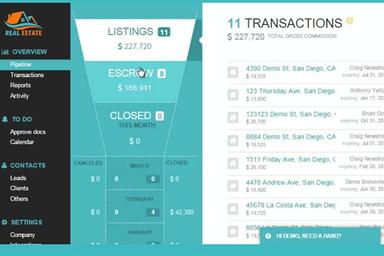
This feature helps real estate teams keep every deal organized in one place. From tracking deadlines and documents to monitoring each stage of the closing process, it gives brokers and coordinators better visibility into active transactions. This can help reduce paperwork, avoid missed tasks, and keep deals moving more smoothly.
Accounting
The Accounting tools in BrokerMint helps brokerages manage commissions, payouts, deductions, and financial records without juggling multiple spreadsheets. Because transaction and commission data are connected, teams can handle day-to-day accounting tasks with more accuracy and less manual work.
Agent Management
BrokerMint gives brokers a simple way to manage agent information, commission plans, documents, and activity from a central dashboard. It helps keep teams organized, especially for growing brokerages with multiple agents or office locations.
Analytics And Reporting
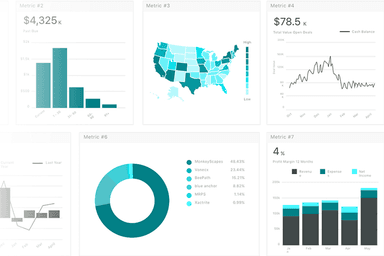
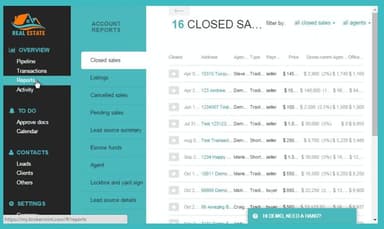
The platform includes customizable dashboards and reporting tools that help brokerages monitor transaction value, agent performance, cash flow activity, and operational trends. These reporting capabilities provide administrators with broader visibility into brokerage performance and transaction activity across the organization.
Pros And Cons of Brokermint
Pros
Offers the ability to track transactions, manage documents, and ensure compliance efficiently
The commission tracking tools are highly praised for their accuracy and ease of use
Integrates well with various other tools and CRM systems
Offers mobile app accessibility for increased flexibility
Cons
Users report customer support to be slow and not as responsive as expected
Adding signatures to documents is a bit challenging and requires multiple attempts
Brokermint Reviews
Total 238 reviews
4.4
All reviews are from verified customers
Rating Distribution
5
Stars61%
4
Stars26%
3
Stars7%
2
Stars1%
1
Stars4%
Share your experience
felicia
Real Estate, 11-50 employees
Less than 6 months
“Mobile app makes managing easier
Pros
As a Realtor who is always on the move, this mobile app makes managing things so much easier. Plus I love how the platform handles electronic signatures and how it shows whether someone has viewed a document but has not signed yet or has only partially signed it.
Cons
I wish the unsorted documents and the checklist were not kept in different locations. I mean it would be much more convenient if I could easily flip between them and view documents side by side without jumping around the app.
Rating Distribution
Ease of use
8
Value for money
10
Customer Support
10
Functionality
10
Luke
Real Estate, 1-10 employees
More than a year
“Terrible and unfriendly support
Pros
Honestly it is not particularly well organized and I find myself looking for the ability to create my own custom reports since the default reporting tools don't deliver the results I need.
Cons
Their customer support is terrible as staff are unfriendly and difficult to deal with. As they require at least thirty days notice to cancel and I had to play endless phone tag because cancelling by email isn't allowed which was extremely frustrating.
Rating Distribution
Ease of use
3
Value for money
3
Customer Support
2
Functionality
3
Paul
Real Estate, 11-50 employees
Less than 6 months
“Maintains compliance and consistency
Pros
It helps maintain compliance and provides a consistent method for managing paperwork which improves agent accountability.
Cons
The software is overly complicated for the majority of our agents. So we have had to assign a part-time person to manually input transactions. Plus when a lead arrives, we are unable to tell whether it originated from MaxTech or BoldTrail, so we don't know if a referral fee should apply. To make matters worse, leads come from a DoNotReply address, so how are we supposed to report issues or provide feedback?
Rating Distribution
Ease of use
7
Value for money
10
Customer Support
10
Functionality
10
Frequently Asked Questions
Does Brokermint offer an API?
Yes, Brokermint offers an API.
What language does Brokermint support?
Brokermint primarily supports English.
What other apps does Brokermint integrate with?
Brokermint integrates with a variety of other applications, including popular tools like QuickBooks, Apination, CINC, Matrix, BoomTown, and Wise Agent.
Does Brokermint support mobile devices?
Yes, Brokermint supports mobile devices.
What types of pricing plans does Brokermint offer?
Brokermint price is estimated to start at $99 /month. If you want to get the personalized Brokermint pricing quote, contact us right away.
Who are the typical users of Brokermint?
The typical users of Brokermint are real estate brokerages, agents, and administrative staff.
What level of support does Brokermint offer?
Brokermint provides support via customer portal.
Does Brokermint support commission tracking and team commission management?
Yes, Brokermint provides tools to automate commission calculations, set up team caps, generate disbursement forms, and manage commission-related reporting workflows across brokerage teams.
What are the main advantages and limitations of Brokermint?
Brokermint offers checklist workflows, an organized interface, and documentation management tools for handling transaction and brokerage operations. However, the platform may take time to learn during initial setup, some integrations require additional configuration effort, QuickBooks connectivity can be difficult to manage, and e-signature workflows do not currently support saving drafts.