


Last Updated

Overview
Are complex AECO contracts causing headaches? Onware is specialized software that delivers robust tools for RFIs, submittals, change orders, and more. This user-friendly platform allows seamless collaboration and improved project outcomes.
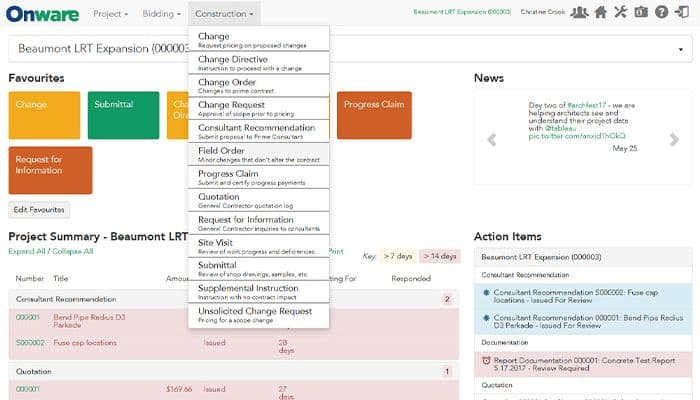
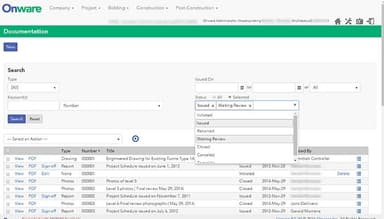
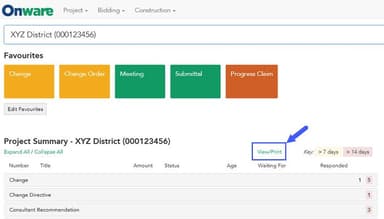
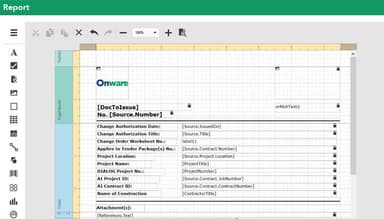
Onware Specifications
- Project Planning and Scheduling
- Budget Management
- Resource Allocation
- Document Management
Onware Features
RFI Management
Streamlines the process of asking, responding to, and tracking Requests for Information (RFIs). This system centralizes project communication, reducing delays, ensuring all stakeholders have the information they need, and promoting timely decision-making.
Submittal Management
Onware simplifies the review and approval of shop drawings, material samples, and product data. It automates workflows, tracks revisions, and provides a clear audit trail, ensuring accurate submissions, minimizing project bottlenecks, and promoting adherence to specifications.
Change Order Management
This feature facilitates the tracking and management of proposed changes, assessing their impact on project scope, budget, and timeline. It maintains transparency and control throughout the process, reducing the risk of cost overruns and disputes while ensuring that all changes are appropriately documented and implemented.
Document Control
Provides a centralized, secure repository for all project documents, including drawings, specifications, contracts, and more. Robust version control and audit trails ensure data integrity, making it easy to locate the latest information and maintain accurate project records.
Reporting And Analytics
Onware offers customizable reports and dashboards, providing insights into project progress, budget, RFIs, change orders, and other key metrics. It transforms data into actionable insights, empowering stakeholders with the information they need for proactive decision-making and effective risk mitigation.
Pros And Cons of Onware
Pros
Intuitive and user-friendly interface
Streamlines contract administration processes
Centralized document storage and tracking
Real-time collaboration for all stakeholders
Real-time collaboration for all stakeholders
Cons
Requires some initial setup and customization
Occasional limitations in report customization
Potential for minor workflow adjustments, according to some Onware reviews
Onware Reviews
Total 25 reviews
4.2
All reviews are from verified customers
Rating Distribution
5
Stars44%
4
Stars36%
3
Stars20%
2
Stars0%
1
Stars0%
Share your experience
blon
Engineering, 1-10 employees
More than a year
“necessary evil”
Pros
The management and staff are genuinely top-notch.
Cons
The advertisement was meant to make the application more sensible.
Rating Distribution
Ease of use
10
Value for money
10
Customer Support
7
Functionality
8
Sharon
Architecture, 500+ employees
More than a year
“Administrative Assistant”
Pros
I find navigating the system very amazing, and the software effectively tracks and generates reports on documentation status.
Cons
Sometimes, I find the software sluggish. When I get an error message, I often need to contact Onware Support instead of fixing it myself.
Rating Distribution
Ease of use
9
Value for money
10
Customer Support
8
Functionality
9
Peter
Architecture, 500+ employees
More than a year
“First time user review”
Pros
Our team used Onware on a project worth over $500M, handling the change management, RFI, and submittal processes. The software was easy to pick up and could be tailored to our project's specifics.
Cons
The submittals module doesn't feel as smooth and intuitive as the other modules I use.
Rating Distribution
Ease of use
10
Value for money
10
Customer Support
10
Functionality
9
Frequently Asked Questions
Does Onware offer an API?
No, Onware does not currently offer a public API.
What language does Onware support?
The software supports the English language.
What other apps does Onware integrate with?
The software hasn’t revealed its integrations with third-party services.
Does Onware support mobile devices?
The software supports mobile devices.
What types of pricing plans does Onware offer?
The software provides a range of pricing plans to accommodate the diverse and changing requirements of many organizations. Inquire for a personalized Onware pricing.
Who are the typical users of Onware?
Onware is a versatile solution for construction projects of all sizes, serving stakeholders in the Engineering, Architecture, Construction, and Operations (AECO) industries.
What level of support does Onware offer?
Onware offers support via phone, email, an online knowledge base, and training options.
How does this collaborative contract administration software differ from other document management software?
The software package eliminates duplication common in conventional documentation processing. It focuses on the contract administration process, streamlining tasks specific to the construction and architectural industry with deep technical expertise.
How does this software improve the progress claim input process for managing documentation?
The software allows for easy linking to all the linked documents, simplifies parallel document tracking, and provides a centralized location for storing and organizing progress claim documents.
Does using this software mean I should stop using my existing document management software?
Not necessarily. Onware software excels at the contract administration process. It might integrate with your current document management software, offering specialized functionality for the construction industry. Consider them complementary tools.