


Last Updated

Overview
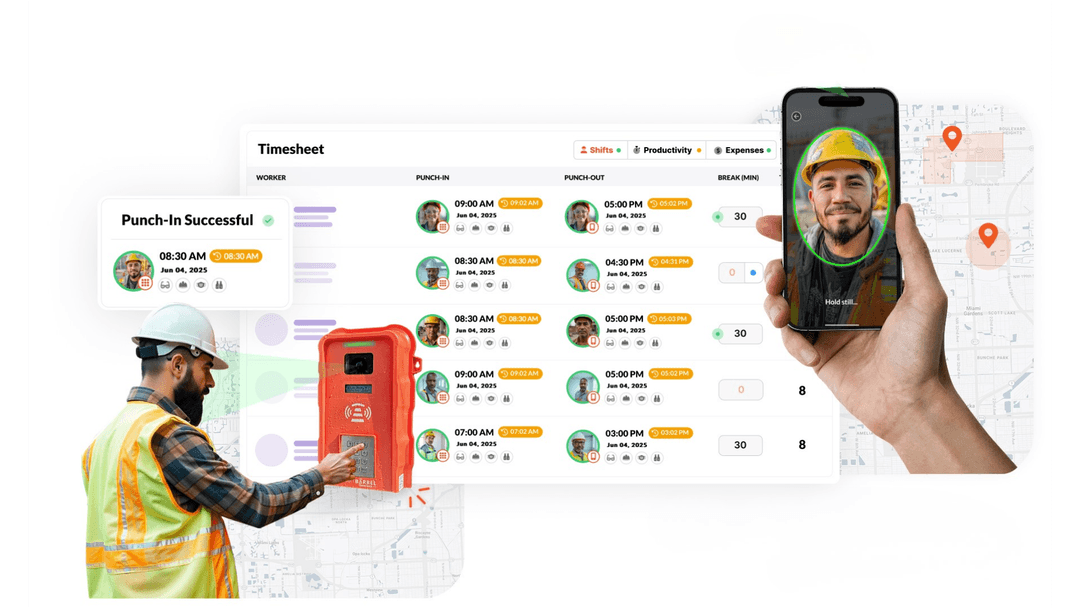
SmartBarrel is revolutionizing time tracking for trade contractors with AI-powered hardware and software solutions built for job sites of all sizes. SmartBarrel uses biometric facial verification, via rugged solar-powered devices or the mobile app, to eliminate buddy punching and time theft, delivering 100% accurate hours and reliable payroll data.
SmartBarrel Specifications
- Subcontractor Management
- Safety Management
- Progress Tracking
- Mobile App
What Is SmartBarrel?
SmartBarrel is a construction time tracking solution designed for trade contractors. It combines biometric facial verification with rugged, solar-powered time clocks and a mobile app to record employee work hours on job sites. The platform helps businesses reduce time theft, prevent buddy punching, and improve payroll accuracy by verifying worker identities at clock-in and clock-out.
SmartBarrel Pricing
SmartBarrel Integrations
The platform integrates with several third-party applications:
- Procore
- CMiC
- Plexxis
- Foundation
- BuildOps
- Vista by Viewpoint
- Spectrum
- Sage
- Intuit QuickBooks
- Microsoft Power BI
- Microsoft Excel software
Who Is SmartBarrel For?
SmartBarrel is ideal for trade contractors in the following industries and sectors:
- Electrical
- Mechanical
- Plumbing
- MEP
- Concrete
- Drywall
- Solar
- Glass and glazing
- Scaffolding
Is SmartBarrel Right For You?
SmartBarrel is suitable for construction companies that need to track employee time, manage labor costs, and maintain accurate payroll records across job sites. The platform uses biometric facial verification with fixed time clocks and a mobile app to verify employee identities and record work hours. It also supports cost code tracking, labor management, and compliance reporting, making it a practical option for contractors handling prevailing wage projects or managing multiple crews.
By maintaining a verifiable record of on-site labor activity, SmartBarrel can help reduce payroll disputes, improve job costing, and simplify administrative processes.
Still unsure if SmartBarrel is right for you? Connect with our customer support staff at (661) 384-7070 for further guidance.
SmartBarrel Features
Portable Time Clock
The platform’s core is a rugged, weatherproof hardware time clock that uses AI-powered facial verification for employee clock-ins. This process eliminates time theft practices like “buddy punching” and ensures every timesheet is accurate. The device is self-sufficient, with solar power and LTE connectivity options for remote job sites.
Biometric Facial Verification
SmartBarrel uses AI to verify every worker by comparing their punch to all previous punches. This confirms whether or not the same person is punching in. The same technology is used whether workers check in on the portable time clock or the mobile app.
Mobile App with Geofencing
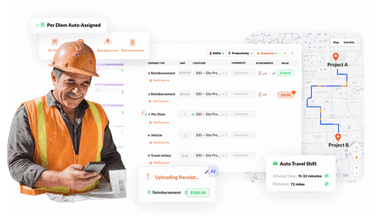
Build boundaries around your jobsite once so workers can only clock-in using the app when they are physically onsite.
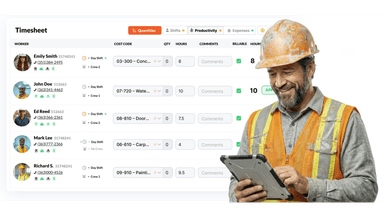
Cost Code Tracking
Assign cost codes directly in the field tied to verified time.
Automated Field Reporting And Daily Logs
SmartBarrel features automation of detailed daily logs, a critical task for project managers. The system captures and compiles real-time data, including subcontractor headcounts, hours worked, local weather conditions, and safety incidents, reducing manual work by a significant margin.
Jobsite Safety And Compliance
The system ensures on-site safety with instant PPE verification, automated incident reporting, and centralized employee documentation. Quick onboarding and broadcast messaging keep workers informed and compliant, reducing administrative effort while maintaining regulatory standards and minimizing jobsite risk.
Pros And Cons of SmartBarrel
Pros
AI-powered facial verification ensures accurate time tracking
Enables paperless daily logs and safety reports
Supports enhanced worker accountability and transparency
Cons
May require time to learn all features
Customization options may not suit every workflow
SmartBarrel Reviews
Total 4 reviews
4.8
All reviews are from verified customers
Rating Distribution
5
Stars75%
4
Stars25%
3
Stars0%
2
Stars0%
1
Stars0%
Share your experience
Construction, 51-100 employees
More than a year
“Crucial for internal communication”
Pros
It facilitates the communication between our on site team and the accounting department in the office which handles weekly payroll.
Cons
We dont have anything negative to say. It connects our job site with the office payroll team really well. We are pleased with the performance.
Rating Distribution
Ease of use
9
Value for money
9
Customer Support
9
Functionality
9
Construction, 500+ employees
Less than a year
“Customer Service That Listens and Actively Improves”
Pros
Customer service is amazing. They actually take suggestions seriously and take action based on them. I can use it on both desktop and iPad and features like facial recognition, time stamps, geofencing and custom rules are really useful. They're also making continuous improvements.
Cons
Some features weren't available at first but the team really put in the effort to add them. They're constantly adding new features and improving the system.
Rating Distribution
Ease of use
9
Value for money
9
Customer Support
9
Functionality
9
Electrical/ Electronic Manufacturing, 500+ employees
Less than 6 months
“Payrolls made convenient”
Pros
I love how many bulk actions I can perform. With 362 people on payroll, being able to approve time in just 10 minutes the next morning is a huge time saver. My onboarding specialist and my account rep have been amazing, always there to help me with any setup issues or concerns I've had.
Cons
We had some trouble getting the web app to work in kiosk mode inside the building but the Smart Barrel Kiosks have been working perfectly since day one with no issues.
Rating Distribution
Ease of use
9
Value for money
9
Customer Support
9
Functionality
9
Frequently Asked Questions
What other apps does SmartBarrel integrate with?
SmartBarrel integrates with CMiC, Vista, Spectrum, Foundation, Plexxis, Procore and BuildOps.
What types of SmartBarrel price plans are available?
The software offers tailored pricing. Contact us to request a personalized SmartBarrel cost quote based on your requirements.
Does SmartBarrel have a mobile app?
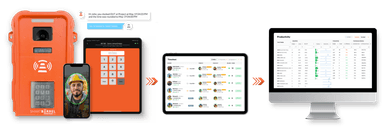
Yes, SmartBarrel offers a mobile app for both Android and iOS users. Capture time on the SmartBarrel app two ways. Kiosk Mode turns any foreman's tablet into a shared check-in station. Punch Mode allows workers to clock in on their personal smartphones.
What language does SmartBarrel support?
The software supports English and Spanish.
Does SmartBarrel offer an API?
Yes, SmartBarrel offers an API.
Who are the typical users of SmartBarrel?
SmartBarrel serves the following speciality trades: Electrical, Mechanical, Plumbing, Concrete, Drywall, Heavy Civil, Solar, Glass & Glazing.
What level of support does SmartBarrel offer?
SmartBarrel provides English and Spanish support via chat, phone and email.
Where is SmartBarrel's hardware built?
Every TimeClock 4.0 is designed, engineered, and assembled in the United States. From the molded shell to the soldered board to the packaging that ships to your jobsite. That means tighter quality control and safety protocols, faster repairs, and a hardware partner that’s accountable to you, not a factory eight time zones away.